emailmd MCP Server
dev.emailmd/emailmd
Render markdown into email-safe HTML, lint for deliverability, and preview emails across all clients.
What this kind of tool is for
- Draft or rewrite copy in a format your agent can iterate on with you.
- Convert research notes or transcripts into publishable drafts.
- Keep terminology and tone consistent across a set of documents.
How to compare servers like this
- Output format:
- Prefer tools that emit clean markdown or structured text over unverifiable blobs.
- Source handling:
- Check how the tool treats citations and quotes; sourced claims beat paraphrase.
- Maintenance signal:
- Prompt-driven tools improve with updates; check the last-commit date.
- License clarity:
- Know what license governs the tool and any shipped prompt or template content.
This page carries your copy-paste config: pick your MCP client in the install section on this page and use the copy button.
What is the emailmd MCP server?
The emailmd MCP server converts markdown into responsive, email-safe HTML that works across Gmail, Outlook, Apple Mail, Yahoo, and other email clients. It exposes tools to render markdown to HTML, lint drafts for deliverability problems, and look up emailmd syntax documentation. Use it to write emails in markdown without wrestling with HTML or client compatibility.
emailmd lets you write emails in clean markdown and automatically converts them to email-safe HTML that renders correctly everywhere. The MCP server integrates this into AI workflows, exposing render, lint, and documentation tools so Claude or other AI assistants can help you draft, validate, and preview emails without manual HTML work.
How to install emailmd
Copy-paste configuration for popular MCP clients.
{
  "mcpServers": {
    "emailmd": {
      "command": "npx",
      "args": [
        "-y",
        "emailmd"
      ]
    }
  }
}
Tools & capabilities
Tools this server exposes to the agent.
render— Convert markdown to email-safe HTML and plain text versions compatible with all major email clients.lint— Flag deliverability and compatibility problems in email markdown drafts without rendering.read_docs— Look up emailmd syntax, directives, theming, and API reference.
Use cases
- Draft marketing or transactional emails in markdown and render them to production-ready HTML.
- Validate email templates for deliverability issues before sending.
- Generate responsive email layouts with buttons, images, and formatting that work across Gmail, Outlook, and Apple Mail.
- Build email templates programmatically in Node.js or via CLI.
- Use AI to help write and iterate on email copy with real-time preview and linting.
emailmd MCP server FAQ
emailmd is a markdown-to-email converter that produces email-safe HTML compatible with all major email clients (Gmail, Outlook, Apple Mail, Yahoo, etc.). The MCP server exposes render, lint, and documentation tools for AI assistants.
Yes, emailmd is open-source (MIT license). The hosted MCP endpoint at https://www.emailmd.dev/api/mcp is free to use, or you can run it locally with `npx emailmd mcp`.
Add the MCP server to your client config using either the hosted endpoint (https://www.emailmd.dev/api/mcp) or run locally via stdio with `npx emailmd mcp`. See https://www.emailmd.dev/docs/mcp for per-client setup instructions.
No authentication is required for the hosted MCP endpoint or local installation.
emailmd renders emails that work across Gmail, Outlook, Apple Mail, Yahoo, and all other major email clients using MJML under the hood.
Yes. emailmd is available as an npm package, a CLI tool, and a React component. The MCP server is optional and designed for AI-assisted workflows.
README (reference)
Source of truth, from the repository.
emailmd
Write markdown. Ship emails. No HTMHELL.
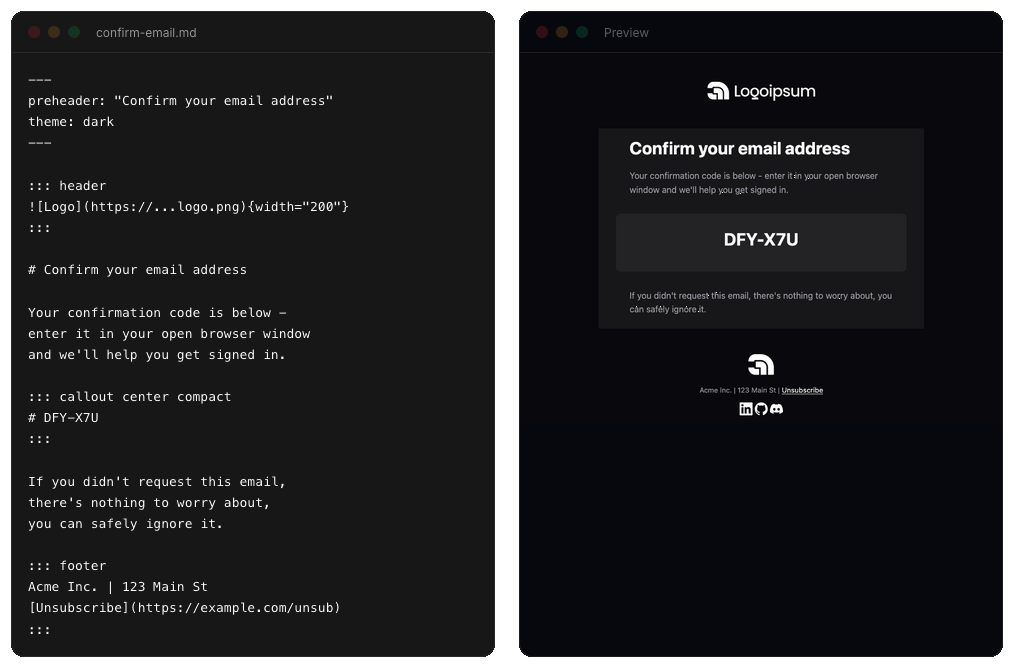
emailmd converts markdown into responsive, email-safe HTML that works across Gmail, Outlook, Apple Mail, Yahoo, and every other client.
Install
npm install emailmd
Quick Start
import { render } from "emailmd";

const { html, text } = await render(`
# Welcome!

Thanks for signing up.

[Get Started](https://example.com){button}
`);

// html → complete email-safe HTML
// text → plain text version for text/plain MIME part
v0.3.0 migration:
render()is now async. Update calls fromrender(md)toawait render(md). Requires Node 20+ (MJML 5).
CLI
emailmd also ships with a command-line interface.
# Render to HTML
emailmd input.md

# Write to file
emailmd input.md -o output.html

# Plain text output
emailmd input.md --text

# Pipe from another command
echo "# Hello" | emailmd
Run emailmd --help for all options.
React
@emailmd/react provides a live-preview hook (useEmailmd), an <EmailPreview /> iframe component, and <EmailmdBuilder /> — the full builder as a drop-in component for your own app.
npm install @emailmd/react emailmd
Learn More
- Docs — full syntax reference, theming, frontmatter, directives, and API
- Templates — ready-made email templates you can copy and customize
- Builder — live editor to write and preview emails in your browser
MCP
emailmd ships a Model Context Protocol server, so an AI assistant can render, lint, and preview emails for you. It exposes three tools — render (markdown to email-safe HTML), lint (flag deliverability problems without rendering), and read_docs (look up emailmd syntax) — over either transport:
# Hosted (Streamable HTTP)
https://www.emailmd.dev/api/mcp

# Or run it locally over stdio
npx emailmd mcp
Published to the official MCP registry as dev.emailmd/emailmd. See the MCP docs for per-client setup.
AI
Prefer plain context over tools? emailmd is just markdown, so AI is great at writing templates. Feed the full docs to your AI tool:
https://www.emailmd.dev/llms-full.txt
Contributing
Contributions are welcome! Feel free to open an issue or submit a pull request.
emailmd is under active development. The API may change between minor versions until we hit 1.0 — breaking changes are always called out in the changelog. See Stability & Versioning for what the semver contract covers.
Acknowledgements
License
MIT
Related MCP servers

flatmark
Document to Markdown MCP server: PDF, Word, PowerPoint, Excel and HTML, with OCR for large files.
Preview: video subtitle OCR, transcription, translation, QC and export. Early access only.
Xiaohongshu, Douyin, TikTok, YouTube, X links to text: transcript, on-screen text, images described
Overleaf alternative online LaTeX editor. AI agents edit, comment, and chat. Keep or revert edits.

emisar
Give AI agents safe, audited access to infrastructure actions without SSH or shell access.
EQ scoring plus a read-only Storelayer matcher and guarded self-install; no website credentials