ToolTrust Scanner MCP Server
io.github.AgentSafe-AI/tooltrust-scanner
Static security scanner for MCP servers—assigns trust grades (A–F) to detect prompt injection, data exfiltration, and privilege escalation before your agent calls a tool.
What is the ToolTrust Scanner MCP server?
The ToolTrust Scanner is a static security scanner for MCP tool definitions that assigns trust grades (A–F) based on 16+ built-in rules detecting prompt injection, privilege escalation, supply-chain CVEs, arbitrary code execution, and other attack vectors. It runs as an MCP server, CLI tool, or CI check—pure static analysis with no LLM calls or data exfiltration, completing scans in milliseconds.
ToolTrust scans MCP server tool definitions before your agent trusts them, identifying security risks like adversarial prompts, over-broad permissions, known CVEs, and code-execution patterns. Use it to audit your entire MCP config, gate untrusted servers before installation, or integrate into CI/CD pipelines to enforce security policies across your agent tooling.
How to install ToolTrust Scanner
Copy-paste configuration for popular MCP clients.
Tools & capabilities
Tools this server exposes to the agent.
tooltrust_scan_config— Scan all MCP servers in your .mcp.json or ~/.claude.json configuration file; reads local config and spawns each server as subprocess.tooltrust_scan_server— Launch and scan a specific MCP server by command; runs user-supplied command as subprocess over stdio.tooltrust_scanner_scan— Scan a raw JSON blob of tool definitions; in-memory analysis with no subprocess or network access.tooltrust_lookup— Look up a server's trust grade from the ToolTrust Directory; network request to ToolTrust Directory API.tooltrust_list_rules— List all built-in security rules (AS-001–AS-019); local catalog only.
Use cases
- Audit your entire MCP configuration and get risk grades before your agent calls any tool.
- Block or require approval for risky MCP servers in CI/CD pipelines using GitHub Actions.
- Scan a new MCP server before adding it to your config using the gate command.
- Detect supply-chain attacks, known CVEs, and compromised packages in MCP dependencies.
- Identify prompt injection, privilege escalation, and arbitrary code execution patterns in tool definitions.
ToolTrust Scanner MCP server FAQ
ToolTrust is a static security scanner that analyzes MCP tool definitions and assigns trust grades (A–F) based on 16+ rules detecting prompt injection, data exfiltration, privilege escalation, supply-chain CVEs, and other attack vectors. It runs as an MCP server, CLI, or CI check.
Yes, ToolTrust Scanner is open-source under the MIT license. The CLI and MCP server are free to install and use; the ToolTrust Directory (tooltrust.dev) provides public trust grades and scan reports.
Add ToolTrust as an MCP server in your config (e.g., ~/.claude.json or Cursor settings) with command `npx -y tooltrust-mcp`, or use the one-line install: `curl -sfL https://raw.githubusercontent.com/AgentSafe-AI/tooltrust-scanner/main/install.sh | bash`.
No. ToolTrust runs pure static analysis locally with no LLM calls or data exfiltration. Optional CVE lookups use the OSV database, but the tool works offline. No credentials or API keys required.
ToolTrust assigns letter grades based on risk score: Grade A is clean (no findings), B is low-risk, C is medium-risk, D is high-risk, and F is critical (e.g., known compromised packages). Grades map to policies: A/B allow, C/D require approval, F blocks.
Yes. Use the GitHub Actions workflow or the CLI `tooltrust-scanner gate` command to scan servers before installation and fail the build on risky grades (e.g., fail-on: 'approval' or 'critical').
README (reference)
Source of truth, from the repository.
Every MCP tool your agent calls is an attack surface — prompt injection, data exfiltration, privilege escalation, supply-chain backdoors. ToolTrust scans tool definitions before your agent trusts them and assigns a trust grade (A–F) so you know the risk. ToolTrust is an MCP Server and a CLI/CI tool — not a host, gateway, or runtime proxy. Coverage is expanding beyond today’s MCP-focused workflows; skills and additional agent tool formats are on the roadmap.
<p align="center"> <strong><a href="https://www.tooltrust.dev/">Browse the live ToolTrust Directory</a></strong> — trust grades and scan-backed reports before you install.<br/><br/> <a href="https://www.tooltrust.dev/"><img src="docs/tooltrust-ui.png" alt="ToolTrust Directory UI" /></a> </p> <p align="center"><em>MCP demo: run a full config scan from your agent.</em></p>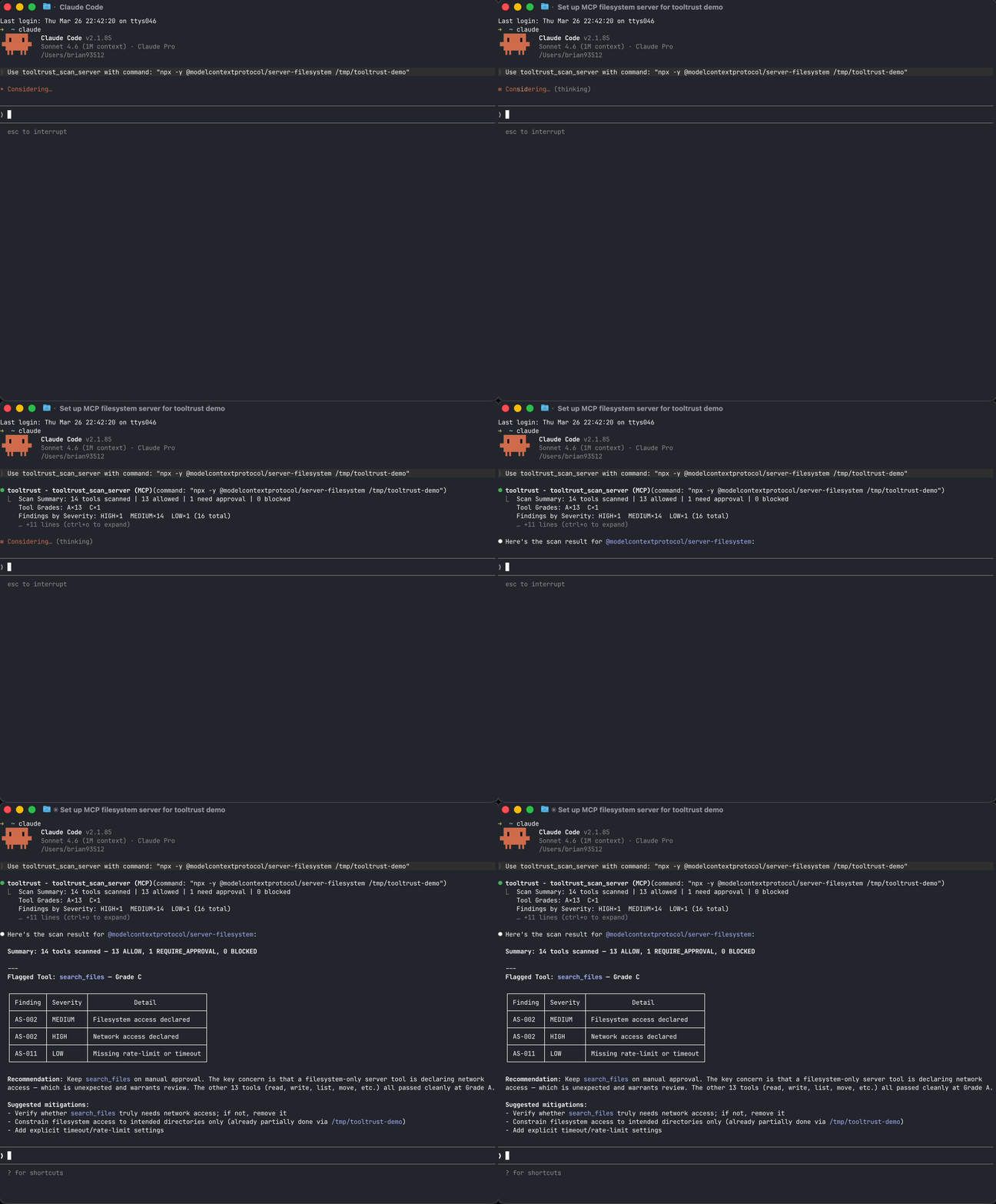
Scan your setup in 30 seconds
Add ToolTrust as an MCP server and let your agent audit its own tools (stdio transport — no network listener; your host launches it as a subprocess):
{
  "mcpServers": {
    "tooltrust": {
      "command": "npx",
      "args": ["-y", "tooltrust-mcp"]
    }
  }
}
Then ask your agent: "Run tooltrust_scan_config"
It reads your MCP config, connects to each server in parallel, scans every tool, and returns a risk report with grades and enforcement decisions — all in seconds.
Or use the CLI:
curl -sfL https://raw.githubusercontent.com/AgentSafe-AI/tooltrust-scanner/main/install.sh | bash
tooltrust-scanner scan --server "npx -y @modelcontextprotocol/server-filesystem /tmp"
Example snapshot (research cohort)
The public ToolTrust Directory holds current grades and aggregates as scanning scales. One published research pass illustrates the shape of the problem — 207 MCP servers, 3,235 tools — not an exhaustive count of everything we scan today:
| Metric | Count |
|---|---|
| MCP servers in cohort | 207 |
| Individual tools analyzed | 3,235 |
| Total security findings | 3,613 |
| Servers with at least one finding | 145 (70%) |
| Servers with a clean Grade A | 22 (10%) |
| Servers with arbitrary code execution | 16 |
Only 10% of servers in that cohort had a clean Grade A. See tooltrust.dev for up-to-date directory-wide results (and use this table only as a labeled snapshot).
🔍 What it catches
ToolTrust runs 16 static tool-definition rules in this repo (AS-001–AS-011, AS-013–AS-017) plus 2 source-scan rules for embedded MCP implementations (AS-018, AS-019). AS-012 (tool drift) is evaluated in the ToolTrust Directory when new scan results are compared to previous runs.
| ID | Severity | Detects |
|---|---|---|
| 🛡️ AS‑001 | Critical | Tool Poisoning — Adversarial prompts hidden in tool descriptions (ignore previous instructions, <INST>) |
| 🔑 AS‑002 | High/Low | Permission Surface — exec, network, db, fs beyond stated purpose; over-broad input schema |
| 📐 AS‑003 | High | Scope Mismatch — Tool name contradicts its permissions (e.g. read_config with exec) |
| 📦 AS‑004 | High/Critical | Supply Chain CVEs — Known CVEs in bundled dependencies via OSV |
| 🔓 AS‑005 | High | Privilege Escalation — admin/:write OAuth scopes; sudo/impersonate in descriptions |
| ⚡ AS‑006 | Critical | Arbitrary Code Execution — evaluate_script, _evaluate suffix, execute javascript, page.evaluate() patterns |
| ℹ️ AS‑007 | Info | Insufficient Tool Data — Tool lacks a valid description or schema |
| 🚨 AS‑008 | Critical | Known Compromised Package — Offline embedded blacklist of confirmed supply-chain attacks (LiteLLM 1.82.7/1.82.8, Trivy v0.69.4-v0.69.6, Langflow <1.9.0, Axios 1.14.1/0.30.4). Zero-latency, no network required. |
| 🔤 AS‑009 | Medium | Typosquatting — Tool name within edit-distance 2 of a well-known MCP tool, suggesting impersonation |
| 🗝️ AS‑010 | Medium | Secret Handling — Input params accepting API keys/passwords; credentials logged insecurely |
| ⚡ AS‑011 | Low | DoS Resilience — No rate-limit, timeout, or retry config on network/exec tools |
| 🔄 AS‑012 | High | Rug-Pull — Tool set changed between scans of the same version without a version bump (directory pipeline only) |
| 👥 AS‑013 | High/Medium | Tool Shadowing — Duplicate or near-duplicate tool name hijacks calls intended for a trusted tool |
| ℹ️ AS‑014 | Info | Dependency Inventory Unavailable — MCP server exposed neither metadata.dependencies nor a repo_url, so supply-chain coverage is limited and must be treated as incomplete |
| ⚠️ AS‑015 | Medium/High | Suspicious NPM Lifecycle Script — npm dependency publishes preinstall / postinstall / similar install-time scripts; severity rises for remote-fetch or inline-execution patterns |
| 🚨 AS‑016 | Critical | Suspicious NPM IOC Dependency — published npm metadata or install-time scripts reference a known malicious IOC package, domain, URL, or reviewed script pattern such as plain-crypto-js, even if the top-level package name is new |
| ⚠️ AS‑017 | Medium | Suspicious Data Exfiltration Description — tool description explicitly suggests sending user data, content, or conversation history to external / remote endpoints, without classifying it as prompt injection |
| ℹ️ AS‑018 | Info | Embedded MCP Server Detected — source-level MCP SDK usage was found, but tools could not be enumerated from a manifest or live handshake, so manual review is still required |
| 🔓 AS‑019 | High | Unauthenticated MCP Route Exposure — embedded MCP HTTP routes expose the same handler without equivalent authentication middleware |
Full rule details: docs/RULES.md
How it works
- Parse — Connects to a live MCP server (or reads a JSON file) and extracts every tool definition
- Analyze — Runs tool-definition rules against each tool's name, description, schema, and permissions; source scans add embedded MCP implementation checks
- Grade — Assigns a numeric risk score and letter grade (A–F) per tool
- Enforce — Maps each grade to a gateway policy:
ALLOW,REQUIRE_APPROVAL, orBLOCK
Pure static analysis. No LLM calls. No data leaves your machine (except optional CVE lookups). Runs in milliseconds. Deterministic and reproducible.
Install
# One-line install (macOS / Linux)
curl -sfL https://raw.githubusercontent.com/AgentSafe-AI/tooltrust-scanner/main/install.sh | bash

# Go
go install github.com/AgentSafe-AI/tooltrust-scanner/cmd/tooltrust-scanner@latest

# npx (no install needed)
npx -y tooltrust-mcp
MCP tools
When running as an MCP server, ToolTrust exposes these tools to your agent:
| Tool | What it does | Data access |
|---|---|---|
tooltrust_scan_config | Scan all MCP servers in your .mcp.json or ~/.claude.json | Reads local config; spawns each server as subprocess |
tooltrust_scan_server | Launch and scan a specific MCP server by command | Runs user-supplied command as subprocess (stdio) |
tooltrust_scanner_scan | Scan a raw JSON blob of tool definitions | In-memory only; no subprocess or network |
tooltrust_lookup | Look up a server's trust grade from the ToolTrust Directory | Network request to ToolTrust Directory API |
tooltrust_list_rules | List all built-in security rules | Local catalog only |
CI / GitHub Actions
Block risky MCP servers in your pipeline:
- name: Audit MCP Server
  uses: AgentSafe-AI/tooltrust-scanner@main
  with:
    server: "npx -y @modelcontextprotocol/server-filesystem /tmp"
    fail-on: "approval"
Deployment and security
For deployment, use the install paths in Install or the workflow example in CI / GitHub Actions. For vulnerability reporting and disclosure policy, see docs/SECURITY.md.
Scan-before-install gate
Never add an untrusted MCP server to your config again:
# Scans the server, then auto-installs if Grade A/B, prompts on C/D, blocks on F
tooltrust-scanner gate @modelcontextprotocol/server-memory -- /tmp

# Replace `claude mcp add` with a scanned install
alias mcp-add='tooltrust-scanner gate'
Full gate options and pre-commit hook setup: docs/USAGE.md
Add a trust badge to your project
If your MCP server passes ToolTrust, let people know:
[](https://www.tooltrust.dev/)

Supply-chain alert: ToolTrust detects and blocks confirmed compromised packages including LiteLLM v1.82.7/8 (TeamPCP backdoor), Trivy v0.69.4–v0.69.6, and Langflow < 1.9.0. If you encounter a Grade F with rule AS-008, remove the package immediately and rotate all credentials.
Usage guide · Developer guide · Contributing · Deployment & security · Changelog · Security · License: MIT
Related MCP servers

Rank agents; signed machine messages + wallet gates via x402; free verifiable agent passports.
Authorize x402 payments before signing with request-bound, signed safety decisions.

Discover x402 services, MCP servers and A2A agents by intent — agent-tools.cloud directory.

ModelShortlist
Local BYOK MCP for AI model shortlisting using OpenRouter + Artificial Analysis.
Connect Claude, Cursor, or ChatGPT to your business data. Ask questions, get answers.

Intelligent AI workflow orchestration with long-term memory, 100+ integrations, and unified credits.