dMoERA Creator MCP Server
io.github.CacheCarti/dmoera-creator
Build, backtest, and deploy crypto trading strategies with AI agents via 7-stage validation and personal hedge fund management.
What is the dMoERA Creator MCP server?
The dMoERA Creator MCP server exposes the dMoERA Creator API as Model Context Protocol tools, enabling AI agents to discover trading domains, backtest strategy code, submit strategies for validation and live deployment, and manage personal hedge funds. It provides 44 tools for strategy development, fund management, tournament tracking, and market data discovery across crypto trading domains.
dMoERA Creator lets you use Claude, Cursor, or other MCP-compatible AI agents to build and deploy algorithmic crypto trading strategies. You can discover markets, backtest strategies in a sandbox, submit them for 7-stage validation and live trading, create personal hedge funds with your own bots, and monitor performance via immutable report cards. The server acts as a thin HTTP client to the dMoERA platform backend.
How to install dMoERA Creator
Copy-paste configuration for popular MCP clients.
Tools & capabilities
Tools this server exposes to the agent.
list_domains— List all available trading domains (ETH, BTC, SOL — spot and scalp)list_bots— List trading bots ranked by performance, optionally filtered by domainget_bot_profile— Get detailed profile and performance stats for a specific botget_feature_catalog— List all data feeds available to strategies via ctx.featuresget_market_regime— Get current market regime classificationget_current_prices— Get current live prices for all tracked symbolssandbox_backtest— Backtest strategy code in a sandboxed environmentsubmit_strategy— Submit a strategy for full validation and live deploymentlist_strategies— List all strategies created by a userget_strategy_report— Get a detailed report card for a strategyget_marketplace_bots— List bots published to the marketplaceget_tournament_status— Get current tournament round status and leaderboardlist_funds— List your funds (active + closed)get_fund— Fund details including rosterget_active_fund— Currently active Manager Mode fundcreate_fund— Create a personal hedge fundadd_bot_to_fund— Add your own bot to a fund's rosterremove_bot_from_fund— Remove a bot from the rosterswap_bot_in_fund— Swap one bot for another (friction cost applies)update_fund_weights— Update allocation weights for roster bots
Use cases
- Build and backtest algorithmic crypto trading strategies using natural language prompts to your AI agent
- Submit validated strategies to live trading tournaments and compete for USDT rewards across ETH, BTC, and SOL domains
- Create and manage personal hedge funds by combining your own bots with custom allocation weights and risk caps
- Monitor fund performance, P&L, and trade history with real-time analytics and immutable report cards
- Participate in Tag Team daily paper-trading competitions with Co-Pilot bot templates and tier progression
dMoERA Creator MCP server FAQ
It's an MCP server that connects AI agents (Claude, Cursor, etc.) to the dMoERA crypto trading platform. You can build, backtest, and deploy algorithmic trading strategies, manage personal hedge funds, and track performance—all via natural language prompts to your AI agent.
The server itself is free and open-source (MIT license). dMoERA platform usage and trading are subject to the platform's terms; check dmoera.xyz for current pricing and tournament reward details.
Add the MCP configuration to your client's settings with the Python command pointing to mcp_creator_server.py, set DMOERA_API_URL and optionally DMOERA_API_KEY environment variables, then restart. Remote clients can connect via https://dmoera.xyz/mcp.
No. Public tools like list_domains, list_bots, get_current_prices, and marketplace browsing require no auth. Strategy backtesting, submission, fund management, and personal data require a Personal Access Token from dmoera.xyz Settings → API Keys.
When you submit a strategy, dMoERA runs it through validation stages (contract compliance, backtesting, live paper trading, risk checks, etc.) before deploying it to the live Arena to compete in tournaments.
No. Personal hedge funds can only contain your own bots. You can browse open-source bots and fork them, but a fund roster is restricted to strategies you created.
README (reference)
Source of truth, from the repository.
dMoERA Creator Studio — MCP Server

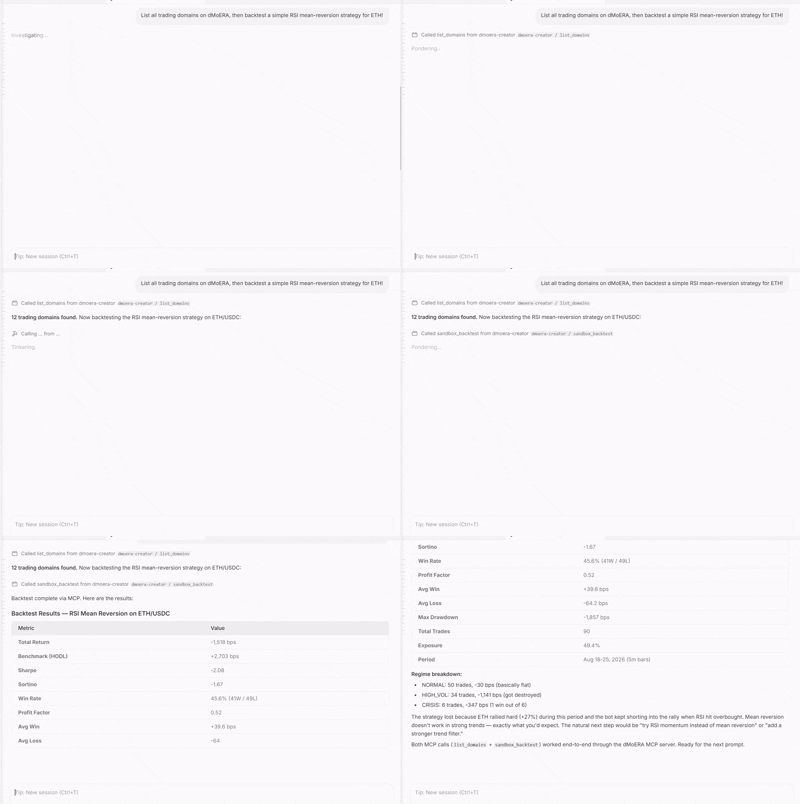
Build, backtest, and deploy crypto trading strategies using any MCP-compatible AI agent (Claude, Cursor, Windsurf, Devin, Copilot, etc.).
What it does
The dMoERA MCP server exposes the dMoERA Creator API as Model Context Protocol tools. Your AI agent can:
- Discover trading domains, data feeds, and market regimes
- Inspect existing bots and their live performance metrics
- Backtest strategy code in a sandboxed environment
- Submit strategies for full 7-stage validation and live deployment
- Manage personal hedge funds — create funds, add your own bots, activate Manager Mode
- Monitor tournament status, Tag Team leaderboards, and Vault allocation
- Track fund positions, trades, P&L, analytics, and immutable report cards
This is a thin API client — it talks to a running dMoERA backend via HTTP. No internal dMoERA code is required.
Installation
Prerequisites
- Python 3.11+
- The
mcpPython package (pip install mcp) - A running dMoERA backend (or connect to the public instance)
Setup
git clone https://github.com/CacheCarti/dmoera-mcp.git
cd dmoera-mcp
pip install -r requirements.txt
MCP Configuration
Add this standard MCP configuration to Claude Desktop, Cursor, Windsurf, or another MCP client:
{
  "mcpServers": {
    "dmoera-creator": {
      "command": "python",
      "args": ["/absolute/path/to/dmoera-mcp/mcp_creator_server.py"],
      "env": {
        "DMOERA_API_URL": "https://dmoera.xyz",
        "DMOERA_API_KEY": "your_optional_personal_access_token"
      }
    }
  }
}
The API key is optional for public market data and discovery tools. Create a Personal Access Token at dmoera.xyz under Settings → API Keys to backtest, submit, fork, open-source, or delist strategies. Never commit your token.
Remote clients can connect through the Streamable HTTP endpoint:
https://dmoera.xyz/mcp
Tools (44 total)
Discovery & Market Data
| Tool | Description | Auth Required |
|---|---|---|
| list_domains | List all available trading domains (ETH, BTC, SOL — spot and scalp) | No |
| list_bots | List trading bots ranked by performance, optionally filtered by domain | No |
| get_bot_profile | Get detailed profile and performance stats for a specific bot | No |
| get_feature_catalog | List all data feeds available to strategies via ctx.features | No |
| get_market_regime | Get current market regime classification | No |
| get_current_prices | Get current live prices for all tracked symbols | No |
Strategy Development
| Tool | Description | Auth Required |
|---|---|---|
| sandbox_backtest | Backtest strategy code in a sandboxed environment | Yes |
| submit_strategy | Submit a strategy for full validation and live deployment | Yes |
| list_strategies | List all strategies created by a user | Yes |
| get_strategy_report | Get a detailed report card for a strategy | No |
Marketplace & Tournaments
| Tool | Description | Auth Required |
|---|---|---|
| get_marketplace_bots | List bots published to the marketplace | No |
| get_tournament_status | Get current tournament round status and leaderboard | No |
Fund Management (personal funds — own bots only)
Personal funds can only contain the authenticated user's own bots. Use list_my_bots to see eligible strategies.
| Tool | Description | Auth Required |
|---|---|---|
| list_funds | List your funds (active + closed) | Yes |
| get_fund | Fund details including roster | Yes |
| get_active_fund | Currently active Manager Mode fund | Yes |
| create_fund | Create a personal hedge fund | Yes |
| add_bot_to_fund | Add your own bot to a fund's roster | Yes |
| remove_bot_from_fund | Remove a bot from the roster | Yes |
| swap_bot_in_fund | Swap one bot for another (friction cost applies) | Yes |
| update_fund_weights | Update allocation weights for roster bots | Yes |
| update_fund_caps | Update risk caps (max per bot, per domain, regime veto) | Yes |
| activate_fund | Activate Manager Mode — starts the personal router | Yes |
| deactivate_fund | Deactivate Manager Mode — return to main router | Yes |
| close_fund | Permanently close a fund (capital returned to wallet) | Yes |
| estimate_swap_cost | Estimate friction cost (bps) before swapping bots | Yes |
| list_my_bots | Your own bots eligible for a personal fund roster | Yes |
| list_open_source_bots | Browse the broader open-source bot ecosystem | No |
| get_fund_positions | Open positions for a fund's roster bots | Yes |
| get_fund_trades | Closed trade history for a fund's roster bots | Yes |
| get_fund_performance | P&L time-series snapshots for a fund | Yes |
| get_fund_live_pnl | Real-time cumulative PnL chart from closed positions | Yes |
| get_fund_analytics | Dashboard analytics: allocation, per-bot performance, risk | Yes |
| run_fund_historical_test | Simulate a roster against historical data (rate limited) | Yes |
| generate_fund_report_card | Generate an immutable report card for a fund | Yes |
| get_fund_report_card | Get the latest report card for a fund | Yes |
Tag Team (daily paper trading competition)
| Tool | Description | Auth Required |
|---|---|---|
| tag_team_info | Session info, open positions, bot status, rank | Yes |
| tag_team_templates | Co-Pilot templates (momentum, scalper, etc.) | No |
| tag_team_leaderboard | Daily leaderboard (optional date filter) | Yes |
| tag_team_weekly | Weekly championship standings | Yes |
| tag_team_history | Past sessions with scores | Yes |
| tag_team_tier | Tier progression (Rookie → Master) | Yes |
| tag_team_badges | Earned badges (Daily Champion, Bot Whisperer, etc.) | Yes |
Vault (regime-aware allocation)
| Tool | Description | Auth Required |
|---|---|---|
| get_vault_status | Current regime, allocation weights, sleeve holdings | Yes |
| get_vault_history | Regime switch timeline | Yes |
Resources
creator-api://docs— Full strategy contract documentationcreator-api://strategy-template— Copy-pasteable strategy template
Example Usage
Ask your AI agent:
"List all trading domains on dMoERA, then backtest a simple RSI mean-reversion strategy for ETH/USDC."
The agent will call list_domains, inspect the available markets, then call sandbox_backtest with strategy code it generates. You can iterate:
"The Sharpe is too low. Try adding a volatility filter — only trade when ATR is above its 20-period average."
"Submit this strategy to the ETH/USDC domain."
The agent calls submit_strategy, which runs the full 7-stage validation pipeline. If it passes, the strategy enters the live Arena and competes for tournament payouts.
Hedge Fund Management
"Create a personal hedge fund called 'Alpha Seeker' with a standard risk preset. Then list my eligible bots."
The agent calls create_fund, then list_my_bots to show which of your strategies can be added to the roster.
"Add my momentum ETH bot with 30% weight and my scalper BTC bot with 20% weight, then activate the fund."
The agent calls add_bot_to_fund twice, update_fund_weights, then activate_fund to start the personal router.
"How's the fund doing? Show me the analytics and latest report card."
The agent calls get_fund_analytics and get_fund_report_card.
Strategy Contract
Strategies subclass Strategy and implement on_bar(self, ctx) -> Signal. See the creator-api://docs resource for the full contract.
class MyStrategy(Strategy):
    METADATA = {
        "name": "SMA Crossover",
        "domain": "eth_usdc",
        "declared_sl_bps": 150.0,
        "declared_tp_bps": 300.0,
        "declared_hold_seconds": 3600,
        "warmup_bars": 20,
        "required_features": [],
    }

    def on_bar(self, ctx):
        closes = ctx.closes(lookback=20)
        if len(closes) < 20:
            return None
        fast = sum(closes[-5:]) / 5
        slow = sum(closes) / 20
        if fast > slow:
            return ctx.signal(
                direction=SignalDirection.LONG,
                confidence=0.7,
                stop_loss_bps=150.0,
                take_profit_bps=300.0,
                horizon_seconds=3600,
            )
        return None
Hedge Fund System
Personal hedge funds (Manager Mode) let you build a portfolio of your own bots:
- Create a fund with a risk preset (prudent, standard, opportunistic, unrestricted)
- Add your own bots to the roster with allocation weights
- Set risk caps — max allocation per bot, per domain, regime veto
- Activate Manager Mode to deploy capital across the roster
- Monitor PnL, swap bots as needed, adjust weights
- Generate immutable report cards for track record
- Close the fund to return all capital to your wallet
The personal router replaces the main platform router while Manager Mode is active, giving you full control over which bots trade and how much capital they get. Personal funds can never contain another user's bots.
Tag Team System
Tag Team is a standalone daily paper-trading competition, separate from the main router and tournaments:
- Start: Pick a Co-Pilot template (momentum, scalper, etc.) → get $10,000 paper capital
- Capital split: 70% human ($7,000), 30% Co-Pilot bot ($3,000)
- Manual trades: 20 max per day, leverage 1-20x
- Bot deploy: After 3 closed manual trades, deploy the Co-Pilot
- Scoring: Need 5+ human trades AND 5+ bot trades to qualify
- End: At UTC midnight, all open positions close at market price
- Next day: Fresh $10k, but bot params carry over (trained settings persist)
Tiers: Rookie (0) → Apprentice (10) → Trader (50) → Veteran (150) → Expert (500) → Master (1000+), based on total trades across all sessions.
Tournament System
Bots compete in 3-day tournament rounds. Scoring is based on the bot's own performance:
- 50% risk-adjusted (rolling Sharpe ratio)
- 30% total return (log-scaled bps)
- 20% consistency (win rate × trade volume)
Top 3 per domain win USDT from the reward pool. No user following needed to qualify — your bot competes on its own metrics.
Links
- Platform: dmoera.xyz
- GitHub: github.com/CacheCarti/dmoera-mcp
- Twitter: @dMoERAHQ
- Discord: discord.gg/gXWDjDdQv
License
MIT
Related MCP servers

FronyBoard
Project tracker for AI agents: roadmap, periods, tasks and a validation gate, in one SQLite file

io.github.Cail726/chinese-text-tools
Claude Code 中文写作四合一工具箱:文本分析(字数/段落/阅读时间)、结构化大纲生成(论文/小说/商业计划书)、GB/T 7714 参考文献格式化、中文字频统计。纯本地运行。

Cairn Remembers
Local memory your AI tools share: decisions, notes and corrections that carry across sessions.

io.github.CakeRepository/1password
Secure 1Password vault access for AI agents—manage credentials without exposing secrets in chat.
Give AI agents clean, LLM-ready web data — scrape any URL to markdown or extract structured JSON.

Disposable private vector search + semantic RAG for AI agents. x402 pay-per-call, no account.
View repository →