io.github.Cavinooo/claude-find MCP Server
io.github.Cavinooo/claude-find
Semantic search across your Claude Code sessions to find context, decisions, and past solutions instantly.
What is the io.github.Cavinooo/claude-find MCP server?
The claude-find MCP server enables semantic search over all your past Claude Code sessions, finding relevant conversations by meaning and keywords. It indexes raw conversation transcripts—not summaries—so you get full context including reasoning, constraints, failed approaches, and decisions. Search results are synthesized by Claude to reconstruct what was tried, what failed, and what decisions were made.
claude-find lets you pull deep memory from across your Claude Code history when you need it. Instead of scrolling through old sessions, you can semantically search for concepts, problems, or decisions by natural language queries. It indexes your session transcripts in the background using local embeddings (Ollama), supports hybrid semantic and keyword search, and returns raw conversation chunks so Claude can synthesize full context.
How to install io.github.Cavinooo/claude-find
Copy-paste configuration for popular MCP clients.
Tools & capabilities
Tools this server exposes to the agent.
find— Semantic search across Claude Code sessions using natural language queries to retrieve relevant conversations, decisions, and context from past work.
Use cases
- Find a past database migration discussion to understand schema decisions and constraints
- Locate why a specific architectural choice (e.g., websockets vs polling) was made in a previous session
- Search for sessions where a particular error occurred to understand troubleshooting steps and solutions
- Retrieve context about refactoring work on a specific module across multiple projects
- Discover past conversations about a feature to understand requirements, failed approaches, and final implementation
io.github.Cavinooo/claude-find MCP server FAQ
claude-find is an MCP server that lets you semantically search across all your Claude Code sessions to find relevant context, decisions, and past solutions by meaning and keywords.
Yes, claude-find is open-source under the MIT license and uses local tools (Bun, Ollama) with no external API costs.
Run `brew install bun ollama` (or install Bun and Ollama manually on Linux/Windows), then `bunx claude-find setup`. Setup starts Ollama, downloads the embedding model, and registers the MCP server with Claude Code.
No, claude-find runs entirely locally. It indexes your Claude Code session files from `~/.claude/projects/` and uses Ollama for embeddings—no external services or API keys needed.
It uses hybrid semantic search (embeddings via Ollama) combined with keyword search (FTS5), merged via Reciprocal Rank Fusion to return the most relevant conversation chunks from your past sessions.
Yes, it's retroactive and works on all existing Claude Code sessions immediately. Setup also disables Claude Code's 30-day session cleanup so your sessions are permanently searchable.
README (reference)
Source of truth, from the repository.
claude-find
Pull deep memory from across your Claude Code sessions — when you need it.
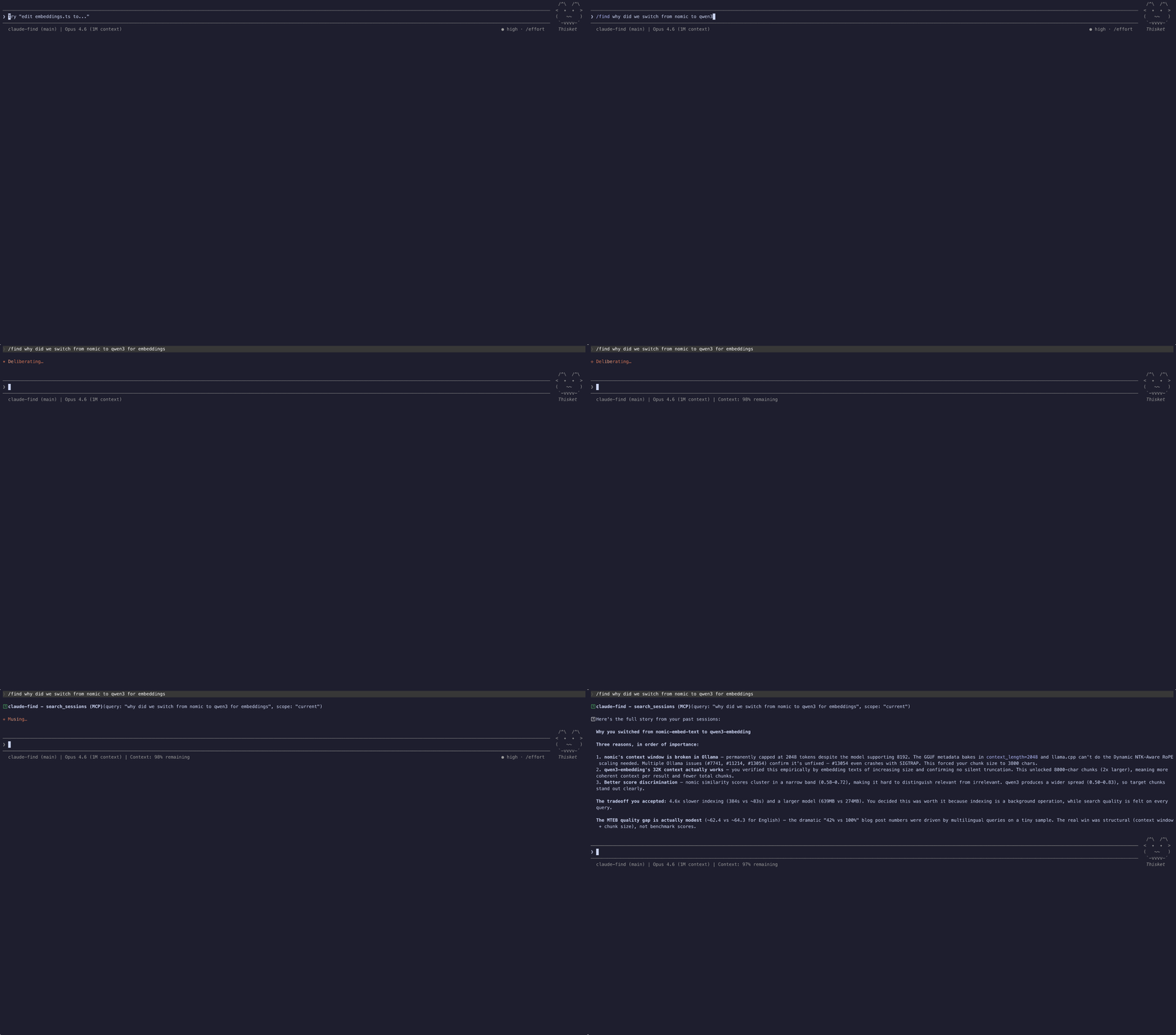
Semantic search over all your past Claude Code sessions. Finds context by meaning and keywords. Searches the raw conversation transcripts, not compressed summaries, so Claude gets the full picture: reasoning, constraints, failed approaches, and decisions.
Setup
brew install bun ollama
bunx claude-find setup
setup starts Ollama, pulls the embedding model, sets session retention to permanent, and registers the MCP server with Claude Code. Sessions are indexed in the background on startup. Searches work immediately and return progressively more complete results as indexing continues.
Install Bun and Ollama, then run bunx claude-find setup. It detects your platform and guides you through anything missing.
Use it
In any Claude Code session:
/find that database migration we discussed last week
/find why we chose websockets over polling
/find the session where we kept getting timeout errors
/find refactoring the payment module across all projects
Claude searches your past sessions semantically, finds the relevant conversations, and synthesizes the context: what was tried, what failed, what constraints you set, and what decisions were made.
How it works
- Indexes all Claude Code session JSONL files from
~/.claude/projects/ - Extracts user + assistant messages, compact summaries, file paths from tool calls
- Enriches each chunk with metadata context (project, branch, files, date) for better retrieval
- Embeds conversation chunks using qwen3-embedding via Ollama (GPU accelerated)
- Searches with hybrid semantic + keyword (FTS5) merged via Reciprocal Rank Fusion
- Returns raw conversation chunks so Claude can synthesize with full context
After upgrading, run bunx claude-find index to rebuild the index with the latest improvements.
What makes this different
- Searches raw transcripts. Nothing lost through compression.
- Retroactive: works on all existing sessions immediately. No hooks needed.
- Permanent history: setup disables Claude Code's 30-day session cleanup so your sessions are searchable forever.
- Non-blocking: indexes in the background at startup. Searches work instantly, even mid-indexing.
- Uses compact summaries: Claude's own session understanding, boosted in ranking.
- Indexes tool call metadata: search by files touched, errors encountered.
- Fast: Ollama + GPU keeps indexing fast and memory bounded.
Requirements
License
MIT
Related MCP servers
Validate, extract, repair and generate French Factur-X / EN16931 invoices via AgentForge API
MCP server (stdio): fetch web pages as clean readable markdown via the AgentForge API
MCP server (stdio): repair broken/malformed JSON via the AgentForge API
MCP server (stdio): lint OpenAPI specs with Spectral via the AgentForge API
MCP server (stdio): validate JSON against JSON Schema (draft-07 / 2020-12) via the AgentForge API
MCP server (stdio): check if URLs are alive (status, redirects, latency) via the AgentForge API