io.github.HarimxChoi/google-surf-mcp MCP Server
io.github.HarimxChoi/google-surf-mcp
Google search via Playwright with a warm Chrome profile—no API key, no proxies, no CAPTCHA solver needed.
What is the io.github.HarimxChoi/google-surf-mcp MCP server?
The google-surf-mcp MCP server provides Google search functionality without requiring an API key or external proxies. It uses Playwright with a persistent Chrome profile and includes built-in tools for searching, extracting article content, and handling CAPTCHAs through human intervention when needed. One server replaces three: search + URL fetcher + academic PDF extractor.
google-surf-mcp gives AI agents access to Google search and web content extraction. It combines search results with URL fetching and academic PDF extraction in a single tool set. The server runs headless by default, auto-bootstraps on first use, and handles CAPTCHAs by opening a browser window for human solving. It's designed for local use but supports cloud/serverless environments with fail-fast CAPTCHA handling.
How to install io.github.HarimxChoi/google-surf-mcp
Copy-paste configuration for popular MCP clients.
CHROME_PATHAbsolute path to the Chrome binary. Auto-detected on Windows/macOS/Linux when omitted.
SURF_PROFILE_ROOTDirectory for the warm Chrome profile. Defaults to ~/.google-surf-mcp.
SURF_LOCALEBrowser locale, e.g. en-US.
SURF_TZIANA timezone, e.g. America/New_York. Defaults to system timezone.
SURF_HEADLESSSet to 'false' to run Chrome visibly (demos/debugging). Defaults to true. CAPTCHA recovery always runs visible regardless.
SURF_IDLE_CLOSE_MSIdle ms before closing the sequential ctx and pool. 0 disables idle auto-close. Defaults to 30000.
SURF_ALLOW_PRIVATESet to 'true' to allow extract on private/loopback addresses (localhost, 10.x, 192.168.x, 169.254.x, etc). Default blocks them as an SSRF guard.
Tools & capabilities
Tools this server exposes to the agent.
search— Single query search returning title, URL, and snippet. Drops sponsored ads and knowledge panels. Results cached 24h by default.search_parallel— Parallel search with a pool of 4 workers, supporting up to 10 queries per call.extract— Fetch and extract content from a URL. Supports full body extraction, abstract mode (~1500 chars), or metadata-only. Handles HTML via Readability and PDFs via spatial parsing.search_extract— Combined search and parallel extract in one call. Defaults to abstract mode for token efficiency; supports full mode for complete article text.health— Server status check returning cascade state, worker pool health, rate limiter, cache, telemetry, and self-healing strategy information.
Use cases
- Search Google and retrieve results without an API key or rate limits
- Extract full article text or abstracts from web pages and academic PDFs in parallel
- Combine search and content extraction in a single call for efficient research workflows
- Access academic papers from arxiv, bioRxiv, Nature, OpenReview, NeurIPS, JMLR, and other repositories
- Troubleshoot search failures and monitor server health via the health tool
io.github.HarimxChoi/google-surf-mcp MCP server FAQ
google-surf-mcp is an MCP server that provides Google search, URL extraction, and academic PDF parsing without requiring an API key, proxies, or external CAPTCHA solvers. It uses Playwright with a persistent Chrome profile and handles CAPTCHAs by opening a browser window for human solving.
Yes. google-surf-mcp is free and open-source (MIT license). It requires only Node 18+ and Google Chrome/Chromium installed locally. No API keys or paid services are needed.
Install via npm: `npx google-surf-mcp`. For Claude Code, add this to `~/.claude.json`: `{"mcpServers": {"google-surf": {"command": "npx", "args": ["-y", "google-surf-mcp"]}}}`. Restart Claude Code and the tools become available.
No. google-surf-mcp requires no API keys, proxies, or external services. It auto-bootstraps a warm Chrome profile on first use. For LLM-assisted selector repair (optional), you can set `SURF_LLM_HEAL=true` with your own `ANTHROPIC_API_KEY`, but this is opt-in and disabled by default.
Sequential searches take ~1.5s per query (first call ~4s including setup). Parallel searches with 4 workers complete ~4 queries in ~1.5s wall time. Abstract extraction (default) is token-cheap; full extraction is slower but returns complete article text.
The server handles CAPTCHAs in 4 modes: (1) OS notification + headed Chrome (default for local use), (2) headed Chrome only (`SURF_HEADLESS=false`), (3) remote DevTools debugging (`SURF_REMOTE_DEBUG=true`), or (4) fail-fast error (`SURF_CLOUD_MODE=true` for serverless). Each solve preserves the profile's reputation with Google.
README (reference)
Source of truth, from the repository.
google-surf-mcp
English | 한국어




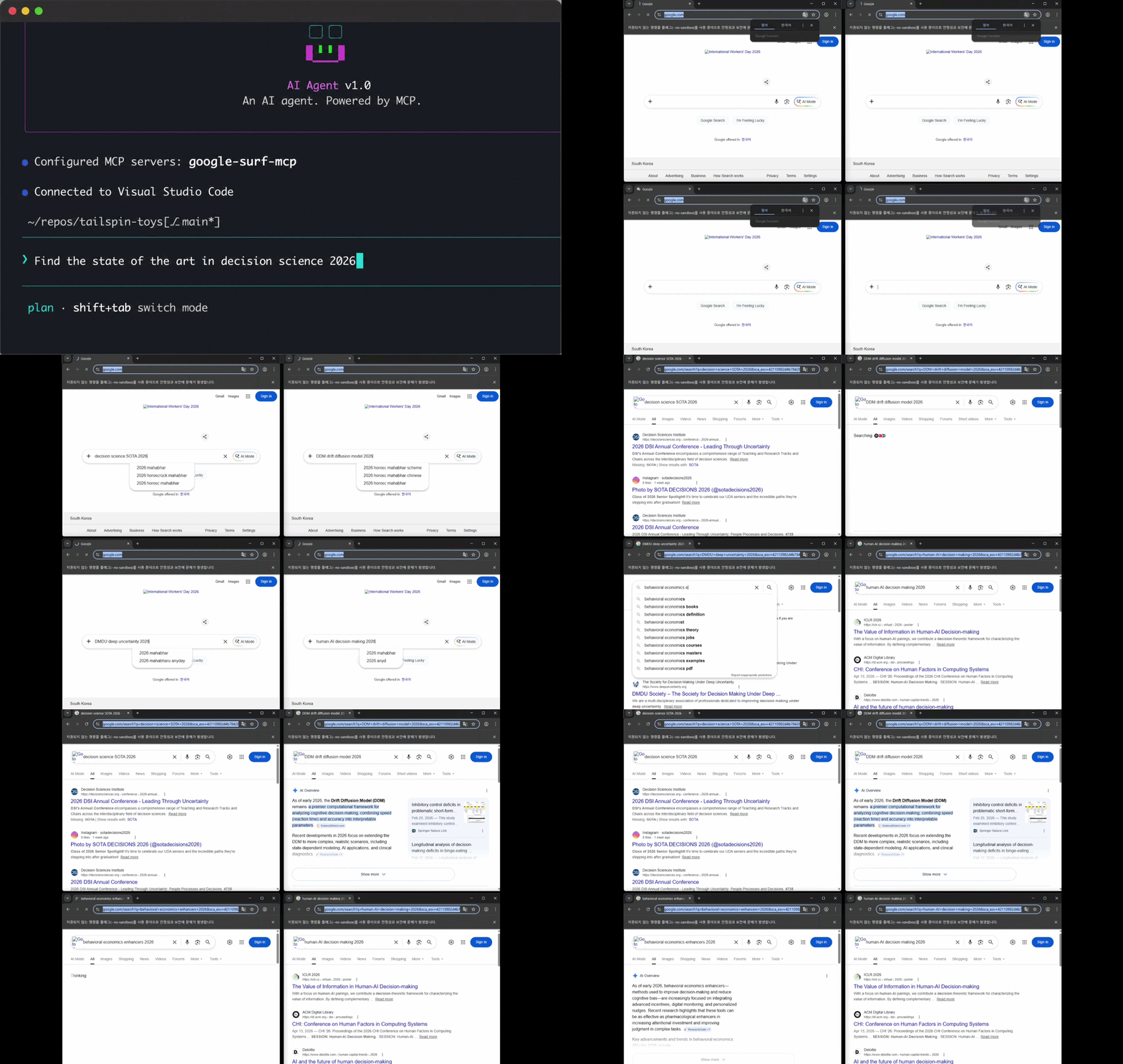
Demo only. Actual searches run headless by default (no visible browser). Set
SURF_HEADLESS=falseto make Chrome visible like in the clip above.
Google search MCP. No API key. Just works.
One MCP replaces three: search + URL fetcher + academic-paper extractor.
- ✅ Actually works (tested 6 free Google search MCPs, all failed)
- ✅ Search + URL + academic PDF extract in one MCP (replaces the search MCP + fetch MCP + academic-search MCP combo)
- ✅ Academic PDFs extracted inline: arxiv, biorxiv, Nature, OpenReview, NeurIPS, JMLR, PMLR, Springer, PubMed (via PMC)
- ✅
search_extractdefaults to abstract mode (~1500 chars/result, token-cheap),mode="full"for whole bodies - ✅ Sponsored ads + knowledge panels dropped (geometric verification, not just text matching)
- ✅ CAPTCHA recovery in 4 modes: OS notification (default) /
SURF_HEADLESS=false/SURF_REMOTE_DEBUG/SURF_CLOUD_MODE(fail-fast) - ✅ No API key, no proxies, no solver
5 tools: search / search_parallel / extract / search_extract / health
What
Plug it into any MCP client and you get Google search as a tool.
No CAPTCHA solver. When CAPTCHA fires on any tool, a Chrome window opens for a human to solve. Each solve preserves the profile's reputation with Google.
First call auto-bootstraps the warm profile. Designed for local use. For headless / serverless environments set SURF_CLOUD_MODE=true (fail-fast on CAPTCHA, worker pool disabled).
Numbers
| result | |
|---|---|
| sequential | ~1.5s/query (first call ~4s, includes setup) |
| parallel x4 | ~1.5s wall (first call ~9s, includes pool warm) |
| parallel x10 | ~4.5s wall |
| search_extract x5 (abstract, default) | ~3s wall |
| search_extract x5 (full) | ~5s wall (search + 5 parallel extracts) |
Measured on a workstation with a 1Gb/s connection.
Stack
- Playwright + persistent Chrome profile
playwright-extrastealth as a cascade fallback tier- Multi-strategy SERP parser + geometric verification (drops sponsored / knowledge_panel / related)
@llamaindex/liteparsefor PDF text extraction (PDFium spatial parsing, optional OCR); Mozilla Readability + Turndown for HTML- Resource-blocked images / media / fonts for speed
- Auto-bootstrap on first call; pool falls back to single-context after repeated warm failures
- Self-healing: runtime parser-strategy reorder (deterministic) + daily cron repair PR (synthesis → optional LLM → triple-gate validation, human review)
Install
Requires Node 18+ and Google Chrome (or Chromium) on the system.
npx google-surf-mcp # actual MCP - register in client config
First tool call auto-bootstraps the warm profile (you may see Chrome open briefly).
Or local clone:
git clone https://github.com/HarimxChoi/google-surf-mcp
cd google-surf-mcp
npm install
If auto-bootstrap fails (rare), run it manually:
npm run bootstrap
Override paths if needed:
CHROME_PATH=/path/to/chrome SURF_TZ=America/New_York npm run bootstrap
Use with Claude Code
Paste this into your ~/.claude.json:
{
  "mcpServers": {
    "google-surf": {
      "command": "npx",
      "args": ["-y", "google-surf-mcp"]
    }
  }
}
Restart Claude Code. Done. search, search_parallel, extract, search_extract, health are now available.
For other MCP clients, use the same JSON shape in their config file.
Local clone variant:
{
  "mcpServers": {
    "google-surf": {
      "command": "node",
      "args": ["/abs/path/to/google-surf-mcp/build/index.js"]
    }
  }
}
Tools
search(query, limit?)- single query, ~1.5s. Returns title / url / snippet. Sponsored ads + knowledge-panel dropped (response includesdroppedcount +dropped_reasons). Results cached 24h (SURF_CACHE_TTL_SEARCH_MS=0to bypass).search_parallel(queries[], limit?)- pool of 4, max 10 queries per call.extract(url, max_chars?, mode?)- fetch a URL, return article content.mode="full"(default): whole body. HTML via Readability, PDFs vialiteparse(spatial parsing, multi-column reading order).mode="abstract": ~1500-char survey (PDF page 1 or HTML meta description). Triage relevance before paying for full text.mode="metadata": PDF page count only.- Response:
content,title,excerpt,length,is_pdf,page_count,extraction_quality. Failures return{ error }, never throw.
search_extract(query, limit?, max_chars?, mode?)- search + parallel extract in one call. Defaultmode="abstract"returns SERP enriched with ~1500-char summaries (cheap triage). Usemode="full"when you actually need the article texts (slower, more tokens).health()- server status. Response:cascade/pool(warmFailures+fallback) /rateLimiter/cache/telemetry/selfHealing(current strategy order + stats) /config. Call it if searches start failing —pool.fallback=trueor risingcascade.totalCaptchasare the usual culprits.
Env vars
| var | default | notes |
|---|---|---|
CHROME_PATH | auto-detected | absolute path to Chrome binary |
SURF_PROFILE_ROOT | ~/.google-surf-mcp | where the warm profile lives |
SURF_LOCALE | en-US | browser locale |
SURF_TZ | system tz | e.g. America/New_York |
SURF_HEADLESS | true | set false to run Chrome visibly (demos / debugging). When false, CAPTCHA recovery skips the OS notification (user is already watching). |
SURF_REMOTE_DEBUG | false | set true on a headless server with remote DevTools. CAPTCHA path emits the DevTools port and throws instead of spawning a window; attach chrome://inspect from a local machine over SSH port-forward to solve. |
SURF_IDLE_CLOSE_MS | 30000 | idle ms before closing the sequential ctx and pool. 0 disables idle auto-close. Lower = faster cleanup, higher = warmer cache for spaced-out calls. |
SURF_ALLOW_PRIVATE | false | set true to allow extract to fetch private/loopback addresses (localhost, 127.0.0.1, 10.x, 192.168.x, 169.254.x, etc). Default blocks them as an SSRF guard. |
SURF_EXTRACT_MAX_CHARS | 8000 | default extract truncation (200–50000); per-call max_chars still overrides |
SURF_EXTRACT_OCR | false | OCR scanned/image PDFs via Tesseract (slower; off by default) |
SURF_CLOUD_MODE | false | headless/serverless mode: TLS bypass + --no-sandbox + --disable-dev-shm-usage + worker pool disabled + fail-fast on CAPTCHA |
SURF_CASCADE_DISABLED | false | pin a single stealth mode (chosen by SURF_USE_STEALTH) instead of the 3-tier auto-cascade |
SURF_USE_STEALTH | true | initial stealth tier — only consulted when SURF_CASCADE_DISABLED=true |
SURF_HUMANLIKE_MODE | off | off / background (fire-and-forget after returning results) / inline (await before returning, slower) — opt-in humanlike browsing |
SURF_RATE_LIMIT_PER_MIN | 10 | internal cap on Google-facing requests per minute |
SURF_CACHE_TTL_SEARCH_MS | 86400000 | search cache TTL (24h); 0 disables caching |
SURF_CACHE_MAX_ENTRIES | 1000 | LRU cap per cache namespace |
SURF_CACHE_ROOT | <profile>/cache | cache directory |
SURF_INSECURE_TLS | =SURF_CLOUD_MODE | --ignore-certificate-errors (auto-on in cloud mode) |
SURF_NO_SANDBOX | =SURF_CLOUD_MODE | --no-sandbox (auto-on in cloud mode) |
SURF_TELEMETRY | false | set true to enable jsonl event logging (search outcomes, cache hits/misses, tool errors, parser staleness) under {SURF_TELEMETRY_ROOT}. Designed as the input feed for the self-healing pipeline. Off by default. |
SURF_TELEMETRY_ROOT | <profile>/telemetry | directory for jsonl telemetry files. UTC-dated one file per day (YYYY-MM-DD.jsonl). |
SURF_SELF_HEALING | true | per-strategy outcome tracking + persisted reordering. Healing must win by 3 outcomes before reorder kicks in, so single-call flapping is impossible. Set false to pin the default strategy order. |
SURF_SELF_HEALING_FILE | <profile>/.heal/strategy-order.json | persistence path for healing state. Atomic tmp+rename writes; debounced 5s. |
SURF_LLM_HEAL | false | opt-in for LLM-assisted selector repair in the workflow-only repairWithLLM helper. Off by default → no third-party LLM request ever fires. When true, requires ANTHROPIC_API_KEY (your own); the package never ships a maintainer key. |
ANTHROPIC_API_KEY | — | your Anthropic key. Read only when SURF_LLM_HEAL=true. The runtime self-healing in SURF_SELF_HEALING is deterministic and never reads this variable. |
Troubleshooting
- CAPTCHA in 4 modes (picked automatically from env):
- default (local desktop): OS notification fires, headed Chrome opens, human solves, call retries
SURF_HEADLESS=false: headed Chrome opens, no notification (user is already watching)SURF_REMOTE_DEBUG=true: DevTools port + instructions printed, attachchrome://inspectlocally to solveSURF_CLOUD_MODE=true: fail-fast withCAPTCHA_REQUIREDerror
- Headed Chrome opens to a plain search box instead of CAPTCHA: just type any query in the box and press Enter. Subsequent calls work.
- "Chrome not found": install Chrome or set
CHROME_PATH. - Stale selectors: two-layer mitigation — runtime per-strategy reorder (
SURF_SELF_HEALING, deterministic) + daily cron that opens draft PRs with candidate fixes (SURF_LLM_HEALoptional, human review required, never auto-merged). - Searches feel slower than the Numbers table: check
health().pool.fallback.truemeans the worker pool gave up after 3 warm failures and is using a single context. Usually fixed bynpm run bootstrapto refresh the seed profile. - SSRF:
extractblockslocalhost, private IPs, AWS metadata by default. SetSURF_ALLOW_PRIVATE=trueto allow them.
Changelog
See CHANGELOG.md.
License
MIT
Related MCP servers

Canadian procurement intelligence: CanadaBuys and Alberta tenders, ranked for your shop.

Computer-use MCP for Windows 10/11: 32 tools — screenshot, UIA, Chrome CDP, type/click/scroll, VBA.

io.github.HaseebKhalid1507/velocirag
Lightning-fast RAG for AI agents. 4-layer fusion, ONNX Runtime, sub-200ms search.

AI-assisted MCP server for JSTQB-based test planning, design, review, and analysis.

Hashlock Markets
Non-custodial cross-chain OTC for AI agents: sealed RFQ, negotiation, HTLC atomic swaps. Testnet.

Stock Image MCP
Search and download stock images from Unsplash, Pexels, Pixabay, Freepik, StockVault, and Burst