Memory Vault MCP Server
io.github.MihaiBuilds/memory-vault
Self-hosted AI memory layer with hybrid search, knowledge graphs, and MCP integration for Claude.
What is the Memory Vault MCP server?
Memory Vault is a self-hosted Postgres + pgvector database that stores persistent memories for AI applications with hybrid semantic and keyword search. It integrates natively with Claude via MCP tools (recall, remember, forget) and includes a local LLM chat interface, REST API, and knowledge graph extraction—all running on your machine without cloud dependencies.
Memory Vault solves the problem of AI conversations starting from zero by providing a persistent memory layer underneath. Store decisions, conversations, notes, and project context in a single Postgres database, then have Claude recall and update memories during any session via MCP. You can also chat with your own memories using a local LLM with sources shown for every answer, or build custom AI tools on top of the REST API.
How to install Memory Vault
Copy-paste configuration for popular MCP clients.
DB_HOSTrequiredHostname of the Postgres+pgvector instance Memory Vault connects to (e.g. 'host.docker.internal' when Postgres runs on the host, 'localhost' when running natively, or the service name when both run in compose)
DB_PORTrequiredPostgres port
DB_NAMErequiredPostgres database name
DB_USERrequiredPostgres user with read/write access to the memory vault database
DB_PASSWORDrequiredsecretPostgres password for DB_USER
Tools & capabilities
Tools this server exposes to the agent.
recall— Search memories with hybrid search combining vector similarity, full-text matching, and reciprocal rank fusion (RRF)remember— Store a new memory—automatically classified, embedded, and added to the knowledge graphforget— Soft-delete a memory by chunk IDpurge_forgotten— Permanently delete memories forgotten more than N days agomove_memory— Move a memory to another space and rebuild its graph entriesmemory_status— Check database health, chunk counts, and embedding model informationmemory://spaces resource— List all memory spaces with chunk countsmemory://stats resource— Access current system statistics
Use cases
- Store project decisions and context so Claude recalls them across sessions without re-explaining
- Search your own notes and memories using natural language hybrid search to find relevant information quickly
- Chat with your vault using a local LLM to ask questions about stored memories with sources shown for verification
- Build custom AI applications on top of the REST API with persistent memory and knowledge graph extraction
- Maintain separate memory spaces for different projects or domains with automatic entity extraction and relationship mapping
Memory Vault MCP server FAQ
Memory Vault is a self-hosted Postgres + pgvector database that provides persistent memory for AI applications. It stores memories with hybrid search (semantic + keyword), integrates with Claude via MCP, includes local LLM chat with sources, and extracts a knowledge graph automatically.
Yes, Memory Vault is open-source under the MIT license and completely free. It's self-hosted, so you run it on your own machine or server.
Add a server block to your `.mcp.json` config file pointing to the memory-vault Python module with your PostgreSQL credentials, then restart Claude. For Claude Code, add it to `~/.claude/.mcp.json` and enable it in settings; for Claude Desktop, add it via Settings → Developer → Edit Config.
Memory Vault requires PostgreSQL 16 with pgvector extension running locally or accessible over the network. For the REST API and remote MCP-over-HTTP access, you can create bearer tokens. The MCP stdio transport (local) does not require additional authentication.
Yes. You need Python 3.11+, PostgreSQL 16 with pgvector, and uv or pip. Clone the repo, run `uv sync` (or `pip install -e .`), download the spaCy model, configure `.env` with your database credentials, and run `memory-vault migrate`.
No. Memory Vault uses CPU-only embeddings (sentence-transformers all-MiniLM-L6-v2) and spaCy for entity extraction, both of which run on a normal laptop without GPU acceleration.
README (reference)
Source of truth, from the repository.
Memory Vault




The memory database for AI applications. Self-hosted Postgres + pgvector with hybrid search, MCP-native, and a knowledge graph baked in.
Every conversation with Claude or ChatGPT starts from zero. No memory of what you built last week, what decisions you made last month, what problems you've already solved. You either re-explain everything from scratch, or paste in a wall of context and hope it fits in the window.
Memory Vault is the persistent layer underneath. It stores what you want your AI to remember — decisions, conversations, notes, project context — in a single Postgres database with hybrid semantic + keyword search. Claude can recall and store memories during any session via MCP, you can chat with your own memories through a local LLM, or you can build your own AI tool on top of the REST API.
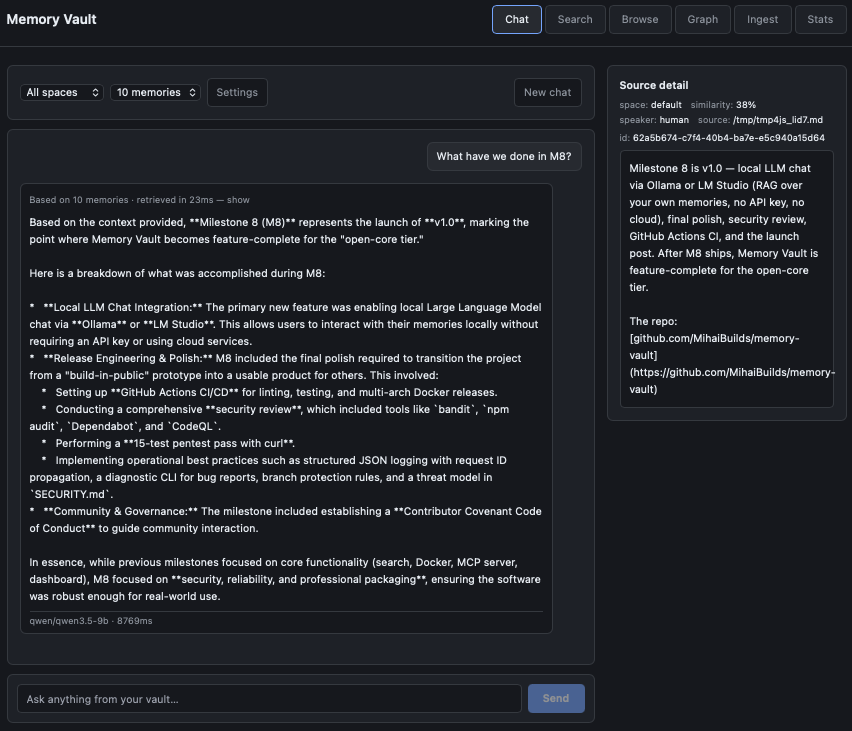
Chat with your vault using a local LLM. Every answer shows the exact memories it was grounded in — click any source to verify.
Status
v1.0 — released 2026-05-07. First stable release of Memory Vault. M1-M7 (hybrid search, Docker, MCP, REST API, dashboard, knowledge graph, local LLM chat) all shipped and stable.
See CHANGELOG.md for the full per-release history, or GitHub Releases for the platform-native view.
Semver from here forward — the public surface (REST API endpoints, MCP tool signatures, DB schema) is stable. Breaking changes only on a major version bump.
Quick Start (Docker)
git clone https://github.com/MihaiBuilds/memory-vault.git
cd memory-vault
docker compose up -d
That's it. PostgreSQL + pgvector + Memory Vault, running and ready. Migrations run automatically on first start.
# Check it's working
docker compose exec app memory-vault status

# Ingest a file
docker compose exec app memory-vault ingest /path/to/file.md --space default

# Search
docker compose exec app memory-vault search "your query here"
Data persists in a Docker volume — docker compose down and up again, your memories are still there.
Open http://localhost:8000 in your browser to use the dashboard (Chat, Search, Browse, Graph, Ingest, Stats).
Windows users: clone into WSL2, not a Windows path, and read docs/windows.md if you hit a line-ending error.
No-Docker quick start
If you prefer running without Docker:
Prerequisites
Setup with uv (recommended)
# Clone
git clone https://github.com/MihaiBuilds/memory-vault.git
cd memory-vault

# Create virtual environment and install dependencies
uv sync

# Install the spaCy language model
uv run python -m spacy download en_core_web_sm

# Configure
cp .env.example .env
# Edit .env with your PostgreSQL credentials

# Run migrations
uv run memory-vault migrate

# Verify
uv run memory-vault status
Setup with pip + venv (fallback)
If you don't want to install uv, plain pip + venv works too:
# Clone
git clone https://github.com/MihaiBuilds/memory-vault.git
cd memory-vault

# Create virtual environment
python -m venv .venv
source .venv/bin/activate

# Install dependencies
pip install -e .

# Install the spaCy language model
python -m spacy download en_core_web_sm

# Configure
cp .env.example .env
# Edit .env with your PostgreSQL credentials

# Run migrations
memory-vault migrate

# Verify
memory-vault status
Usage
If you set up with uv, prefix commands with uv run (e.g. uv run memory-vault search ...). If you used pip + venv, activate the venv first (source .venv/bin/activate) and run commands directly:
# Ingest a file
memory-vault ingest notes.md --space default

# Search memories
memory-vault search "hybrid search architecture" --limit 5

# Check status
memory-vault status
Features
- Hybrid search — semantic similarity + keyword matching combined, so you find the right memory even when you don't remember the exact words
- MCP integration — four tools (
recall,remember,forget,memory_status) that Claude can use natively during any session - Local LLM chat — query your own memories through LM Studio without sending anything to the cloud, with sources shown for every answer
- Knowledge graph — entities and relationships extracted automatically, connections between things emerge over time
- Memory spaces — separate namespaces for different projects or domains
- REST API — integrate AI memory into any application
- One-command setup —
docker compose upand it's running - Self-hosted — your data stays on your machine, always
Architecture
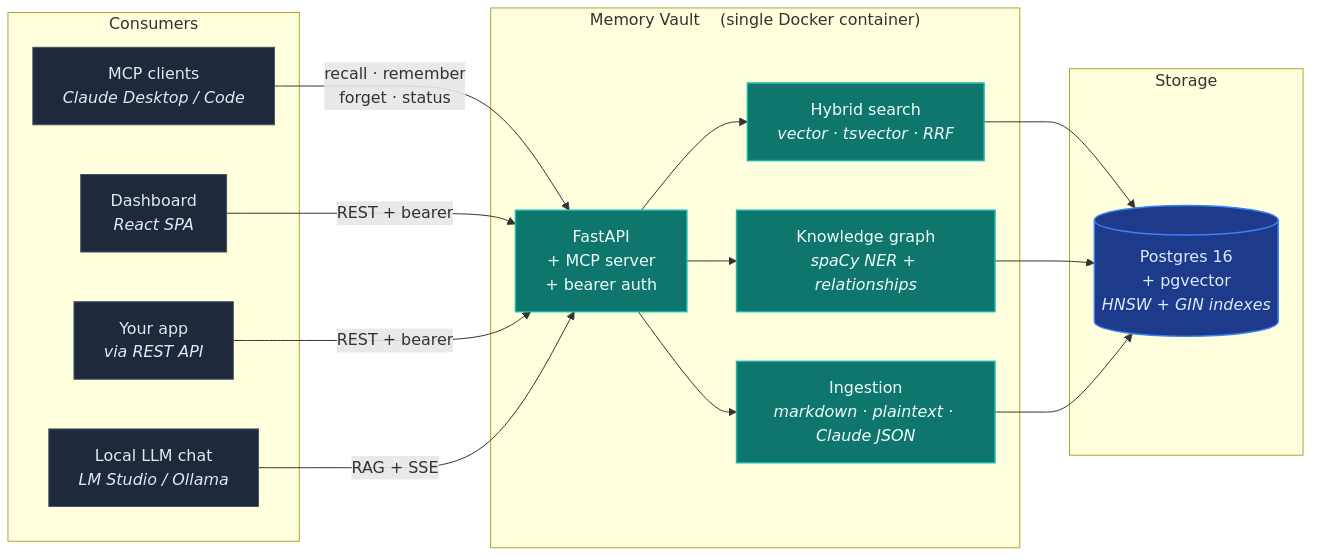
Postgres + pgvector at the core. The same memory layer is reachable from MCP (Claude), the dashboard chat page, the REST API, and any app you build on top.
Three things are deliberate about this stack:
- One database, not two. Vector embeddings, full-text indexes, and relational data all live in Postgres. No separate vector DB to keep in sync.
- Frontend-agnostic. The dashboard is one consumer of the API, not the API itself. MCP, REST, CLI, and your own apps are equal first-class clients.
- CPU-only by default. No GPU required. Embeddings (sentence-transformers) and entity extraction (spaCy) both run on a normal laptop.
Tech Stack
- PostgreSQL 16 + pgvector — vector storage and hybrid search in one database
- Python 3.11+ — async backend with psycopg 3
- sentence-transformers —
all-MiniLM-L6-v2embeddings (384-d, runs on CPU) - spaCy —
en_core_web_smfor entity extraction (CPU-only, no LLM calls) - FastAPI — REST API with bearer auth, rate limiting, and OpenAPI docs
- React 19 + Vite + TanStack Query — web dashboard, baked into the main Docker image
- Cytoscape.js + cose-bilkent — force-directed knowledge graph rendering on the dashboard
- Docker — one-command deployment with
docker compose up - MCP — Claude integration via FastMCP (stdio transport)
MCP Integration (Claude Desktop & Claude Code)
Memory Vault exposes six tools via the Model Context Protocol so Claude can read and write memories during any conversation.
Tools
| Tool | Description |
|---|---|
recall | Search memories with hybrid search (vector + full-text + RRF) |
remember | Store a new memory — auto-classified and embedded |
forget | Soft-delete a memory by chunk ID |
purge_forgotten | Permanently delete memories forgotten more than N days ago |
move_memory | Move a memory to another space, rebuilding its graph entries |
memory_status | Database health, chunk counts, embedding model info |
Resources
| Resource | Description |
|---|---|
memory://spaces | List all memory spaces with chunk counts |
memory://stats | Current system statistics |
Setup — Claude Code
Make sure you've completed the No-Docker quick start above (uv sync or pip install, plus the spaCy model download) so the memory_vault package is installed.
Project scope — add to your project's .mcp.json:
{
  "mcpServers": {
    "memory-vault": {
      "command": "/path/to/memory-vault/.venv/bin/python",
      "args": ["-m", "memory_vault.mcp"],
      "env": {
        "DB_HOST": "localhost",
        "DB_PORT": "5432",
        "DB_NAME": "memory_vault",
        "DB_USER": "memory_vault",
        "DB_PASSWORD": "memory_vault"
      }
    }
  }
}
Global scope — to make memory-vault available in every Claude Code session, add the same server block to ~/.claude/.mcp.json, then add memory-vault to enabledMcpjsonServers in ~/.claude/settings.json:
{
  "enabledMcpjsonServers": ["memory-vault"]
}
Verify with claude mcp list — memory-vault should show connected.
Setup — Claude Desktop
Add the same server block to Claude Desktop's config (Settings → Developer → Edit Config), then restart Claude Desktop.
Docker Users
If you're running Memory Vault via Docker, use DB_HOST: "127.0.0.1" and make sure port 5432 is exposed in your docker-compose.yml:
{
  "mcpServers": {
    "memory-vault": {
      "command": "/path/to/memory-vault/.venv/bin/python",
      "args": ["-m", "memory_vault.mcp"],
      "env": {
        "DB_HOST": "127.0.0.1",
        "DB_PORT": "5432",
        "DB_NAME": "memory_vault",
        "DB_USER": "memory_vault",
        "DB_PASSWORD": "memory_vault"
      }
    }
  }
}
The MCP server runs on the host (not inside Docker) and connects to the PostgreSQL container over the exposed port.
Verify It Works
Once configured, Claude will have access to the memory tools. Try:
"Use memory_status to check the memory system."
"Remember that we chose Redis for the session cache."
"Recall everything about hybrid search."
Troubleshooting
ModuleNotFoundErroron startup — the virtual environment isn't installed; re-runuv sync(orpip install -e .) in the repo directory.OSError: [E050]on startup — the spaCy language model isn't installed; re-runpython -m spacy download en_core_web_sm.- Server shows
failedin Claude Code — runclaude --debug mcpto see the server's error output. - Tools not available in Claude Code despite server connecting — confirm
memory-vaultis listed inenabledMcpjsonServersin~/.claude/settings.json. - Connection refused with Docker running — use
DB_HOST: "127.0.0.1"instead of"localhost".
Remote access over HTTP
Everything above runs MCP over stdio, which assumes the client and the server are on the same machine. If your client is somewhere else — Claude Desktop on another machine, an agent harness in a different container — Memory Vault can also serve MCP over HTTP using SSE.
It is off by default. A memory store is not something to start listening on a port without being asked:
MCP_HTTP_ENABLED=true
The transport then mounts at /api/mcp on the same port as the REST API, so a
client connects to http://<host>:8000/api/mcp/sse.
Every request needs a token, created the same way as for the REST API:
memory-vault token create my-remote-client
Clients differ in how they express a remote MCP server, but they all need the same three things — the SSE transport, the URL, and the token. In the shape most of them use:
{
  "mcpServers": {
    "memory-vault": {
      "type": "sse",
      "url": "http://192.168.1.50:8000/api/mcp/sse",
      "headers": { "Authorization": "Bearer mv_your-token-here" }
    }
  }
}
Say which hostnames are yours
Memory Vault answers only to hostnames you have declared, and refuses anything
else with HTTP 421. That check is what stops a page in a browser resolving
its own domain to 127.0.0.1 and reaching your memory store through your
machine.
The default covers a client on the same machine (localhost and 127.0.0.1,
on any port). Reaching it by any other name — a LAN address, a container name,
a hostname behind a reverse proxy — means saying so:
MCP_HTTP_ALLOWED_HOSTS=memory.internal:8000,192.168.1.50:8000
The list replaces the default rather than adding to it, so include
localhost:* if you still want local clients. A host:* entry matches that
host on any port.
If a client gets 421 Misdirected Request, this is why: the name it used is
not on the list.
Security
API_AUTH_ENABLED=false does not open the MCP transport. That setting is a
local-development convenience for the REST API, and it deliberately stops
there — an unauthenticated REST API on your own laptop is a convenience, while
an unauthenticated memory store on a listening port is how instances end up
public. With the flag off, /api/spaces answers without a token and
/api/mcp/sse still answers 401.
Two things worth knowing before you expose the port:
- Bind to somewhere sensible. Publishing the container port on
0.0.0.0reaches the whole network. Bind to a LAN address or keep it behind a reverse proxy or tunnel. - There is no transport encryption. Tokens travel in a header, so put TLS in front of it — a reverse proxy or a tunnel — for anything crossing a network you do not control.
Tokens behave exactly as they do for the REST API: revoke one with
memory-vault token revoke <prefix> and it stops working on both surfaces at
once, because both check the same table.
stdio keeps working unchanged. This is an additional way in, not a replacement, and enabling it changes nothing for existing clients.
Local LLM Chat
Memory Vault includes a chat page that lets you talk to your own memories using a local LLM — no cloud, no OpenAI key, no telemetry. The dashboard runs hybrid search against your vault, builds a context block from the top hits, and streams the answer back from a model running on your machine.
Sources are shown with every answer. Every response includes the exact chunks the LLM used, with similarity scores and content previews. Click any source to verify the answer is grounded in your data, not invented. This is the differentiator vs. opaque chat-over-docs tools — you always know what the model saw.
Setup
Memory Vault uses LM Studio as the local LLM provider in v1.0.
- Download and install LM Studio.
- Load a non-thinking model — Qwen2.5 (7B+), Llama 3 (8B+), or similar. Avoid Qwen3, DeepSeek-R1, and o1-style reasoning models — they emit chain-of-thought into the answer and break the RAG flow.
- Start the local server (LM Studio → Developer tab → Start Server). Default address:
http://localhost:1234. - Open the Memory Vault dashboard → Chat page → ⚙️ Settings → confirm the Local LLM URL points at your LM Studio instance. The model is auto-detected.
That's it. Ask a question; the dashboard retrieves relevant chunks, sends them with your question to LM Studio, and streams the answer back.
How it works
- Hybrid search retrieves the top chunks for your question (same engine as
/api/searchand MCPrecall) - Top hits are packed into a 6,000-token context budget — oldest history dropped first, then lowest-similarity chunks
- LM Studio generates an answer streamed token-by-token via Server-Sent Events
- Sources arrive first in the stream, so the UI shows "based on N memories" before tokens start flowing
Why LM Studio first
LM Studio's native API supports reasoning="off", which is the only reliable way to suppress chain-of-thought from thinking models in a RAG flow. Memory Vault uses the native API by default and falls back to OpenAI-compat (/v1/chat/completions) with <think>...</think> stripping if the native API isn't available.
REST API
Every MCP tool is also exposed as an HTTP endpoint so you can integrate Memory Vault into any app, script, or language. The API is served by FastAPI at http://localhost:8000 when you run docker compose up.
- Interactive docs: http://localhost:8000/docs
- OpenAPI schema: http://localhost:8000/openapi.json
The auto-generated /docs page is the canonical API reference — it stays in sync with the code. The summary below is for orientation.
Authentication
All endpoints except /api/health require a bearer token. Create one via the CLI:
docker compose exec app memory-vault token create my-app
The plaintext token is shown once — copy it immediately. Then send it as a header:
curl -H "Authorization: Bearer mv_..." http://localhost:8000/api/spaces
Manage tokens:
memory-vault token list
memory-vault token revoke mv_abc1234
To disable auth entirely (local dev only), set API_AUTH_ENABLED=false.
Endpoints
| Method | Path | Description |
|---|---|---|
GET | /api/health | Service + database health (no auth) |
GET | /api/spaces | List memory spaces with chunk counts |
POST | /api/search | Hybrid search (vector + full-text + RRF) |
GET | /api/search/quality | How well recent searches have been matching |
GET | /api/chunks | List chunks with pagination and filters |
GET | /api/chunks/{id} | Get a single chunk |
DELETE | /api/chunks/{id} | Soft-delete (forget) a chunk |
POST | /api/ingest/text | Ingest a text string as a chunk |
POST | /api/ingest/file | Upload a file through the ingestion pipeline |
POST | /api/chat | RAG chat over hybrid search (non-streaming) |
POST | /api/chat/stream | RAG chat with token-by-token SSE streaming |
Example — search
curl -X POST http://localhost:8000/api/search \
  -H "Authorization: Bearer $MV_TOKEN" \
  -H "Content-Type: application/json" \
  -d '{
    "query": "how does hybrid search work",
    "spaces": ["default"],
    "limit": 5
  }'
Example — search quality
curl http://localhost:8000/api/search/quality \
  -H "Authorization: Bearer $MV_TOKEN"
{
  "queries": 42,
  "window_hours": 24,
  "avg_top_similarity": 0.51,
  "weak_matches": 6,
  "empty_results": 0,
  "weak_threshold": 0.35
}
Aggregated from searches that already ran — asking costs nothing and runs no
query of its own. It reports each search's best hit rather than the mean of
its top-K, because a search returns as many rows as you asked for whatever the
vault holds; averaging down the ranks measures your limit as much as the
quality of the match.
weak_matches is the number worth watching. A search that finds nothing
relevant still returns its closest guesses, so empty_results stays near zero
even when nothing is being answered well. A high weak count usually means the
answers were never stored, rather than that search is failing to find them.
The Stats page in the web UI shows the same figures.
Example — ingest text
curl -X POST http://localhost:8000/api/ingest/text \
  -H "Authorization: Bearer $MV_TOKEN" \
  -H "Content-Type: application/json" \
  -d '{"text": "Decided to use RRF for hybrid merging", "space": "default"}'
Example — upload a file
curl -X POST http://localhost:8000/api/ingest/file \
  -H "Authorization: Bearer $MV_TOKEN" \
  -F "file=@notes.md" \
  -F "space=default"
Configuration
| Variable | Default | Description |
|---|---|---|
API_HOST | 0.0.0.0 | Bind address |
API_PORT | 8000 | Port |
API_AUTH_ENABLED | true | Set false to disable bearer auth (local dev only) |
API_CORS_ORIGINS | * | Comma-separated allowed origins, or * |
API_RATE_LIMIT_PER_MIN | 120 | Per-IP request limit per minute |
Dashboard
Memory Vault ships with a web UI baked into the same Docker image as the API — no separate deploy, no extra port. Open http://localhost:8000 in your browser after docker compose up.
Six pages:
- Chat — talk to your vault with a local LLM, sources shown for every answer (default landing page)
- Search — hybrid search with space filter, similarity scores, expandable hit content
- Browse — paginated chunk list with space + sort filters, two-step inline delete
- Graph — force-directed knowledge graph (Cytoscape.js), pan/zoom, click a node to see its mentions and related entities, filters for space / type / min-mentions / max-nodes
- Ingest — paste text or upload files (one at a time in v1.0), per-file status, batch summary
- Stats — system health, total chunks, spaces table with visual distribution, auto-refresh every 30s
Access
The dashboard uses the same bearer token as the API. Create one and paste it into the dashboard's token screen:
docker compose exec app memory-vault token create dashboard
The plaintext token is shown once — copy it immediately. Open http://localhost:8000, paste into the prompt, and the dashboard stores it in localStorage under memory-vault-token. You won't be asked again on that browser.
Rotating or revoking
# See which tokens exist
docker compose exec app memory-vault token list

# Revoke by prefix (shown in list output)
docker compose exec app memory-vault token revoke mv_abc1234

# Create a new one
docker compose exec app memory-vault token create dashboard
After revoking, the dashboard will hit a 401 on its next request and auto-clear the stored token, forcing you to paste the new one.
Troubleshooting
- Prompted for token every reload: your browser is blocking
localStorage(private mode, strict cookie settings). Use a normal window or allow storage forlocalhost. - 401 on every request: the token was revoked or
API_AUTH_ENABLEDchanged. Create a fresh token and paste it in. - Dashboard shows but API calls fail with CORS: you're hitting the API on a different origin than the dashboard. The baked-in build avoids this — use
http://localhost:8000, not the dev server, unless you know what you're doing. - Running the dev server:
cd web && npm install && npm run devserves the UI athttp://localhost:5173with API calls proxied to:8000. For development only. - Windows-specific issues: see docs/windows.md.
- Reporting a bug: run
docker compose exec app memory-vault diagnose(ormemory-vault diagnoseon the host for a fuller bundle includingdocker compose ps+ db logs). The command writes amemory-vault-diagnostic-YYYY-MM-DD-HHMMSS.zipcontaining app logs, status, OS info, and redacted env vars. Bearer tokens, passwords, andmv_tokens are auto-scrubbed — but please review the bundle before attaching it to a public GitHub issue. - Quoting a request ID: every API response carries an
X-Request-IDheader (UUID hex). Include it in bug reports — it lets the maintainer grep the same request across the structured JSON logs.
How It Works
Hybrid Search
Memory Vault combines two search methods and merges the results:
- Vector search — converts your query to an embedding, finds semantically similar chunks via HNSW index
- Full-text search — keyword matching via PostgreSQL tsvector + GIN index
- RRF merging — Reciprocal Rank Fusion combines both ranked lists so neither method dominates
This means you find the right memory whether you remember the exact words or just the concept.
Query Enrichment
Before searching, Memory Vault generates up to 3 query variations using the embedding model's WordPiece tokenizer to extract key technical terms. This improves recall without losing precision.
Ingestion Pipeline
Async queue-based pipeline with adapters for different input formats:
- Markdown — splits by headings, preserves structure
- Plain text — paragraph-based with smart merging
- Claude JSON — parses Claude conversation exports
Knowledge Graph
Memory Vault extracts entities and relationships from every ingested chunk and stores them alongside your memories. Click the Graph page in the dashboard to see how the things you've stored connect to each other.
How extraction works:
- spaCy NER — the small
en_core_web_smmodel (~15 MB, CPU-only) tagsPERSON,ORG, andPRODUCTentities, mapped to Person, Project, and Tool respectively. - Concept extraction — multi-token noun phrases that appear at least twice within a chunk become Concept entities. No LLM, no API calls.
- Co-occurrence relationships — any two entities found in the same chunk produce a
related_torelationship. Edge weight grows with co-occurrence count across chunks. - Per-space deduplication — entities are deduplicated by
(lower(name), type, space), so the same entity stays one node within a space without merging across unrelated projects.
The whole pipeline runs synchronously on ingest, on the same CPU that runs the embeddings — no extra services, no external API costs.
These trade-offs are deliberate. spaCy + co-occurrence is fast, free, and gets you 80% of the way to a useful graph at 0% of the LLM cost. The honest gaps are documented in the Limitations section below.
Performance Tuning
Memory Vault ships with maintenance_work_mem = 1 GB as the default in the bundled docker-compose.yml. The stock PostgreSQL default is 64 MB, which makes HNSW index builds on pgvector painfully slow once your corpus grows past a few thousand chunks.
If you're running on a host with 16 GB of RAM or more, bumping this to 2 GB gives noticeably faster index rebuilds with no downside. Edit the command: block in docker-compose.yml:
db:
  image: pgvector/pgvector:pg16
  command:
    - postgres
    - -c
    - maintenance_work_mem=2GB
If you're running on a small box (4 GB total RAM or less, e.g. a tiny VPS), you may want to drop this back down to 256 MB so the rest of the system has breathing room. Memory Vault still works at the stock 64 MB default — it's just slower on large index rebuilds.
Limitations
v1.0 limitations (honest)
- English-only NER.
en_core_web_smis English-trained; non-English text gets little to no useful entity extraction. Hybrid search and chat work fine in any language — only the auto-extracted knowledge graph is English-limited. - NER is context-dependent. spaCy decides PERSON vs. ORG based on the surrounding sentence. The same name can land as both Person and Project entities depending on syntactic role.
- No fuzzy entity matching. "PostgreSQL" and "Postgres" are separate entities. No alias merging in v1.0.
- No re-extraction on edit. If you forget a chunk and re-ingest a corrected version, the new entities are added; the old ones aren't cleaned up automatically.
- Single-instance. No multi-user / multi-tenant. One vault per deployment. Team features are PRO.
- LM Studio only for chat. No Ollama provider in v1.0.
PRO tier (planned)
Team features, advanced analytics, hosted tier. The free / open-source core stays free forever — open-core, not bait-and-switch.
FAQ
How is this different from claude-mem / cognee / Mem0?
Different layer of the stack. Filesystem-based tools (claude-mem, claudesidian, obsidian-second-brain) keep markdown notes on disk and use grep/read at retrieval time. They work great until your vault grows past a few thousand notes — then grep gets slow and semantic recall isn't there. Memory Vault is a database-backed memory layer (Postgres + pgvector + tsvector + RRF) designed to scale and to be built on top of. Frontend-agnostic. Use it through MCP, REST, the dashboard, or your own app — all equal first-class clients.
cognee and Mem0 are closer in stack but cloud-first or SDK-first. Memory Vault is self-hosted infrastructure-first.
Do I need a GPU?
No. Default embeddings (all-MiniLM-L6-v2, 384-d) and entity extraction (en_core_web_sm) both run on CPU. Local LLM chat uses LM Studio on whatever hardware you have — a modern 16 GB-RAM machine handles 7B-parameter models comfortably.
Is my data sent to the cloud?
No. Memory Vault is self-hosted end-to-end. Embeddings are local (sentence-transformers), entity extraction is local (spaCy), chat uses your local LM Studio instance. No telemetry, no API calls to OpenAI / Anthropic / anyone. Your data stays on your machine, period.
Can I use it without Claude?
Yes. The MCP integration is one of three interfaces. The REST API and dashboard work standalone. Use the chat page with any local LLM (LM Studio supports many open-weights models), or build your own AI tool on top of the API.
What languages does NER support?
English only in v1.0. The default spaCy model is English-trained — non-English text gets little to no useful entity extraction. No multilingual NER in v1.0. Hybrid search and chat work fine in any language; only the auto-extracted knowledge graph is English-limited.
How much disk and RAM does it need?
Roughly: 2 GB disk (Docker image + Postgres data + spaCy + embedding model), 1-2 GB RAM idle, 4 GB+ recommended for active use. The bundled config sets maintenance_work_mem=1GB for fast HNSW index builds — drop it to 256 MB on a small VPS.
Can I run multiple Memory Vault instances?
Yes. Each instance is a single docker compose up. Use separate compose project names (docker compose -p mv-personal up, docker compose -p mv-work up) to keep them isolated, or clone into separate directories.
What happens to my data on future updates?
Migrations are versioned and forward-only. docker compose pull && docker compose up -d runs new migrations on start. Schema changes will be additive within v1.x — no destructive migrations on a minor version bump. That's part of the v1.x semver promise.
Contributing
Memory Vault is MIT-licensed and PRs are welcome. See:
- CONTRIBUTING.md — how to report bugs, suggest features, set up dev environment, coding conventions
- CODE_OF_CONDUCT.md — Contributor Covenant v2.1
- SECURITY.md — reporting vulnerabilities (email
support@mihaibuilds.com, don't open public issues) - docs/threat-model.md — what Memory Vault defends against, what it does not, and how to harden a deployment that goes beyond a single machine
- Bug report template — includes
memory-vault diagnoseinstructions - Feature request template — frame the problem before suggesting a solution
Single-maintainer project. PRs are reviewed when I have time. Big features should be discussed in an issue first.
License
The core is MIT licensed — free forever. Everything that makes Memory Vault useful as a personal memory system (hybrid search, MCP integration, knowledge graph, dashboard, local LLM chat, Docker setup) will always be free and open source.
A PRO tier for teams and advanced features is planned.
Credits
- @rivestack — Postgres + pgvector tuning tips that landed in v1.0 (
maintenance_work_mem=1GBfor fast HNSW builds). More of his suggestions are on the list. - Beta testers — the people who cloned, broke, and reported things during M1-M7
- The open source giants this is built on — PostgreSQL, pgvector, sentence-transformers, spaCy, FastAPI, FastMCP, React, Cytoscape.js
Acknowledgments
The GitHub contributor list credits everyone whose code is in the repo. This section acknowledges reporters and diagnosticians whose insight shaped shipped work but doesn't appear in commit authorship.
- Leonard Janke (lcjanke2020), working with GPT-5.6-Sol through OpenAI Codex (@lcj-codex-coder) — 20+ issues reported across the v1.0.7–v1.0.10 window, spanning version-drift, MCP correctness, timezone handling, embedding-dimension validation, and knowledge-graph soft-delete semantics. Peer-tier diagnostics; every report came with a disposable-database reproduction.
- @git-pharos — diagnostic bundle in #74 that exposed three underlying issues fixed in v1.0.7.
- Rivestack — the per-query
ef_searchknob and warming the vector index at start-up, both shipped in v1.5.0. Operational pgvector experience: the kind of default that is fine in a demo and wrong at scale.
Security reports and correctness findings are always credited by handle, plus any format the reporter specified — including tooling attribution where requested.
Follow the Build
- Website: mihaibuilds.com
- Blog: mihaibuilds.com/blog
- GitHub: @MihaiBuilds
- X: @mihaibuilds
Watch the repo to follow along.
Related MCP servers

Generate design token systems from a hex color — OKLCH-derived, WCAG-validated, multi-format
View repository →
ANIME INTELLIGENCE
Anime shopping intelligence: identity, value, authenticity, BUY/WAIT and purchase routing via x402.

Meta Ads MCP by ScaleForge — control Facebook & Instagram Ads via Graph API v24.0. 32 tools.

Live tools for USDi: CPI-indexed exchange rate, contract/pool addresses, and mint/redeem mechanics.
XLM (Stellar) market sentiment for agents — keyless, pay-per-call via x402 (USDC on Base).

Pay-per-call DNS/TLS truth and npm/PyPI breakage checks via x402. No account or API key.
View repository →