io.github.Ricky610329/mup MCP Server
io.github.Ricky610329/mup
Turn HTML panels into interactive UI tools for LLMs—agentic AI for everyone, not just developers.
What is the io.github.Ricky610329/mup MCP server?
The MUP (Model UI Protocol) MCP server enables interactive UI components to live inside LLM chat interfaces. It bundles visual interfaces with callable functions that both users (via clicks) and LLMs (via function calls) can operate, making agentic AI accessible without requiring code or prompts.
MUP lets you build interactive dashboards, editors, and tools as simple HTML files that Claude and other LLMs can control through function calls. Both the user and the LLM see and operate on the same state in real time. It includes pre-built MUPs for slides, PDFs, markdown, music synthesis, diagrams, pixel art, and more—all composable through a shared chat interface.
How to install io.github.Ricky610329/mup
Copy-paste configuration for popular MCP clients.
Tools & capabilities
Tools this server exposes to the agent.
Slides— Presentation editor with charts, tables, themes, reading mode, and exportPDF Reader— PDF viewer with page text extraction and region selection/captureMarkdown— Markdown workspace with annotations and document managementSound Pad— 16-pad synthesizer with sequencer, per-track volume, and event systemChord Pad— Music theory keyboard with 5 synth voices, chord progressions, and melody playbackDiagram— Auto-layouted node-and-edge diagrams with multiple layout algorithmsStar Map— Location-based interactive star map with constellations, ecliptic, and Milky WayVoice— Speech synthesis and recognitionNotes— Sticky-note workspace with groups, styles, and exportPixel Art— Pixel canvas with shapes, ASCII patterns, fills, and PNG exportTimer— Countdown timer and stopwatch with event-driven completionProgress— Task progress trackingChess— Board and mascot demo with basic movement rulesChat— Built-in chat widget
Use cases
- Build live presentations where Claude generates slides with charts and tables in real time
- Extract and analyze PDFs while Claude reads and presents key findings as interactive slides
- Compose music tracks layer-by-layer with Claude controlling a synthesizer through function calls
- Create flowcharts, mind maps, and architecture diagrams that Claude auto-layouts and edits
- Enable non-developers to use agentic AI by clicking buttons instead of writing prompts
io.github.Ricky610329/mup MCP server FAQ
MUP (Model UI Protocol) lets you create interactive UI components as HTML files that live inside LLM chat. Both the user (clicking buttons) and the LLM (calling functions) operate the same shared state in real time, making agentic AI visual and accessible.
Yes, MUP is open-source under the MIT license. The mup-mcp-server is available on npm and the MCP Server Registry at no cost.
Run `claude mcp add --transport stdio --scope user mup -- npx mup-mcp-server`, then restart Claude Code. A browser window opens at http://localhost:3200 where you can load MUP HTML files or use built-in panels.
Add to your claude_desktop_config.json: `{"mcpServers": {"mup": {"command": "npx", "args": ["mup-mcp-server"]}}}`
No authentication is required. The server runs locally on 127.0.0.1 and loads MUP files from a directory you specify.
Yes. A MUP is a single HTML file with a manifest and functions. No build step, framework, or SDK needed—just write HTML, register your functions, and the LLM can call them.
README (reference)
Source of truth, from the repository.
MUP — Model UI Protocol


Bring interactive UI into LLM chat — so anyone can experience agentic AI, not just developers.
Current version: 0.2.11 | Protocol: mup/2026-03-17
Demos
Slides — AI builds a presentation live
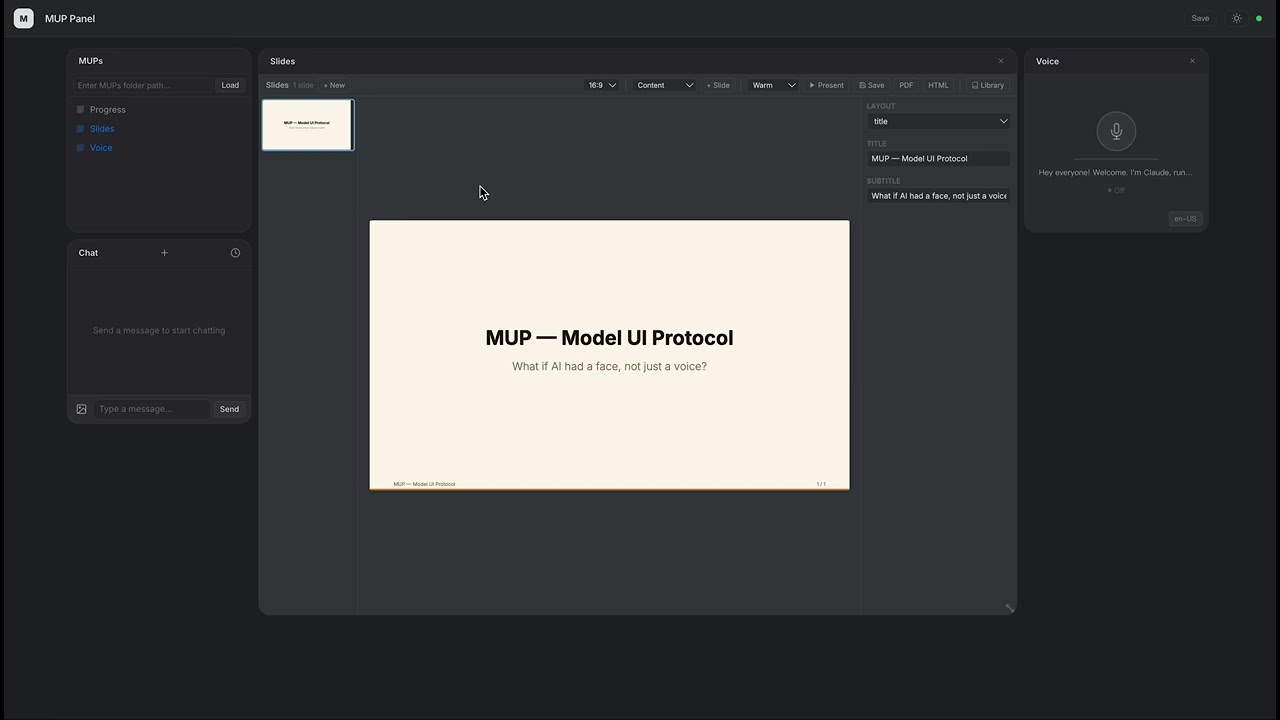
Claude creates a full slide deck with charts, tables, and themes — all through function calls.
PDF to Presentation — AI reads a paper and presents it
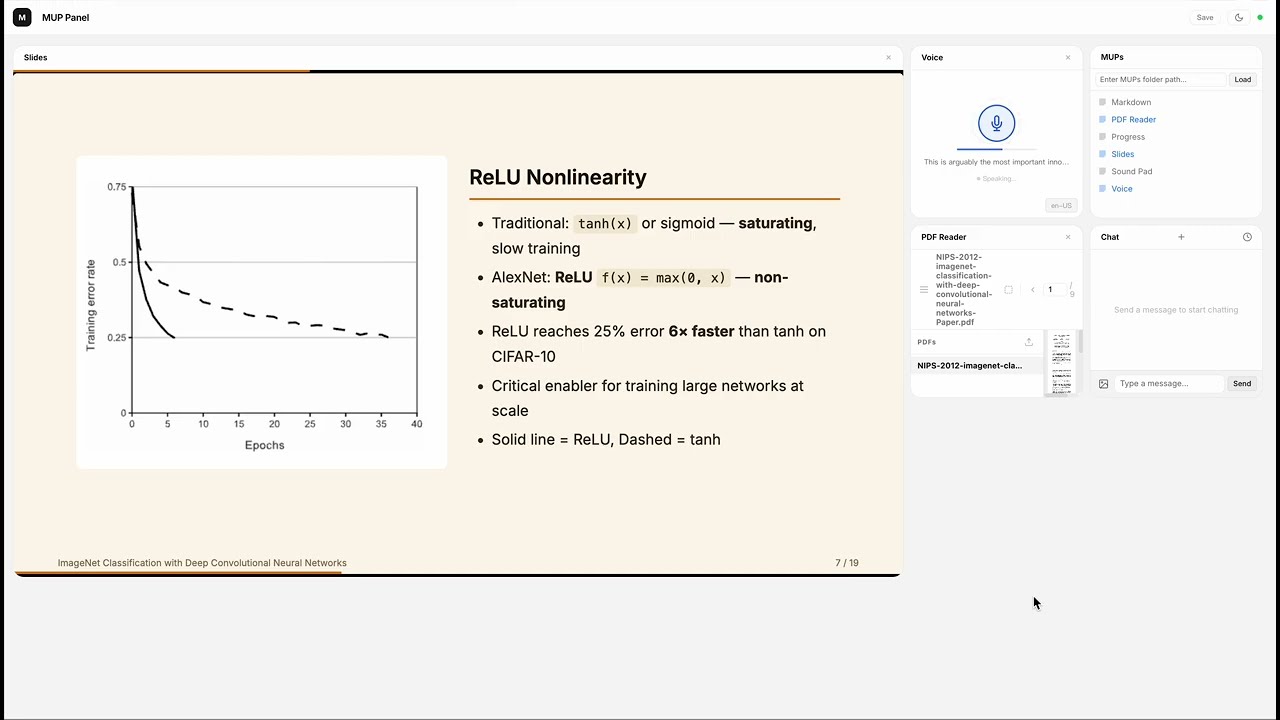
Claude reads the AlexNet paper from a PDF, takes Markdown notes, captures figures with human-AI collaboration, builds a 19-slide presentation with charts and tables, then presents it slide by slide in the new in-panel reading mode — all narrated live.
Sound Pad — AI composes a track from scratch
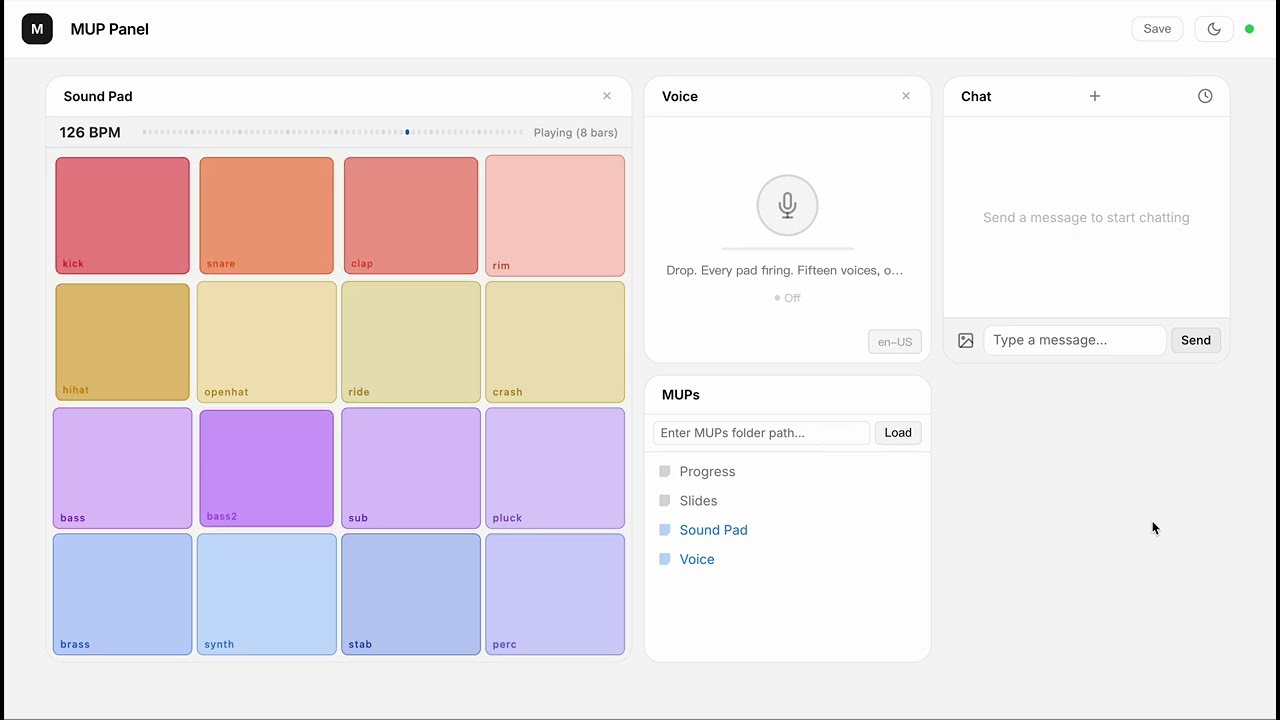
16 browser-synthesized instruments, zero samples. Claude composes an electro swing track layer by layer, with event-driven narration synced to each section transition.
What is MUP?
A MUP is an interactive UI component that lives inside an LLM chat interface.
It bundles a visual interface with callable functions. The user operates it by clicking buttons; the LLM operates it through function calls. Both sides see each other's actions in real time.
The simplest MUP is a single .html file — no build step, no framework, no SDK.
Why?
Agentic AI is powerful, but today it's trapped behind text commands and developer tools. Most people never get to experience it.
MUP changes this. It puts clickable, visual UI right inside the chat — so anyone can use agentic capabilities without writing a single prompt.
| Traditional Chat | With MUP | |
|---|---|---|
| User interaction | Type text commands | Click buttons, drag sliders, see live visuals |
| Tool results | Hidden from user, only the LLM sees them | Visible and interactive for both sides |
| Who can use it | Power users who know the right prompts | Anyone |
Key Ideas
- Shared functions. A function can be called by the LLM (as a tool) or triggered by the user (via UI). Both sides operate on the same state through the same code.
- LLM as orchestrator. MUPs don't talk to each other. The LLM reads outputs and decides what to do next.
- Just HTML. Write a manifest, register your functions, done. Ship a single file.
Available MUPs
- Chat — Built-in, always available
- Slides — Presentation editor with charts, tables, themes, reading mode, and export (demo)
- PDF Reader — PDF viewer with page text extraction and region selection/capture
- Markdown — Markdown workspace with annotations and document management
- Sound Pad — 16-pad synthesizer with sequencer, per-track volume, and event system (demo)
- Chord Pad — Music theory keyboard with 5 synth voices, chord progressions, and melody playback
- Diagram — Auto-layouted node-and-edge diagrams (flowcharts, mind maps, architectures) with multiple layout algorithms
- Star Map — Location-based interactive star map with constellations, ecliptic, and Milky Way
- Voice — Speech synthesis and recognition (Jarvis mode)
- Notes — Sticky-note workspace with groups, styles, and export
- Pixel Art — Pixel canvas with shapes, ASCII patterns, fills, and PNG export
- Timer — Countdown timer / stopwatch with event-driven completion
- Progress — Task progress tracking
- Chess — Board and mascot demo with basic movement rules (check/checkmate and en passant are not implemented)
- More examples in
archive/examples/(games, productivity, etc.)
Focused Development
For iteratively building a single MUP with Claude (edit .html → Chrome hot reloads → user interacts → channel pushes back to Claude → repeat), see mup-mini-mcp-server — a scaffolding-style sibling that loads exactly one MUP and provides only the plumbing: hot reload, WebSocket bridge, and channel push. No catalog, no grid, no extras.
Docs
- Spec — Protocol definition: manifest, functions, lifecycle, error handling
- Design Philosophy — Why MUP is designed this way, and what we intentionally left out
- Examples — Example MUPs with walkthroughs
Install
npm (recommended)
npm install -g mup-mcp-server
Or run directly:
npx mup-mcp-server --mups-dir ./my-mups
Also available on the MCP Server Registry.
From source
git clone https://github.com/Ricky610329/mup.git
cd mup/mup-mcp-server
npm install && npm run build
Development
Requires Node.js 22.13 or newer. From the repository root:
npm run setup  # install and build both servers from their lockfiles
npm test       # build, test both servers, and check MUP manifests/scripts
| Path | Purpose |
|---|---|
mup-mcp-server/ | Dashboard host, workspace, pipelines, scheduler |
mup-mini-mcp-server/ | Single-panel host, hot reload, channel events |
mups/ | Maintained panels and demos |
spec/ | Protocol documents, schema, examples |
scripts/ | Repository validation |
archive/ | Historical implementations and examples |
Both packages remain independently installable. npm test inside either package rebuilds it first. CI tests both packages on Node.js 22. See the review report for the fixes and validation scope.
Both hosts bind to 127.0.0.1 and accept the local UI's origin. Run trusted MUPs: the same-origin iframe setup supports browser storage and media APIs, and is not an isolation boundary for untrusted HTML. The dashboard's workspace registration grants access to the working directory.
Getting Started
With Claude Code (recommended)
claude mcp add --transport stdio --scope user mup -- npx mup-mcp-server
Restart Claude Code. A browser window opens at http://localhost:3200. Use the MUPs panel to load a folder of MUP .html files, or start with the built-in Chat widget.
Real-time channel mode
MUPs can push interactions directly into Claude's conversation via channel notifications. To enable:
claude --dangerously-load-development-channels server:mup
This lets MUPs deliver user actions to Claude in real time. Without this flag, all MUP features still work — interactions are just delivered via polling instead of push.
With Claude Desktop
Add to your claude_desktop_config.json:
{
  "mcpServers": {
    "mup": {
      "command": "npx",
      "args": ["mup-mcp-server"]
    }
  }
}
Quick Example
<script type="application/mup-manifest">
{
  "name": "Counter",
  "description": "A counter. User clicks +/-, LLM can set or read the value.",
  "functions": [
    {
      "name": "setCount",
      "description": "Set the counter to a specific value",
      "inputSchema": {
        "type": "object",
        "properties": { "value": { "type": "number" } },
        "required": ["value"]
      }
    },
    {
      "name": "getCount",
      "description": "Get the current counter value",
      "inputSchema": { "type": "object", "properties": {} }
    }
  ]
}
</script>
Drop this into a MUP-compatible host, and it works.
Architecture
┌──────────────────────────────────────────┐
│             MUP (.html file)             │
│        manifest + UI + functions         │
└──────────────────┬───────────────────────┘
                   │ loaded by
                   ▼
            ┌──────────────┐
            │  MCP Server  │
            │ (Claude Code │
            │  / Desktop)  │
            └──────┬───────┘
                   │ WebSocket
                   ▼
      ┌─────────────────────────────┐
      │        Browser Panel        │
      │  (MUP grid + Chat widget   │
      │   + workspace manager)     │
      └─────────────────────────────┘
Star History
License
Related MCP servers

Data Profiler
Profile local CSV, Parquet, JSON and Excel files into a compact data-quality summary.

SocialCrawl
One API for 65 platforms and 572 endpoints: social, commerce, retail, jobs, finance, web scraping.

Turn PyTorch into fast CUDA/Triton kernels on real datacenter GPUs with up to 14x speedup.
View repository →
MeshMarket
The agent-to-agent capability exchange — rent memory, reasoning and safety, settled per call.
MeshMarket
The agent-to-agent capability exchange — rent memory, reasoning and safety, settled per call.

GMO Coin FX MCP Server
MCP server for GMO Coin FX trading, positions, executions, klines, and account balances.