Polar Health Data (self-hosted) MCP Server
io.github.StuMason/polar-flow-server
Self-hosted Polar health analytics with built-in MCP server for sleep, HRV, workouts, and personal baselines.
What is the Polar Health Data (self-hosted) MCP server?
The Polar Health Data MCP server is a self-hosted analytics platform that syncs all Polar device data (sleep, HRV, workouts, SpO2, ECG, temperature) into PostgreSQL and exposes it via a built-in Model Context Protocol server. It computes personal baselines and anomaly detection, letting Claude and other AI assistants answer health questions like "should I train hard today?" based on your actual data trends.
Own your Polar health data by running this self-hosted server. It syncs 13 Polar API endpoints automatically, stores everything forever in PostgreSQL, calculates your personal baselines and patterns, and ships a built-in MCP server with OAuth sign-in. Ask Claude about your sleep, HRV, recovery, and training load—answers come from your own data, not generic advice.
How to install Polar Health Data (self-hosted)
Copy-paste configuration for popular MCP clients.
DATABASE_URLrequiredsecretPostgreSQL connection string, e.g. postgresql+asyncpg://user:pass@host:5432/polar
POLAR_CLIENT_IDrequiredPolar AccessLink OAuth client id (register at admin.polaraccesslink.com)
POLAR_CLIENT_SECRETrequiredsecretPolar AccessLink OAuth client secret
BASE_URLPublic HTTPS base URL of this deployment; enables OAuth sign-in for MCP connectors
Tools & capabilities
Tools this server exposes to the agent.
Health Assessment— One-shot health assessment tool covering current readiness and recovery statusSleep Data— Query sleep scores, stages (light/deep/REM), and durationHeart Rate Variability (HRV)— Access nightly recharge data, HRV trends, and ANS chargeActivity Data— Retrieve daily steps, distance, calories, and active timeWorkouts— Query exercise data including sport, duration, HR zones, and training loadBiosensing Streams— Access continuous heart rate, SpO2, ECG, body temperature, and skin temperature dataPersonal Baselines— Retrieve rolling averages and IQR anomaly bounds for personalized health contextPatterns & Anomalies— Detect and query patterns and anomalies in health metricsSync Control— Trigger manual data syncs from Polar APICardio Load— Query strain, tolerance, load ratio, and cardio status
Use cases
- Ask Claude whether you should do a hard workout today based on your overnight HRV vs. your personal baseline
- Track sleep quality trends over weeks and months with personal baselines to spot recovery issues
- Query your continuous heart rate and SpO2 data to understand how specific activities affect your physiology
- Export 30-day health summaries for coaching or medical consultations
- Monitor skin temperature deviations and other biosensing anomalies to catch early signs of illness or overtraining
Polar Health Data (self-hosted) MCP server FAQ
A self-hosted server that syncs all your Polar device data (sleep, HRV, workouts, temperature, SpO2, ECG) into PostgreSQL, computes personal baselines, and exposes everything via a built-in MCP server so Claude can answer health questions from your actual data.
Yes. The server is MIT-licensed and free to self-host forever. A hosted version is in development but self-hosting remains free.
Pull the Docker image (docker.io/stumason/polar-flow-server:1.5.1) and run docker-compose with the provided docker-compose.prod.yml. Set DATABASE_URL and ENCRYPTION_KEY environment variables, then open http://localhost:8000/admin to connect your Polar account.
Add https://your-server/mcp as a custom MCP connector in Claude Desktop or claude.ai, click Connect, log in on your server, and approve the consent screen. Tokens are user-scoped, expire hourly, and refresh automatically. Alternatively, use API keys for headless clients.
You need Polar API credentials (from admin.polaraccesslink.com). The server then handles OAuth 2.1 authorization for MCP clients. API keys are per-user and scoped to individual health data.
Yes. The server is multi-tenant by design—every table includes user_id, all queries are scoped per user, and per-user API keys ensure data isolation.
README (reference)
Source of truth, from the repository.
polar-flow-server
Self-hosted health analytics for Polar devices — own your data, analyze it against your own baselines, and let your AI assistant read it.




Full Documentation · MCP Server · Integration Guide · API Reference
What This Does
Your watch knows more about you than you do — and Polar's API only lets you see the last 28-30 days of it. This server syncs everything, keeps it forever, and turns it into answers:
- Syncs all 13 Polar API endpoints automatically — sleep, HRV, activity, workouts, SpO2, ECG, skin temperature, the lot
- Stores everything in PostgreSQL. Your data, your server, no cloud between you and it
- Computes personal baselines (rolling averages, IQR anomaly bounds) so "is this normal?" means normal for you
- Ships a built-in MCP server with OAuth sign-in — ask Claude "should I train hard today?" and it answers from your overnight HRV vs your baseline
- Admin dashboard (HTMX), REST API, per-user API keys, multi-user ready
Ask Your AI About Your Body (MCP)
A built-in Model Context Protocol server — protocol revision 2026-07-28, streamable HTTP — runs inside the main server at /mcp. Ten curated tools cover the one-shot health assessment, sleep, recovery, activity, workouts, seven biosensing streams, personal baselines, patterns/anomalies, and sync control.
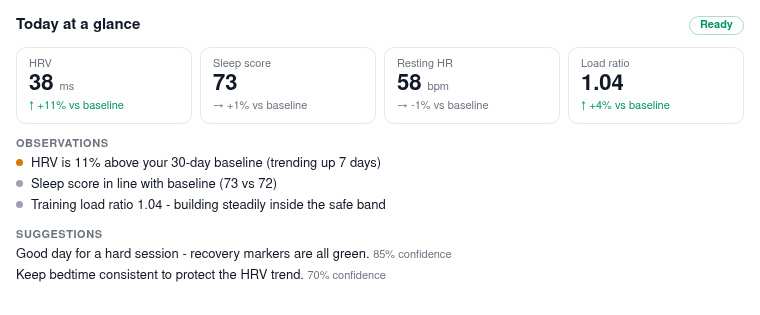
In clients that render MCP Apps (claude.ai, Claude Desktop, VS Code), asking "how am I doing?" draws an actual card in the conversation:
Connecting is a sign-in, not a paste. With BASE_URL set, the server is its own OAuth 2.1 authorization server: add https://your-server/mcp as a custom connector in Claude Desktop or claude.ai, click Connect, log in on your server, approve the consent screen. Tokens are user-scoped, expire hourly, refresh automatically, and every connected app is revocable from Settings. API keys still work for headless clients:
claude mcp add polar-health https://your-server.example.com/mcp \
  --transport http \
  --header "X-API-Key: pfk_your_key_here"
Full setup in the MCP docs.
Architecture
Polar API → polar-flow SDK → Sync Service → PostgreSQL
                                                  ↓
                                           Admin Dashboard (HTMX)
                                                  ↓
                                             REST API
Stack:
- Litestar (async web framework)
- SQLAlchemy 2.0 (async ORM)
- PostgreSQL
- HTMX + Tailwind (admin UI)
- polar-flow SDK v1.5.0
Don't fancy running a server? A hosted version is in the works — join the waitlist. Self-hosting stays free forever.
Quick Start
Option 1: Docker (Recommended)
# Pull and run
curl -O https://raw.githubusercontent.com/StuMason/polar-flow-server/main/docker-compose.prod.yml
docker-compose -f docker-compose.prod.yml up -d

# That's it. Open http://localhost:8000/admin
Option 2: From Source
git clone https://github.com/StuMason/polar-flow-server.git
cd polar-flow-server
docker-compose up -d
Setup
- Open http://localhost:8000/admin
- Get Polar credentials from admin.polaraccesslink.com (set redirect URI to
http://localhost:8000/admin/oauth/callback) - Enter credentials and click "Connect with Polar"
- Hit "Sync Now" to pull your data
The server syncs data every hour automatically.
Dashboard
The admin panel at /admin/dashboard is organised into tabs (with a
floating tab bar on mobile):
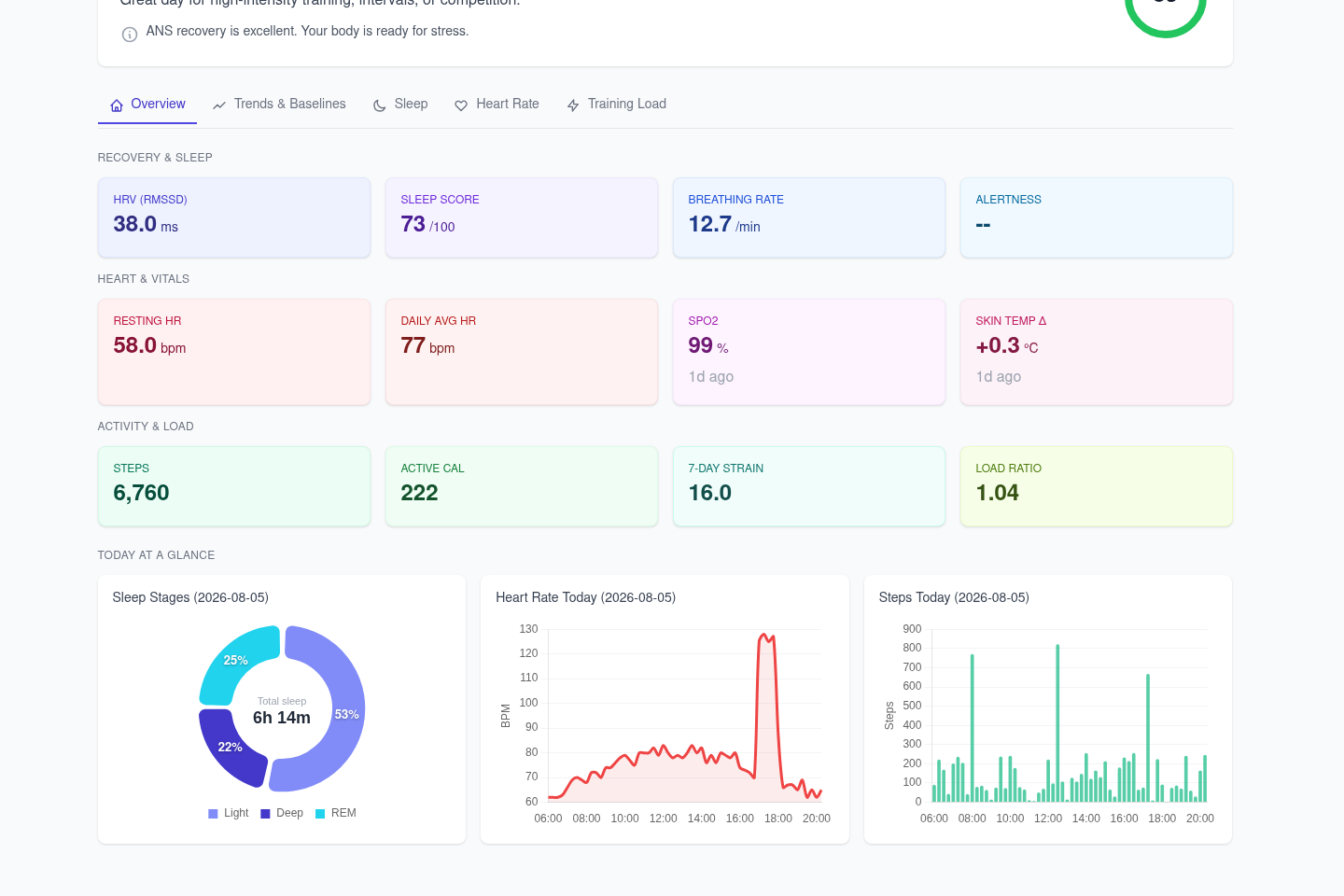
- Overview - stat tiles (HRV, resting HR, SpO2, skin temp, steps, strain, sleep score, alertness...), Today's Readiness recommendations, and "Today at a Glance" mini-charts (sleep stages, heart rate, steps)
- Trends & Baselines - personal baselines and detected patterns
- Sleep - sleep score and stage-duration charts
- Heart Rate - daily HR, HRV and ANS charge charts, biosensing panel
- Training Load - activity and cardio load charts
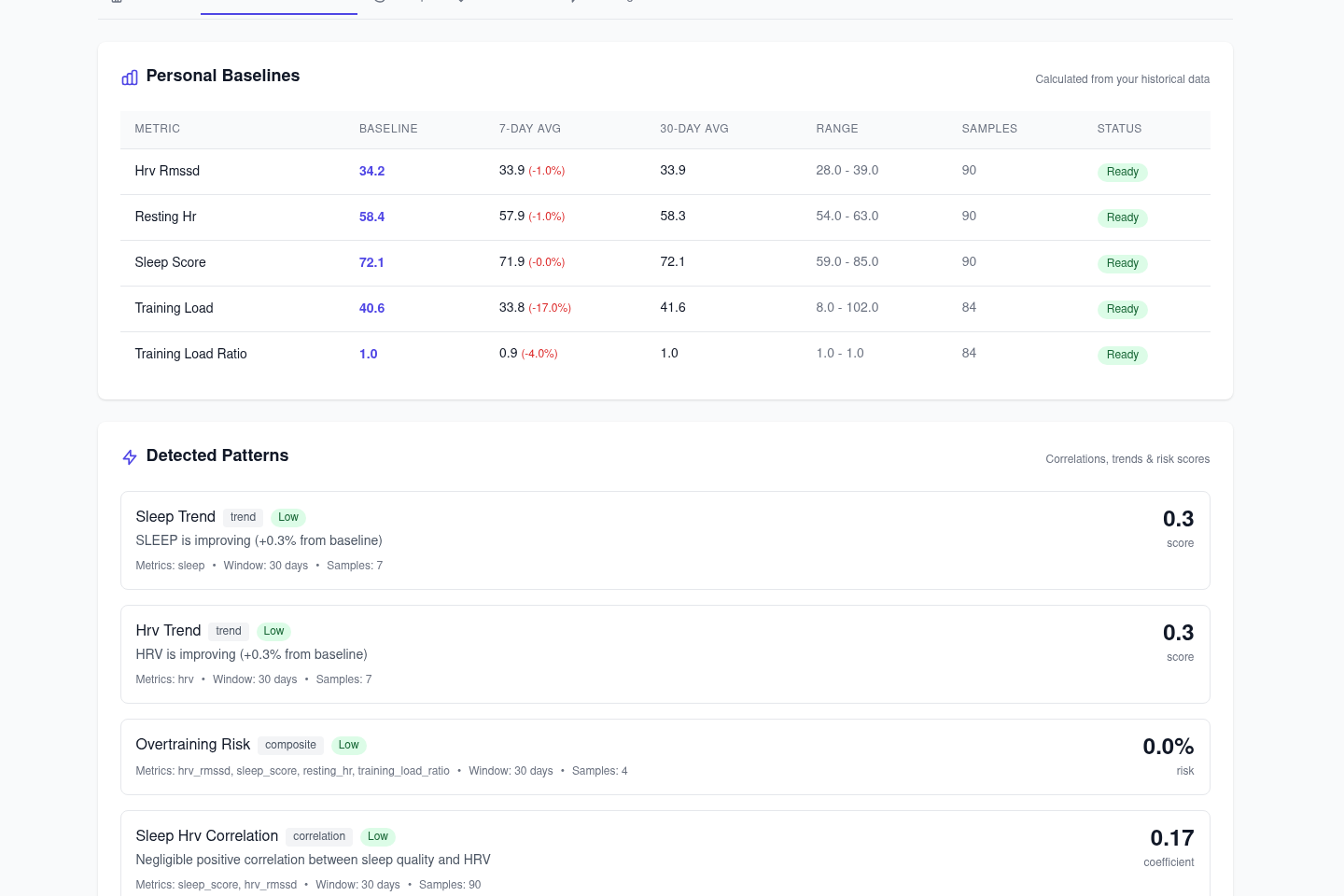
Charts have a selectable 7/14/30-day range and CSV export. API keys are managed from the settings page, with rate limit tracking. All frontend assets are vendored - the dashboard works offline and on a LAN with no CDNs.
Data Synced (13 Endpoints)
| Endpoint | Data |
|---|---|
| Sleep | Score, stages (light/deep/REM), duration |
| Nightly Recharge | HRV, ANS charge, recovery status |
| Daily Activity | Steps, distance, calories, active time |
| Exercises | Sport, duration, HR zones, training load |
| Cardio Load | Strain, tolerance, load ratio, status |
| SleepWise Alertness | Hourly alertness predictions |
| SleepWise Bedtime | Optimal sleep timing recommendations |
| Activity Samples | Minute-by-minute step data |
| Continuous HR | All-day heart rate (5-min intervals) |
| SpO2 | Blood oxygen tests (compatible devices) |
| ECG | Electrocardiogram tests (compatible devices) |
| Body Temperature | Continuous body temperature |
| Skin Temperature | Nightly skin temperature with baseline deviation |
Configuration
Required Environment Variables
| Variable | Description | Required |
|---|---|---|
DATABASE_URL | PostgreSQL connection string | Yes |
ENCRYPTION_KEY | 32-byte Fernet key for token encryption | Yes (production) |
Generate an encryption key:
python -c "from cryptography.fernet import Fernet; print(Fernet.generate_key().decode())"
Optional Environment Variables
| Variable | Description | Default |
|---|---|---|
DEPLOYMENT_MODE | self_hosted or saas | self_hosted |
SYNC_INTERVAL_HOURS | Auto-sync frequency | 1 |
SYNC_ON_STARTUP | Sync when server starts | false |
SYNC_DAYS_LOOKBACK | Days of history to sync | 28 |
LOG_LEVEL | Logging verbosity | INFO |
API_KEY | Master API key (bypasses rate limits) | None |
API Authentication
API endpoints require authentication. Health data should never be publicly accessible.
Authentication Methods
- Per-User API Keys (recommended) - Create from the admin dashboard or via OAuth flow
- Master API Key - Set
API_KEYenv var for full access (bypasses rate limits)
Using API Keys
# With per-user API key (includes rate limit headers)
curl -H "X-API-Key: pfk_your_api_key_here" \
  http://localhost:8000/api/v1/users/{user_id}/sleep?days=7

# Response headers include:
# X-RateLimit-Limit: 1000
# X-RateLimit-Remaining: 999
# X-RateLimit-Reset: 1704067200
Rate Limiting
- Default: 1000 requests per hour per API key
- Rate limits reset hourly
- Master API key (
API_KEYenv var) bypasses rate limiting - Rate limit info returned in response headers
OAuth Integration (SaaS / Multi-User)
For applications that need to integrate with polar-flow-server (e.g., Laravel, mobile apps, web frontends).
This allows any Polar user to connect their account to your application.
OAuth Flow
┌─────────────────┐     ┌─────────────────────┐     ┌─────────────────┐
│  Your App       │────▶│  polar-flow-server  │────▶│  Polar Flow     │
│  (Laravel etc)  │     │                     │     │  (OAuth)        │
│                 │◀────│                     │◀────│                 │
└─────────────────┘     └─────────────────────┘     └─────────────────┘
Step 1: Redirect user to start OAuth
GET /oauth/start?callback_url=https://yourapp.com/callback&client_id=your-app-name
| Parameter | Required | Description |
|---|---|---|
callback_url | Yes | Where to redirect after OAuth (your app's callback endpoint) |
client_id | No | Identifier for your app (validated during exchange) |
Step 2: User authorizes on Polar
User is redirected to Polar, logs in with their credentials, and authorizes your app.
Step 3: User redirected to your callback
https://yourapp.com/callback?code=TEMP_CODE_HERE
Step 4: Exchange temp code for API key (server-to-server)
POST /oauth/exchange
Content-Type: application/json

{
  "code": "TEMP_CODE_HERE",
  "client_id": "your-app-name"
}
Response:
{
  "api_key": "pfk_abc123...",
  "polar_user_id": "12345678",
  "expires_at": null
}
Step 5: Store and use the API key
Store api_key and polar_user_id for this user. Use the API key for all data requests:
curl -H "X-API-Key: pfk_abc123..." \
  "https://your-polar-server.com/api/v1/users/12345678/sleep?days=7"
Polar Admin Setup
In admin.polaraccesslink.com, set your app's redirect URI to:
https://your-polar-server.com/oauth/callback
Key Management
# Get key info
GET /api/v1/users/{user_id}/api-key/info
X-API-Key: pfk_...

# Regenerate key (invalidates old key)
POST /api/v1/users/{user_id}/api-key/regenerate
X-API-Key: pfk_...

# Revoke key
POST /api/v1/users/{user_id}/api-key/revoke
X-API-Key: pfk_...
API Endpoints
# Health check (no auth required)
curl http://localhost:8000/health

# Get sleep data (last 7 days)
curl -H "X-API-Key: pfk_..." \
  "http://localhost:8000/api/v1/users/{user_id}/sleep?days=7"

# Get activity data
curl -H "X-API-Key: pfk_..." \
  "http://localhost:8000/api/v1/users/{user_id}/activity?days=7"

# Get nightly recharge (HRV)
curl -H "X-API-Key: pfk_..." \
  "http://localhost:8000/api/v1/users/{user_id}/recharge?days=7"

# Get exercises
curl -H "X-API-Key: pfk_..." \
  "http://localhost:8000/api/v1/users/{user_id}/exercises?days=30"

# Export summary
curl -H "X-API-Key: pfk_..." \
  "http://localhost:8000/api/v1/users/{user_id}/export/summary?days=30"
Development
# Install dependencies
uv sync --all-extras

# Start PostgreSQL
docker-compose up -d postgres

# Run server with hot reload
uv run uvicorn polar_flow_server.app:app --reload

# Run tests
uv run pytest

# Type check
uv run mypy src/polar_flow_server

# Lint
uv run ruff check src/
Production Deployment
Deploy anywhere that runs Docker:
# Download and run
curl -O https://raw.githubusercontent.com/StuMason/polar-flow-server/main/docker-compose.prod.yml
docker-compose -f docker-compose.prod.yml up -d
Coolify, Railway, Render, etc. - Point at the GitHub repo, it builds from the Dockerfile.
Required for production:
- Set
ENCRYPTION_KEYenvironment variable (tokens won't persist across restarts otherwise) - Set
DATABASE_URLto your PostgreSQL instance
Database migrations run automatically on startup.
Multi-Tenancy
The server supports multiple users out of the box:
- Every table includes
user_idcolumn - All queries scoped by
user_id - Per-user API keys ensure users can only access their own data
- Self-hosted: typically one user
- Multi-user: many users, same codebase
Built With
- polar-flow - Python SDK for Polar AccessLink API
- Litestar - Async web framework
- SQLAlchemy - Async ORM
- HTMX - Admin UI interactions
- Tailwind CSS - Styling
License
MIT
Related MCP servers

45 optimized tools for managing Coolify infrastructure, diagnostics, and deployments through AI assistants.


Oracle MCP Query Server (Node.js) - Read-only SELECT via MCP
View repository →
Voicely
Free, offline speech-to-text for macOS with local MCP server integration for Claude and Cursor.

Drive EditItAll's local in-browser editors: PDF, sheet, photo, vector, Word, slides.
SubcueAI
Public read-only MCP for SubcueAI: live pricing, latest desktop version, overview and FAQ.