tsbootstrap MCP Server
io.github.astrogilda/tsbootstrap
Read-only MCP server for time-series diagnostics and bootstrap confidence intervals.
What is the tsbootstrap MCP server?
The tsbootstrap MCP server is a read-only Model Context Protocol server that enables LLM agents and IDEs to diagnose time-series data and compute bootstrap confidence intervals without writing Python code. It exposes two tools for analyzing serial dependence, stationarity, and computing percentile confidence intervals on series statistics.
This server provides time-series analysis capabilities through an MCP interface. It diagnoses autocorrelation and stationarity in short series, recommends appropriate bootstrap methods, and computes confidence intervals for mean, median, standard deviation, and variance using i.i.d. or block bootstrap techniques. Useful for agents that need to perform statistical inference on time-series data.
How to install tsbootstrap
Copy-paste configuration for popular MCP clients.
Tools & capabilities
Tools this server exposes to the agent.
diagnose_series— Analyzes a time series for serial dependence and stationarity, returns diagnostics, recommended Politis-White block length, and supported bootstrap methods.bootstrap_confidence_interval— Computes a percentile confidence interval for mean, median, std, or variance using i.i.d. or block bootstrap methods.
Use cases
- Diagnose autocorrelation and stationarity in time-series data to determine appropriate resampling methods
- Compute confidence intervals for time-series statistics without manual Python implementation
- Recommend optimal block lengths for block bootstrap methods based on series characteristics
- Generate bootstrap-based uncertainty estimates for forecasting and statistical inference
- Validate statistical assumptions in time-series analysis through automated diagnostics
tsbootstrap MCP server FAQ
It is a read-only MCP server that provides time-series diagnostics and bootstrap confidence interval computation. It exposes two tools: diagnose_series (for analyzing autocorrelation and stationarity) and bootstrap_confidence_interval (for computing confidence intervals on series statistics).
Yes, tsbootstrap is open-source under the MIT License and available on PyPI.
Run: uvx --from "tsbootstrap[mcp]" tsbootstrap-mcp. It uses stdio transport and requires no additional configuration.
Both tools accept at most 500 observations and run at most 500 replicates. For larger series or model-based methods, use the library directly.
No, it is a local, read-only server with no external dependencies or authentication requirements.
It supports i.i.d. bootstrap and block bootstrap methods (MovingBlock, CircularBlock, StationaryBlock). The diagnose_series tool recommends methods appropriate for the input series.
README (reference)
Source of truth, from the repository.

📒 Table of Contents
- 🚀 Getting Started
- ⚡ Performance
- 📚 Articles
- 🧩 Modules
- 🗺 Roadmap
- 🤝 Contributing
- 📄 License
- 📍 Time Series Bootstrapping Methods intro
- 👏 Contributors
🚀 Getting Started
🎮 Using tsbootstrap
tsbootstrap exposes one typed entry point, bootstrap, configured with a method
specification. The same call works for every method.
import numpy as np
from tsbootstrap import bootstrap, MovingBlock

x = np.random.default_rng(0).standard_normal(200)

result = bootstrap(x, method=MovingBlock(block_length="auto"), n_bootstraps=999, random_state=0)

samples = result.values()      # (n_bootstraps, n) resampled series
oob = result.get_oob_mask()    # (n_bootstraps, n) out-of-bag mask
Choose a method spec for the structure you need (block lengths default to the automatic Politis-White selection):
from tsbootstrap import StationaryBlock, ResidualBootstrap, SieveAR, AR, ARIMA, diagnose

bootstrap(x, method=StationaryBlock(avg_block_length="auto"))

# recursive model-based bootstraps (need the model extra: uv add "tsbootstrap[models]")
bootstrap(x, method=ResidualBootstrap(model=AR(order=2)))
bootstrap(x, method=ResidualBootstrap(model=ARIMA(order=(1, 1, 1))))
bootstrap(x, method=SieveAR())

# not sure which fits? ask:
print(diagnose(x).recommended_methods)
Inputs can be NumPy arrays, lists, or pandas / Polars DataFrames and Series. The
result is a BootstrapResult carrying the samples, provenance metadata, and
out-of-bag / in-bag primitives. For the sktime ecosystem, the same methods are
also available as estimator classes (MovingBlockBootstrap, ARResidualBootstrap,
SieveBootstrap, and the rest) under tsbootstrap.adapters.
Uncertainty quantification
The uq layer turns resampled series into prediction intervals. forecast_intervals
gives forward forecast bands for an AR model; EnbPIEnsemble produces out-of-bag
prediction intervals for an sklearn-style regressor, with calibrators for stationary,
volatility-clustered, and drifting data (static, sliding window, and the adaptive ACI,
AgACI, and NexCP schemes); and bootstrap_reduce streams a per-replicate statistic so
calibration scales to large replicate counts without holding every path in memory.
from tsbootstrap import AR, forecast_intervals

lower, upper, median = forecast_intervals(x, model=AR(order=2), horizon=12, alpha=0.1)
For a confidence interval on a statistic of one series, conf_int runs the bootstrap
and reads the interval in one call:
from tsbootstrap import IID, conf_int

lower, upper, point = conf_int(x, "mean", method=IID(), kind="bca", alpha=0.1)
The conformal pieces (EnbPIEnsemble and the calibrators) need the uq extra
(scikit-learn). The interactive
tutorial gallery
works through every method on real and synthetic data, including a "which bootstrap
should I use?" decision guide.
MCP server
tsbootstrap ships a read-only Model Context Protocol
server so an MCP client (an LLM agent, an IDE) can diagnose a short series and compute a
bootstrap confidence interval without writing any Python. Run it with no install step:
uvx --from "tsbootstrap[mcp]" tsbootstrap-mcp
It speaks the stdio transport and exposes exactly two read-only tools:
diagnose_series: serial-dependence and stationarity diagnostics, a recommended Politis-White block length, and the bootstrap methods the server supports for the series.bootstrap_confidence_interval: a percentile confidence interval for the mean, median, std, or variance, using an i.i.d. or block bootstrap.
Both tools accept at most 500 observations and run at most 500 replicates. For larger series, model-based methods, or the uncertainty layer, use the library directly in a local script.
📦 Installation
Requires Python 3.10 or higher.
# with uv (recommended):
uv add tsbootstrap                   # core: i.i.d. and block methods
uv add "tsbootstrap[models]"         # adds AR / ARIMA / VAR / sieve (statsmodels)

# with pip:
pip install tsbootstrap
pip install "tsbootstrap[models]"
The model-based methods import statsmodels lazily and raise a clear install hint if
the models extra is missing.
⚡ Performance
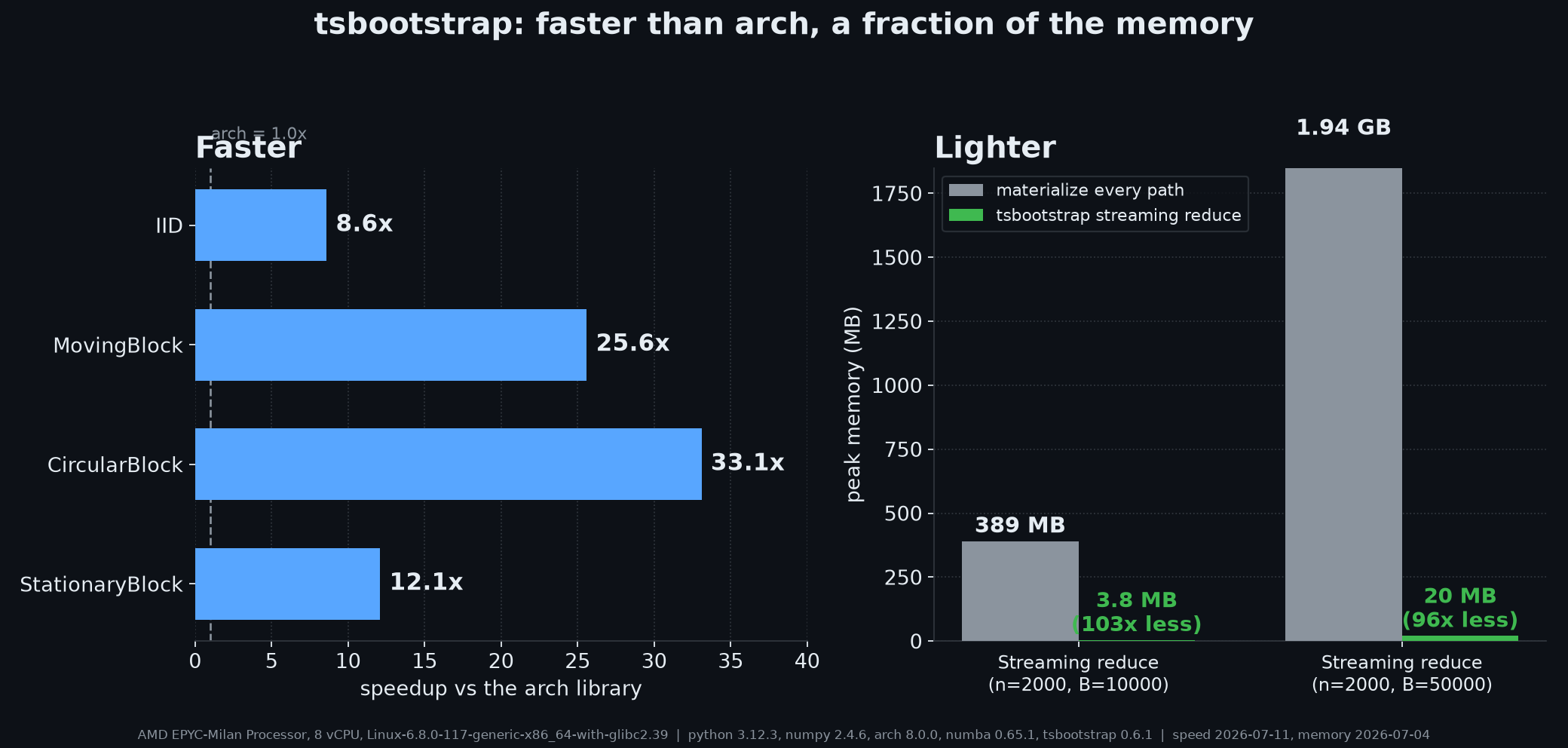
Left: speedup of the compiled reduce path over the arch library on the four overlapping methods. Right: peak memory before and after on the two headline reduce workloads (baseline = materialize every path, then reduce). The figure and the table below are generated from the committed benchmark data in benchmarks/results/; regenerate with python benchmarks/plot_launch.py.
tsbootstrap ships an optional compiled backend (backend="compiled", via the
[accel] extra) that is faster than the arch
library on every overlapping resampling method. The table below is the speedup of
the streaming reduce path over arch.apply on an 8-core CPU (higher is better),
read from benchmarks/results/vs_arch_ccx33_2026-07-11_settled.json
(the settled-min statistic; methodology in benchmarks/README.md).
| Method | n=200, B=999 | n=200, B=10000 | n=2000, B=999 | n=2000, B=10000 |
|---|---|---|---|---|
| IID | 15x | 19x | 4.7x | 8.6x |
| MovingBlock | 38x | 61x | 9.8x | 26x |
| CircularBlock | 41x | 66x | 13x | 33x |
| StationaryBlock | 19x | 24x | 6.8x | 12x |
Read these as sustained gains of roughly 4.7x to 33x on the larger n=2000
workloads; the very large small-n multiples come from arch's per-replicate
Python callback in bs.apply, whose overhead dominates its runtime when each
resample is cheap, so they measure that overhead as much as the compiled kernel.
The compiled reduce fuses index build, gather, and reduction into one pass, so
peak memory stays flat in the number of replicates: at n=2000 the streaming
reduce holds about 20 MB at B=50000 where materializing every replicate takes
about 1.94 GB (roughly 96x lighter), from
benchmarks/results/membench_2026-07-04.json.
The multivariate and ragged-panel reduce
paths have no equivalent in arch. The panel reduce
(bootstrap_reduce_panel) returns the full per-series bootstrap distribution
of the statistic (n_bootstraps x num_series), so quantile and tail workflows
on an estimator are served directly with no replicate tensor. Use the
materializing path only when the workflow consumes the resampled paths
themselves. Full methodology,
single-threaded numbers, and the reproduction script are in
benchmarks/README.md.
# install the compiled backend
uv add "tsbootstrap[accel]"
# or
pip install "tsbootstrap[accel]"
📚 Articles
Deep dives on the statistics and engineering behind the library, with worked examples and animations:
- Your bootstrap is lying to you: why the ordinary i.i.d. bootstrap collapses on autocorrelated data (a nominal 90% interval that covers 49.6% of the time) and how block resampling repairs it.
- When your errors aren't equal: the wild bootstrap for heteroskedastic errors, and what a block-wild variant preserves.
- Count the bytes, not the FLOPs: the memory-wall engineering behind the compiled backend, with hardware-counter receipts.
🧩 Modules
Package layout:
| Area | Module(s) | Role |
|---|---|---|
| Public API | api.py, methods.py, results.py, errors.py, diagnostics.py | the bootstrap() entry point, typed method specs, structured results, error taxonomy, and diagnose() |
| Infrastructure | rng.py, validation.py, dispatch.py, metadata.py | deterministic RNG contract, input coercion (incl. the narwhals DataFrame boundary), spec to executor dispatch, method metadata |
| Block methods | block/ | vectorized index kernels, true Politis-Romano stationary, energy-normalized tapering, PWSD block length, OOB primitives |
| Model methods | model/, engines/ | model fitting, stability guards, and recursive AR/ARMA/VAR simulation |
| Uncertainty quantification | uq/ | classical confidence intervals (percentile, basic, studentized, BCa) via conf_int, EnbPI prediction intervals, the static / sliding-window / ACI / AgACI / NexCP calibrators, and AR forecast intervals |
| Ecosystem | adapters/ | skbase / sktime estimator classes over the functional core |
🗺 Roadmap
The full, living roadmap is issue #181. Highlights:
Near term:
- Out-of-sample forecast intervals for ARIMA and VAR (currently AR-only).
- Python 3.14, once statsmodels publishes a 3.14 wheel (#202).
Candidate methods (good first issues):
- Generalized block (#104), local block (#105), and frequency-domain (#107) bootstraps.
- A GARCH / volatility residual bootstrap, and the smooth-kernel dependent-wild bootstrap.
Distributed execution (Dask / Spark / Ray), an async layer, and a string-keyed
factory were considered and deliberately left out. The library is a CPU-bound,
single-process toolkit.
🤝 Contributing
See our good first issues for getting started.
Developer setup
-
Fork the tsbootstrap repository
-
Clone the fork to local:
git clone https://github.com/astrogilda/tsbootstrap
- In the local repository root, sync the locked development environment with uv:
uv sync --extra dev
-
uv creates an isolated virtual environment from
uv.lockand editable-installs the package, so changes to the package are reflected in your environment automatically. Run tools through the environment withuv run(for exampleuv run pytest). -
Install the pre-commit hooks:
uv run pre-commit install
The hooks run ruff, formatting, and the other code-quality checks on each commit.
Verifying the Installation
Verify the installation:
python -c "import tsbootstrap; print(tsbootstrap.__version__)"
This prints the installed version.
Contribution workflow
- Create a new branch with a descriptive name (e.g.,
new-feature-branchorbugfix-issue-123).
git checkout -b new-feature-branch
- Make changes to the project's codebase.
- Commit your changes to your local branch with a clear commit message that explains the changes you've made.
git commit -m 'Implemented new feature.'
- Push your changes to your forked repository on GitHub using the following command
git push origin new-feature-branch
- Create a new pull request to the original project repository. In the pull request, describe the changes you've made and why they're necessary.
🧪 Running Tests
To run all tests, in your developer environment, run:
uv run pytest tests/
The sktime adapter classes can be validated with sktime's estimator checks:
from sktime.utils import check_estimator
from tsbootstrap.adapters import MovingBlockBootstrap

check_estimator(MovingBlockBootstrap)
Contribution guide
See CONTRIBUTING.md for details.
📄 License
This project is licensed under the ℹ️ MIT License. See the LICENSE file for additional info.
👏 Contributors
Contributors:
<!-- ALL-CONTRIBUTORS-LIST:START - Do not remove or modify this section --> <!-- prettier-ignore-start --> <!-- markdownlint-disable --> <!-- markdownlint-restore --> <!-- prettier-ignore-end --> <!-- ALL-CONTRIBUTORS-LIST:END -->This project follows the all-contributors specification. Contributions of any kind welcome!
📍 Time Series Bootstrapping
tsbootstrap implements bootstrapping methods for time series data. It generates resampled copies of univariate and multivariate series that preserve their chronological order and dependence structure.
Overview
Traditional bootstrap methods resample observations independently, which breaks the dependence in a time series: each observation usually depends on the ones before it. Time series bootstraps resample while preserving chronological order and correlation, so the resulting uncertainty estimates stay valid under that dependence.
Bootstrapping methodology
tsbootstrap resamples either the observations directly (i.i.d. and block methods) or
the innovations of a fitted model (residual and sieve methods), respecting the
chronological order and dependence structure of the data.
Block bootstrap
Block methods resample blocks of consecutive observations to preserve short-range dependence. The block length defaults to the automatic Politis-White (2004) selection.
- Moving block (
MovingBlock): overlapping fixed-length blocks (Kunsch 1989). - Circular block (
CircularBlock): blocks wrap around the series end (Politis-Romano 1992). - Stationary block (
StationaryBlock): geometric block lengths with independent uniform restart points (Politis-Romano 1994). - Non-overlapping block (
NonOverlappingBlock): disjoint blocks (Carlstein 1986). - Tapered block (
TaperedBlock(window=...)): blocks weighted by an energy-normalized window (Bartlett, Blackman, Hamming, Hann, or Tukey; Paparoditis-Politis 2001).
Residual bootstrap
For dependent data with a good model fit, ResidualBootstrap(model=...) regenerates the
series recursively from the fitted dynamics and resampled, centered innovations (not
fitted + residuals). Supported models: AR, ARIMA, and VAR (multivariate). A
non-stationary fit is refused (or skipped, per stability_policy) rather than producing
explosive paths.
Sieve bootstrap
SieveAR selects an autoregressive order on the original series, then runs the AR recursion;
suited to data with autoregressive structure.
Innovation resamplers
The innovation argument on ResidualBootstrap and SieveAR controls how the centered
residuals are resampled. It defaults to IID (uniform resampling); two wild resamplers relax
the exchangeability that assumes.
- Wild (
Wild(distribution=...)): multiplies each residual in place by a mean-zero, unit-variance draw (e*_t = v_t * e_hat_t), keeping its time position and magnitude, so it stays valid under conditional heteroskedasticity (Wu 1986; Liu 1988; Rademacher default per Davidson-Flachaire 2008). - Block-wild (
BlockWild(block_length=...)): holds one multiplier constant across each block of residuals, so serial dependence left by a misspecified mean survives the resampling (piecewise-constant dependent wild bootstrap, Shao 2010).
Both require the host model's burn_in=0 and initial="fixed" defaults so the multipliers
align one-to-one with the residuals.
Deferred to a later release
Markov resampling, the distribution bootstrap, GARCH/volatility models, and frequency-domain / seasonal block methods are planned for a future version. The statistic-preserving method has been removed.
Related MCP servers

Workstation-local event bus: agents wait on or emit CI/pytest/Docker/filesystem events, no polling.

Agentic House Search
UK neighbourhood research from government open data: postcode reports, comparisons, 45 datasets.

Query OneLens cloud-cost data in natural language: breakdowns, trends, cost centers. Read-only.
View repository →Scales, chords, progressions, key detection, and genre intelligence for your AI. No API keys needed.
View repository →
io.github.asume21/webear
Give your AI coding assistant ears — capture, analyze, and describe live audio.

Asynthetic
Ground truth for AI coding agents: what breaks between library versions and how to fix it