io.github.bnymnDev/shopware-mcp MCP Server
io.github.bnymnDev/shopware-mcp
Query and safely manage Shopware 6 shops: products, orders, customers, stock, audits, and reports via MCP.
What is the io.github.bnymnDev/shopware-mcp MCP server?
The shopware-mcp MCP server connects Claude and other AI hosts to Shopware 6 Admin and Store APIs, exposing curated tools for querying and safely managing products, orders, customers, stock, audits, and reports. It abstracts Shopware's 200+ entities into twenty focused tools with built-in safety guardrails, dry-run writes, and privilege-minimal setup.
shopware-mcp bridges AI assistants to Shopware 6 e-commerce shops. Instead of wiring models directly to the Admin API, it provides a safety layer with curated, shop-aware tools: read-only by default, dry-run writes, audit and pulse checks to detect anomalies, customer-view checkout simulation, sales and customer reports with aggregations, and an escape hatch for any entity. It also auto-detects installed plugins and registers extra tools for known extensions.
How to install io.github.bnymnDev/shopware-mcp
Copy-paste configuration for popular MCP clients.
SHOPWARE_URLrequiredShop base URL, e.g. https://shop.example.com
SHOPWARE_CLIENT_IDrequiredIntegration access key ID
SHOPWARE_CLIENT_SECRETrequiredsecretIntegration secret access key
SHOPWARE_MCP_ALLOW_WRITESet to true to register the guarded write tools
Tools & capabilities
Tools this server exposes to the agent.
shop_pulse— Compares today's order volume against the same hours of recent weeks to detect unusual silence and assess likelihood of anomaly vs. chance.shop_audit— Runs seventeen checks in one call: checkout anomalies, unpaid/unshipped orders, out-of-stock products, expired promotions, maintenance mode, missing legal pages, pending reviews, stale scheduled tasks, extension updates, and EU duty coverage.checkout_simulate— Puts products and promotion codes into a throwaway cart via Shopware's Store API as a guest or specific customer, showing exact cart errors and why items cannot be purchased.storefront_search— Searches products as a customer would and explains why products do not appear in results.sales_report— Aggregates sales by currency, channel, state, and time period; includes top products and comparison against previous period.customer_report— Aggregates customer metrics: new accounts, guest share, repeat share, top customers by revenue, and period-over-period comparison.stock_forecast— Analyzes six months of sales velocity and current stock to forecast days of cover, run-out dates, and reorder quantities per product.product_search— Queries products with Shopware's Criteria filters and returns compact JSON with exact totals.order_search— Queries orders with Shopware's Criteria filters and returns exact totals and order details.order_history— Retrieves the audit trail of state changes and transitions for a given order.customer_search— Queries customers with Shopware's Criteria filters and returns customer details and totals.category_search— Queries product categories with Shopware's Criteria filters.promotion_search— Queries promotions and their rules with Shopware's Criteria filters.review_search— Queries product reviews, including moderation status.payment_method_search— Lists available payment methods and their configuration.shipping_method_search— Lists available shipping methods and their configuration.plugin_search— Lists installed plugins and their versions.sales_channel_search— Queries sales channels and their settings.scheduled_task_search— Lists scheduled tasks and their execution status.shop_settings— Retrieves the shop's trading settings and configuration.
Use cases
- Detect unusual order silence and diagnose checkout issues by simulating customer purchases and checking storefront visibility.
- Generate daily shop briefs with sales reports, customer metrics, stock forecasts, and audit findings to monitor shop health.
- Safely manage orders: ship with tracking, mark paid, refund, send reminders, and generate invoices in bulk with dry-run preview.
- Create products and promotions with automatic tax calculation and inactive-by-default safety, then moderate reviews with replies.
- Query any Shopware entity (200+) with filters and aggregations to answer ad-hoc questions without custom API knowledge.
io.github.bnymnDev/shopware-mcp MCP server FAQ
shopware-mcp is an MCP server that connects AI assistants (Claude, Cursor, etc.) to Shopware 6 e-commerce shops. It exposes curated, shop-aware tools for querying and safely managing products, orders, customers, stock, audits, and reports—with built-in safety guardrails like dry-run writes and read-only defaults.
Yes, shopware-mcp is open-source under the MIT license and available on npm. You only need a Shopware 6 shop and an MCP-compatible host (Claude, Cursor, etc.).
Install via npm: `npm install -g shopware-mcp`. Run `shopware-mcp setup` to create a minimal-privilege integration and role in your Shopware admin. Then add the server to your Cursor or Claude config with the integration credentials shown by setup.
shopware-mcp requires a Shopware 6 Admin API integration (username and password) and the shop's base URL. The `setup` command creates a read-only integration with exactly the privileges the tools need, measured against your real shop.
By default, shopware-mcp is read-only. Start with `--allow-write` to enable writes. All writes are dry-run first (showing the exact request), and you can cap the write budget. Secrets never appear in output or logs.
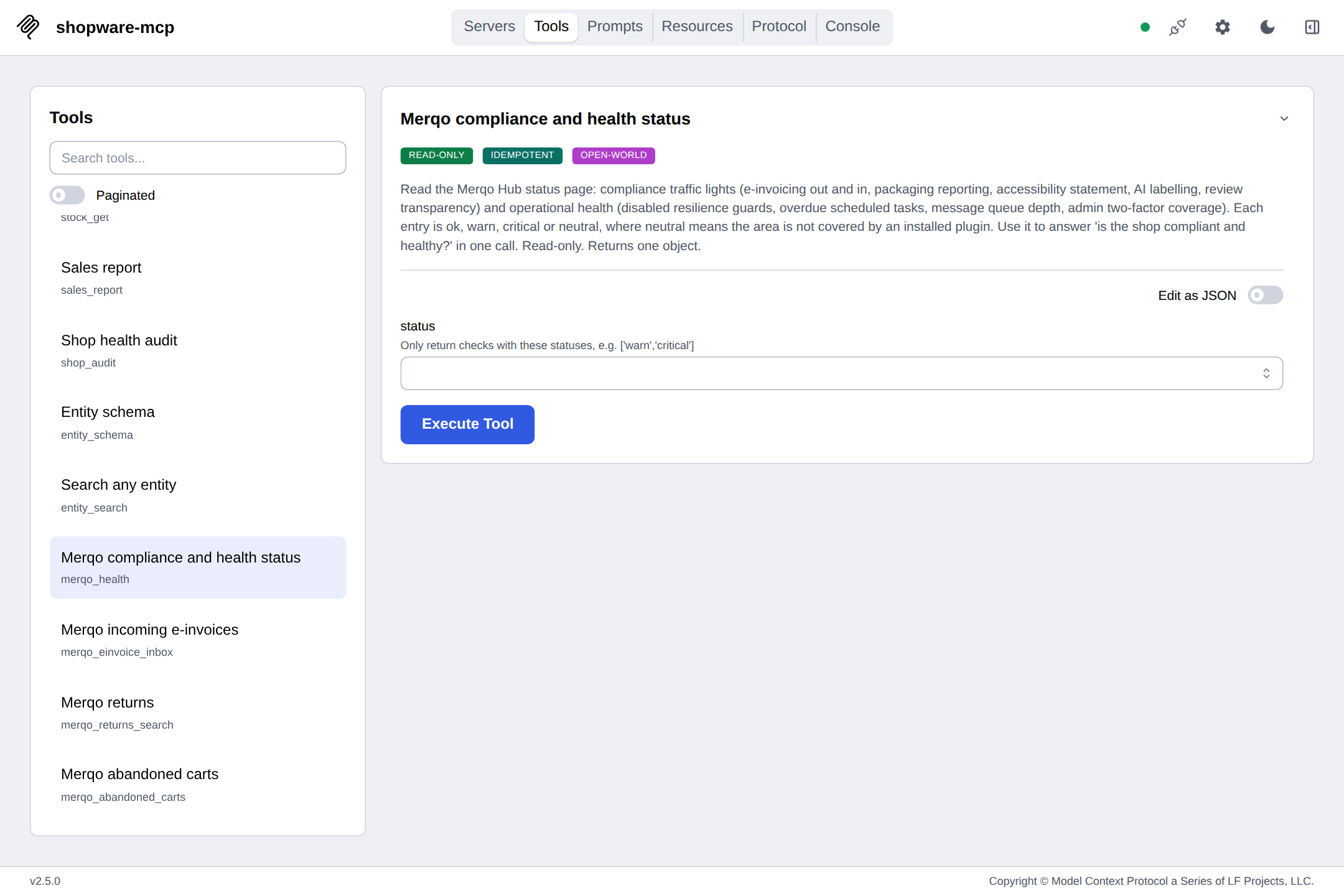
Yes. At startup, shopware-mcp detects installed plugins and auto-registers extra tools for known extensions (e.g., FroshTools for operations checks, Merqo for compliance). No configuration needed.
README (reference)
Source of truth, from the repository.
Introducing shopware-mcp
A Shopware 6 shop is about two hundred entities behind one Admin API. Ask an
assistant "is everything okay with the shop?" and the honest answer takes seven
searches with Criteria filters, three state machines by their technical names,
a couple of aggregations, and an OAuth token it must never repeat back to you.
Wire a model straight to that API and it gets all of it, including the right to
PATCH a price because a prompt said so.
The Model Context Protocol turned "give the model real tools" into a one-line config change. It says nothing about what a good tool for a shop looks like: which of the two hundred entities matter on a Tuesday morning, what "stuck order" means, or that a stock correction should be shown before it is sent.
shopware-mcp is that layer. One small server that speaks MCP to the host and the Admin API to the shop, and knows Shopware well enough to answer in one call what used to take an afternoon in the admin. It also notices when orders stop coming, and tries the checkout the way a customer would to find out why:
| Curated tools | Products, orders and their history, documents, customers, categories, promotions, reviews, payment and shipping methods, plugins, stock, sales channels, scheduled tasks, the shop's trading settings: twenty tools that return compact JSON with exact totals, descriptions written for a model, and Shopware's own Criteria filters. No invented query language. |
| The customer's view | checkout_simulate puts products and codes into a throwaway cart through Shopware's own Store API, as a guest shipping anywhere or as a given customer with their group, prices and rules, and explains every cart error in plain words: a country the channel does not ship to, a code that expired, a payment method hidden by a rule, a parent product that needs a variant, a customer who cannot log in there. storefront_search searches like a customer and says why a product does not show up. Nothing is ordered; the cart is deleted. |
| A pulse | shop_pulse puts today next to the same hours of the same weekday in recent weeks and weighs the current quiet spell: how many orders those hours usually bring and how likely it is to see none by chance. "No order for six hours, when three to seven always came" is a broken checkout, not a slow Sunday. |
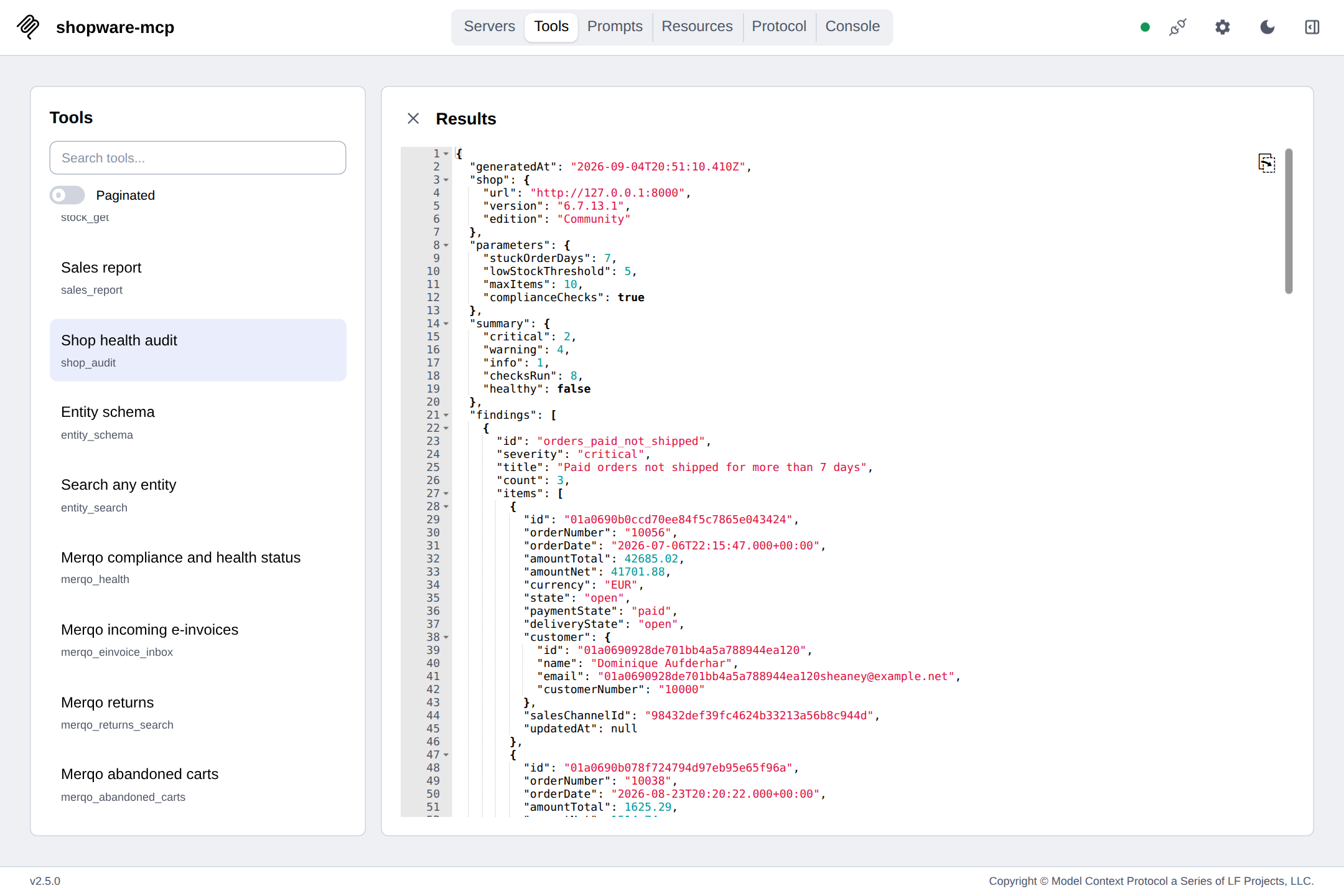
| An audit | shop_audit runs seventeen checks in one call: a checkout that went unusually silent, paid orders that never shipped or never got an invoice, unpaid orders going stale, shipped orders never completed, products out of stock, running out at the current sales pace, without a cover, without a delivery time or invisible in every sales channel, promotions past their end date, channels in maintenance, storefronts missing a legal page, reviews waiting for moderation, scheduled tasks that stopped running, extensions with updates waiting, and which EU duties look covered by an installed extension. Prioritised, with samples and a hint per finding. The same audit runs as shopware-mcp audit from cron or CI, no MCP host needed. |
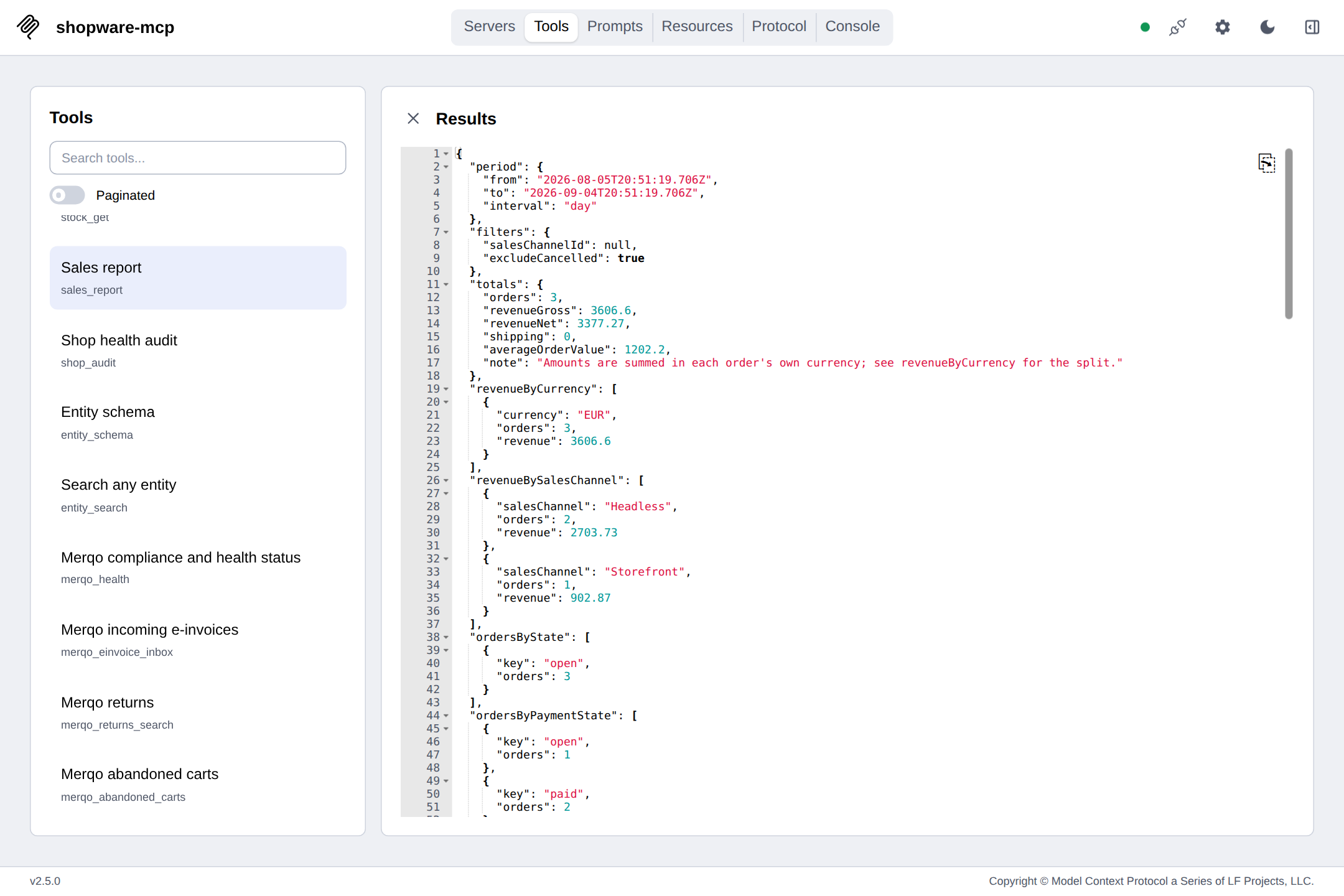
| Reports and a forecast | sales_report asks Shopware to aggregate: gross, net, average order, revenue per currency and channel, orders per state, a day/week/month timeline, the top products and, on request, the change against the period before. customer_report does the same for people: new accounts, guest share, repeat share, top customers by revenue. stock_forecast turns sales velocity and stock into days of cover, run-out dates and reorder quantities. The figures were checked against SQL on the same database. |
| An escape hatch | entity_schema describes any of the 200+ entities, a plugin's custom entities included, and entity_search queries them with the same filters and lets Shopware aggregate over the match: orders per payment method, revenue per month, anything a terms, sum or histogram can say. Entities that hold credentials are refused, secrets in the rest are scrubbed. |
| A brake | Read-only unless you start it with --allow-write. Even then every write is a dry run that shows the exact request first, and a write budget can cap how many real writes a process may make. Ship, mark paid, remind, refund, correct stock, note, generate a document, create a product or a promotion, give a product a picture, moderate a review, update a customer, invoice fifty orders in one go, tag a record: fifteen narrow writes, nothing else. Secrets never appear in output, logs or errors. |
Shops are not identical, so the tool list is not either: at startup the server looks up which extensions are installed and registers extra tools for the ones it knows. A plain shop gets the core set. A shop with more plugins gets a bigger agent, without configuration.
See it work
Six hours without an order, and why. Sunday evening. The pulse compares the silence with the same hours of the last eight Sundays, which always brought three to seven orders, and puts the odds of chance at about one in 170. The agent then tries to buy something the way a customer would and finds the storefront in maintenance mode. Nothing was ordered, nothing changed.
The checkout as a customer sees it. A customer in Switzerland says a code does not work. A throwaway cart through Shopware's own Store API explains both problems at once: Switzerland is not a country of that channel, and the code's promotion ended in August. Then the search explains why a product never shows up.
Every morning, one page. shopware-mcp brief --html brief.html writes the
pulse, the audit and the last seven days as one self-contained page that loads
nothing from anywhere and follows the reader's dark mode. From cron, with
--slack for a one-paragraph summary in a channel.
Open a real one.
Least privilege in one command. shopware-mcp setup logs in as an admin
once, creates a role with exactly the privileges the tools need, measured
against a real shop and not guessed, and an integration that is not an
administrator. It shows the secret once, verifies both and prints the host
config. Run it again after an upgrade and it brings the role up to date while
the keys stay.
Every recording on this page is real output from the server against a Shopware
6.7.13 test shop with generated demo data, replayed from the transcripts in
docs/demo/. Tool calls and results are verbatim, shortened to
fit the screen. The prose is what an MCP host says with them.
One question, one call. Three paid orders are still waiting for shipment, the storefront is in maintenance, a summer promotion outlived August. The answer names order numbers and amounts, and offers the safe next step.

Numbers the shop computed itself. Totals, channels, states, a monthly timeline and the top product for eight months, from one call. No order was paged through; Shopware's aggregations did the work.
No tool for that? There is a schema for that. Manufacturers have no
dedicated tool. The agent reads the entity's schema, spots mediaId, and
filters on it. The same path reaches every other entity, custom ones included.
Writes show their hand first. With --allow-write, a stock correction
comes back as the request it would send. Only an explicit dryRun: false
touches the shop, and the result is re-read from Shopware.
Ship it, then prove it. A delivery transition is two requests, shown before they are sent: the tracking code onto the delivery, then the state change. The order's history afterwards names the transition, the states and who made it.
A product and its launch code, from one sentence. product_create picks
the shop's default tax and derives the net price, and says so in the dry run.
The promotion arrives inactive, so nobody sees a code before it was checked.

Moderation with a reply. Two reviews wait for approval. The spam stays hidden, the complaint is approved together with the shop's public answer, and the model never had to touch the admin.
People, not just revenue. New accounts by group, how many customers ordered and how many came back, the guest share, and the top customers with their share of the period, next to the period before.
A shop with more plugins gets a bigger agent. The core tools are ready immediately. The extension lookup finishes in the background, four tools appear, the host is told to refresh its list, and a compliance question has an answer.
Reorder before it hurts. stock_forecast reads six months of line items
through one aggregation, joins them with the current stock, and says per
product how many days are left, when it hits zero, and how much to order. Nine
of these are already oversold; two are still fine today and will not be in
October.

The same audit, no host in sight. shopware-mcp audit prints the findings
as Markdown and exits non-zero when something is critical (or, with
--fail-on warning, when anything is off). Put it in cron and read the mail;
put it in CI and let the job fail. shopware-mcp report does the same for the
numbers.

A shop with an operations plugin gets an operations agent. FroshTools is the open-source toolbox many Shopware hosters install. When it is there, three more tools appear: the platform's health checks, the message queue with its worker, and the dependency advisories. The agent tells stale search results apart from a dead worker.
Fifty-six invoices, three at a time. order_documents_bulk_create finds the
paid orders that never got an invoice, oldest first, and shows the single request
that would create them before it does. Every order counts against the write
budget. Then scheduled_tasks_list explains how the backlog grew: 31 of 33
tasks overdue, none ever run, the scheduler is not running. tag_assign marks
the order for the team, creating the tag on the way.

Know before the agent finds out. shopware-mcp doctor probes what the integration may read, reads its role for the write privileges where it can, and names the missing one per tool. An administrator gets a wall of ticks; a support-desk role gets told exactly what to grant.

What's in the box
| Twenty curated tools | products_search, orders_get, customers_search, stock_get, promotions_list, reviews_search, payment_methods_list, shipping_methods_list, plugins_list, scheduled_tasks_list and friends. Each search takes { term?, filter?, sort?, page?, limit?, fields? } and returns { total, page, limit, items }. |
| Shop settings | shop_settings reads the trading settings from Shopware's system configuration, shop-wide or per sales channel with inheritance: guest checkout, double opt-in, password rules, cart limits, listing defaults, default tax, legal pages. Only an allowlist of core domains; mail servers, licences and plugin secrets are never read. |
| Order history | order_history lists every order, payment and delivery transition of one order in sequence: previous state, new state, action, and whether an admin user, an API integration or Shopware itself triggered it. |
| Checkout simulation | checkout_simulate fills a throwaway cart through Shopware's admin proxy to the Store API, the route the admin's own order dialog uses: as a guest with a shipping country, or logged in as a customer with their group, prices, rules and address. It returns prices per item next to the listing price, discounts, shipping, taxes, the total, the payment and shipping methods offered and the ones hidden with the rule that hides them, and every cart error with a plain explanation. Nothing is ordered, the cart is deleted. |
| Storefront search | storefront_search runs a search in a sales channel the way a customer does, same visibility, stock and closeout rules, same ranking and prices, and explains one product on request: its position, or why it is missing (inactive, not visible in the channel, link-only, closeout without stock, not in the search index, no keyword matching the term). |
| Shop pulse | shop_pulse compares orders and revenue since local midnight with the same hours of the same weekday in the last 2 to 12 weeks, weighs the current quiet spell with a Poisson estimate, and watches today's failed payments against their usual share. One aggregation request, whatever the shop's size. |
| Health audit | shop_audit with tunable thresholds (stuckOrderDays, lowStockThreshold, forecastDays, maxItems). Seventeen checks including a checkout that went silent, paid orders without an invoice, products running out at the current pace, legal pages per storefront, delivery times, sales channel visibility, pending reviews and scheduled tasks that stopped running, prioritised findings, a hint per finding, and an EU duty overview that names duties and deadlines, never products. |
| Sales report | sales_report for any period, by day, week or month, optionally per sales channel, cancelled orders excluded. compareWithPrevious adds the preceding period and the change in orders, revenue and average order value. Top products resolved by exact product id so ties cannot skew revenue. |
| Customer report | customer_report for the same periods: new accounts split into registered and guest and by group, distinct ordering customers, repeat share, guest order share, and the top customers by revenue with their share of the total. |
| Stock forecast | stock_forecast for 'what do I need to reorder?': units sold per product in a window, current available stock, days of cover, the run-out date and a reorder quantity that covers the horizon plus a restock period. Nothing is estimated for products without sales. |
| Any entity | entity_schema lists all entities or describes one: fields, types, flags, associations. entity_search queries it, with Shopware aggregations (terms, sum, avg, min, max, count, stats, histogram, one nested metric) over the whole match on request. Long text values are truncated, secrets scrubbed, credential entities and credential fields refused. |
| Plugin-aware tools | The server detects installed, active extensions and adds tools for the ones it knows. Packs: FroshTools (platform health checks, message queue, dependency advisories) and Merqo. Off with --no-extensions. |
| Documents | order_documents_list, order_document_create (invoice, delivery note, credit note, cancellation, by Shopware's own generator), order_documents_bulk_create (one document type for up to fifty orders in one request, by default the paid orders that have none yet) and document_download, which hands the PDF to the host as an embedded resource while the model sees only the metadata. |
| Guarded writes | stock_set (absolute or delta), product_update, product_create, product_cover_set (a picture from a URL or bytes, uploaded by the shop), order_state_transition, order_delivery_transition (ship, with tracking codes), order_transaction_transition (mark paid, remind, refund), order_note (internal comment), order_document_create, order_documents_bulk_create, promotion_toggle, promotion_create, customer_update, review_moderate, tag_assign (tags by name on a customer, order or product; missing tags are created). Registered only with --allow-write, dryRun: true by default, the re-fetched entity on a real write. SHOPWARE_MCP_MAX_WRITES caps real writes per process, and a bulk call counts once per order. |
| A command line too | shopware-mcp setup creates a least-privilege integration from one admin login. shopware-mcp doctor says per tool whether this integration can use it and which privilege is missing. shopware-mcp init tests the credentials and prints or writes the config for Claude Desktop, Claude Code, Cursor, VS Code, Windsurf, Gemini CLI, Codex CLI or Zed. shopware-mcp brief, audit and report print Markdown or JSON, write a self-contained HTML page with --html and the JSON with --json-file, and exit non-zero for cron and CI; brief and audit also post a summary to Slack with --slack. |
| A GitHub Action | uses: bnymnDev/shopware-mcp@v0.8.0 runs the audit in a workflow with the shopware-mcp release of that tag, writes the Markdown into the job summary, exposes the counts and the exit code as outputs and fails the job on the severity you choose. |
| Resources and prompts | shopware://shop, shopware://sales-channels, the templates shopware://order/{orderNumber}, shopware://product/{productNumber} and shopware://customer/{customerNumber} so a host can attach a record as context, and six prompts: order_summary, customer_profile, low_stock_report, reorder_list, review_moderation and weekly_review. |
| Shopware's vocabulary | Filters are Shopware Criteria filters (equals, contains, range, equalsAny) on Shopware field paths, including associations like manufacturer.name. State names are the technical names you already know. |
| Portable schemas | Every tool schema is checked to avoid constructs that some MCP clients misread, so the same server works in every host. |
| A solid client | OAuth client credentials with early token refresh, one retry on 401 and on 429/5xx with Retry-After, a per-request timeout, exact totals, inheritance and language headers, a cached entity schema. |
| Two transports | stdio for desktop hosts, stateless Streamable HTTP for everything else, with an optional bearer token. |
| Packaged four ways | npm with build provenance, a Docker image on GHCR for amd64 and arm64, a one-click .mcpb bundle for Claude Desktop that asks for the credentials and a write budget, and a listing in the official MCP registry. |
Who it is for
- You run a shop and want to ask it questions instead of clicking through the admin. Stuck orders, low stock, last month's numbers, one prompt each.
- You run an agency and look after many shops. The core here covers one shop per server; the multi-shop, audited, hosted version is what the author builds for clients (see Open core).
- You build Shopware plugins and want your custom entities reachable by an agent today, and your own tools registered tomorrow.
entity_searchdoes the first; one file undersrc/extensions/does the second. - You build agents and want an MCP server that behaves: compact output, honest totals, dry runs, no surprises in the schema.
60 seconds
1. Let setup create the integration. It logs in as an admin once (the password is never stored), creates a read-only role with exactly the privileges the tools need and an integration using it, verifies both and prints or writes the host config:
npx shopware-mcp setup --url https://shop.example.com --user admin --for claude-desktop --write
Add --allow-write for the write tools and --settings for shop_settings; --dry-run shows the role's privileges first. After an upgrade, run the same command again: it updates the role and keeps the keys. Rather click it yourself? Create an Integration under Settings → System → Integrations, give it a role (see permissions) and continue with step 2.
2. Or let the wizard test existing credentials and write the host config for you:
npx shopware-mcp init                  # asks for URL, key and secret, tests them, prints the config
npx shopware-mcp init --for claude-desktop --write   # or merges it into the host's config file
npx shopware-mcp doctor                # which tools can this integration use, and what is missing
npx shopware-mcp audit --fail-on warning   # the shop audit as Markdown, exit 1 when something is off
npx shopware-mcp report --interval week    # the sales report of the last 30 days as Markdown
npx shopware-mcp brief --html brief.html   # pulse, audit and the last 7 days as one HTML page
Or run the server by hand:
export SHOPWARE_URL=https://shop.example.com
export SHOPWARE_CLIENT_ID=SWIA...
export SHOPWARE_CLIENT_SECRET=...

npx shopware-mcp                       # stdio (default)
npx shopware-mcp --http --port 3333    # Streamable HTTP on http://127.0.0.1:3333/mcp
npx shopware-mcp --allow-write         # also register the guarded write tools
3. Connect a host (or let init --write do it):
Download shopware-mcp.mcpb from the latest release and double-click it, or add this to claude_desktop_config.json:
{
  "mcpServers": {
    "shopware": {
      "command": "npx",
      "args": ["-y", "shopware-mcp"],
      "env": {
        "SHOPWARE_URL": "https://shop.example.com",
        "SHOPWARE_CLIENT_ID": "SWIA...",
        "SHOPWARE_CLIENT_SECRET": "..."
      }
    }
  }
}
claude mcp add shopware \
  -e SHOPWARE_URL=https://shop.example.com \
  -e SHOPWARE_CLIENT_ID=SWIA... \
  -e SHOPWARE_CLIENT_SECRET=... \
  -- npx -y shopware-mcp
They all take the same three fields. Cursor reads .cursor/mcp.json, VS Code .vscode/mcp.json (under servers instead of mcpServers), Windsurf ~/.codeium/windsurf/mcp_config.json, Gemini CLI ~/.gemini/settings.json, Codex CLI a [mcp_servers.shopware] table in ~/.codex/config.toml, Zed its context_servers block. init --for <host> --write writes each of them:
{
  "mcpServers": {
    "shopware": {
      "command": "npx",
      "args": ["-y", "shopware-mcp"],
      "env": {
        "SHOPWARE_URL": "https://shop.example.com",
        "SHOPWARE_CLIENT_ID": "SWIA...",
        "SHOPWARE_CLIENT_SECRET": "..."
      }
    }
  }
}
Hosts that read the official MCP registry find it as io.github.bnymnDev/shopware-mcp.
docker run --rm -p 3333:3333 \
  -e SHOPWARE_URL=https://shop.example.com \
  -e SHOPWARE_CLIENT_ID=SWIA... -e SHOPWARE_CLIENT_SECRET=... \
  ghcr.io/bnymndev/shopware-mcp
The image serves Streamable HTTP on http://127.0.0.1:3333/mcp. Point any HTTP-capable host at that URL. Add -e SHOPWARE_MCP_HTTP_TOKEN=<random secret> and the endpoint requires Authorization: Bearer <secret>; without a token, keep it on localhost or behind a proxy that authenticates (self-hosting notes).
4. Ask. The first useful question is usually "Is everything okay with the shop?"
Ask it anything
| You say | The agent calls |
|---|---|
| "Is today normal?" | shop_pulse |
| "Why can't customer 10009 check out?" | checkout_simulate { customerNumber: "10009", items } |
| "Why does the code SUMMER26 not work?" | checkout_simulate { promotionCodes: ["SUMMER26"], items } |
| "What does shipping to Switzerland cost?" | checkout_simulate { country: "CH", items } |
| "Why can nobody find the steel shirt?" | storefront_search { term: "steel shirt", explain: "SW10002" } |
| "Is everything okay with the shop?" | shop_audit |
| "How did we do in August?" | sales_report { from, to, interval: "week" } |
| "Which products are below 5 in stock?" | products_search with a range filter, or the low_stock_report prompt |
| "Summarise order 10042 for a support reply." | orders_get, or the order_summary prompt |
| "Which customers ordered more than ten times?" | customers_search with a range filter on orderCount |
| "Is the PayPal plugin up to date?" | plugins_list |
| "Which manufacturers have no logo?" | entity_schema then entity_search on product_manufacturer |
| "Set the stock of SW10084 to 40." | stock_set, dry run first, then for real |
| "Order 10042 shipped with DHL, tracking 00340434." | order_delivery_transition { transition: "ship", trackingCodes } |
| "The bank transfer for 10038 arrived." | order_transaction_transition { transition: "paid" } |
| "How was last week compared to the week before?" | sales_report { compareWithPrevious: true }, or the weekly_review prompt |
| "Send me the invoice for 10042." | order_documents_list, then document_download returns the PDF |
| "Note on 10042: customer called, ships Monday." | order_note |
| "What happened to order 10042, and who did it?" | order_history |
| "Who is customer 10042 and what did they order last?" | customers_get and orders_search, or the customer_profile prompt |
| "Who were our best customers this quarter?" | customer_report { from, to, topCustomers: 20 } |
| "Which reviews are waiting for approval?" | reviews_search with status: false, or the review_moderation prompt |
| "Approve the review from Dominique and thank her." | review_moderate { approved: true, comment } |
| "Which payment methods does the storefront offer?" | payment_methods_list, shipping_methods_list |
| "Create a 10 % code AUTUMN10 for October." | promotion_create, created inactive until you say otherwise |
| "Add the product Bench, SW10200, 119 euro, 3 in stock." | product_create, net price derived from the tax rate |
| "Two came back from the customer, add them to SW10084." | stock_set { delta: 2 } |
| "What do I need to reorder in the next two weeks?" | stock_forecast, or the reorder_list prompt |
| "Orders per payment method last month, with revenue?" | entity_search on order with a terms aggregation and a nested sum |
| "Which paid orders have no invoice yet? Create them." | shop_audit, then order_documents_bulk_create { type: "invoice" }, dry run first |
| "Are the cron jobs running at all?" | scheduled_tasks_list { onlyProblems: true } |
| "Mark this customer as VIP." | tag_assign { entity: "customer", add: ["VIP"] } |
| "Is guest checkout on, and what is the default tax?" | shop_settings |
| "Give SW10084 this picture: https://…/bench.jpg" | product_cover_set, the shop downloads it |
| "Thumbnails are missing, is the platform okay?" | frosh_health and frosh_queue, when FroshTools is installed |
| "Set it up with the least rights it needs." | not a tool: npx shopware-mcp setup |
| "Which of my tools will fail with this integration?" | not a tool: npx shopware-mcp doctor |
| "Send me one page every morning." | shopware-mcp brief --html brief.html --slack <webhook> in cron |
| "Mail me the audit every Monday." | not a tool either: shopware-mcp audit --fail-on warning in cron |
Filters, in one screen
Every search tool takes the same filter array, and every entry is a Shopware Criteria filter:
{ "type": "equals",    "field": "active",                                    "value": true }
{ "type": "range",     "field": "stock",                                     "value": { "lt": 5 } }
{ "type": "range",     "field": "orderDateTime",                             "value": { "gte": "2026-06-01" } }
{ "type": "equals",    "field": "transactions.stateMachineState.technicalName", "value": "paid" }
{ "type": "contains",  "field": "name",                                      "value": "shirt" }
{ "type": "equalsAny", "field": "id",                                        "value": ["…", "…"] }
{ "type": "equals",    "field": "manufacturer.name",                         "value": "Acme" }
Anything you can filter in the Admin API works here too, associations included.
Need a raw field that the compact output leaves out, such as customFields,
ean or weight? Pass fields: ["customFields", "ean"] and it is added to
every item. Reading a shop in another language? Set SHOPWARE_LANGUAGE_ID.
The full cheat sheet has more.
Tools
<!-- TOOLS:START -->| Tool | Access | Purpose |
|---|---|---|
shop_info | read | Shop info |
shop_settings | read | Shop settings |
sales_channels_list | read | List sales channels |
products_search | read | Search products |
products_get | read | Get product |
orders_search | read | Search orders |
orders_get | read | Get order |
order_history | read | Order history |
order_documents_list | read | List order documents |
document_download | read | Download document PDF |
customers_search | read | Search customers |
customers_get | read | Get customer |
categories_list | read | List categories |
promotions_list | read | List promotions |
reviews_search | read | Search product reviews |
payment_methods_list | read | List payment methods |
shipping_methods_list | read | List shipping methods |
plugins_list | read | List plugins and apps |
scheduled_tasks_list | read | Scheduled tasks |
stock_get | read | Get stock |
stock_forecast | read | Stock forecast |
storefront_search | read | Search like a customer |
checkout_simulate | read | Simulate a checkout |
sales_report | read | Sales report |
customer_report | read | Customer report |
shop_pulse | read | Shop pulse |
shop_audit | read | Shop health audit |
entity_schema | read | Entity schema |
entity_search | read | Search any entity |
stock_set | write (guarded) | Set stock (guarded) |
product_update | write (guarded) | Update product (guarded) |
product_create | write (guarded) | Create product (guarded) |
product_cover_set | write (guarded) | Set product cover image (guarded) |
order_state_transition | write (guarded) | Transition order state (guarded) |
order_delivery_transition | write (guarded) | Transition delivery state (guarded) |
order_transaction_transition | write (guarded) | Transition payment state (guarded) |
order_note | write (guarded) | Add internal order note (guarded) |
order_document_create | write (guarded) | Create order document (guarded) |
order_documents_bulk_create | write (guarded) | Create documents for many orders (guarded) |
promotion_toggle | write (guarded) | Toggle promotion (guarded) |
promotion_create | write (guarded) | Create promotion (guarded) |
customer_update | write (guarded) | Update customer (guarded) |
review_moderate | write (guarded) | Moderate review (guarded) |
tag_assign | write (guarded) | Assign tags (guarded) |
Every parameter of every tool: docs/tools.md. Searches return
{ total, page, limit, items } with exact totals, limit is capped at 50, and
errors come back as { error: { status, code, detail } } so the model can
react instead of guessing.
Resources: shopware://shop, shopware://sales-channels, shopware://order/{orderNumber},
shopware://product/{productNumber}. Prompts: order_summary, low_stock_report, weekly_review.
Plugin-aware tools
At startup the server asks the shop which extensions are installed and active,
in the background, and registers extra tools for the ones it knows. A shop that
does not answer simply keeps the core tools. --no-extensions turns the whole
mechanism off.
Two packs ship today. FroshTools,
the open-source operations plugin, adds frosh_health (platform health and
performance checks), frosh_queue (message queue transports, waiting messages,
worker) and frosh_composer_audit (dependency advisories); all read-only, the
plugin's own maintenance actions are never called. Merqo
adds merqo_health, merqo_einvoice_inbox, merqo_returns_search and
merqo_abandoned_carts. Shops without a plugin never see its tools, and nothing
in the core tools changes either way. Support for another vendor's extensions
is one file under src/extensions/, tested against the installed plugin; a
pack names the ACL privileges its plugin's routes need, and shopware-mcp setup
grants them when that plugin is installed. Pull requests are welcome.
Safety
- Read-only by default. Without
--allow-write(orSHOPWARE_MCP_ALLOW_WRITE=true) the write tools are not registered. An agent cannot discover what it cannot call. - Every write is a dry run first. All fifteen write tools, from
stock_settotag_assign, default todryRun: trueand return{ dryRun: true, wouldSend: { method, url, body } }, a list when one call needs several requests. A real write returns the re-fetched entity. - A write budget.
SHOPWARE_MCP_MAX_WRITES=20refuses the twenty-first real write of a process withWRITE_BUDGET_EXHAUSTED; dry runs stay free. No prompt can lift it. - Narrow writes.
product_updatetouches name, description, active and one currency's price;product_createmakes a simple product and nothing else;product_cover_setadds one picture (JPEG, PNG, WebP, GIF or AVIF, never SVG) that the shop itself downloads.promotion_createcreates one cart discount, inactive unless told otherwise.customer_updatetouches the active flag and the group. The transition tools only move state machines; nothing moves money. Documents come from Shopware's own generator and are never sent by this server;order_documents_bulk_createmakes at most fifty per call and charges the write budget once per order.tag_assignadds or removes tags by name and leaves the rest of the record alone. Nothing deletes. Nothing else is writable. - A simulated cart is not an order.
checkout_simulateandstorefront_searchgo through Shopware's own admin proxy to the Store API with a random context token no visitor holds. The order route is never called and the cart is deleted afterwards; what remains is a context row Shopware expires by itself. Simulating as a customer does not touch that customer's own session or saved cart. Extensions that react to saved carts, such as abandoned-cart mailers, do see the simulated cart as that customer's, so simulate as a real customer only where that is fine. - Least privilege by default.
shopware-mcp setupgrants each tool exactly the privileges it was measured to need against a role that had nothing else, and never administrator rights. Two privileges reach further than their tool and stay out unless you ask: reading the whole system config, SMTP passwords and payment keys included (--settings), and installing extensions (--plugin-updates). Setup only changes a role it created, names every privilege it adds or removes, and shows the new secret before anything else can fail. The admin password is used for one login over https, or plain http to this machine only, and never stored. - Scrubbed reads.
entity_searchstrips passwords, keys, tokens and hashes from every payload and refuses entities that exist to hold credentials or system internals: users, integrations, ACL roles, apps, system config. - No secrets anywhere. Credentials never appear in output, logs or error messages. Logs go to stderr only, at
errorlevel unless you ask for more. - No telemetry. The server talks to your shop and to your host. Nothing else.
- HTTP transport. Set
SHOPWARE_MCP_HTTP_TOKENand every call to/mcpneeds that bearer token, compared in constant time. Without it, bind to localhost (the default) or put it behind a reverse proxy that authenticates; the server warns when it is reachable further without a token. - Requests time out. A shop that stops answering costs one request 30 seconds (
SHOPWARE_MCP_TIMEOUT_MS), not the whole session.
Found something? See SECURITY.md.
Configuration
| Variable | Required | Notes |
|---|---|---|
SHOPWARE_URL | yes | Shop base URL, e.g. https://shop.example.com (trailing slash is stripped) |
SHOPWARE_CLIENT_ID | yes | Integration access key ID |
SHOPWARE_CLIENT_SECRET | yes | Integration secret access key |
SHOPWARE_MCP_ALLOW_WRITE | no | true registers the write tools. Default: off |
SHOPWARE_MCP_MAX_WRITES | no | Real writes one process may perform in total; 0 (default) means no cap |
SHOPWARE_MCP_DEFAULT_LIMIT | no | Default page size for search tools (default 20, max 50) |
SHOPWARE_MCP_EXTENSIONS | no | false disables plugin-aware tools and the extension lookup at startup |
SHOPWARE_LANGUAGE_ID | no | Language UUID for translated fields (sw-language-id). Default: shop default language |
SHOPWARE_MCP_TIMEOUT_MS | no | Per-request timeout for the Admin API in milliseconds (default 30000, 1000 to 600000) |
SHOPWARE_MCP_HTTP_TOKEN | no | Bearer token the HTTP transport requires on /mcp (at least 16 characters). Default: none |
SHOPWARE_MCP_LOG_LEVEL | no | error (default), warn, info, debug. Logs go to stderr only |
TZ | no | Time zone for "today" in shop_pulse and brief, e.g. Europe/Berlin. Default: the system's |
SHOPWARE_ADMIN_USER, SHOPWARE_ADMIN_PASSWORD | setup only | The admin login setup uses once to create the role and integration. Never stored; without them setup asks |
CLI flags override the environment: --allow-write, --max-writes <n>, --no-extensions, --http, --port <n>, --host <addr>, --log-level <level>. Commands: setup, doctor, init, brief, audit and report; npx shopware-mcp --help lists their options.
The Integration needs read permissions on the entities the tools touch and
write permissions for the write tools. shopware-mcp setup grants exactly
those; Administrator is the quick path for a dev shop
(which permissions).
Design principles
- Shopware's vocabulary, not ours. Filters, field paths, state names and entity names are Shopware's. A tool call reads like the Admin API request it becomes, and a Shopware developer needs no second dictionary.
- Compact by default, complete on request. Items carry what a model needs to reason and page. Raw fields come with
fields, more rows withpage, and long text is truncated rather than dumped. - Reading is free, writing is explicit. Write tools exist only when asked for, default to a dry run, and return the exact request. The model sees the consequence before the shop does.
- Let the shop do the maths. Totals, timelines and top products are Shopware aggregations with exact counts, not client-side sums over pages.
- Vendor-neutral core. Extension packs live in their own files, are registered only when the shop has the extension, and never change how the core tools behave. No telemetry, no phone-home.
The reasoning behind individual choices is in docs/decisions.md.
Documentation
| Document | What is in it |
|---|---|
| docs/quickstart.md | Integration, first run, host configs, example questions, the filters cheat sheet |
| docs/tools.md | Every tool with every parameter, generated from the code |
| docs/self-hosting.md | Transports, Docker, reverse proxies, Shopware permissions, operations |
| docs/decisions.md | Design decisions and the reasoning behind each |
| CONTRIBUTING.md | Setup, ground rules, end-to-end tests, releasing |
| SECURITY.md | What to report and where |
| CHANGELOG.md | What changed in each version |
Open core
Everything in this repository is MIT and stays that way. It covers one shop, one operator, interactive use.
The same author builds Merqo, a commercial suite of Shopware extensions for EU compliance and daily operations. This server detects them and adds matching tools, but it never requires them, and the core tools behave the same either way.
Agencies and merchants running this at scale usually need more, and that is what I build and operate for clients:
- Multi-shop: one MCP endpoint that routes to dozens of shops with per-shop credentials and permissions
- Hosted with audit trail: every tool call logged with who, what and when, role-based access, SLA
- Bulk operations and migrations: mass price and stock updates, catalogue imports, safe rollbacks
- Custom agents and Shopware plugins: workflows tailored to your ERP, PIM or support desk
Interested? Open an issue with the consulting label or reach out via github.com/bnymnDev. Using shopware-mcp in production and want it to stay maintained? Sponsoring helps.
Building from source
pnpm install
pnpm dev          # stdio server via tsx
pnpm test         # vitest + msw-mocked Admin API
pnpm build        # tsup → dist/ (npm) and dist/bundle/ (self-contained)
pnpm pack:mcpb    # Claude Desktop bundle → shopware-mcp.mcpb
pnpm inspect      # MCP Inspector against dist/
pnpm docs:tools   # regenerate docs/tools.md and the tool tables in both READMEs
pnpm docs:demos   # re-render the recordings in docs/demo/ from their transcripts
End-to-end tests against a real Shopware (dockware/dev, or any shop you point them at) run with pnpm test:e2e; see CONTRIBUTING.md.
Status
v0.8. Everything on this page is implemented, covered by unit tests against mocked Admin API responses, and exercised nightly end-to-end against a real Shopware. The recordings above come from Shopware 6.7.13; 6.6 is supported too.
Not in it, on purpose: user management for the HTTP transport (one static token, or a proxy), multi-shop routing and audit trails (the commercial part), and write tools beyond the fifteen that a support desk and a shop manager need on a normal day.
Ideas that fit: more extension packs, more cart errors explained in plain words,
a products_search example gallery. The good first
issues
are a fine place to start.
License
<p align="center"><sub>If shopware-mcp answered a question your admin could not, a star helps the next shop find it.</sub></p>Related MCP servers

MotionLint
Catch bad animations before they ship. Deterministic motion audit + vision-LLM design review.
A generic append-only log MCP server. Persist timestamped JSON entries and query them by recency.

Project Gutenberg MCP
Read Project Gutenberg books via MCP. Search, fetch metadata, and retrieve text in passages.

Quarterback
Strategic task prioritization and agent orchestration for multi-project operators

Read-only public CVE records, capability metadata, and agent instructions from Hacker Bob.
View repository →
VIVATLAS
Self-hosted catalogue of your skills, agents and MCP servers, searchable by meaning over MCP