DBHub MCP Server
io.github.bytebase/dbhub
Token-efficient MCP server for querying PostgreSQL, MySQL, SQL Server, SQLite, and MariaDB with zero dependencies.
What is the DBHub MCP server?
DBHub is a lightweight, zero-dependency MCP server that enables AI agents to connect to and query multiple databases including PostgreSQL, MySQL, SQL Server, SQLite, and MariaDB. It provides two core tools—execute_sql and search_objects—optimized for minimal token usage, plus support for custom parameterized SQL operations defined in configuration.
DBHub acts as a gateway between MCP-compatible clients (Claude, Cursor, VS Code) and your databases. It's designed for local development with read-only mode, row limiting, query timeouts, and security features like SSH tunneling and SSL/TLS encryption. A built-in web workbench lets you test queries and tools without an MCP client.
How to install DBHub
Copy-paste configuration for popular MCP clients.
DSNsecretDatabase connection string (e.g., postgres://user:pass@host:5432/db)
DB_TYPEDatabase type: postgres, mysql, mariadb, sqlserver, sqlite
DB_HOSTDatabase hostname
DB_PORTDatabase port
DB_USERDatabase username
DB_PASSWORDsecretDatabase password
DB_NAMEDatabase name or SQLite file path
TRANSPORTTransport mode: stdio or http
PORTHTTP server port (default: 8080)
IDInstance identifier for tool names
SSH_HOSTSSH server hostname
SSH_PORTSSH server port (default: 22)
SSH_USERSSH username
SSH_PASSWORDsecretSSH password
SSH_KEYPath to SSH private key
SSH_PASSPHRASEsecretSSH key passphrase
Tools & capabilities
Tools this server exposes to the agent.
execute_sql— Execute SQL queries with transaction support and safety controls including read-only mode, row limiting, and query timeouts.search_objects— Search and explore database schemas, tables, columns, indexes, and procedures with progressive disclosure.Custom Tools— Define reusable, parameterized SQL operations in your dbhub.toml configuration file.
Use cases
- Query production databases safely from Claude or Cursor with read-only guardrails and row limits.
- Explore database schemas and structure to understand table relationships and column definitions.
- Execute parameterized SQL operations defined as custom tools for repeated tasks.
- Connect to multiple databases simultaneously (production, staging, dev) from a single DBHub instance.
- Debug database issues using the built-in web workbench without setting up an MCP client.
DBHub MCP server FAQ
PostgreSQL, MySQL, MariaDB, SQL Server, and SQLite.
Yes, DBHub is open-source and brought to you by Bytebase, an open-source database DevSecOps platform.
Install via npm: `npx @bytebase/dbhub@latest` (requires Node.js >= 22.5.0), or use Docker. Configure it as an MCP server in your client's settings pointing to the DBHub HTTP or stdio transport.
DBHub does not authenticate HTTP clients itself. For production, bind to 127.0.0.1 and use a reverse proxy (nginx/Caddy) or firewall. SSH tunneling and SSL/TLS encryption are supported for database connections.
Yes, use TOML configuration files to connect to multiple databases simultaneously from a single DBHub instance.
Read-only mode, row limiting, query timeouts, and DNS-rebinding protection to prevent runaway operations and unauthorized access.
README (reference)
Source of truth, from the repository.
<p align="center"> <a href="https://dbhub.ai/" target="_blank"> <picture> <source media="(prefers-color-scheme: dark)" srcset="https://raw.githubusercontent.com/bytebase/dbhub/main/docs/images/logo/full-dark.svg" width="75%"> <source media="(prefers-color-scheme: light)" srcset="https://raw.githubusercontent.com/bytebase/dbhub/main/docs/images/logo/full-light.svg" width="75%"> <img src="https://raw.githubusercontent.com/bytebase/dbhub/main/docs/images/logo/full-light.svg" width="75%" alt="DBHub Logo"> </picture> </a> </p>[!NOTE]
Brought to you by Bytebase, open-source database DevSecOps platform.
            +------------------+    +--------------+    +------------------+
            |                  |    |              |    |                  |
            |                  |    |              |    |                  |
            |  Claude Desktop  +--->+              +--->+    PostgreSQL    |
            |                  |    |              |    |                  |
            |  Claude Code     +--->+              +--->+    SQL Server    |
            |                  |    |              |    |                  |
            |  Cursor          +--->+    DBHub     +--->+    SQLite        |
            |                  |    |              |    |                  |
            |  VS Code         +--->+              +--->+    MySQL         |
            |                  |    |              |    |                  |
            |  Copilot CLI     +--->+              +--->+    MariaDB       |
            |                  |    |              |    |                  |
            |                  |    |              |    |                  |
            +------------------+    +--------------+    +------------------+
                 MCP Clients           MCP Server             Databases
DBHub is a zero-dependency, token efficient MCP server implementing the Model Context Protocol (MCP) server interface. This lightweight gateway allows MCP-compatible clients to connect to and explore different databases:
- Local Development First: Zero dependency, token efficient with just two MCP tools to maximize context window
- Multi-Database: PostgreSQL, MySQL, MariaDB, SQL Server, and SQLite through a single interface
- Multi-Connection: Connect to multiple databases simultaneously with TOML configuration
- Guardrails: Read-only mode, row limiting, and query timeout to prevent runaway operations
- Secure Access: SSH tunneling and SSL/TLS encryption
Supported Databases
PostgreSQL, MySQL, SQL Server, MariaDB, and SQLite.
MCP Tools
DBHub implements MCP tools for database operations:
- execute_sql: Execute SQL queries with transaction support and safety controls
- search_objects: Search and explore database schemas, tables, columns, indexes, and procedures with progressive disclosure
- Custom Tools: Define reusable, parameterized SQL operations in your
dbhub.tomlconfiguration file
Workbench
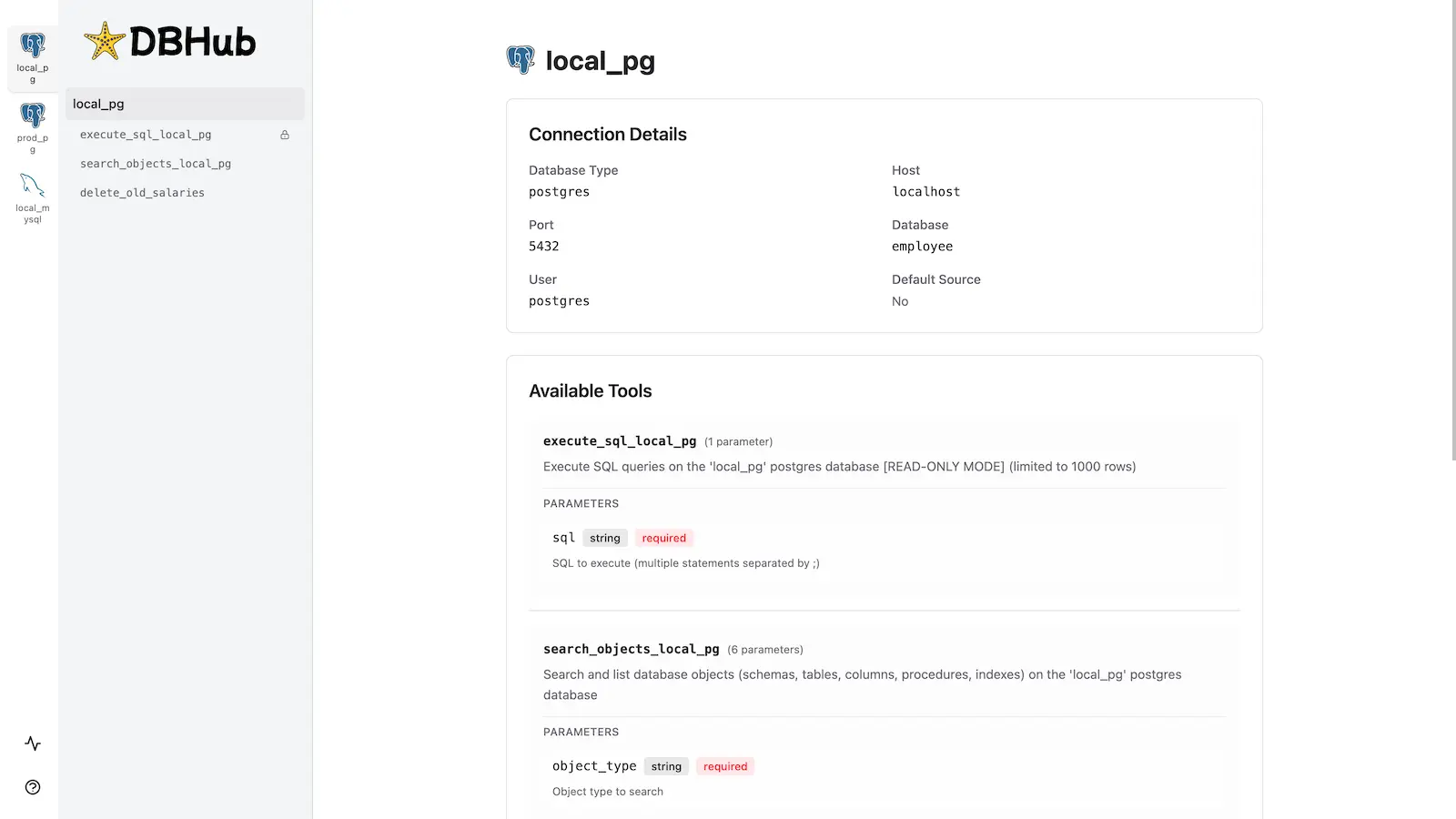
DBHub includes a built-in web interface for interacting with your database tools. It provides a visual way to execute queries, run custom tools, and view request traces without requiring an MCP client.
Installation
See the full Installation Guide for detailed instructions.
Quick Start
Docker:
docker run --rm --init \
   --name dbhub \
   --publish 8080:8080 \
   bytebase/dbhub \
   --transport http \
   --port 8080 \
   --dsn "postgres://user:password@localhost:5432/dbname?sslmode=disable"
NPM: (requires Node.js >= 22.5.0)
npx @bytebase/dbhub@latest --transport http --port 8080 --dsn "postgres://user:password@localhost:5432/dbname?sslmode=disable"
Demo Mode:
npx @bytebase/dbhub@latest --transport http --port 8080 --demo
Restrict to loopback (recommended for production):
npx @bytebase/dbhub@latest --transport http --host 127.0.0.1 --port 8080 --demo
The HTTP transport defaults to
--host 0.0.0.0, exposing DBHub on every network interface. For production, bind to127.0.0.1and front DBHub with a reverse proxy (nginx/Caddy) or firewall — DBHub does not authenticate HTTP clients.The HTTP transport also has built-in DNS-rebinding protection: it only accepts requests whose
Hostis loopback, this machine's own hostname/IPs, or a name you allow via--allowed-hosts. If a client behind a reverse proxy or custom DNS name gets a403, add that hostname with--allowed-hosts.
See Command-Line Options for all available parameters.
Multi-Database Setup
Connect to multiple databases simultaneously using TOML configuration files. Perfect for managing production, staging, and development databases from a single DBHub instance.
See Multi-Database Configuration for complete setup instructions.
Development
Requires Node.js >= 22.5.0 (DBHub uses the built-in node:sqlite module).
# Install dependencies
pnpm install

# Run in development mode
pnpm dev

# Build and run for production
pnpm build && pnpm start --transport stdio --dsn "postgres://user:password@localhost:5432/dbname"
Contributors
<a href="https://github.com/bytebase/dbhub/graphs/contributors"> <img src="https://contrib.rocks/image?repo=bytebase/dbhub" /> </a>Star History
<a href="https://www.star-history.com/?repos=bytebase%2Fdbhub&type=date&legend=top-left"> <picture> <source media="(prefers-color-scheme: dark)" srcset="https://api.star-history.com/chart?repos=bytebase/dbhub&type=date&theme=dark&legend=top-left" /> <source media="(prefers-color-scheme: light)" srcset="https://api.star-history.com/chart?repos=bytebase/dbhub&type=date&legend=top-left" /> <img alt="Star History Chart" src="https://api.star-history.com/chart?repos=bytebase/dbhub&type=date&legend=top-left" /> </picture> </a>Related MCP servers

Browser automation for AI agents via MCP, powering ByteDance's Agent TARS hybrid GUI/DOM browser control.
Run arbitrary shell commands from an MCP-connected AI agent.
Filesystem access MCP server from ByteDance's UI-TARS/Agent TARS ecosystem.
Adds web search capability to MCP-enabled AI agents like Agent TARS.

An MCP server that provides Email, Phone and Address Validation Services from Byteplant
