Clipboard History MCP MCP Server
io.github.d-khomenko/clipboard-history-mcp
Claude-accessible clipboard history with type classification, secret encryption, and Touch ID gating.
What is the Clipboard History MCP MCP server?
Clipboard History MCP is a Rust daemon that captures your clipboard history and makes it searchable and accessible to Claude through 15 MCP tools. It classifies clip types (URLs, JSON, code, secrets), encrypts sensitive data at rest with AES-256-GCM, and gates secret access behind Touch ID authentication.
A lightweight background daemon (~1 mW idle, ~24 MB RAM) that continuously captures clipboard history on macOS and Linux, automatically detects and encrypts secrets using 252+ gitleaks patterns, and indexes clips by content and window title for context-aware search. Claude can then query your clipboard history, restore items, manage pins and tags, and unlock secrets with biometric authentication—replacing a typical three-app clipboard-manager + secret-scanner + export stack.
How to install Clipboard History MCP
Copy-paste configuration for popular MCP clients.
CLIPBOARD_VAULT_PATHAuto-mirror non-secret clips to this Obsidian vault directory. Sidecar `.md` per clip + bullet in `daily/YYYY-MM-DD.md`. Secrets are never mirrored.
CLIPBOARD_CAPTURE_WINDOW_TITLESet to '1' to capture the active window title alongside each clip (needs Accessibility permission on macOS, X11 only on Linux).
CLIPBOARD_IGNORE_APPSComma-separated app display names to skip (e.g. '1Password,Bitwarden,KeePassXC').
CLIPBOARD_NEVER_STORE_SECRETSSet to '1' for paranoid mode — secrets are detected and metadata-logged but ciphertext is never stored.
CLIPBOARD_HISTORY_MAXMaximum number of clips kept in the ring buffer. Defaults to 1000.
CLIPBOARD_POLL_MSWatcher poll interval in milliseconds. Defaults to 1500.
Tools & capabilities
Tools this server exposes to the agent.
list_history— Paginated clipboard history, newest first. Supports filtering by kind, source app, date range, and pinned status.get_item— Retrieve a single clipboard item by ID.search_history— Full-text search across clip preview and window title using SQLite FTS5 BM25 ranking.get_urls— Return URL clips deduplicated by hostname.get_code— Return code clips with optional language filter.get_json— Return JSON clips with parsed structure.get_secrets_index— List secret metadata (kind, source, timestamp) without revealing values.unlock_secret— Decrypt and reveal a single secret, gated by Touch ID authentication with mandatory reason logging.get_stats— Return counts by kind, oldest/newest timestamps, and database size.daemon_status— Report daemon PID and running state.copy_item— Restore a clipboard item back to the system clipboard.pin_item— Pin a clip so it survives history clearing.tag_item— Add or remove free-form tags on a clip.delete_item— Permanently delete a single clip.clear_history— Bulk clear history by scope: all, older than N days, or by kind.
Use cases
- Search and restore code snippets, JSON configs, or API keys you copied hours or days ago without re-typing or re-finding them.
- Detect and securely manage leaked credentials (API keys, tokens, passwords) captured from dashboards or logs, with Touch ID-gated access.
- Index clipboard history by source application and window title to find clips by context (e.g., 'all URLs from Safari in the last 3 hours').
- Auto-mirror non-secret clipboard captures to an Obsidian vault for persistent note-taking and daily timeline tracking.
- Pin frequently-used snippets (SQL queries, shell commands, JSON templates) so they survive automatic history rotation.
Clipboard History MCP MCP server FAQ
It's a Rust daemon that captures your clipboard history, classifies clip types, encrypts secrets, and exposes 15 tools to Claude via MCP so you can search, restore, and manage your clipboard without leaving the chat.
Yes, it's MIT-licensed open-source. The author accepts optional sponsorship on Patreon or GitHub Sponsors but does not require payment.
Download the `.mcpb` file from the latest release, open Claude Desktop Settings → Extensions → 'Install from file', select the file, and restart Claude. No other setup needed.
On macOS, secrets are stored in Keychain and unlocking requires Touch ID biometric authentication. On Linux, it uses your system's Secret Service (GNOME Keyring or KWallet). No external API keys or accounts needed.
Not yet. macOS 13+ and Linux (X11/Wayland) are supported. Windows support is planned but not yet implemented.
No. Secret rows in list/search results show only metadata with `text: null` and `preview: '[REDACTED:kind]'`. The only way to reveal plaintext is calling `unlock_secret(id, reason)`, which requires Touch ID and logs the reason.
README (reference)
Source of truth, from the repository.
clipboard-history-mcp
Your clipboard, but Claude can read it. Type-classified, secret-encrypted, macOS-native.
flowchart LR
  U[You ⌘C something] --> D[Rust daemon<br/>launchd-managed]
  D -->|classify + encrypt| DB[(SQLite + FTS5)]
  D -. non-secret clips .-> O[Obsidian vault<br/>optional]
  C[Claude] -->|MCP stdio| M[15 tools]
  M --> DB
  M -->|Touch ID| V[Vault<br/>AES-256-GCM]
One Rust binary. No Node.js, no Swift toolchain, no other apps to install. Drag a .mcpb into Claude Desktop, done.
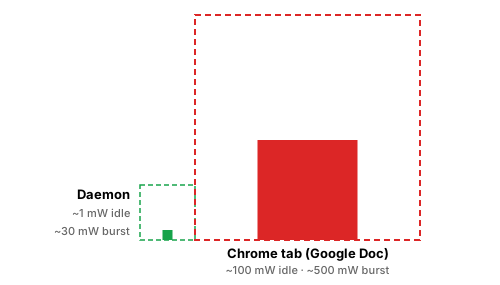
One process · ~1 mW idle · ~24 MB RAM. Replaces the clipboard-manager + secret-scanner + Obsidian-export stack a typical setup needs three or four background apps to assemble.
What this gets you
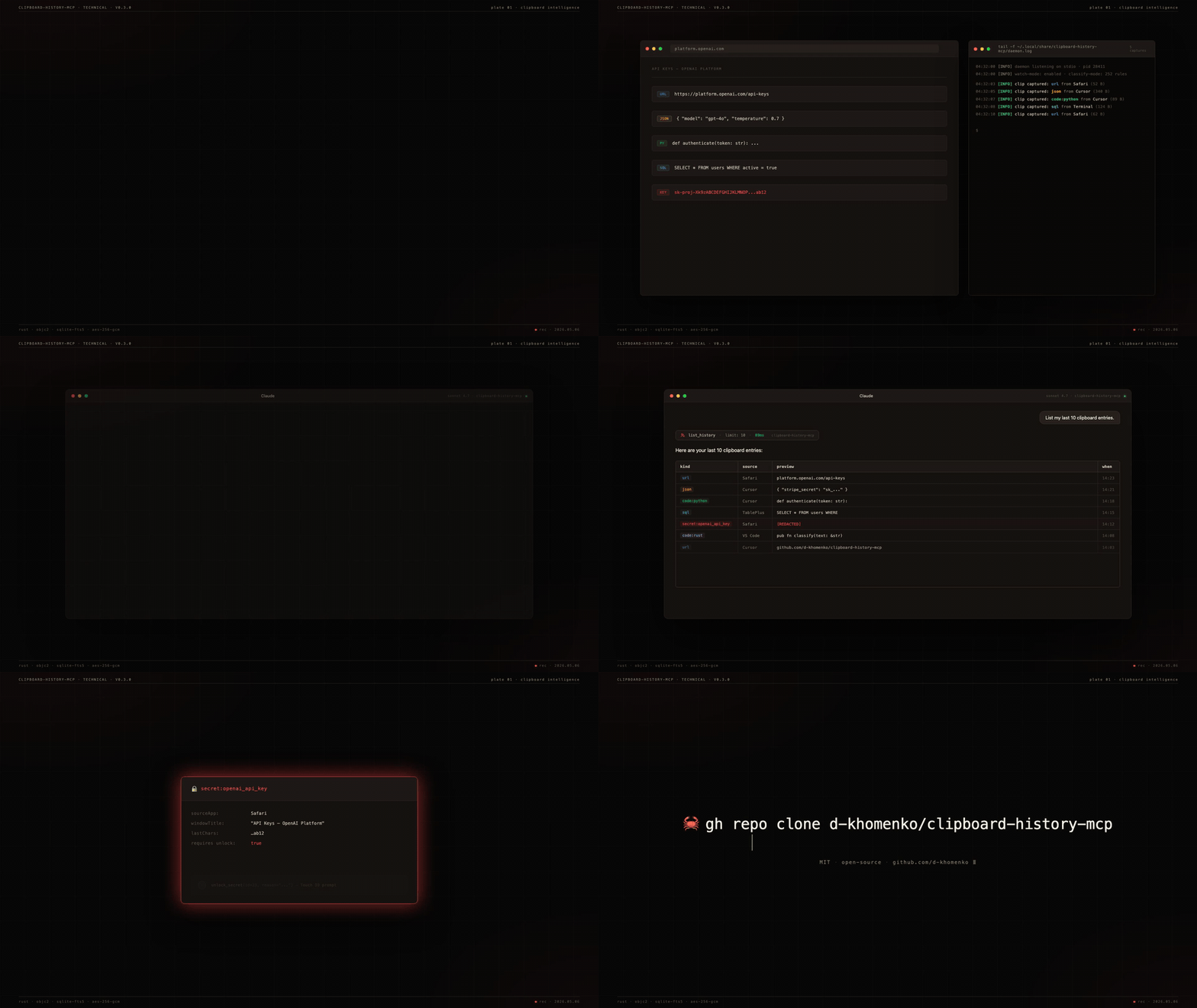
You're working in Claude. You've copied 47 things today — URLs, JSON snippets, an OpenAI key from a dashboard, a SQL query from your DB tool, half a Stripe webhook payload. Now Claude can use any of them:
You: "Find that API key I copied from the OpenAI dashboard yesterday"
Claude: Found 1 secret matching "OpenAI" — kind: openai_api_key,
source: Safari, copied 14h ago. Last 4 chars: ab12.
To reveal, call unlock_secret(id=23, reason="...").

You: "Give me all the GitHub URLs I copied"
Claude: Returns 12 unique GitHub URLs deduplicated by repo,
ranked by how often you pasted them back.

You: "There was a Stripe JSON config in the buffer — restore it to my clipboard"
Claude: Found, restoring. ✓ ready to ⌘V.

You: "What code did I copy from ChatGPT over the last 2 hours?"
Claude: 3 Python snippets, 1 SQL query, 1 shell command.

You: "Show me the screenshot I just copied"
Claude: Returns a 142×120 PNG, mime image/png, captured from Preview 2 minutes ago.
Search uses SQLite FTS5 + window-title indexing — you find clips by where you copied them, not just by content.
Why nothing else does this
| Maccy | maccy-clipboard-mcp | clipboard-history-mcp | |
|---|---|---|---|
| Captures clipboard | ✓ | (reads Maccy's DB) | ✓ |
| Classifies clip type (URL/JSON/code/SQL/secret) | ✗ | ✗ | ✓ |
| Indexes window titles for context-search | ✗ | ✗ | ✓ |
| Detects secrets at capture (252 gitleaks rules) | ✗ | ✗ | ✓ |
| Encrypts secrets at rest with Touch ID gate | ✗ | ✗ | ✓ |
| Standalone binary (no runtime needed) | n/a | ✗ | ✓ macOS + Linux |
.mcpb one-click install | n/a | ✗ | ✓ |
The other ~20 clipboard-mcp repos on GitHub only read the current clipboard. None capture history.
Install
One-click — Claude Desktop
- Download
clipboard-history-mcp.mcpbfrom the latest release. - Claude Desktop → Settings → Extensions → "Install from file" → pick the
.mcpb. - Restart Claude Desktop. Ask: "List my recent clipboard URLs."
Manual — Claude Code / CLI
curl -L https://github.com/d-khomenko/clipboard-history-mcp/releases/latest/download/clipboard-history-mcp.mcpb \
  -o clipboard-history-mcp.mcpb
unzip clipboard-history-mcp.mcpb -d ext

# register MCP
claude mcp add -s user clipboard-history -- ./ext/server/clipboard-history-mcp serve

# install background daemon (captures even when Claude is closed)
./ext/server/clipboard-history-mcp install
Quick install — cargo install
If you have a Rust toolchain (Rust 1.95+) and use Claude Code:
cargo install clipboard-history-mcp
clipboard-history-mcp install                      # start daemon
claude mcp add -s user clipboard-history -- clipboard-history-mcp serve
This pulls a release crate from crates.io and compiles locally. Slightly slower than the .mcpb drag-and-drop above (compile takes ~2 min on Apple Silicon), but it's the cleanest path for Claude Code users — three commands and you're capturing.
From source (macOS)
Requirements: Rust 1.95+, macOS 13+.
git clone https://github.com/d-khomenko/clipboard-history-mcp
cd clipboard-history-mcp
cargo build --release
./target/release/clipboard-history-mcp install                                 # start daemon
claude mcp add -s user clipboard-history -- "$(pwd)/target/release/clipboard-history-mcp" serve
Linux (X11; Wayland partial)
Requirements: a working Secret Service implementation (GNOME Keyring or KWallet — comes with most desktop installs), xvfb not required for normal use (only for headless CI).
git clone https://github.com/d-khomenko/clipboard-history-mcp
cd clipboard-history-mcp
cargo build --release

# Set a master password (used to wrap your AES master key)
./target/release/clipboard-history-mcp migrate-v2

# Install systemd user service
./target/release/clipboard-history-mcp install
# Optional: keep daemon running after logout
./target/release/clipboard-history-mcp install --linger

# Register with Claude Code
claude mcp add -s user clipboard-history -- "$(pwd)/target/release/clipboard-history-mcp" serve
Wayland note: clipboard read/write works on Wayland via arboard's portal handling. Window-title capture (opt-in via CLIPBOARD_CAPTURE_WINDOW_TITLE=1) currently only works on X11; Wayland support is deferred to v0.4.x once xdg-desktop-portal window-title APIs are widely shipped.
1Password / Bitwarden: add app names to CLIPBOARD_IGNORE_APPS so password-manager paste events are skipped:
CLIPBOARD_IGNORE_APPS="1Password,Bitwarden,KeePassXC" \
  ./target/release/clipboard-history-mcp install
Auto-mirror to Obsidian vault (optional)
If you also use Obsidian, the daemon can write a sidecar .md for every captured clip plus a daily-note timeline entry. Configure at install time:
clipboard-history-mcp install --vault ~/Documents/Obsidian/MyVault
Result: every non-secret clip lands as <vault>/clipboard/YYYY-MM/<id>-<kind>-<slug>.md with frontmatter (kind, source, captured-at), and a bullet appended to <vault>/daily/YYYY-MM-DD.md linking back to the sidecar. Secrets are never mirrored — they stay encrypted in the SQLite vault.
The daemon owns the ## Clipboard captures H2 section in your daily notes — append-only, idempotent. You can write anything else above or below it.
Try asking Claude
Copy any of these prompts into Claude after install:
List my last 20 clipboard entries.

Show me only the URLs I've copied today.

Search my clipboard history for "anthropic".

Find any code snippets in Python from the last 3 hours.

How many secrets are in my clipboard vault, by kind?

Pin the JSON I just copied — I'll need it again.

Show me only my pinned clips.

What apps did I copy from most this week?

Restore that GitHub PR link to my clipboard.
Claude picks the right tool from 15 available and answers directly.
Configuration
Set env vars in the launchd plist (install writes them) or via claude mcp add --env KEY=val:
| Variable | Default | What it does |
|---|---|---|
CLIPBOARD_POLL_MS | 1500 | Watcher poll interval (ms) |
CLIPBOARD_HISTORY_MAX | 1000 | Ring-buffer size (unpinned clips only — pinned items sit outside the ring buffer) |
CLIPBOARD_CAPTURE_WINDOW_TITLE | 0 | Capture window titles (needs Accessibility permission) |
CLIPBOARD_IGNORE_APPS | (empty) | Comma-separated app display names to skip |
CLIPBOARD_NEVER_STORE_SECRETS | 0 | Paranoid mode — metadata only, no ciphertext |
CLIPBOARD_DATA_DIR | ~/Library/Application Support/clipboard-history-mcp | Override data dir |
CLIPBOARD_VAULT_PATH | (empty) | Auto-mirror non-secret clips to this Obsidian vault directory (sidecar .md per clip + bullet in daily/YYYY-MM-DD.md). Set via --vault PATH at install time. |
CLIPBOARD_MAX_BLOB_BYTES | 26214400 (25 MB) | Skip image / file pasteboards larger than this. Logs a WARN line with the source app + size. |
Tools (15)
Read
list_history(limit?, kind?, source_app?, since?, pinned_only?) | Paginated history, newest first. pinned_only=true returns only pinned clips. |
get_item(id) | Single clip by id |
search_history(query, limit?) | FTS5 BM25 across preview + window title |
get_urls(limit?) | URL clips, deduped by hostname |
get_code(language?, limit?) | Code clips, optional language filter |
get_json(limit?) | JSON clips with parsed structure |
get_secrets_index(kind?) | Secret metadata — no values |
unlock_secret(id, reason) | Decrypt one secret — gated by Touch ID |
get_stats | Counts by kind, oldest/newest, db size |
daemon_status | PID, running state |
Write
copy_item(id) | Restore a clip back to system clipboard |
pin_item(id, pinned) | Pin so it survives clear_history |
tag_item(id, tag, remove?) | Free-form tagging |
delete_item(id) | Hard delete |
clear_history(scope) | 'all' | 'older_than_days:N' | 'kind:K' |
CLI
clipboard-history-mcp daemon         # run watcher (managed by launchd)
clipboard-history-mcp serve          # MCP stdio server (Claude spawns this)
clipboard-history-mcp install [--window-titles]
clipboard-history-mcp uninstall [--keep-data]
clipboard-history-mcp status         # JSON: daemon pid, db size, etc.
clipboard-history-mcp vault list     # secret metadata
clipboard-history-mcp vault unlock N # decrypt secret #N (Touch ID)
clipboard-history-mcp doctor         # diagnose perms/Keychain/pasteboard
clipboard-history-mcp migrate-v2     # validate v0.2.x SQLite (no-op import)
clipboard-history-mcp clean-legacy [-y]  # remove the v0.3.x macOS data dir (~/Library/Application Support/clipboard-history-mcp/)
Security model
- Secrets detected at capture — 252+ gitleaks regex patterns + RFC 7519 JWT + Luhn-validated cards.
- Encryption at rest — AES-256-GCM with a 32-byte master key in macOS Keychain.
- Touch ID gate —
unlock_secretcallsLAContext.evaluatePolicy(.deviceOwnerAuthenticationWithBiometrics). 5-minute auth cache per session. - LLM-blind by default —
list_historyandsearch_historyreturn secret rows withtext: nullandpreview: "[REDACTED:kind]". The only path that returns plaintext isunlock_secret(id, reason), and thereasonargument is mandatory and audit-logged. - Paranoid mode —
CLIPBOARD_NEVER_STORE_SECRETS=1keeps metadata only; ciphertext never written. - Transient-type respect — clips marked by password managers (1Password, Bitwarden) with
org.nspasteboard.ConcealedTypeare never captured.
Architecture
src/
├── main.rs               # binary entry; clap subcommand dispatch
├── core/
│   ├── db.rs             # SQLite WAL + migrations + FTS5
│   ├── store.rs          # add/list/search/delete clips
│   ├── crypto.rs         # AES-256-GCM + Keychain
│   ├── types.rs          # classifier (url/json/sql/shell/code:lang)
│   ├── secrets.rs        # gitleaks rules + JWT + Luhn
│   ├── pasteboard.rs     # NSPasteboard via objc2
│   └── biometry.rs       # LAContext Touch ID gate
├── daemon/{watcher,context}.rs    # poll loop on pinned thread
├── mcp/tools.rs                   # 15 MCP tools via rmcp
└── cli/{install,uninstall,status,vault,doctor,migrate_v2}.rs
Tech stack: Rust 1.95 · rmcp 1.6 · tokio · objc2 · rusqlite (bundled FTS5) · aes-gcm · security-framework · objc2-local-authentication · clap 4
Performance
Daemon idle footprint, measured on Apple Silicon with default CLIPBOARD_POLL_MS=1500 and vault-mirror enabled:
| Metric | Value | How measured |
|---|---|---|
| CPU steady-state | 0.05 % | ps cumulative CPU-time delta over 60 s (0.03 s / 60 s) |
| Memory (RSS) | ~24 MB | ps -o rss |
| Power draw (avg) | ~1 mW | 0.05 % of an E-core (~1 W full tilt) running continuously |
| Battery impact | ~1 % per 3 weeks | 1 mW × 504 h = 0.5 Wh on a 52 Wh MacBook Air battery, assuming 24/7 continuous run |
See the two-squares comparison at the top of this README for a visual on how this compares to a single Chrome tab.
Burst cost on each ⌘C: ~30 ms tick at 1–3 % CPU (secret-classifier regexes + FTS5 index + AES-GCM + optional vault file write), then back to idle. Activity Monitor's Energy Impact column reports ~0 — below its detection threshold.
Linux numbers untested but expected similar order of magnitude (arboard polling + SQLite is portable).
FAQ
Does this run on Linux/Windows?
Linux: yes since v0.4 (X11 + Wayland clipboard via arboard; window-title capture is X11-only for now). See the Linux install section above. Windows: not yet — arboard works there, but the launchd/systemd-style installer hasn't been ported. PRs welcome.
What if I copy a 50MB blob?
Currently captured. A CLIPBOARD_MAX_BYTES guard is on the roadmap.
Can Claude leak my secrets?
Not without you (a) installing this tool, (b) approving Touch ID, (c) the LLM choosing to call unlock_secret with a reason that gets logged. The text field for secret rows is always null in list_history/search_history.
Does it sync across Macs?
No native cross-device sync — the SQLite vault stays local. If you set --vault PATH to point inside a synced Obsidian vault (iCloud, git, Syncthing, etc.), the per-clip sidecar markdown files follow your sync — but secrets are never mirrored to the vault, so password-protected items remain on the originating machine.
Can I use this with Maccy already running?
Yes. They don't conflict — Maccy provides UI, this provides the MCP layer. Both poll NSPasteboard.changeCount independently.
What about [other clipboard manager]?
Same answer — there's no exclusive lock. Worst case, both store the same clip; storage cost is trivial.
Changelog
See CHANGELOG.md. Latest: v0.3.0-alpha.0.
Contributing
See CONTRIBUTING.md. PRs welcome — issues with macOS 13/14 reproductions especially.
Sponsor
Pre-1.0 alpha. Built solo, in bursts. If clipboard-history-mcp finds you a
leaked key, saves you from typing the same JSON twice, or just makes Claude
slightly more useful at your terminal — consider becoming a backer or
Founding Sponsor on Patreon.
- $3 / month — backer ☕ — name in
SUPPORTERS.md, Discord role - $10 / month — founding sponsor 🥇 — name + avatar in this README, permanently listed if you join before v1.0
Sponsorship is gratitude, not a support contract. It does not buy priority
issue triage, custom features, or response-time SLA — solo OSS doesn't scale
that way. What it buys: visibility, the occasional roadmap vote, and proof
that this kind of tool is worth maintaining past 0.x.
GitHub Sponsors works too — see the Sponsor button at the top of the repo.
License
MIT. vendor/gitleaks.toml is the gitleaks rule catalog (also MIT) — see vendor/README.md.
Related MCP servers

MCP SSH Gateway
SSH terminals for AI agents: stateful shells, exit codes the moment a command ends, router CLIs.

CrazySEO
Audit whether ChatGPT, Gemini and Perplexity recommend a site. Readiness checks need no keys.

AlbumentationsX MCP
AlbumentationsX MCP for batch previews, compare preview runs, segmentation masks, and exports.

Planhat MCP
Connect Planhat CRM to Claude and other MCP clients with 60 local tools across 12 resource types.

io.github.daanielcruz/gsearch
Free Google Search with inline citations for any MCP-compatible AI tool.

hledit MCP
Hash-anchored file edits for MCP clients. Rejects stale writes before they happen.