DevLens MCP Server
io.github.devlensio/devlens
Query a precomputed code graph of TS/JS/React/Next.js/Node repos via MCP—ranked files, call flow, impact, and security.
What this kind of tool is for
- Automate a build, test, or deployment step you repeat by hand.
- Review or refactor code in an existing repository without leaving your agent.
- Bridge an internal service or CLI into the agent toolset.
How to compare servers like this
- Scope of control:
- Repos and CI are hard to undo; prefer tools that ask before anything irreversible.
- Environment fit:
- Match the runtime it expects (Node, Python, a container) to what you actually run.
- Maintenance signal:
- Check the last-commit date — dev tooling that lags upstream breaks first.
- Config surface:
- Prefer tools whose environment-variable or config keys are documented plainly.
This page carries your copy-paste config: pick your MCP client in the install section on this page and use the copy button.
What is the DevLens MCP server?
DevLens is an MCP server that provides codebase intelligence by exposing a precomputed code graph (nodes, edges, and AI summaries) for TypeScript, JavaScript, React, Next.js, and Node.js repositories. Instead of re-reading files, AI agents query the graph once to get ranked, task-shaped packets of relevant code, call flows, and security findings. It ranks first across correctness, F1, latency, and token efficiency in public benchmarks against nine competing tools.
DevLens analyzes your repository once to build a type-resolved code graph with per-node technical, business, and security summaries. Your AI agent then queries this graph through MCP to retrieve ranked files, call flows, impact analysis, and security flags—all within a configurable token budget and in milliseconds. It supports TypeScript/JavaScript, Python, Java, Go, and Rust with native parsers and framework-aware edges (Next.js routes, Django ORM, Spring Boot, etc.), and is free for commercial use under AGPL-3.0.
How to install DevLens
Copy-paste configuration for popular MCP clients.
{
  "mcpServers": {
    "devlens": {
      "command": "npx",
      "args": [
        "-y",
        "@devlensio/cli",
        "mcp"
      ]
    }
  }
}
Tools & capabilities
Tools this server exposes to the agent.
resolve_context— Front-door tool that returns a task-shaped packet: ranked nodes with meanings, call flow, involved files, key code bodies, security flags, and an id map within a token budget. Supports intents: pinpoint, reference-list, flow, overview, concept, security-audit, exploratory.blast_radius— Cheap change-impact wrapper showing what depends on a symbol, packed small.find_symbols— BM25F name lookup returning nodeIds plus file:line without graph traversal or source code.get_node— Full detail for one node including technical, business, and security summaries plus metadata.get_node_code— Raw source code for one node (expensive, recommended as a last resort).get_blast_radius— Upstream dependents of a symbol out to a chosen radius.get_khop— Downstream dependencies of a symbol out to a chosen radius.get_summaries— Batch-read summaries for multiple node ids.get_security_issues— Security findings ranked by severity then impact, with severity distribution and assessment coverage.check_freshness— Check if the graph is stale versus the working tree.architecture_brief— One-call architecture report covering modules, routes, flows, and health.security_brief— Ranked security report with blast-radius reach for each finding.review_pr— PR review packet including diff, impact, tests, and security delta.onboarding_tour— Modules, routes, flows, and glossary for new team members.analyze_changes— Commit diff impact analysis.
Use cases
- Ask your AI agent 'how does auth work in this repo?' and get a ranked packet of relevant files, call flows, and security issues instead of file-by-file re-reading.
- Analyze the blast radius before changing a symbol: instantly see what breaks and how far the impact reaches.
- Generate PR review packets automatically with diff, impact analysis, test coverage, and security delta.
- Onboard new developers with an interactive architecture brief covering modules, routes, data flows, and key concepts.
- Run security audits with per-node severity scores, exploit descriptions, and impact reach for each vulnerability.
DevLens MCP server FAQ
DevLens is an MCP server that exposes a precomputed code graph of your TypeScript, JavaScript, Python, Java, Go, or Rust repository. Instead of re-reading files, your AI agent queries the graph to get ranked files, call flows, security findings, and impact analysis—all within milliseconds and a configurable token budget.
Yes. DevLens is free and open-source under AGPL-3.0, including for commercial use. You can use it offline for structure-only analysis, or optionally add AI summaries by configuring an LLM provider (OpenAI, Anthropic, local models like Ollama, etc.).
Install the CLI with `npm install -g @devlensio/cli`, analyze your repo with `devlens analyze . --summarize`, then add the MCP server to your agent config. For Cursor, add to `.cursor/mcp.json`: `{"mcpServers": {"devlens": {"command": "devlens", "args": ["mcp"]}}}`. For Claude Desktop, run `claude mcp add devlens -- devlens mcp`.
No API key is required for structure-only analysis (the graph and search index). AI summaries are optional; if you want them, you configure an LLM provider once (OpenAI, Anthropic, local Ollama, etc.) via `devlens init`.
DevLens natively parses TypeScript/JavaScript (React, Next.js, Express, Node.js), Python (FastAPI, Django, Flask), Java (Spring Boot), Go (Gin, Echo, net/http), and Rust (axum, actix-web). Each language uses its own parser (TS compiler, Python ast, JavaParser, go/types, syn) for type-resolved edges.
DevLens averages 67 ms per query and returns packets 6.7× smaller than the closest competitor. It is ranked first on correctness, F1, recall, and precision in public benchmarks against nine tools, and guarantees 100% token-budget compliance.
README (reference)
Source of truth, from the repository.
DevLens
Codebase Intelligence for AI agents and Developers.
Analyze your repo once. Your AI agent then queries a precomputed code graph through MCP — ranked files, call flow, impact, and security — instead of re-reading your codebase file by file. Ranked first of nine tools on every quality measure in our public benchmark.



Join the DevLens Cloud Waitlist →
</div>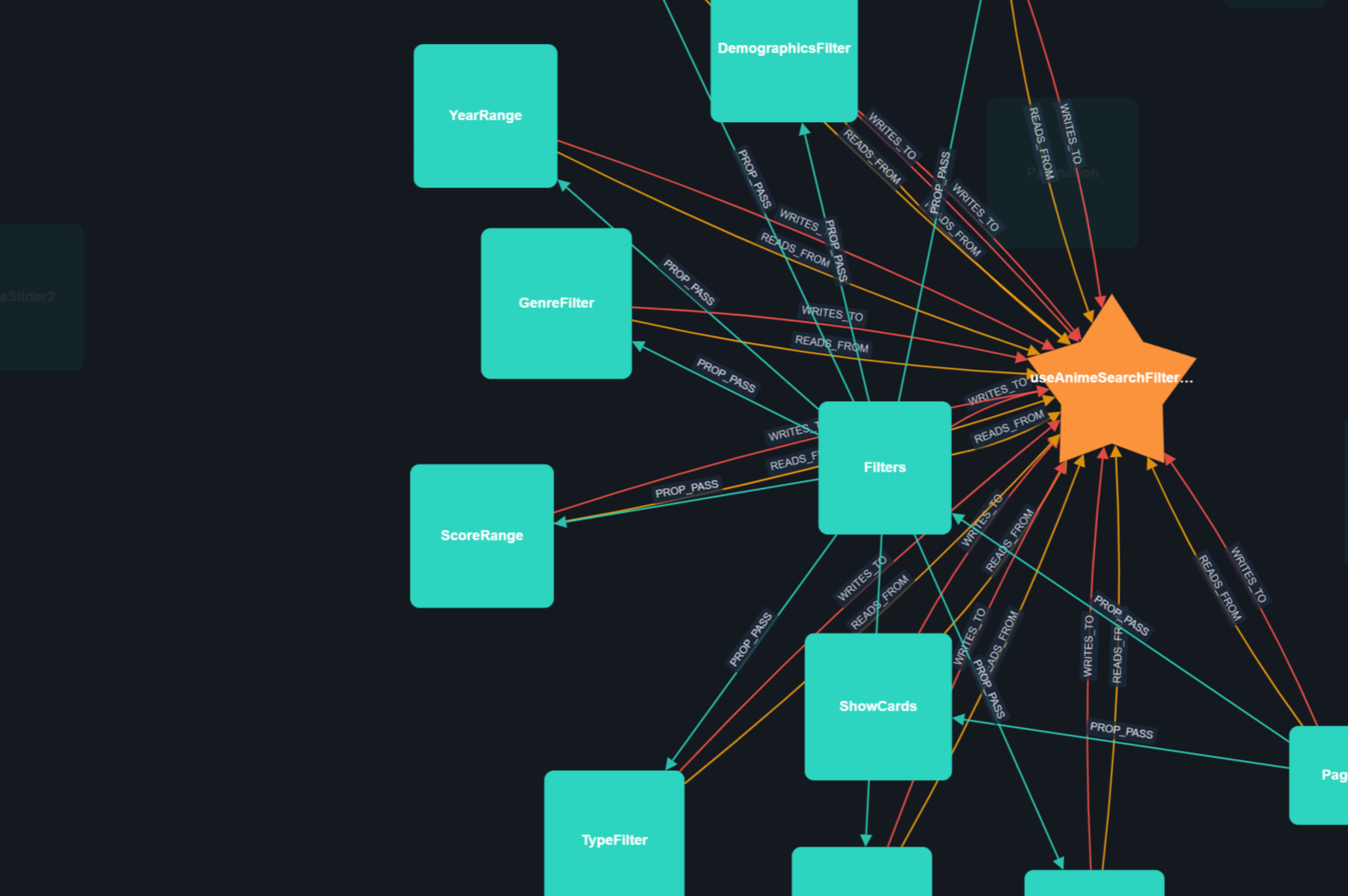
Why DevLens?
- Your agent stops burning tokens. One MCP call returns a task-shaped packet — the files and symbols that matter, ranked, within a token budget. No grep loops, no re-reading files.
- It wins the benchmark. First of nine tools on correctness, F1, recall, and precision — the only tool that leads every quality column.
- It is fast and small. 67 ms per call, packets 6.7× smaller than the closest graph competitor, and it never exceeds the token budget you set.
- Developers get it too. Interactive graph visualization, blast radius before you change a symbol, PR review packets, and per-node security analysis.
Benchmarks
We benchmarked DevLens MCP against seven other code graph and retrieval tools — Graphify, codegraph, serena, semble, codebase-memory, and others. One headless coding agent, one model, one real TypeScript repository, 133 real questions written from actual pull requests and symbols, two runs each: 2,394 agent runs in total.
| DevLens OSS | Graphify | codegraph | serena | semble | codebase-memory | |
|---|---|---|---|---|---|---|
| Correctness | 🥇 0.694 | 0.662 | 0.674 | 0.656 | 0.652 | 0.644 |
| F1 | 🥇 0.562 | 0.548 | 0.555 | 0.545 | 0.535 | 0.544 |
| Latency per call | 67 ms | 2,469 ms | 2,736 ms | 106 ms | 508 ms | 1,100 ms |
| Response packet | 2,230 tokens | 15,020 tokens | 6,339 tokens | 8 tokens* | 736 tokens | 294 tokens |
| Token budget compliance | 100% | median 2.5× over | — | — | — | — |
| Graph size | 10,346 nodes / 19,847 edges | 16,999 / 71,694 | not measured | — | — | 26,299 / 99,321 |
* serena's symbol tool returned no results on every question, so its tiny packet means it found nothing, not that it is efficient. The low response-payload figures for codebase-memory, semble, and BM25-style tools come from line lists rather than structured answers.
DevLens is the only tool ranked first on correctness, F1, recall, and precision — and it wins with the fastest calls and one of the smallest packets. Head-to-head against Graphify on identical questions: packet 6.7× smaller on all 54 of 54 comparable questions, ~37× faster per call, and a paired 15 wins to 9 losses.
The pattern behind the numbers: syntactic tools return big blobs or bare line lists. DevLens returns a task-shaped packet from a type-resolved graph — the files that matter, ranked, within your token budget, in milliseconds.
Full methodology, all nine tools, five languages: docs/PUBLIC-BENCHMARKS.md
How DevLens compares
DevLens is the only tool in this space that combines native semantic parsing, per-node AI summaries with per-node security analysis, and framework-aware data edges — and the only option you can use commercially under AGPL.
| Dimension | DevLens | Graphify | GitNexus | Sourcegraph | DeepWiki |
|---|---|---|---|---|---|
| Parsing depth | Native semantic parsers (TS compiler, Python ast, go/types, JavaParser, syn), type-resolved | tree-sitter (syntactic, no type info) | tree-sitter + native bindings (no type info) | SCIP/LSIF symbol index + language servers (no semantic parse) | LLM reads source directly (no structured parser) |
| Edge quality | Type-checked IMPLEMENTS/EXTENDS, framework routes (Next.js, Django, Spring, Gin, axum), ORM data edges (READS_FROM/WRITES_TO) | EXTRACTED/INFERRED/AMBIGUOUS tags, no type or framework awareness | call chains, clusters, route_map, no ORM or data edges | precise symbol cross-references (SCIP), no type-checked inheritance | docs-level relationships (no structured graph) |
| Per-node AI summaries | Technical + business + security with severity on every node | No (LLM used for docs and concepts) | No (embeddings for semantic query) | Via Cody (hover and inline docs, chat-level) | Auto-generated docs per symbol (no security, no technical/business split) |
| Security analysis | Per-node severity + blast-radius reach with real exploit descriptions | No | Partial (opt-in PDG/taint) | No (compliance certifications only) | No |
| Agent / MCP integration | CLI + self-describing MCP server + Web UI | CLI + local skill (no MCP) | CLI + 17-tool MCP + hooks (AGENTS.md) | MCP server (cross-repo search, not per-repo graph queries) | Unknown (no public MCP integration) |
| Language coverage | TS/JS, Python, Java, Go, Rust with native parsers for each | 12 code families + docs/images (shallow syntactic) | Many via tree-sitter (Dart/Kotlin/Swift), shallow syntactic | 30+ via language servers (symbol-level, no semantic edges) | Any (LLM reads source, no structured extraction) |
| License / pricing | AGPL-3.0, free, including commercial use | Apache-2.0 | PolyForm Noncommercial (cannot use commercially) | Open-source core, Enterprise paid | Free for public repos, enterprise tiers unlisted |
(Feature comparison from public sources, Aug 2026.)
Why teams choose DevLens: semantic edges that syntactic tools cannot produce, per-node security analysis no other open-source tool provides, benchmark-winning retrieval quality, and a single MCP front door — free for commercial use.
Quick Start
Step 1 — Install the CLI
npm install -g @devlensio/cli
Or install the standalone binary (no Node.js needed):
# Linux / macOS
curl -fsSL https://raw.githubusercontent.com/devlensio/devlensOSS/main/scripts/install.sh | sh

# Windows (PowerShell)
irm https://raw.githubusercontent.com/devlensio/devlensOSS/main/scripts/install.ps1 | iex
Step 2 — Configure a model (optional)
Only needed if you want AI summaries. Structure-only analysis works offline with no API key.
devlens init
This walks you through picking a provider and model interactively. Local models work too (Ollama, 8 GB+ RAM). See Configuration for recommended models.
Step 3 — Analyze your repo
cd your-project
devlens analyze . --summarize
This builds the graph, generates summaries, and creates the search index — once. After this, everything below is instant.
Step 4 — Connect your AI agent
Start the MCP server:
devlens mcp
Then register it in your agent. Pick your tool:
Claude Code / Claude Desktop
claude mcp add devlens -- devlens mcp
Cursor — add to .cursor/mcp.json:
{
  "mcpServers": {
    "devlens": { "command": "devlens", "args": ["mcp"] }
  }
}
Codex — add to ~/.codex/config.toml:
[mcp_servers.devlens]
command = "devlens"
args = ["mcp"]
Hermes — add to config.yaml:
mcp:
  servers:
    devlens:
      command: devlens
      args: [mcp]
Any other MCP client — the server speaks standard MCP over stdio. Point your client at the command devlens mcp. For an HTTP transport instead:
devlens mcp http -p 7000
The server self-describes its full tool list through tools/list, so your agent discovers everything on its own. That's it — ask your agent "how does auth work in this repo?" and watch it query the graph instead of reading files.
What your agent can ask
| Tool | What it does |
|---|---|
resolve_context | The front door. One call returns a task-shaped packet: ranked nodes with one-line meanings, call flow, involved files, key code bodies, security flags, and an id map — all within a token budget. Intents: pinpoint, reference-list, flow, overview, concept, security-audit, exploratory. |
blast_radius | Cheap change-impact wrapper: what depends on a symbol, packed small. |
find_symbols | Cheap BM25F name lookup: nodeIds plus file:line, no graph, no source. |
get_node | Full detail for one node: technical, business, and security summaries plus metadata. |
get_node_code | Raw source for one node (expensive, so use it last). |
get_blast_radius / get_khop | Upstream dependents or downstream dependencies out to a chosen radius. |
get_summaries | Batch-read summaries for several node ids. |
get_security_issues | Security findings ranked by severity then impact, with the severity distribution and how much of the graph was assessed. |
check_freshness | Is the graph stale versus the working tree? |
Plus repo-level tools: architecture_brief (one-call architecture report), security_brief (ranked security report), review_pr (PR review packet), onboarding_tour (modules, routes, flows, glossary), analyze_changes (commit diff impact), and more — 24 tools in total.
Every response carries a provenance block (commitHash, analyzedAt, hasGit), so your agent always knows which snapshot answered the question.
Full reference:
docs/mcp-reference.md
Supported languages
DevLens parses five language families with native parsers (no AI, no regex, no tree-sitter) and understands their frameworks. Summaries are never generated silently: you confirm before tokens are spent, and structure-only analysis needs no provider at all.
| Language | Frameworks / stacks the graph understands | What gets parsed |
|---|---|---|
| TypeScript / JavaScript | React, Next.js (app and pages router), Express/Hono/Fastify, React Router, TanStack Router, any Node | components, hooks, state stores, classes, methods, functions, routes |
| Python | FastAPI, Flask, Django (+DRF), SQLAlchemy / Django ORM, Celery, Pydantic | classes, methods, functions, routes, data models |
| Java | Spring Boot (controllers, JPA, Spring Data repositories) | classes, methods, interfaces, enums, routes |
| Go | net/http, Gin, Echo, chi, Fiber, GORM, database/sql | structs, interfaces, methods, functions, routes |
| Rust | axum, actix-web, rocket, utoipa, Diesel | structs, enums, traits, impl blocks, methods, functions, routes |
Each repo is analyzed with its language's own parser (Python ast, JavaParser, Go go/ast plus go/types, Rust syn, TS compiler API), so edges are real: type-checked interfaces (IMPLEMENTS), framework routes (HANDLES), and ORM data layers (READS_FROM, WRITES_TO).
For developers: the Web UI
For when you want to see your codebase laid out as an interactive graph.
Open the Web UI, paste your repo path, and explore a force-directed canvas. Click any node to see its summaries, callers, callees, and security flags. Search, filter, and diff commits across versions. The Project panel shows search index readiness with a one-click reindex action.
bun start # from the source repo: API + Web UI on one port (http://localhost:3000)
The Web UI runs from the source tree, it is not bundled into the installed CLI binary.
CLI
For scripts, CI, and fast answers without leaving the terminal. Every command supports --json for piping into scripts, -v/--verbose for diagnostics, and --quiet for minimal output.
Analyze and summarize
| Command | What it does |
|---|---|
devlens detect [path] [--deps] | Inspect a repo before analyzing: language, manifest, dependency count, source files |
devlens analyze [path] [--summarize] [--force-summarize] | Build the graph and its search index (optionally add AI summaries) |
devlens summarize [target] | (Re)generate technical, business, and security summaries |
devlens status | Which repos are analyzed, their language and summary coverage |
devlens doctor | Environment health check: git, storage, LLM provider, and the four extractor runtimes (go, rust, java, python) |
devlens init | First-time setup: configure the LLM provider interactively |
Explore and understand
| Command | What it does |
|---|---|
devlens overview | Big picture: language, framework, stats, central nodes |
devlens top-nodes [-l <n>] | Highest-scoring (most central) nodes |
devlens find-nodes <name> [-t <type>] | Search by name, type, file, or severity (for example -t ROUTE) |
devlens nodes-in-path <path> | All nodes in a file or folder |
devlens get-node <id> | Full detail for one node: summaries, callers, callees |
devlens node-code <id> | Raw source for a node (expensive, prefer get-node) |
devlens architecture | One-call architecture brief: modules, routes, flows, health |
devlens get-context <query> | Token-budgeted context packet for an agent |
Impact and quality
| Command | What it does |
|---|---|
devlens blast-radius <id> | What breaks if I change this (upstream dependents) |
devlens khop <id> | What does it depend on (downstream) |
devlens subgraph <seed> | The cohesive cluster (module) a node belongs to |
devlens cycles | Circular dependencies |
devlens security [--min-severity ...] | Security findings with severity and explanation |
devlens security-brief | Ranked security report with blast-radius reach |
devlens diff <from> <to> | Compare two analyzed commits |
devlens review-pr <from> <to> | PR review packet: diff, impact, tests, security delta |
devlens check-freshness | Is the graph stale versus HEAD? |
Manage and integrate
| Command | What it does |
|---|---|
devlens config | View or set LLM provider config (~/.devlens/config.json) |
devlens repos | List analyzed repos |
devlens graphs list | delete | Manage stored graphs |
devlens reindex [graphId] [commitHash] [--force] | Rebuild the local search index (.search.json) without re-analyzing. No arguments reindexes the latest commit of every graph |
devlens serve | Start the backend HTTP API only (used by the MCP server and the Web UI) |
devlens mcp | Run the MCP server (see Quick Start) |
Hands-on examples
devlens analyze . --summarize             # graph + summaries + search index
devlens find-nodes -t ROUTE               # every route in the app
devlens blast-radius "src/auth/login.ts::login"
devlens reindex                          # index everything up front
Full reference:
src/cli/README.mdfor every command with options and examples.
How to summarize
Summaries are per-node AI descriptions that make querying much richer. Run them during analysis, or any time later:
devlens analyze . --summarize                  # during analysis (recommended)
devlens summarize .                            # current directory's repo
devlens summarize <graphId>                    # a stored graph
devlens summarize . --force-summarize          # re-generate even if summarized
devlens summarize . --provider openai --provider-name deepseek --model deepseek-v4-flash
When a repo is re-summarized, only nodes without summaries are processed, so tokens are not spent twice. Configure your provider once with devlens init.
Configuration
Config lives in ~/.devlens/config.json, set via devlens init or devlens config. Models are discovered dynamically from each provider's /models endpoint, so there are no hardcoded model lists — pick whatever fits your budget and quality bar.
devlens config --set                            # interactive setup
devlens config --provider openai --provider-name deepseek --model deepseek-v4-flash --api-key <key>
devlens config --active openai:deepseek         # switch saved provider
devlens doctor                                  # health check
What DevLens understands
A graph is per repo and per language. Node types include FILE, FUNCTION, METHOD, CLASS, INTERFACE, STRUCT, ENUM, TRAIT, IMPL_BLOCK, ROUTE, COMPONENT, HOOK, STATE_STORE, UTILITY, TEST, STORY, and THIRD_PARTY (language dependent). Every node carries an importance score plus its functional, technical, and security summaries once summarized.
Edge types (the connections the graph draws): CALLS, IMPORTS, READS_FROM, WRITES_TO, PROP_PASS, EMITS, LISTENS, WRAPPED_BY, GUARDS, HANDLES, TESTS, USES, NEXTJS_API_CALL, NAVIGATES_TO, IMPLEMENTS (class to interface, trait, or ABC), EXTENDS (class to base class). EXPORTS, THROWS, MODULE, and PACKAGE are reserved for future languages.
Router awareness: routes are real graph nodes, for Next.js (app and pages), React Router, TanStack Router, wouter, Express, Fastify, Hono, Koa, Django URLconf and DRF, Flask blueprints, @RestController (Spring), Gin, Echo, chi, plain HTTP handlers, axum, actix, and rocket.
Search index
Each analyzed commit gets a derived BM25F search index next to the graph, at ~/.devlens/graphs/<graphId>/commits/<commitHash>.search.json.
- Every
devlens analyzeanddevlens summarizerebuilds the index for the commit it produced, so search is ready immediately. - Graphs built by older DevLens versions have no index. They are indexed lazily on the first search, or you can index everything up front with
devlens reindex. - The index is derived data: deleting it is safe, it rebuilds on demand.
devlens reindex                                  # latest commit of every graph
devlens reindex <graphId>                        # every commit of one graph
devlens reindex <graphId> <commitHash> --force   # one commit, rebuilt even if present
The same operations are available over HTTP: POST /api/reindex and POST /api/reindex/:graphId?commitHash=...&force=1.
Screenshots
<div align="center"> <img src="assets/screenshot-graph.jpg" alt="Interactive graph explorer" width="48%" /> <img src="assets/screenshot-node.jpg" alt="Node inspector with summaries and security risk" width="48%" /> <img src="assets/screenshot-subgraph.jpg" alt="Focused node subgraph" width="48%" /> <img src="assets/screenshot-security.jpg" alt="Security findings" width="48%" /> <br/> <em>Graph explorer · node inspector with summaries and security risk · focused subgraph · security findings</em> </div>Why it's fast and cheaper
A node summary is roughly 50 tokens. The file it describes is roughly 2,000. Querying summaries and graph slices costs a fraction of reading files, so humans get answers faster and AI agents spend dramatically fewer tokens on the same task.
Who is this for
- Developers and teams: onboard in hours not weeks, review PRs with impact context, catch circular dependencies and god-files, keep living documentation.
- Engineering leaders: a bird's-eye architecture view, spot debt before it becomes a crisis.
- AI-augmented developers: stop letting your agent burn tokens re-reading files; it queries the graph instead.
Repository layout
devlensOSS/
├── src/
│   ├── cli/                  # `devlens` CLI (commander program + commands)
│   ├── core/                 # Shared query core (CLI + MCP, they never drift)
│   ├── mcp/                  # MCP server (stdio + HTTP) and packet renderer
│   ├── search/               # Local BM25F search stack (index, query, cache)
│   └── server/               # HTTP API for the Web UI + Next.js proxy
├── frontend/                 # Next.js graph visualizer (Cytoscape)
├── plugins/devlens/          # Deprecated agent skill source (old installs)
├── packages/skill-installer/ # @devlensio/skill (deprecated)
├── bin/ + npm/<platform>/    # Launcher and prebuilt binary packages
├── scripts/                  # Release tooling + start.mjs (bun start build-or-skip)
└── server.json               # MCP registry manifest
The analysis engine (native parsers and graph build) ships as the separate devlensio package.
DevLens Cloud
A hosted version is in development: shareable graphs, team workspaces, live per-commit documentation with node summaries, detailed PR analysis (summary, impact, security), commit diffs showing added/modified/deleted nodes, an AI-native chat over your codebase, and no local setup.
License
AGPL-3.0. Part of the devlensio family of tools.
Related MCP servers

Auto-resolves trivial Git merge conflicts so AI agents focus on complex hunks.

Observatory operated and funded by devlo: real tools on frozen tasks; intervals, cost, limits.
View repository →
Throughline
Give Claude complete understanding of your software project.

x402 Trinity
Give an agent a wallet. Pays for x402 resources within hard limits. Base + USDC, gasless.

Engraphy
Self-hosted MCP memory server: a typed knowledge graph on Postgres 16 and pgvector.