io.github.faze79/wpf-visual-tree MCP Server
io.github.faze79/wpf-visual-tree
Let AI agents inspect, debug, and drive running WPF apps—visual tree, bindings, screenshots, clicks, and keyboard input.
What is the io.github.faze79/wpf-visual-tree MCP server?
WpfVisualTreeMcp is an MCP server that allows AI coding agents to inspect and interact with running WPF applications. It exposes WPF inspection capabilities like visual tree navigation, binding analysis, property inspection, and UI interaction (clicks, text input, keyboard) through the Model Context Protocol, enabling agents to diagnose UI issues and assist with debugging without modifying the target application.
WpfVisualTreeMcp bridges the gap between AI agents and WPF debugging by providing real-time inspection of running WPF apps. It combines the deep introspection of tools like Snoop WPF with the interaction capabilities of UI automation, allowing agents to understand UI structure, diagnose binding errors, capture screenshots, and drive the application through clicks and keyboard input—all without requiring changes to the target app.
How to install io.github.faze79/wpf-visual-tree
Copy-paste configuration for popular MCP clients.
Tools & capabilities
Tools this server exposes to the agent.
wpf_list_processes— List all running WPF applications available for inspectionwpf_attach— Attach to a WPF application with optional auto-injection of the Inspector DLLwpf_get_visual_tree— Get the visual tree hierarchy of the attached application (default depth 25, max 100)wpf_get_element_properties— Get all dependency properties of a specified UI elementwpf_find_elements— Query elements by type, name, visible text, property values, and visibility state; includes screen boundswpf_find_elements_deep— Deep search across all windows including adorners and popups without result limitswpf_capture_screenshot— Capture a screenshot of the window or element; 'screen' mode captures real on-screen pixels including popups and context menuswpf_get_bindings— Get data bindings for an element including MultiBinding, converter, and StringFormat detailswpf_get_binding_errors— List all captured binding errors with classificationwpf_clear_binding_errors— Clear the captured binding errors listwpf_get_data_context— Get DataContext type, properties, INPC status, and inheritance chainwpf_get_resources— Enumerate resource dictionaries at any scopewpf_get_styles— Get applied styles and templates for an elementwpf_watch_property— Monitor a property for changes in real-timewpf_evaluate_binding— Explain why a property has its value, including value source and binding resolution pathwpf_explain_triggers— Evaluate Style and ControlTemplate triggers against current state and attribute property values to their sourcewpf_snapshot— Capture an element subtree's state (layout, visibility, brushes, text) under a labelwpf_diff— Diff two snapshots to measure exactly what changed (property values, added/removed elements)wpf_set_property— Live-edit a dependency property at runtime for testing without rebuildingwpf_revert_property— Undo wpf_set_property edits and restore prior binding/value/default
Use cases
- Diagnose why data bindings are failing in a running WPF application by inspecting binding errors and DataContext state
- Automate UI testing by having an AI agent find controls by visible text, fill forms, click buttons, and verify results
- Debug layout and styling issues by capturing screenshots and inspecting the visual tree hierarchy in real-time
- Assist with UI refactoring by analyzing the current visual tree structure and suggesting improvements
- Verify that triggers and styles are firing correctly by evaluating their conditions against the current element state
io.github.faze79/wpf-visual-tree MCP server FAQ
WpfVisualTreeMcp is an MCP server that gives AI agents the ability to inspect and interact with running WPF applications. It provides access to the visual tree, data bindings, properties, screenshots, and UI interaction (clicks, text input, keyboard) without requiring any changes to the target application.
Yes, WpfVisualTreeMcp is open-source and free to use under the MIT license.
Download the latest release or install via NuGet (`dotnet tool install -g WpfVisualTreeMcp`), then use `claude mcp add wpf-visual-tree -- C:/path/to/WpfVisualTreeMcp.Server.exe` or manually add it to `.mcp.json` in your project root with the path to the executable.
Add the server to `.cursor/mcp.json` with the path to `WpfVisualTreeMcp.Server.exe` and restart Cursor.
No, WpfVisualTreeMcp does not require any authentication or API keys. It works by injecting into running WPF processes on your local machine.
Windows 10/11, .NET 8.0 Desktop Runtime or SDK, and a running WPF application to inspect.
README (reference)
Source of truth, from the repository.
WpfVisualTreeMcp
<!-- mcp-name: io.github.faze79/wpf-visual-tree -->




Let AI agents see, debug and drive running WPF apps. Snoop + Playwright for AI, exposed over the Model Context Protocol — visual tree, data bindings, screenshots, clicks, text input and keyboard, against any running WPF process, no source changes needed.
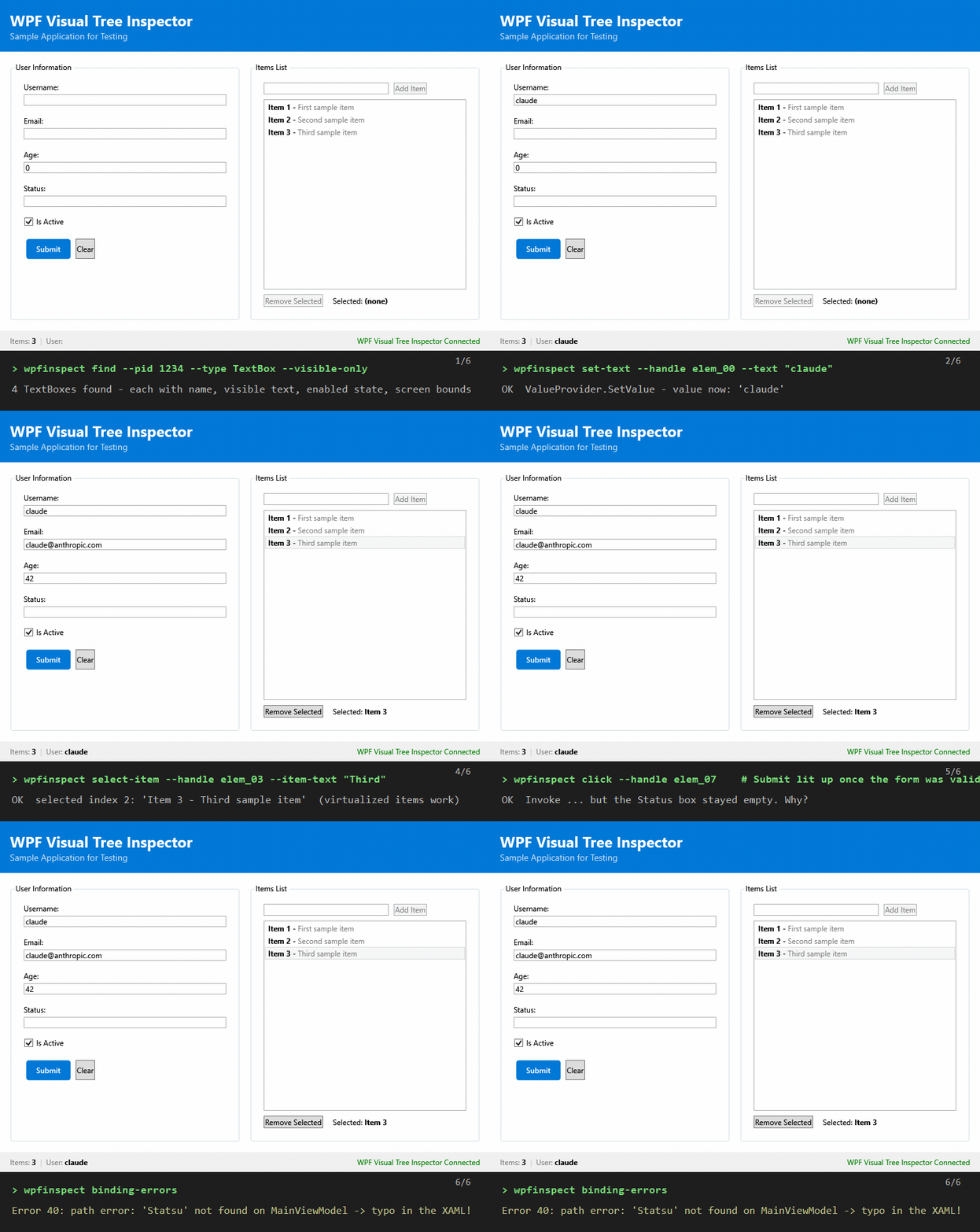
An AI agent queries controls by visible text, fills the form, selects a list item, clicks Submit — then explains why the Status box stayed empty by pulling the app's binding errors. Every step is one MCP tool call (or CLI command).
Quickstart (60 seconds)
- Download and extract the latest release zip (requires the .NET 8 Desktop Runtime).
- Register it in your MCP client — for Claude Code, add to
.mcp.json:{ "mcpServers": { "wpf-visual-tree": { "command": "C:/path/to/WpfVisualTreeMcp.Server.exe", "args": [] } } } - Ask your agent: "Look at my running WPF app and tell me why the Save button is disabled."
Prefer the terminal? The same exe is a full CLI: WpfVisualTreeMcp.Server.exe help.
Overview
WpfVisualTreeMcp is a Model Context Protocol (MCP) server that allows AI coding agents (Claude Code, Cursor, GitHub Copilot) to inspect and interact with running WPF applications. Think of it as giving your AI assistant the same capabilities as tools like Snoop WPF or Visual Studio's Live Visual Tree.
Why This Matters
Debugging WPF UI issues traditionally requires manual inspection with specialized tools. This project bridges that gap by exposing WPF inspection capabilities through MCP, enabling AI agents to:
- Understand UI structure during code reviews
- Diagnose binding errors automatically
- Suggest fixes for layout issues
- Assist with UI refactoring tasks
- Analyze visual tree hierarchies in real-time
Features
Core Inspection
- Process Discovery - List all running WPF applications available for inspection
- Visual Tree Navigation - Traverse the complete visual tree hierarchy
- Logical Tree Access - Navigate the logical tree structure
- Property Inspection - Read all dependency properties of any UI element
Binding & Resources
- Binding Analysis - Inspect bindings with converter, StringFormat, FallbackValue, MultiBinding support
- DataContext Inspection - View DataContext type, properties, INPC status, and inheritance chain
- Binding Error Detection - Automatically capture and report binding errors with classification
- Resource Enumeration - Browse resource dictionaries at any scope
- Style Inspection - View applied styles and templates
Search & Monitoring
- Element Search - Find elements by type, name, or property values
- Deep Search - Search entire tree including AdornerLayer and Popup elements
- Property Watching - Monitor property changes in real-time
Interaction & Export
- Screenshot Capture - Capture window/element screenshots visible to AI agents
- Element Highlighting - Visually highlight elements in the running app
- Control Click (v0.4.0) - Click elements via UI Automation (
Invoke/Toggle/Select/ExpandCollapse) or a real OS mouse click - Set Text (new in v0.5.0) - Fill a TextBox/ComboBox/PasswordBox via UI Automation
IValueProvider.SetValue, with aTextBox.Text/PasswordBox.Password/ reflected-Textfallback, orphysical=trueto type via OS keyboard input (full Unicode BMP) - Send Keys (new in v0.5.0) - Send keyboard shortcuts (
Ctrl+S,Alt+F4,F5,Enter,Ctrl+Shift+F, ...) to an element or the focused window via OS keyboard input - Layout Information - Get detailed layout metrics
- Tree Export - Export visual tree to XAML or JSON format
- Auto-Injection - Inject Inspector into running WPF processes (no source changes needed); multi-architecture since v0.6.0 — a 64-bit server can inject into 32-bit WPF apps via a bundled
WpfInjectorHelper.exe
Dual-Mode CLI (new in v0.4.0)
The same WpfVisualTreeMcp.Server.exe runs as either an MCP stdio server
(no arguments, default) or as a one-shot CLI (any recognised subcommand).
Useful when the MCP server isn't connected, for scripting, and for verifying
the pipeline manually. Run WpfVisualTreeMcp.Server.exe help for the full
command list. Output is JSON on stdout; diagnostics go to stderr.
How it compares
vs. the general tool categories:
| WpfVisualTreeMcp | Snoop | FlaUI / WinAppDriver | Generic computer-use (screenshot + mouse) | |
|---|---|---|---|---|
| Consumer | AI agents (MCP) + humans (CLI) | Humans (GUI) | Test code (C#) | AI agents |
| Visual tree, dependency properties | ✅ | ✅ | ❌ (UIA view only) | ❌ |
| Data bindings, binding errors, DataContext | ✅ | ✅ | ❌ | ❌ |
| Find controls by visible text / properties | ✅ | manual | partial (UIA) | pixel guessing |
| Click / type / select / shortcuts | ✅ | ❌ | ✅ | ✅ (blind) |
| Wait for UI conditions (no sleep loops) | ✅ | ❌ | ✅ | ❌ |
| Element screenshots + popup-aware screen capture | ✅ | ❌ | partial | full screen only |
| Works without target source changes | ✅ (auto-injection) | ✅ | ✅ | ✅ |
vs. other WPF MCP servers. Most WPF MCP servers are built on UI Automation (FlaUI): they read the accessibility tree, and can only reach WPF internals — bindings, DataContext, ViewModel state — if you install their in-process probe into the app you want to inspect. This server takes the Snoop route instead: it injects at runtime, so it reads the real visual tree and diagnoses binding errors and DataContext with zero changes to the target app — nothing to add to your build, nothing to ship into production.
| WpfVisualTreeMcp | UIA-based servers (FlaUI) | Other injection-based servers | |
|---|---|---|---|
| Sees the real visual tree (not just the UIA view) | ✅ injection | ❌ accessibility tree | ✅ |
| Binding errors + DataContext without a probe in the target | ✅ | ❌ (needs in-process probe) | partial |
| Interaction surface | click (UIA + physical, double/right), set-text w/ read-back, send-keys, select-item (virtualized) | click / type / select | usually invoke-only |
| Wait for element conditions | ✅ wpf_wait_for | ✅ | ❌ |
| Popup / dropdown / context-menu screenshots | ✅ screen mode | partial | screenshot only |
| Cross-architecture injection (x64 ⇄ x86) | ✅ | n/a | ❌ |
| Dual-mode: MCP server and one-shot CLI | ✅ | ❌ | ❌ |
| Distribution | NuGet (dnx/tool) + official MCP registry | varies | varies |
In short: UIA-based tools see what accessibility exposes, and computer-use agents see pixels. This project gives the agent the same insider view a WPF developer has in Snoop — with no probe to install in the target app — plus the widest set of hands to act on it, over a protocol every AI coding tool speaks.
Installation
Prerequisites
- Windows 10/11
- .NET 8.0 SDK or later
- A WPF application to inspect
Installation
Option 1: .NET tool / NuGet (Recommended)
dotnet tool install -g WpfVisualTreeMcp # installs the `wpfinspect` command
The package is also published as an MCP server package (PackageType: McpServer),
so MCP clients that support NuGet-hosted servers can launch it directly:
dnx WpfVisualTreeMcp # runs the MCP stdio server
Option 2: Download Release
Download the latest release from GitHub Releases:
- Download
WpfVisualTreeMcp-vX.X.X-win-x64.zip - Extract to a folder (e.g.,
C:\Tools\WpfVisualTreeMcp) - The MCP server executable is
WpfVisualTreeMcp.Server.exe
Option 3: Build from Source
git clone https://github.com/faze79/WpfVisualTreeMcp.git
cd WpfVisualTreeMcp
dotnet build -c Release
Configuration
The server uses the official Microsoft/Anthropic MCP SDK for .NET, providing guaranteed compatibility with Claude Code and other MCP clients.
Claude Code
Option 1: Command Line (Recommended)
Use the claude mcp add command to add the server directly:
# Add to current project only
claude mcp add wpf-visual-tree -- C:/path/to/WpfVisualTreeMcp/publish/WpfVisualTreeMcp.Server.exe

# Add globally (available in all projects)
claude mcp add --scope user wpf-visual-tree -- C:/path/to/WpfVisualTreeMcp/publish/WpfVisualTreeMcp.Server.exe
You can verify the server was added:
claude mcp list
Option 2: Project-level JSON Configuration
Create or edit .mcp.json in your project root:
{
  "mcpServers": {
    "wpf-visual-tree": {
      "command": "C:/path/to/WpfVisualTreeMcp/publish/WpfVisualTreeMcp.Server.exe",
      "args": []
    }
  }
}
Option 3: Global JSON Configuration
Add to ~/.claude/settings.json:
{
  "mcpServers": {
    "wpf-visual-tree": {
      "command": "C:/path/to/WpfVisualTreeMcp/publish/WpfVisualTreeMcp.Server.exe",
      "args": []
    }
  }
}
Important Notes:
- Use absolute paths to the built
.exefile - Use forward slashes (
/) in paths on Windows - Build in Release mode for production:
dotnet build -c Release - Restart Claude Code after configuration changes
Cursor
Add to your Cursor settings (.cursor/mcp.json):
{
  "mcpServers": {
    "wpf-visual-tree": {
      "command": "C:/path/to/WpfVisualTreeMcp/publish/WpfVisualTreeMcp.Server.exe",
      "args": []
    }
  }
}
Self-Hosted Mode (Recommended)
For your WPF application to be inspectable, add a reference to the Inspector DLL and initialize it on startup:
-
Add a project reference to
WpfVisualTreeMcp.Inspector -
In your
App.xaml.cs:
using System.Diagnostics;
using System.Windows;
using WpfVisualTreeMcp.Inspector;

public partial class App : Application
{
    protected override void OnStartup(StartupEventArgs e)
    {
        base.OnStartup(e);

        // Initialize the WPF Visual Tree Inspector
        InspectorService.Initialize(Process.GetCurrentProcess().Id);
    }

    protected override void OnExit(ExitEventArgs e)
    {
        InspectorService.Instance?.Dispose();
        base.OnExit(e);
    }
}
This enables the MCP server to connect to your application via named pipes for real-time inspection.
Usage Examples
List Running WPF Applications
Use the wpf_list_processes tool to show all running WPF applications.
Attach and Inspect Visual Tree
Attach to the MyApp.exe WPF application and show me the visual tree of the main window.
Find Binding Errors
Check the attached WPF application for any binding errors and explain what's causing them.
Search for Elements
Find all Button elements in the visual tree that have IsEnabled set to false.
Export Visual Tree
Export the visual tree of the current window to JSON format so I can analyze the structure.
Architecture
┌─────────────────────────────────────────────────────────────┐
│                    AI Agent (Claude Code)                    │
└─────────────────────────┬───────────────────────────────────┘
                          │ MCP Protocol (stdio)
                          ▼
┌─────────────────────────────────────────────────────────────┐
│                 WpfVisualTreeMcp Server                      │
│  ┌─────────────────┐  ┌─────────────────┐  ┌─────────────┐  │
│  │   MCP Handler   │  │  Tree Navigator │  │   Injector  │  │
│  │  (Tools/Res.)   │  │   & Inspector   │  │   Manager   │  │
│  └────────┬────────┘  └────────┬────────┘  └──────┬──────┘  │
└───────────┼────────────────────┼───────────────────┼────────┘
            │                    │                   │
            └────────────────────┼───────────────────┘
                                 │ Named Pipes / IPC
                                 ▼
┌─────────────────────────────────────────────────────────────┐
│                   Target WPF Application                     │
│  ┌─────────────────────────────────────────────────────────┐│
│  │              Injected Inspector DLL                      ││
│  │  • VisualTreeHelper access                              ││
│  │  • LogicalTreeHelper access                             ││
│  │  • Property/Binding inspection                          ││
│  │  • Resource dictionary enumeration                      ││
│  └─────────────────────────────────────────────────────────┘│
└─────────────────────────────────────────────────────────────┘
For detailed architecture documentation, see docs/ARCHITECTURE.md.
Available Tools
| Tool | Description |
|---|---|
wpf_list_processes | List all running WPF applications |
wpf_attach | Attach to a WPF application (supports auto_inject for DLL injection) |
wpf_get_visual_tree | Get the visual tree hierarchy (default depth: 25, max: 100) |
wpf_get_element_properties | Get all dependency properties of an element |
wpf_find_elements | Query elements by type, x:Name, visible text, property values and visibility; results include text, automation id, enabled/visible state and screen bounds |
wpf_find_elements_deep | Same query filters without result limit, across all windows including adorners/popups |
wpf_capture_screenshot | Capture a screenshot of the window or element (returns image); mode='screen' captures real on-screen pixels including open popups, dropdowns and context menus |
wpf_get_bindings | Get data bindings for an element (includes MultiBinding, converter, StringFormat) |
wpf_get_binding_errors | List all captured binding errors |
wpf_clear_binding_errors | Clear the captured binding errors list |
wpf_get_data_context | Get DataContext type, properties, INPC status, and inheritance chain |
wpf_get_resources | Enumerate resource dictionaries |
wpf_get_styles | Get applied styles and templates |
wpf_watch_property | Monitor a property for changes |
wpf_evaluate_binding | Explain why a property has its value — value source, and for bindings a hop-by-hop path resolution pinpointing where a broken binding fails |
wpf_explain_triggers | Evaluate Style and ControlTemplate triggers against the current state (condition, current value, active, setters) — 'why doesn't this trigger fire?'; and attribute a property's value to the style setter / active trigger that set it |
wpf_snapshot | Capture an element subtree's state (layout, visibility, brushes, text) under a label |
wpf_diff | Diff two snapshots — measure exactly what a change moved (property from→to, added/removed) |
wpf_set_property | Live-edit a dependency property at runtime (type-converted), to test a change without rebuilding. State-changing, reversible. |
wpf_revert_property | Undo wpf_set_property edits (one, filtered, or all) — restores the prior binding/value/default. |
wpf_highlight_element | Visually highlight an element |
wpf_click_element | Click a control — UI Automation invoke (Invoke/Toggle/Select/ExpandCollapse) by default, physical=true for a real OS mouse click (auto-scrolls into view), click_type='double'/'right' for double/right clicks. State-changing. |
wpf_select_item | Select an item in a ComboBox/ListBox/ListView/TabControl by visible text or index — works with virtualized items. State-changing. |
wpf_wait_for | Wait until an element is visible/exists/enabled/hidden, polling in the target app — no sleep-and-retry loops. |
wpf_set_text | Set text/value of a TextBox/ComboBox/PasswordBox — UI Automation IValueProvider.SetValue by default, physical=true to type via OS keyboard input. State-changing. |
wpf_send_keys | Send a keyboard shortcut (Ctrl+S, Alt+F4, F5, Enter, ...) to an element or the focused window. State-changing. |
wpf_get_layout_info | Get layout information |
wpf_export_tree | Export visual tree to XAML or JSON |
For complete tool documentation, see docs/TOOLS_REFERENCE.md.
Roadmap
Phase 1: Core Inspection ✅
- Project structure and architecture
- Process discovery and enumeration
- Basic process attachment
- Visual tree navigation
- Property inspection
- Element search
Phase 2: Advanced Features ✅
- IPC communication via named pipes
- Binding analysis and error detection
- Resource dictionary enumeration
- Style and template inspection
- Property change monitoring (with notifications)
Phase 3: Interaction & Diagnostics ✅
- Element highlighting overlay
- XAML/JSON export
- Screenshot capture (returns MCP
ImageContentBlock) - DLL auto-injection into running WPF processes (x64/x86)
- AdornerLayer and Popup visual tree traversal
Phase 4: CLI + Driving the App ✅ (v0.4.0 / v0.5.0)
- Dual-mode executable (MCP stdio + one-shot CLI) (v0.4.0)
- Control click via UI Automation patterns (v0.4.0)
- Physical OS mouse click as opt-in fallback (v0.4.0)
- User-level Claude Code skill bundling the CLI (v0.4.0)
- Set text/value via UI Automation
IValueProvider+ fallbacks (v0.5.0) - Physical keyboard typing with Unicode BMP support (v0.5.0)
- Keyboard shortcuts (
Ctrl+S,Alt+F4,F5, ...) via OS input (v0.5.0)
Phase 5: Multi-architecture ✅ (v0.6.0)
- Cross-bitness auto-injection (64-bit server → 32-bit target)
- Architecture-matching
WpfInjectorHelper.exe(32-bit .NET 8) - Removes v0.5.0 known limitation; both x86 and x64 WPF apps drivable
Phase 6: Query engine & full driving ✅ (v0.7.0)
- Query elements by visible text, property values, visibility
- Enriched results: text, automation id, enabled/visible state, screen bounds
-
wpf_select_item— select in ComboBox/ListBox/TabControl by text or index - Double / right click; scroll-into-view before physical input
- Screen-mode screenshots (popups, dropdowns, context menus visible)
- Set-text read-back verification; weak element-handle cache
- Critical IPC serialization fix (request parameters were silently dropped)
Phase 7: Distribution & agent ergonomics ✅ (v0.7.1 / v0.8.0)
- NuGet package, installable via
dnx/dotnet tool install(MCP server package type) - Published to nuget.org (trusted publishing / OIDC) and the official MCP registry
- Binding-error capture fixed (was never wired up), IPC parameter-drop fix
-
wpf_wait_for— wait for an element/condition, no sleep-and-retry loops - Concurrent IPC connections (a long wait no longer blocks other commands)
Next up
The "change → measure → is it effective?" loop is complete: live-edit a property, then diff a before/after snapshot to see exactly what moved.
-
wpf_set_property/wpf_revert_property— live-edit a dependency property, then undo (v0.9.0) -
wpf_snapshot/wpf_diff— before/after snapshot to verify a change's effect (v0.10.0) -
wpf_evaluate_binding— explain why a property has its value; resolve a binding path hop-by-hop (v0.11.0) -
wpf_record→wpf_export_test— record a driven workflow, export an xUnit + driver test - Inspector-only NuGet package for self-hosted mode (reference instead of injection)
- Streaming binding-error / property-change notifications to the MCP client
- WinUI 3 support
See docs/ROADMAP.md for the full prioritized plan (rationale, design notes, effort, and suggested sequencing).
Contributing
Contributions are welcome! Please feel free to submit a Pull Request.
Development Setup
-
Clone the repository:
git clone https://github.com/faze79/WpfVisualTreeMcp.git cd WpfVisualTreeMcp -
Open in Visual Studio 2022 or VS Code:
code . # or start WpfVisualTreeMcp.sln -
Build and run tests:
dotnet build dotnet test -
Run the sample WPF app for testing:
dotnet run --project samples/SampleWpfApp
Project Structure
WpfVisualTreeMcp/
├── src/
│   ├── WpfVisualTreeMcp.Server/        # MCP Server (.NET 8) - Uses official MCP SDK
│   │   ├── Program.cs                  # Server initialization with MCP SDK
│   │   ├── WpfTools.cs                 # 20 WPF tools (17 inspection + click/set-text/send-keys)
│   │   ├── Cli/CliRunner.cs            # One-shot CLI front-end (v0.4.0)
│   │   └── Services/                   # Process & IPC management
│   ├── WpfVisualTreeMcp.Inspector/     # Injected DLL (.NET Framework 4.8)
│   ├── WpfVisualTreeMcp.Injector/      # Managed injection logic (CreateRemoteThread; net48 + net8.0)
│   ├── WpfVisualTreeMcp.InjectorHelper/# x86 .NET 8 helper exe for cross-arch injection (v0.6.0)
│   ├── WpfVisualTreeMcp.Bootstrapper/  # Native C++ DLL for CLR hosting
│   └── WpfVisualTreeMcp.Shared/        # Shared models & IPC contracts
├── samples/
│   └── SampleWpfApp/                   # Test application
├── tests/
│   └── WpfVisualTreeMcp.Tests/         # Unit tests (48 tests)
├── publish/                            # Published server + native DLLs
│   └── native/{x64,x86}/              # Architecture-specific bootstrapper
└── docs/                               # Documentation
Technical Details
- MCP SDK: Built with the official C# MCP SDK from Microsoft/Anthropic
- Protocol: JSON-RPC 2.0 over stdio transport
- Target Framework: .NET 8.0 (Server) / .NET Framework 4.8 + .NET 8.0-windows (Inspector, dual-target)
- IPC: Named Pipes for server-to-application communication
- Tools: 28 tools auto-discovered via
[McpServerTool]attributes (22 read-only inspection incl.wpf_wait_for,wpf_snapshot,wpf_diff,wpf_evaluate_binding,wpf_explain_triggers+ 6 state-changing:wpf_click_element,wpf_select_item,wpf_set_text,wpf_send_keys,wpf_set_property,wpf_revert_property) - CLI: same executable runs as one-shot CLI when given a subcommand (
Program.csroutes viaCliRunner.IsCliCommand)
Acknowledgments
- Inspired by Snoop WPF - the original WPF spy utility
- Built on the Model Context Protocol by Anthropic
- Thanks to the .NET and WPF community
License
This project is licensed under the MIT License - see the LICENSE file for details.
Related MCP servers

MaxStat MCP
Search 408K+ MAX channels and 86M+ posts; metrics, reactions, forwards, webhooks and usage.


OpenTranscribe MCP
Provider-independent speech-to-text with normalized transcripts over MCP.
Proton Safe MCP
Read Proton Mail, extract bounded attachment text, and create explicitly confirmed drafts.

SolidPing
Self-hostable uptime monitoring with 40 check types, distributed workers, and AI/LLM integration via MCP.
Portolan: an MCP server that charts codebases - Chart store, Harbor expeditions, Chart Room.