webfetch MCP Server
io.github.firish/webfetch
Self-hosted web search for LLM agents with semantic caching—8x fewer tokens and 3x lower cost than hosted alternatives.
What is the webfetch MCP server?
The webfetch MCP server is a self-hosted web search pipeline for LLM agents that combines multi-engine search (DuckDuckGo, Brave, Serper, Tavily), local page fetching and extraction, semantic reranking, and intelligent caching. It reduces input tokens by up to 8x and costs by 3x compared to hosted web search tools while maintaining comparable accuracy.
webfetch replaces expensive hosted web search APIs with a local pipeline you control. It searches across multiple engines (with reciprocal-rank fusion), fetches and extracts pages locally, ranks results with BM25 and neural models, compresses output to query-relevant sentences, and caches both exact and semantically similar queries. Works free with DuckDuckGo alone, or add API keys for Brave, Serper, and Tavily to improve recall. Ideal for cost-conscious deployments and agents that need fresh information without paying per-search fees.
How to install webfetch
Copy-paste configuration for popular MCP clients.
BRAVE_API_KEYsecretOptional - adds Brave to the multi-engine fusion. DDG works with no keys at all.
SERPER_API_KEYsecretOptional - adds Serper (Google results) to the multi-engine fusion.
TAVILY_API_KEYsecretOptional - adds Tavily to the multi-engine fusion.
WEBFETCH_PROVIDEROptional - search strategy: multi (RRF fusion of available engines, default), fallback (priority failover), or a single engine name like ddg.
Tools & capabilities
Tools this server exposes to the agent.
web_search— Search across multiple engines (DuckDuckGo, Brave, Serper, Tavily) with reciprocal-rank fusion, local extraction, semantic reranking, and sentence-level compression.fetch_url— Fetch and extract the full text of a specific URL, served instantly if the pipeline has previously fetched it.save_finding— Store a finding from an alternative source (marked UNVERIFIED) in the cache with automatic TTL expiration and force_fresh escape hatch.status— Check which search engines are configured and ready, view active features (semantic ranking, JS rendering, PDF extraction), and inspect cache location and size.savings_report— Display session and lifetime usage counters showing searches served from cache, fees avoided, and content-token savings.
Use cases
- Run cost-effective web search in agent loops without per-search API fees or token billing for retrieved content.
- Serve repeated and paraphrased queries instantly from semantic cache, avoiding redundant searches and API calls.
- Fetch and extract full page text on demand for cited sources, with local caching for instant retrieval on repeat visits.
- Monitor search costs and cache hit rates with detailed session and lifetime savings reports.
- Maintain a local, auditable search pipeline with control over ranking, compression, and freshness policies.
webfetch MCP server FAQ
webfetch is a self-hosted web search pipeline that replaces expensive hosted search APIs. It fuses results from multiple engines (DuckDuckGo, Brave, Serper, Tavily), fetches and extracts pages locally, ranks them with neural models, compresses output, and caches both exact and semantically similar queries—reducing tokens by 8x and costs by 3x compared to hosted tools.
Yes, webfetch works free with DuckDuckGo alone (no API key required). Adding keys for Brave, Serper, and Tavily improves recall and joins them in fusion, but all engines offer free tiers. You pay only for the keys you choose to add; there are no per-search fees or content-token billing like hosted tools charge.
In Claude Code, use `/plugin marketplace add firish/webfetch` then `/plugin install webfetch@webfetch`. In Claude Desktop or Cursor, run `claude mcp add webfetch -- uvx --from webfetch-llm@latest webfetch-mcp` or install manually with `pip install webfetch-llm[all]` then `claude mcp add webfetch -- webfetch-mcp`.
None required to start—DuckDuckGo works with zero keys. Optional API keys (BRAVE_API_KEY, SERPER_API_KEY, TAVILY_API_KEY) can be set in a `.env` file or environment variables to add those engines to the fusion and improve recall. Keys are read at server startup and never logged.
Fresh searches take 10–40 seconds (real pages are fetched and ranked locally). Cached queries (exact or semantic matches) return instantly. Hosted search APIs return in ~10s and snippet APIs in ~6s, so webfetch trades latency for cost and token savings. If you need sub-second search, this is not the right tool.
Yes. Import `WEB_SEARCH_TOOL` and `handle_web_search` from webfetch, add the tool to your Claude API calls, and pass the model's tool input to `handle_web_search()`. A complete example with prompt caching is in `examples/agent_loop.py`. Remember to include today's date in your system prompt so the model will search for recent events.
README (reference)
Source of truth, from the repository.
webfetch
<!-- mcp-name: io.github.firish/webfetch -->Web search for LLM agents that you run yourself - up to 8x fewer input tokens and 3x lower cost than hosted web_search, at the same accuracy.
Hosted web-search tools charge $10 per thousand searches and then bill you
again for every token of retrieved content they push into your context
window. webfetch replaces them with a local pipeline - multi-engine
search, page fetching and extraction, semantic reranking, sentence-level
compression - exposed as a web_search tool your model calls like any
other. And unlike every hosted tool and search API we surveyed, repeated
and paraphrased queries are served from a semantic cache for free.
(Install with pip install webfetch-llm; the import name is webfetch.)
Jump to: The headline · What you get · Getting started · Check your setup · Full benchmark results · Claude Code · Agent loop · Savings report · How it works · Caveats
Same accuracy. A third of the cost. An eighth of the tokens.
One agent loop, one model, one judge, 50 SimpleQA questions. The only thing that changes between rows is the search tool:
| search tool | accuracy | input tok/query | cost/query |
|---|---|---|---|
| Anthropic hosted web_search | 96% | 17,408 | $0.108 |
| webfetch (4-engine fusion) | 92% | 3,467 | $0.035 |
| webfetch (DDG only, $0 in fees) | 84% | 3,623 | $0.026 |
Swap Opus for gpt-5.6-sol and the same webfetch tool hits 96% - hosted parity - at $0.040/query and 2,156 tokens: an eighth of what the hosted tool pushes into your context. Full results cover every arm we ran.
These numbers are the WORST case for webfetch - measured on an empty cache. In real use the gap widens on its own: repeats and rewords serve from cache for free, and the token advantage is paid again on every later turn that keeps search results in context. It adds up to receipts like this one, from an ordinary Claude Code session:
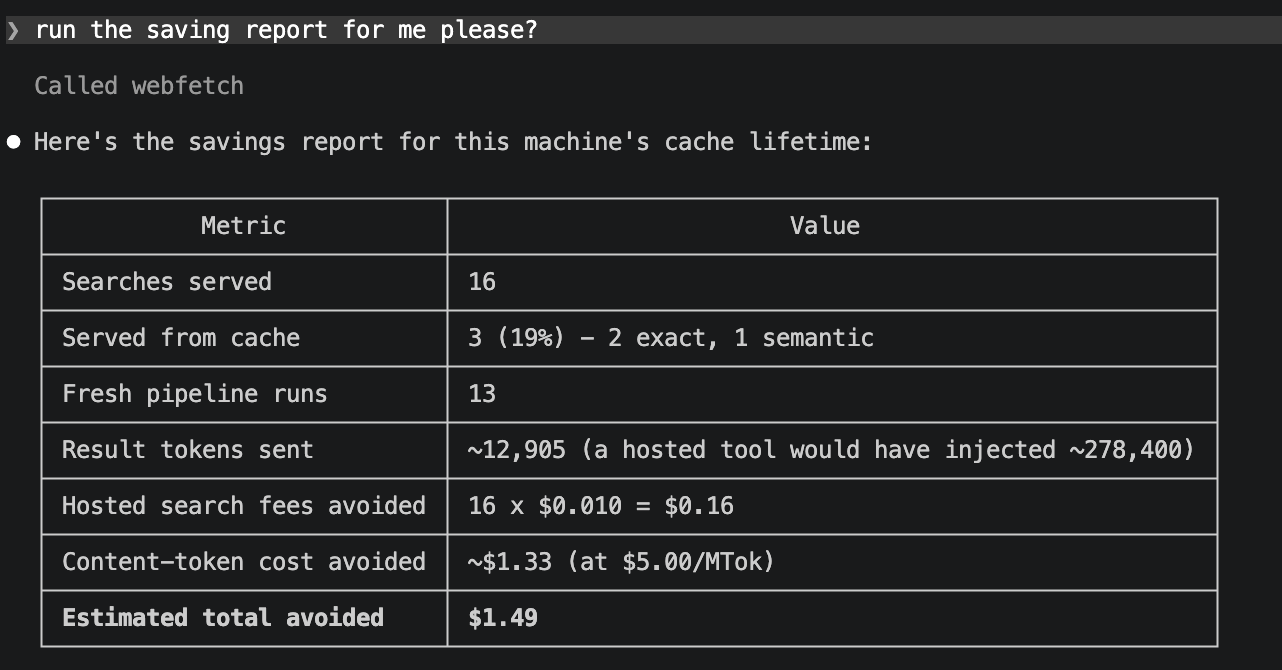
Every claim in this README is generated by an eval harness that ships in this repo - the question sets, per-question records, judging protocol, and the negative results are all in evals/, and every table can be regenerated with one command. Don't take our word for the grading: evals/results/README.md maps every table row to the raw result file that produced it, down to per-question judge verdicts.
What you get
A search pipeline you own (4-engine RRF fusion, local extraction, sentence-level compression). Results come from reciprocal-rank fusion across DuckDuckGo, Brave, Serper, and Tavily - whichever of them you have keys for. DDG needs no key, so the tool works at literally zero cost out of the box; every key you add joins the fusion automatically. Pages are fetched and extracted locally (trafilatura, readability, newspaper4k, Playwright rendering for JS pages and 403 walls), chunked, ranked by a hybrid BM25 + bi-encoder cascade with a cross-encoder on top, then compressed to the sentences that answer the query - measured 50% fewer tokens at zero recall loss.
Caching nobody else has (exact + semantic matching, volatility-aware
TTLs). Two layers in one sqlite file: page text by
URL, ranked results by query. Identical queries hit an exact cache.
Paraphrased queries hit a semantic cache - an embedding shortlist
verified by an NLI cross-encoder, tuned eval-first for precision (zero
wrong-target matches across every live run we have done). Cache lifetimes
adapt to the query: prices and scores expire in 15 minutes, current-ish
topics in 7 days, release notes and specs in 90 - classified by the
calling model's hint or a local classifier. The model sees provenance on
every cached result ([cache: semantic match to "...", 2h old, recent])
and can send force_fresh when it disagrees. No hosted tool or search
API we surveyed offers any client-visible caching at all.
The model can maintain its own cache (save_finding, labeled
UNVERIFIED, kill switch included). If a search comes up empty and
the model answers from some other source (a hosted search fallback, say),
it can call save_finding to store what it learned - marked
model-contributed, served with an explicit UNVERIFIED warning and a
force_fresh escape hatch, and aged out on the normal TTL rules. A kill
switch (SAVE_FINDING_ENABLED = False) exists for deployments that never
want unverified content cached.
Levers where models actually need them (full_results, fetch_url,
freshness, force_fresh). full_results returns
uncompressed excerpts for list and ranking queries (compression trims
parallel list items - we measured it). fetch_url pulls one cited page
in full, instantly if the pipeline has ever fetched it. freshness hints
control cache lifetime; force_fresh bypasses it.
Receipts (session and lifetime, exact counters). Usage counters
persist in the cache file;
webfetch-savings (or the savings_report tool) shows what you did not
pay hosted-search pricing for, split by this session and lifetime.
Sample below.
Getting started
The one-liner (uv installs the package on first launch, @latest picks
up new releases automatically):
claude mcp add webfetch -- uvx --from webfetch-llm@latest webfetch-mcp
Or manage the install yourself, two commands:
pip install "webfetch-llm[all]"
claude mcp add webfetch -- webfetch-mcp
The slim install (webfetch-llm without extras) starts in seconds and
runs degraded: BM25 ranking, exact-only cache, lexical compression.
[all] pulls the semantic stack (torch - a few minutes once) plus
Playwright, PDF, and table extraction; it is the configuration every
benchmark number in this README was measured on. Needs pip >= 24 in fresh
venvs (python -m pip install -U pip - older pips crash on a duplicated
extra in our dependency tree). If you install into a venv, register the
absolute path to webfetch-mcp or keep the venv active.
Keys are optional (DDG works with none) but improve recall - all the engines have free tiers:
cp .env.example .env # fill in what you have
The console scripts and the MCP server pick up a .env from the
directory they run in; exported env vars and --env flags on
claude mcp add always take precedence. import webfetch as a library
never reads .env - your process env is yours.
Check your setup
webfetch-status (or asking the model to call the status tool) answers
"is my key being picked up, and what am I actually running?":
webfetch 0.1.3

search engines:
  ddg      ready (no key needed)
  brave    ready (BRAVE_API_KEY is set)
  serper   off   (SERPER_API_KEY not set)
  tavily   ready (TAVILY_API_KEY is set)

active provider: multi(ddg+brave+tavily) (RRF fusion)

optional features:
  semantic ranking/cache/compression: on
  JS-page rendering (playwright):     on
  PDF extraction (pdfplumber):        OFF (pip install 'webfetch-llm[pdf]')
  HTML tables (pandas+tabulate):      on
  result compression:                 on (crossencoder)

cache: /Users/you/.webfetch/cache.db
  5.4 MB, 70 lifetime searches (webfetch-savings for the receipt)
Key names only - values are never printed. Configuration is environment variables, read at server start:
| variable | effect |
|---|---|
BRAVE_API_KEY, SERPER_API_KEY, TAVILY_API_KEY | each key adds an engine to the fusion |
WEBFETCH_PROVIDER | multi (default: fuse everything keyed), fallback (DDG serves, keyed engines catch its blocks), or a single engine name |
WEBFETCH_CACHE_DB | relocate the cache file (default ~/.webfetch/cache.db) |
With zero keys the default resolves to plain DDG; the status output says
so honestly rather than calling it fusion. Library users can skip env
entirely: Pipeline(search=get_search_adapter("fallback"), cache=...).
Full benchmark results
Every arm, same 50 SimpleQA questions, same judge, one same-day run (2026-07-14). Agent-loop arms share an identical loop; only the search tool differs. Costs include model tokens plus each provider's published per-search fees; ours include estimated engine fees.
| search tool | model | accuracy | input tok/q | cost/q |
|---|---|---|---|---|
| OpenAI hosted web_search | gpt-5.6-sol | 100% | 10,027 | $0.066 |
| webfetch (4-engine fusion) | gpt-5.6-sol | 96% | 2,156 | $0.040 |
| Anthropic hosted web_search | Opus 4.7 | 96% | 17,408 | $0.108 |
| webfetch (4-engine fusion) | Opus 4.7 | 92% | 3,467 | $0.035 |
| Exa (search + contents) | Opus 4.7 | 90% | 5,496 | $0.053 |
| Tavily | Opus 4.7 | 88% | 6,387 | $0.047 |
| webfetch (DDG only) | Opus 4.7 | 84% | 3,623 | $0.026 |
| webfetch (4-engine fusion) | Haiku 4.5 | 76%* | 3,021 | $0.031 |
* Haiku's failures were mostly re-searching past the turn cap, and its last few questions ran on a degraded engine set after we exhausted a free tier mid-benchmark. Treat it as a floor.
Notice the token column: webfetch results cost half the input tokens of the snippet APIs and a fifth to an eighth of the hosted tools - which is why our cost stays lowest even where per-search fees are similar.
On a second dataset of 27 questions about events from the two weeks before the run (hand-written, never published, so no vendor could have tuned on them), webfetch scored 100% with fusion and 100% with DDG alone; the hosted tools also scored 100%. Fresh events are not the hard part - the date-injection trap is.
Reproduce: python evals/run_e2e_eval.py --arms ours-multi,hosted - the
harness, datasets, and per-question records are in evals/. The
table above comes from
e2e_eval_20260714_005531.json
(plus the Haiku run and the fresh-events set - the full claim-to-file map
is in evals/results/README.md). The questions
are a seeded sample (seed 42) of OpenAI's public SimpleQA set, so
build_datasets.py regenerates the identical 50 on your machine. One
honest caveat: the live web moves between runs, and at n=50 the 96-vs-92
accuracy gap is 48-vs-46 correct - parity within noise. The token and
cost columns are the mechanically stable result.
Using it in Claude Code / Claude Desktop
Fastest route in Claude Code - install it as a plugin, two slash commands (runs the same uv one-liner under the hood):
/plugin marketplace add firish/webfetch
/plugin install webfetch@webfetch
Or register the MCP server yourself. Either way, a
new session shows webfetch under /mcp with five tools: web_search, fetch_url,
save_finding, status, and savings_report. Ask anything recent and
watch the tool calls; ask the same thing reworded and the result comes
back with a [cache: semantic match ...] header instead of a fresh
search. First call in a session is slow (encoder warm-up plus real page
fetches, 10-40s); cached calls are instant.
Toggle the server off per-session in /mcp; remove it with
/plugin uninstall webfetch or claude mcp remove webfetch, matching
how you installed it. Your cache and its receipt history live in
~/.webfetch/ and survive reinstalls. Run one server per machine - the
semantic cache assumes a single process owns its file.
Update notice: the server makes one request to pypi.org per process to
check for a newer release, surfaced as one line in savings_report
output. UPDATE_CHECK_ENABLED = False in webfetch/config.py disables
it; nothing else is ever sent anywhere.
Use it in your own agent loop
import time
import anthropic
from webfetch import WEB_SEARCH_TOOL, handle_web_search

client = anthropic.Anthropic()
messages = [{"role": "user", "content": "What did the FOMC decide this week?"}]
system = (f"Today's date is {time.strftime('%Y-%m-%d')}. "
          "Use web_search for recent facts.")

while True:
    response = client.messages.create(
        model="claude-opus-4-7", max_tokens=2000, system=system,
        tools=[WEB_SEARCH_TOOL], messages=messages,
    )
    if response.stop_reason != "tool_use":
        break
    messages.append({"role": "assistant", "content": response.content})
    results = [{"type": "tool_result", "tool_use_id": b.id,
                "content": handle_web_search(b.input)}
               for b in response.content if b.type == "tool_use"]
    messages.append({"role": "user", "content": results})
A complete version with prompt caching and adaptive thinking is in examples/agent_loop.py. The tool schema is provider-agnostic in spirit - OpenAI function calling needs only a mechanical reshape of the dict.
Put today's date in your system prompt. This is not optional. Models refuse to search for events they believe have not happened yet: on our fresh-events dataset, loops without the date declined to even call the tool on up to 10 of 27 questions ("Wimbledon 2026 hasn't taken place yet"). One line fixes it. Hosted search tools do this server-side, which is part of why nobody notices until they run their own tool.
handle_web_search never raises. Engine failures, empty results, and
malformed input come back as readable strings the model can react to,
because an exception mid-conversation kills the whole agent loop.
The savings report
Counters accumulate in the cache file as you search. Ask the model to run
the report, or run webfetch-savings yourself. The MCP tool splits this
session from lifetime, so you can see what one conversation saved:

That one-liner unpacked - a 30-search session on this machine:
| this session | lifetime | |
|---|---|---|
| searches served | 30 | 76 |
| served from cache | 17 (57%) - 10 exact, 7 semantic | - |
| search fees avoided | ~$0.30 | |
| content-token cost avoided | ~$2.56 | |
| estimated total avoided | ~$2.86 | ~$7.21 |
Counters are exact; the dollar lines are estimates with the assumptions
(hosted per-search fee, hosted tokens per call - both measured - and your
model's token price) exposed as arguments to webfetch.savings_report().
How it works
query -> multi-engine search (RRF fusion, circuit breakers)
      -> semantic query cache? serve with provenance header
      -> fetch pages concurrently (page cache by URL)
      -> extract (trafilatura -> readability -> newspaper4k -> playwright)
      -> chunk (400 chars) -> BM25 + bi-encoder fusion -> cross-encoder top 5
      -> compress to query-relevant sentences -> source-labeled result
Everything heavy is optional: without [rerank] you get BM25 ranking,
exact-match caching, and lexical compression, with a logged warning
instead of an ImportError. DDG deserves a special note: it
fingerprint-blocks automated clients with silent empty responses.
webfetch detects that (empty-with-peers in fusion, any empty in the
fallback chain), benches the engine on a circuit breaker, and routes
around it; the TLS side is handled by the ddgs dependency.
Design decisions and their measurements are documented as they happened in docs/architecture.md and docs/ROADMAP.md - including the negative results.
Caveats, honestly
- Latency. A fresh search takes 10-40 seconds - real pages get fetched and ranked locally. Hosted search returns in ~10s, snippet APIs in ~6s. Cache hits are instant. If you need sub-second search and do not care about cost, this is not your tool.
- The cache is single-process. One agent loop, one MCP server, or one notebook at a time; a shared team cache backend is on the roadmap.
- Engine free tiers are real quotas. We exhausted Brave's monthly tier during benchmarking. The resilience layer degrades gracefully, but your recall degrades with it. Engine fees in the tables are estimates from published prices.
- Answer quality depends on the model driving the tool - weak models formulate worse queries and re-search instead of reading (see the Haiku row).
- Semantic-cache recall on cross-form rewords ("what did X add" vs "X new features") is partial: measured 6/10 on real pairs after tuning, because some paraphrase forms defeat every available verifier. Misses cost a re-search, never a wrong answer.
Benchmarks and data
Three eval layers, all in evals/: an offline matcher eval that picks the semantic-cache thresholds, a live retrieval eval (recall, tokens, cache diagnostics), and the end-to-end answer eval quoted above (SimpleQA protocol: normalized exact match, then an LLM judge). Datasets are built deterministically from SimpleQA (MIT), QQP/GLUE, and FreshQA (CC-BY-SA), with provenance sidecars next to each file. The fresh-events set was hand-written against verified news sources days before the benchmark ran, specifically so no model or vendor pipeline could have seen it.
License
MIT.
Related MCP servers
113 MCP tools: oracle, escrow, compliance, remittance, AI. 12 free tools, PAYG $0.001/call.

io.github.fishcoco-code/guardrly-mcp
Non-invasive AI Agent monitoring — audit every API call to Shopify, Meta Ads, and more

Markovo File to Markdown
Convert files and authorized public HTTPS pages to Markdown with secure job and billing guidance.

LLM reasoning regime detection, cross-domain pattern transfer, and model routing.
View repository →
glass
Give AI coding agents hands to build, test, and debug native GUI apps independently.

io.github.fjnunezp75/gpu-bridge
30 GPU-powered AI services as MCP tools. LLM, image, video, audio, embeddings & more.