Shuttle MCP Server
io.github.grarcht/shuttle
Android framework preventing TransactionTooLargeException crashes by safely transporting large Serializable objects between components.
What is the Shuttle MCP server?
The Shuttle MCP server is an Android framework that prevents TransactionTooLargeException crashes by storing large Serializable objects in a warehouse and passing only a small identifier through Intent/Bundle objects. It provides a modern, structured solution for safely transporting data between Android components without the risk of binder transaction size limit violations.
Shuttle solves a critical Android problem: TransactionTooLargeException crashes that occur when passing large objects through Intents or Bundles. Instead of passing large Serializable objects directly, Shuttle stores them in a warehouse (Room database) and passes only a small identifier, keeping binder transactions within safe size limits. This eliminates a class of production crashes while providing automatic or on-demand cargo cleanup and reducing the need for constant code review governance.
How to install Shuttle
Copy-paste configuration for popular MCP clients.
Tools & capabilities
Tools this server exposes to the agent.
intentCargoWith— Transport large Serializable objects via Intent by storing them in a warehouse and passing only a small cargo IDnavigateWithShuttle— Transport cargo using Android Navigation Component with automatic warehouse storage and retrievalpickupCargo— Retrieve stored Serializable objects at the destination component using cargo IDremoveCargoBy— Manually remove specific cargo items from the warehouse by cargo IDremoveAllCargo— Manually remove all stored cargo from the warehousecleanShuttleOnReturnTo— Automatically clean up cargo when returning to a source component@ShuttleCargo— Annotation for data classes to auto-generate serialization code at build time without manual Serializable boilerplate
Use cases
- Transport large image or media objects between Activities/Fragments without TransactionTooLargeException crashes
- Pass complex data models containing byte arrays or nested objects through Navigation Component safely
- Implement automatic cargo cleanup when users navigate back to previous screens
- Build features requiring large object passing without custom database setup or table management
- Reduce production crashes and code review overhead by structurally preventing binder transaction overflows
Shuttle MCP server FAQ
Shuttle is an Android framework that prevents TransactionTooLargeException crashes by storing large Serializable objects in a warehouse (Room database) and passing only a small identifier through Intent/Bundle. This keeps binder transactions within safe size limits and eliminates a class of production crashes.
Yes, Shuttle is open-source and available on Maven Central under the MIT license.
Android min SDK 26, Kotlin 2.2.10, AGP 8.0+, and Java 21. KSP is required only when using the @ShuttleCargo annotation.
Add the Shuttle Gradle plugin to settings.gradle.kts, then add framework dependencies to build.gradle.kts. Initialize CargoShuttle as a singleton (typically with Hilt), and use shuttle.intentCargoWith() or navigateWithShuttle() to transport cargo.
No, Shuttle does not require any authentication, API keys, or external services. It uses local Room database storage.
Yes, Shuttle provides a navigateWithShuttle() extension function that integrates seamlessly with Android's Navigation Component for transporting cargo between destinations.
README (reference)
Source of truth, from the repository.
<a href="https://github.com/grarcht/Shuttle/blob/main/LICENSE.md"><img src="https://img.shields.io/github/license/grarcht/shuttle?color=white&style=plastic" alt="License: MIT"/></a> <a href="https://search.maven.org/artifact/com.grarcht.shuttle/framework"><img src="https://img.shields.io/maven-central/v/com.grarcht.shuttle/framework?color=teal&style=plastic" alt="Maven Central"/></a> <a href="https://grarcht.github.io/Shuttle/documentation/"><img src="https://img.shields.io/badge/API%20Docs-Dokka-blueviolet?style=plastic" alt="API Docs"/></a> <a href="https://developer.android.com/studio/releases/platforms"><img src="https://img.shields.io/badge/Min%20SDK-26-brightgreen?style=plastic" alt="Min SDK"/></a> <a href="https://kotlinlang.org/"><img src="https://img.shields.io/badge/Kotlin-2.2.10-purple?style=plastic" alt="Kotlin"/></a>
<br/><a href="https://androidweekly.net/issues/issue-594"><img src="https://img.shields.io/badge/Android%20Weekly-Issue%20%23594-orange?style=flat" alt="Android Weekly #594"/></a> <a href="https://androidweekly.net/issues/issue-455"><img src="https://img.shields.io/badge/Android%20Weekly-Issue%20%23455-orange?style=flat" alt="Android Weekly #455"/></a>
</div>Get To It Quick
- API Documentation
- Why Shuttle?
- How It Works
- Requirements
- Quick Start
- Usage
- Architecture
- Demo Apps
- Heads Up: Know the Tradeoffs
- AI
- Contributing
- License
🚨 Why Shuttle?
🗞️ Featured in Android Weekly #594 and Android Weekly #455, validated by the Android community twice.
You've seen this before. Maybe last week:
android.os.TransactionTooLargeException: data parcel size X bytes
It didn't show up in dev. It didn't show up in QA. It showed up at 2am, in production, for real users. Your Play Store rating took the hit before anyone on the team even knew.
So you triaged it. Filed the ticket. Wrote the fix. Reviewed the PR. Ran QA again. Cut the hotfix. And then you added it to the code review checklist, hoping the next engineer would catch it before it happened again.
They won't. Not reliably. You can't review your way out of a structural problem.
Shuttle provides a modern, guarded way to pass large Serializable objects with Intent objects or save them in Bundle objects to avoid app crashes. The crash class is structurally prevented, not governed against.
Why keep spending more time and money on governance through code reviews? Why not embrace the problem by providing a solution for it?
Shuttle reduces the high level of governance needed to catch TransactionTooLargeException inducing code by:
- storing the
Serializableand passing an identifier for theSerializable - using a small-sized
Bundlefor binder transactions - avoiding app crashes from
TransactionTooLargeExceptions - enabling retrieval of the stored
Serializableat the destination
Shuttle also excels by:
- providing a solution with maven artifacts
- providing Solution Building Blocks (SBBs) for building on
- saving time by avoiding DB and table setup, especially when creating many tables for the content of different types of objects
When envisioning, designing, and creating the architecture, quality attributes and best practices were kept in mind. These attributes include usability, readability, recognizability, reusability, maintainability, and more.
| Without Shuttle | With Shuttle |
|---|---|
Large Serializable passed in Intent/Bundle | Object stored in a warehouse; only a small identifier is passed |
| Silent in dev, catastrophic in production | Binder transaction stays within safe size limits, everywhere |
| Time and money spent on crash investigation, fixes, QA, and hotfixes | Crash class is structurally impossible |
| Requires constant code review governance | Ship with confidence |
| Engineers manually manage object lifecycles | Automatic or on-demand cargo cleanup built in |
| <img src="media/videos/without_shuttle.gif" width="75%"/> | <img src="media/videos/with_shuttle.gif" width="75%"/> |
⚙️ How It Works
The Shuttle framework takes its name from cargo transportation in the freight industry. Moving and storage companies experience scenarios where large moving trucks cannot transport cargo the entire way to the destination (warehouses, houses, et cetera). These scenarios might occur from road restrictions, trucks being overweight from large cargo, and more. As a result, companies use small Shuttle vans to transport smaller cargo groups on multiple trips to deliver the entire shipment.
After the delivery is complete, employees remove the cargo remnants from the shuttle vans and trucks. This clean-up task is one of the last steps for the job.
The Shuttle framework takes its roots in these scenarios:
- creating a smaller cargo bundle object to use in successfully delivering the data to the destination
- shuttling the corresponding large cargo to a warehouse and storing it for pickup
- linking the smaller cargo with the larger cargo by an identifier
- providing a single source of truth (Shuttle interface) to use for transporting cargo
- providing convenience functions to remove cargo (automatically or on-demand)
Shuttle applies this same logic to Android's binder transaction limit:
┌─────────────────────────────────────────────────────────────┐
│  Source Component                                           │
│  1. Large Serializable -> stored in Warehouse (Room/DB)     │
│  2. Small cargo ID     -> passed in Intent/Bundle           │
└──────────────────────────────┬──────────────────────────────┘
                               │ (tiny binder transaction)
┌──────────────────────────────▼──────────────────────────────┐
│  Destination Component                                      │
│  3. Cargo ID received -> retrieved from Warehouse           │
│  4. Large Serializable -> delivered via Kotlin Channel      │
│  5. Cleanup -> cargo removed from Warehouse automatically   │
└─────────────────────────────────────────────────────────────┘
Requirements
| Requirement | Minimum |
|---|---|
| Android min SDK | 26 |
| Kotlin | 2.2.10 |
| AGP (Android Gradle Plugin) | 8.0+ |
| KSP | Required only when using @ShuttleCargo |
| Java | 21 |
🚀 Quick Start
1. Add Dependencies
settings.gradle.kts — apply the Shuttle Gradle plugin so the @ShuttleCargo annotation processor is wired into your build:
@ShuttleCargo annotates the cargo class you want to transport between screens. At build time, the annotation processor generates the serialization code Shuttle needs to store and retrieve cargo, without any manual Serializable boilerplate.
pluginManagement {
    plugins {
        id("com.grarcht.shuttle.cargo") version "4.0.0"
    }
}
The Shuttle Cargo Gradle plugin configures KSP and registers the Shuttle compiler plugin automatically. Without it, @ShuttleCargo-annotated classes will not generate the required serialization glue code.
build.gradle.kts:
plugins {
    id("com.grarcht.shuttle.cargo")
}

dependencies {
    implementation(platform("com.grarcht.shuttle:shuttle-bom:4.0.0"))
    implementation("com.grarcht.shuttle:framework")
    implementation("com.grarcht.shuttle:framework-integrations-persistence")
    implementation("com.grarcht.shuttle:framework-integrations-extensions-room")
    implementation("com.grarcht.shuttle:framework-addons-navigation-component") // Optional

    // Annotation-based API — use @ShuttleCargo to own the serialization contract
    implementation("com.grarcht.shuttle:framework-annotations")
    ksp("com.grarcht.shuttle:framework-annotations-processor")
}
Version Catalog (libs.versions.toml):
[versions]
shuttle = "4.0.0"

[plugins]
shuttle-cargo = { id = "com.grarcht.shuttle.cargo", version.ref = "shuttle" }

[libraries]
shuttle-bom = { group = "com.grarcht.shuttle", name = "shuttle-bom", version.ref = "shuttle" }
shuttle-framework = { group = "com.grarcht.shuttle", name = "framework" }
shuttle-persistence = { group = "com.grarcht.shuttle", name = "framework-integrations-persistence" }
shuttle-room = { group = "com.grarcht.shuttle", name = "framework-integrations-extensions-room" }
shuttle-navigation = { group = "com.grarcht.shuttle", name = "framework-addons-navigation-component" }
shuttle-annotations = { group = "com.grarcht.shuttle", name = "framework-annotations" }
shuttle-annotations-processor = { group = "com.grarcht.shuttle", name = "framework-annotations-processor" }
2. Initialize Shuttle
Wire CargoShuttle once as a singleton. With Hilt:
@Provides @Singleton
fun provideShuttle(facade: ShuttleFacade, warehouse: ShuttleWarehouse): Shuttle =
    CargoShuttle(facade, warehouse)

@Provides @Singleton
fun provideShuttleFacade(
    @ApplicationContext context: Context,
    warehouse: ShuttleWarehouse
): ShuttleFacade = ShuttleCargoFacade(context as Application, warehouse)

@Provides @Singleton
fun provideShuttleWarehouse(
    dao: ShuttleDataAccessObject,
    factory: ShuttleDataModelFactory,
    @ApplicationContext context: Context,
    gateway: ShuttleFileSystemGateway
): ShuttleWarehouse = ShuttleRepository(dao, factory, context.filesDir.absolutePath, gateway)
The ShuttleDataAccessObject comes from ShuttleRoomDataDb.getInstance(ShuttleRoomDbConfig(context)).shuttleDataAccessObject. Inject Shuttle wherever you need to transport data.
3. Ship Your First Cargo
// Source: transport a large Serializable via Intent
shuttle.intentCargoWith(context, DestinationActivity::class.java)
    .transport(cargoId, myLargeSerializable)
    .cleanShuttleOnReturnTo(SourceFragment::class.java, DestinationActivity::class.java, cargoId)
    .deliver(context)
// Destination: pick up the cargo
lifecycleScope.launch {
    getShuttleChannel()
        .consumeAsFlow()
        .collectLatest { result ->
            when (result) {
                is ShuttlePickupCargoResult.Success<*> -> render(result.data as MyModel)
                is ShuttlePickupCargoResult.Error<*>   -> showError()
                ShuttlePickupCargoResult.Loading        -> showLoading()
            }
        }
}
That's it. No custom DB setup. No table management. No crash.
📦 Usage
The recommended entry point is the Shuttle interface with CargoShuttle as the implementation. It's a single source of truth for all cargo transport operations.
Transport with Intents
Source component:
val cargoId = ImageMessageType.ImageData.value

shuttle.intentCargoWith(context, MVCSecondControllerActivity::class.java)
    .transport(cargoId, imageModel)
    .cleanShuttleOnReturnTo(
        MVCFirstControllerFragment::class.java,
        MVCSecondControllerActivity::class.java,
        cargoId
    )
    .deliver(context)
ℹ️
cleanShuttleOnReturnTois important. It ensures cargo is purged from the Warehouse when it's no longer needed.
Transport with the Navigation Component
Source fragment:
val cargoId = ImageMessageType.ImageData.value

navController.navigateWithShuttle(shuttle, R.id.MVVMNavSecondViewActivity)
    ?.logTag(LOG_TAG)
    ?.transport(cargoId, imageModel as Serializable)
    ?.cleanShuttleOnReturnTo(
        MVVMNavFirstViewFragment::class.java,
        MVVMNavSecondViewActivity::class.java,
        cargoId
    )
    ?.deliver()
Pick Up Cargo at the Destination
In a Fragment/Activity:
lifecycleScope.launch {
    getShuttleChannel()
        .consumeAsFlow()
        .collectLatest { result ->
            when (result) {
                ShuttlePickupCargoResult.Loading        -> initLoadingView(view)
                is ShuttlePickupCargoResult.Success<*>  -> { showSuccessView(view, result.data as ImageModel); cancel() }
                is ShuttlePickupCargoResult.Error<*>    -> { showErrorView(view); cancel() }
            }
        }
}
In a ViewModel:
viewModelScope.launch {
    shuttle.pickupCargo<Serializable>(cargoId = cargoId)
        .consumeAsFlow()
        .collectLatest { result ->
            pickupCargoMutableStateFlow.value = result
            when (result) {
                is ShuttlePickupCargoResult.Success<*>,
                is ShuttlePickupCargoResult.Error<*> -> cancel()
                else -> { /* await */ }
            }
        }
}
Cargo States (LCE Pattern)
Shuttle returns sealed class results that promote the Loading-Content-Error (LCE) pattern, giving consumers full control over UI state, analytics, and error handling.
| Operation | Return Type | States |
|---|---|---|
| Store cargo | Channel<ShuttleStoreCargoResult> | Storing, Success, Error |
| Pick up cargo | Channel<ShuttlePickupCargoResult> | Loading, Success, Error |
| Remove cargo | Channel<ShuttleRemoveCargoResult> | Removing, Success, Error |
Using @ShuttleCargo
Annotate any data class you want to transport through Shuttle. The annotation processor generates the serialization code at build time so you never write it by hand:
@ShuttleCargo
data class ImageModel(
    val id: String,
    val title: String,
    val byteArray: ByteArray
)
That's the entire declaration. No Serializable implementation, no custom read/write methods. Then transport it the same way as any other object:
shuttle.intentCargoWith(context, DestinationActivity::class.java)
    .transport(cargoId, imageModel)
    .deliver(context)
Cleaning Up
Cargo is automatically removed when using cleanShuttleOnReturnTo. For manual control:
// Remove a specific cargo item
shuttle.removeCargoBy(cargoId)

// Remove all cargo
shuttle.removeAllCargo()
🏗️ Architecture
Shuttle is a layered Solution Building Block (SBB) framework. Each layer has a well-defined responsibility and no layer forces technology choices on consumers.
Module Overview
| Module | Role | Required? |
|---|---|---|
framework | Core interfaces, transport logic, sealed result types | ✅ Yes |
framework-integrations-persistence | Persistence abstraction/interfaces | ✅ Yes |
framework-integrations-extensions-room | Room implementation of persistence interfaces | ⚡ Default (swappable) |
framework-addons-navigation-component | Navigation Component integration | ➕ Optional |
framework-annotations | @ShuttleCargo annotation for marking data classes as transportable | ➕ Optional |
framework-annotations-processor | KSP processor that generates serialization code at build time | ➕ Optional |
framework-annotations-gradle-plugin | Gradle plugin that wires KSP and the compiler plugin automatically | ➕ Optional |
Context Diagram
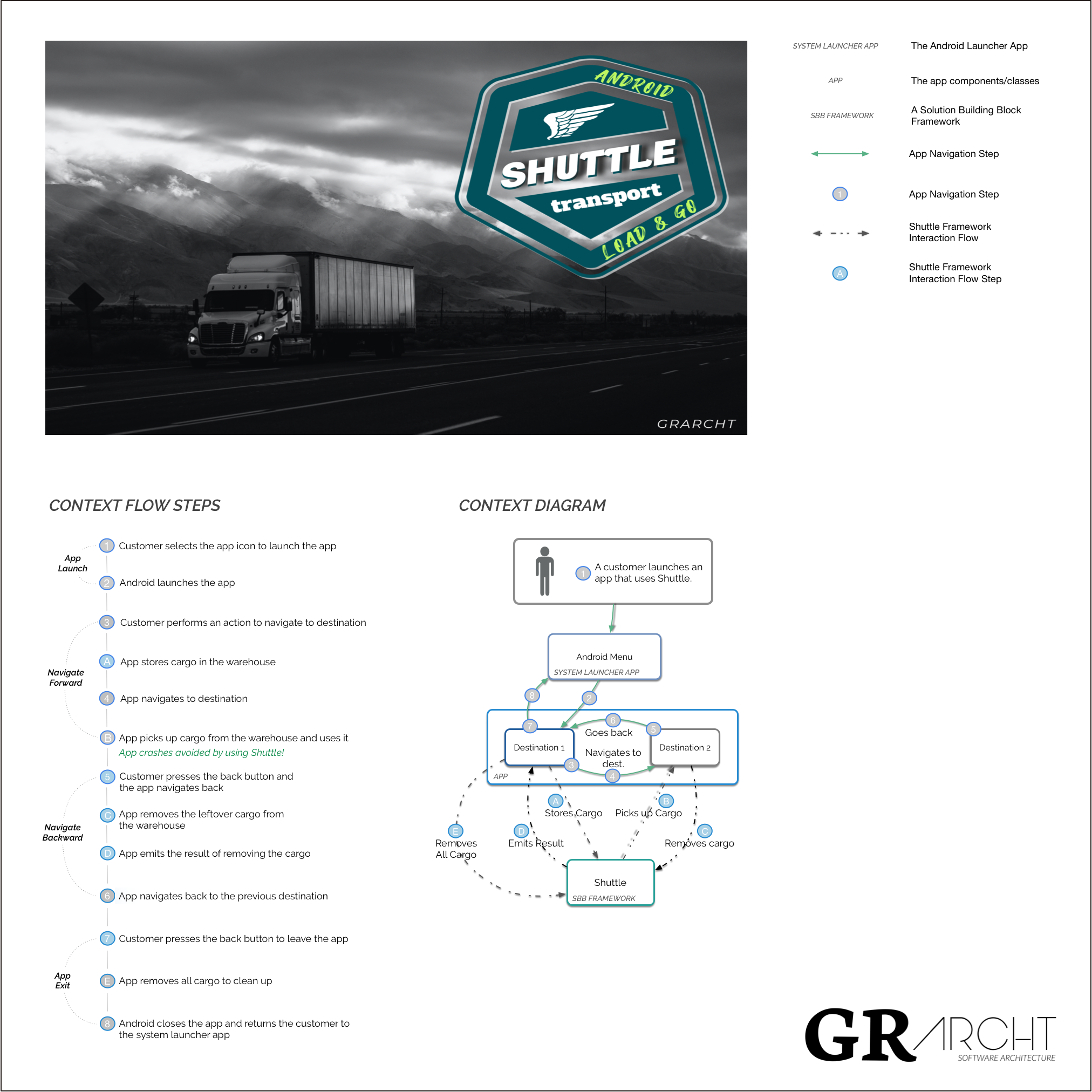
Module Dependency Diagram
graph TD
    A[Your Application]
    A --> B[framework / core]
    A --> C[framework-addons-navigation-component]
    A --> D[your custom integration]
    B --> E[framework-integrations-persistence / abstraction layer]
    E --> F[framework-integrations-extensions-room / default implementation]
Why this layering matters: The persistence abstraction means you can swap Room for any other storage implementation without touching the framework or your application code. Bring your own persistence layer by implementing the integration interfaces.
Shuttle avoids bundling large reactive libraries. Asynchronous communication runs on Kotlin Coroutines and Channels only, which keeps the transitive dependency footprint lean.
🎬 Demo Apps
The demo apps show both the crash scenario and the Shuttle solution side-by-side, using image data transport. Image data is one of the most common real-world contributors to TransactionTooLargeException.
Two architecture patterns are covered:
MVVM: Activities/Fragments as View, ViewModel as state owner and liaison, Kotlin Channels for async notification.
Flow 1: Navigate with Shuttle ✅
Tap "Navigate using Shuttle" -> image loads successfully via warehouse pickup.
| Main Menu | Cargo Unloaded |
|---|---|
| <img src="media/screenshots/main_menu.png" width="200" height="400"/> | <img src="media/screenshots/cargo_unloaded.png" width="200" height="400"/> |
Flow 2: Navigate Normally ❌
Tap "Navigate Normally" -> app crashes with TransactionTooLargeException.
| Main Menu | After Crash |
|---|---|
| <img src="media/screenshots/main_menu.png" width="200" height="400"/> | <img src="media/screenshots/cargo_undelivered.png" width="200" height="400"/> |
ℹ️ For image loading in production, use Glide or Coil. The demo uses raw image data intentionally to trigger the crash condition.
⚠️ Heads Up: Know the Tradeoffs
Other Parcelable objects in the same Intent can still crash your app. Shuttle protects the Serializable payload. It doesn't protect unrelated Parcelable data you're also passing.
Serializable is slower than Parcelable. Parcelable is optimized for IPC and faster to load, but it's unsafe for disk storage. Google recommends serialization for persistence, which is why Shuttle uses it. The LCE state pattern (loading state) gives your UI the hook it needs to handle the slightly longer load time gracefully.
These are documented tradeoffs, not bugs. Architecture is always about weighing options. This one is worth it.
🤖 AI
Model Context Protocol (MCP)
The Model Context Protocol is an open standard that lets AI assistants connect to external tools and data sources. Rather than relying solely on training data, an MCP-enabled assistant can call live tools the moment you need them, generating accurate boilerplate, analysing your actual code, and returning up-to-date documentation without ever leaving your editor.
Shuttle publishes an MCP server to the MCP Registry, which means any developer can point their MCP-compatible editor at it and get Shuttle expertise inside their own project, without cloning or opening this repo. Your AI assistant can scaffold a complete Shuttle integration with ready-to-paste Kotlin boilerplate for Hilt, Koin, or manual wiring; detect TransactionTooLargeException risk in any Kotlin or Java snippet you paste; and retrieve the authoritative Shuttle spec on demand, covering core concepts, setup, transport, pickup, cleanup, and annotations.
For teams, this is the governance multiplier that code review alone cannot be. Every developer, regardless of experience level or editor preference, gets the same accurate, up-to-date guidance on integration patterns and risk from day one.
See the MCP README file for the full list of supported editors and the verification checklist.
🤝 Contributing
Pull requests are welcome. Check the Contributing Guide and Code of Conduct before opening one.
- Fork the repo
- Create a feature branch:
git checkout -b feature/my-feature - Commit your changes:
git commit -m 'Add: my feature' - Push the branch:
git push origin feature/my-feature - Open a Pull Request
For bugs and feature requests, open an issue.
📄 License
MIT. See LICENSE.md for full terms.
Copyright © 2023 Craft & Graft LLC · GRARCHT ™ 2021
<div align="center"> <sub>Built with care by <a href="https://github.com/grarcht">GRARCHT</a> · <a href="https://androidweekly.net/issues/issue-594">Android Weekly #594</a> · <a href="https://androidweekly.net/issues/issue-455">Android Weekly #455</a></sub> </div>
Related MCP servers

Browser-measured visual debugging and verification tools for coding agents.

Decision-theoretic triage and fail-closed agent gating: 32 tools over stdio.

Awardopedia - Federal Contracts
Search federal government contract opportunities from SAM.gov via Claude

Free calculators as MCP tools: finance, taxes, health, units, dates. Search, fetch & compute.

Agent-to-Agent (A2A) hub for cosmetics: skin care, fragrance, sun care, dermocosmetics.
View repository →