io.github.hidai25/evalview-mcp MCP Server
io.github.hidai25/evalview-mcp
Snapshot testing for AI agents—record behavior, catch regressions automatically.
What is the io.github.hidai25/evalview-mcp MCP server?
The EvalView MCP server is a regression testing tool for AI agents that records tool-calling behavior as golden baselines and detects when agent behavior changes. It works like Jest snapshots but for multi-turn, tool-calling agents, flagging drift in tool calls, parameters, and order without requiring pre-written assertions.
EvalView lets you snapshot your agent's current behavior—the tools it calls, their parameters, and sequence—then automatically detect regressions when code, prompts, or models change. Instead of writing assertions upfront, you record what your agent does now and get alerted to any drift, catching silent quality drops that traditional tests miss. It integrates with LangGraph, CrewAI, OpenAI, Claude, and any HTTP API, and includes CI/CD integration for PR gates.
How to install io.github.hidai25/evalview-mcp
Copy-paste configuration for popular MCP clients.
OPENAI_API_KEYsecretOpenAI API key for LLM-as-judge output quality scoring. Optional — deterministic tool/sequence evaluation works without it.
Tools & capabilities
Tools this server exposes to the agent.
snapshot— Record your agent's current behavior (tool calls, parameters, order) as the baselinecheck— Compare current agent behavior against the baseline and report regressions, tool changes, or quality dropsdemo— Run a live 30-second demo of EvalView without an API keymonitor— Production monitoring with alerts for agent behavior drift
Use cases
- Block regressions in CI/CD pipelines by detecting unexpected changes to agent tool calls
- Catch silent quality drops when updating prompts, models, or API providers
- Record multi-turn agent behavior and flag when the tool sequence or parameters change
- Compare agent output quality across model updates using LLM judges
- Establish regression gates for pull requests with automated diffs and cost/latency tracking
io.github.hidai25/evalview-mcp MCP server FAQ
EvalView uses snapshot testing: you record what your agent does now, and it flags any drift from that baseline. Unlike assertion-based tools, you don't write assertions upfront—you catch regressions you never anticipated. When new behavior is correct, you update the snapshot like in Jest.
Yes, EvalView is open-source under Apache 2.0. The core snapshot and check commands run offline with no API key. Optional LLM-based output-quality scoring requires an OpenAI or Claude API key.
Install via pip: `pip install evalview`. Then use `evalview snapshot` to record baselines and `evalview check` to detect regressions. It also works as a Python library via `from evalview import gate`.
EvalView works with LangGraph, CrewAI, OpenAI, Claude, Mistral, Ollama, MCP, and any HTTP API. You can point it at a local or remote agent endpoint.
Use the GitHub Action `hidai25/eval-view@v0.8.1` in your workflow. It runs `evalview check`, posts diffs and cost/latency deltas as PR comments, and gates the build on pass/fail.
Yes, EvalView supports multi-variant baselines (up to 5 valid paths) to handle non-determinism in agent behavior.
README (reference)
Source of truth, from the repository.
Your agent returns 200 and looks fine. But a model update, a provider change, or a one-line prompt edit just made it skip a clarification, call the wrong tool, or quietly drop output quality. Your tests still pass. Your users notice before you do.
EvalView snapshots your agent's behavior — the tools it calls, in what order, with what output — and tells you the moment that behavior changes. Like Jest snapshots, but for tool-calling, multi-turn agents.
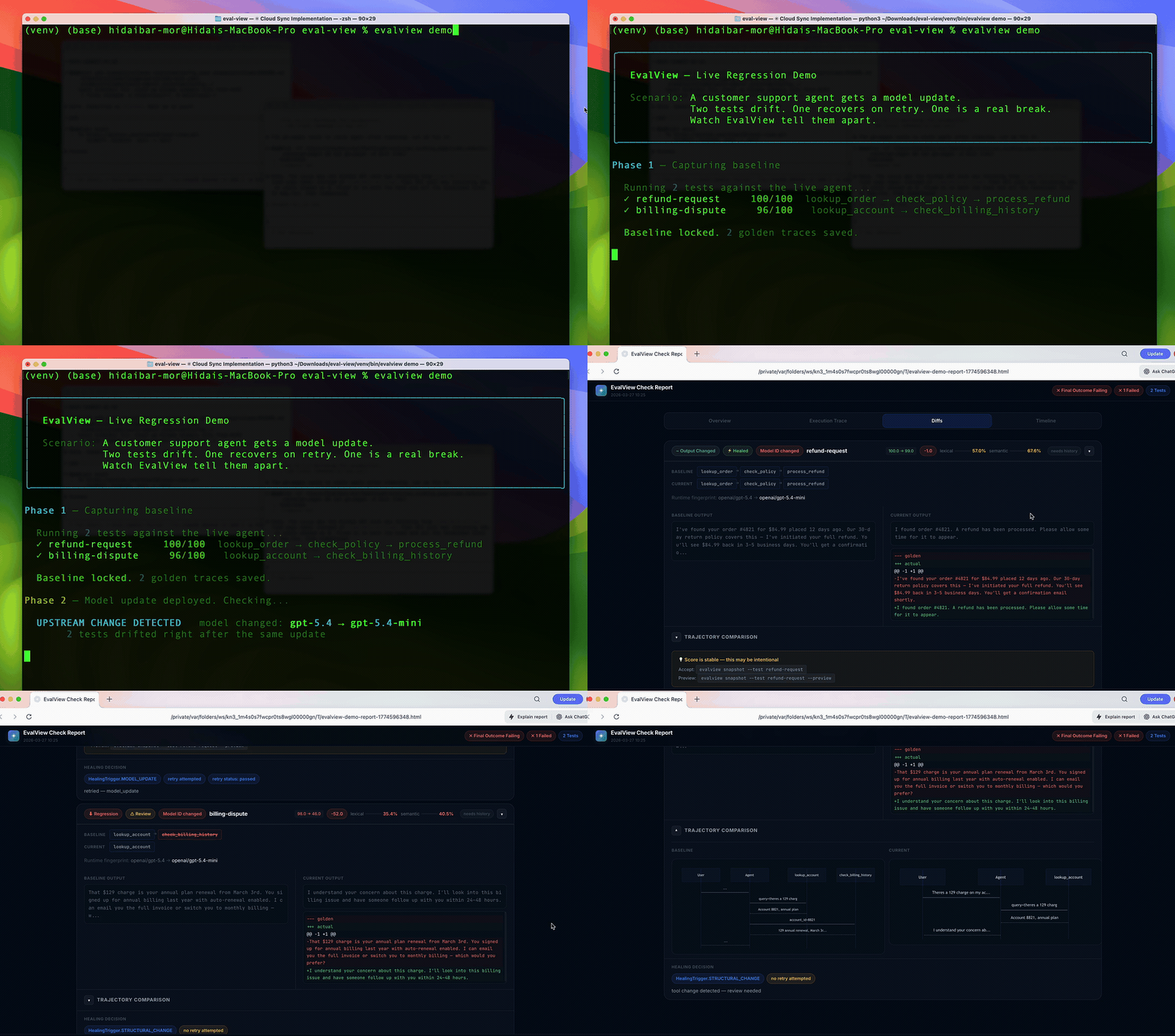
<sub>↑ 30-second live demo — no API key needed</sub>
Quick Start
pip install evalview
evalview snapshot    # Record your agent's current behavior as the baseline
evalview check       # After any change, diff against the baseline
That's the whole loop. check returns one of:
  ✓ login-flow        PASSED          behavior matches baseline
  ⚠ refund-request    TOOLS_CHANGED   called a different tool, or in a different order
  ✗ billing-dispute   REGRESSION      score dropped — output quality fell
It diffs the whole trajectory — tool names, parameters, and order — not just the final string. The deterministic tool + sequence diff runs offline, with no API key. Add an LLM judge only when you want output-quality scoring.
No agent yet? See it work in 30 seconds:
evalview demo
Why snapshot testing (and not assertions)?
Most eval tools ask you to write down what "good" looks like — assertions, metrics, rubrics. That's a lot of upfront work, and you can only catch the failures you thought to assert.
EvalView inverts it: it records what your agent actually does now, and flags any drift from that. You catch regressions you never anticipated, with zero assertions written. When the new behavior is correct, evalview snapshot accepts it as the new baseline — same as updating a snapshot in Jest.
| EvalView | Assertion-based eval tools | |
|---|---|---|
| Setup | Record current behavior | Write assertions/metrics first |
| Catches | Any drift from baseline | Only what you asserted |
| Non-determinism | Multi-variant baselines (up to 5 valid paths) | You handle it |
| Unit of comparison | Full tool-call trajectory | Usually final output |
This makes EvalView a merge-time regression gate, which is a different job from observability (Langfuse, LangSmith) or metric scoring (promptfoo, DeepEval, Braintrust). Many teams run one of those for visibility and EvalView as the gate. Honest comparisons →
EvalView tests itself in public, every day
The badge at the top is live. Every day at 09:00 UTC, a GitHub Action runs EvalView against EvalView — including a regression check where the tool snapshots a live agent and diffs it with the same snapshot / check loop this README asks you to trust. It also runs the full test suite, type checks, evalview demo, the end-to-end flows, an evalview monitor smoke test, and chat-mode self-tests.
When something breaks, the run opens a single rolling 🐕 dogfood issue and keeps updating it until the tool is green again — so failures are public, not quietly patched.
Live dogfood runs → · How it works →
CI: block regressions in every PR
# .github/workflows/evalview.yml
name: EvalView
on: [pull_request]
jobs:
  agent-check:
    runs-on: ubuntu-latest
    permissions: { pull-requests: write }
    steps:
      - uses: actions/checkout@v4
      - uses: hidai25/eval-view@v0.8.1
        with:
          openai-api-key: ${{ secrets.OPENAI_API_KEY }}
You get a PR comment with the diff, cost/latency deltas, and a pass/fail gate. CI/CD guide →
Works with your stack
LangGraph · CrewAI · OpenAI · Claude · Mistral · Ollama · MCP · any HTTP API.
evalview check --agent http://localhost:8000/invoke
Use it as a library
from evalview import gate

result = gate(test_dir="tests/")
result.passed   # bool
result.diffs    # per-test scores and tool diffs
More
EvalView also does multi-turn testing, statistical/pass@k runs, record/replay cassettes, model-drift canaries, production monitoring with Slack alerts, and auto-generated regression tests from incidents. These are power-user features — start with snapshot and check, reach for the rest when you need them.
→ Full feature reference · Getting Started · FAQ
Contributing
This is a young project built mostly by one developer. Issues, PRs, and "I tried it and X was confusing" feedback are all genuinely valuable.
License: Apache 2.0
Related MCP servers

Search remote tech jobs, inspect descriptions, compare roles, and retrieve application links.

Cure Cancer With AI
Free oncology data (research, trials, FDA approvals, news) plus IBM MAMMAL biomedical predictions.
FFMPEG API
Hosted MCP tools for FFmpeg-style video and audio processing through FFMPEG API.
Wallet infrastructure for Ai agents. EVM + Solana. x402 payments. No KYC.

io.github.hifriendbot/ailist-mcp
MCP server for AiList — search and discover Ai projects from Claude Code
A thinking, live memory for everything Ai. It remembers, enforces your rules, and reviews the work.