OfficeAgent.NET MCP Server
io.github.ilia-sokolov/officeagent
Create and edit Word, PowerPoint, and Excel files with typed plans and safe previews
What is the OfficeAgent.NET MCP server?
OfficeAgent.NET is a .NET document-automation library built on the Open XML SDK that turns document intent into typed, validated operations for Word .docx, PowerPoint .pptx, and Excel .xlsx files. It provides an MCP server, Microsoft Agent Framework tools, and a direct .NET API for generating documents, making targeted edits, updating tables and styles, and managing comments and review state.
OfficeAgent.NET automates Office document creation and editing with structured operations that preserve document integrity. Use it to generate Word documents and PowerPoint decks, make targeted edits with tracked changes, populate templates, compare documents, manage comments and revisions, and inspect or edit Excel workbooks—all through an MCP server, Agent Framework tools, or direct .NET API.
How to install OfficeAgent.NET
Copy-paste configuration for popular MCP clients.
OfficeAgent__FileSystemConnections__0__ConnectionIdConnection id the agent uses to address documents on the filesystem (any non-empty string). Optional: with nothing configured the server starts with an in-memory session connection whose documents last only while it runs. Set this and RootPath to edit documents on disk instead; SharePoint is OfficeAgent__SharePointConnections__0__*
OfficeAgent__FileSystemConnections__0__RootPathAbsolute path to the directory this filesystem connection may read and write documents under. Only .docx is allowed unless OfficeAgent__FileSystemConnections__0__AllowedExtensions__N adds more (.pptx for decks or .xlsx for workbooks). Deck connections usually want OfficeAgent__FileSystemConnections__0__DefaultChangeMode=Direct because PowerPoint cannot record tracked changes
OfficeAgent__AllowCreationSet to true to expose create_document, so an agent can author a new file in the connection rather than only editing existing ones. Off by default: creating agent-named files under a connection root is a capability the host should choose deliberately
Tools & capabilities
Tools this server exposes to the agent.
create_document— Create a new Word, PowerPoint, or Excel documentinspect— Read document text, structure, tables, images, styles, content controls, headers, footers, and propertiesfind— Locate text, paragraphs, or other content within a documentapply_plan— Apply a validated plan of operations to a document, with optional tracked changes for Word reviewpreview— Preview a plan before applying it to verify the intended changesregister— Register a document for multi-step workflowscompare— Compare supported free-body paragraph text in Word documents and produce a native redline plan
Use cases
- Edit contract clauses or terms in Word documents with tracked changes for review
- Generate Word documents and PowerPoint decks from templates or scratch
- Populate quote templates and bind unique content-control tags or shape names
- Manage document review workflows with comments, revisions, and tracked changes
- Inspect and edit Excel worksheets, tables, and cell values with formulas
- Create batches of documents with one receipt per output for audit trails
OfficeAgent.NET MCP server FAQ
OfficeAgent.NET is a .NET library for automating Office document creation and editing. It works with Word .docx, PowerPoint .pptx, and Excel .xlsx files through an MCP server, Microsoft Agent Framework tools, or direct .NET API.
Yes, OfficeAgent.NET is open-source under the MIT license and available on NuGet.
Install the global tool with `dotnet tool install --global OfficeAgent.Mcp`, then register it with `claude mcp add` pointing to a document folder via environment variables like `OfficeAgent__FileSystemConnections__0__RootPath`.
No, it works directly with Office Open XML files using the Open XML SDK and does not require Office to be installed.
Yes, Word edits can be recorded as tracked revisions with a specified author and revision identity, preserving review state and allowing acceptance or rejection in Word.
OfficeAgent supports filesystem roots, SharePoint, in-memory sessions, and self-contained inline content (base64) for document access.
README (reference)
Source of truth, from the repository.
OfficeAgent.NET
<!-- mcp-name: io.github.ilia-sokolov/officeagent -->



OfficeAgent.NET is a .NET document-automation library built on the
Open XML SDK. Its direct
.NET API turns document intent into typed, validated operations for Word .docx,
PowerPoint .pptx, and Excel .xlsx packages.
Use it to generate documents and presentations, make targeted edits, update tables,
styles, and images, or manage comments and review state. An MCP server and adapters
for Microsoft Agent Framework and Microsoft.Extensions.AI are optional interfaces
to the same engine. Applications can use the engine directly without MCP.
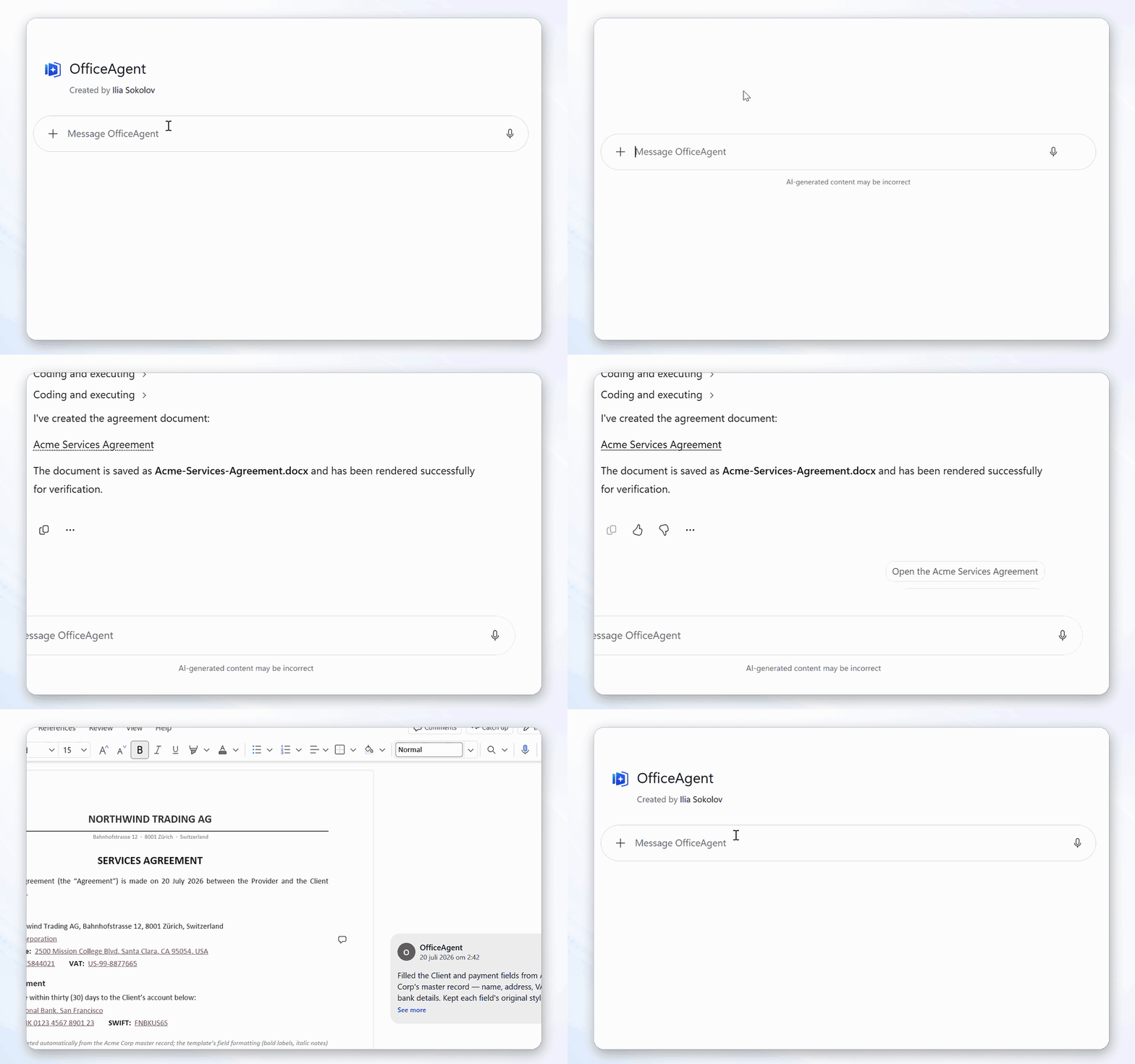
One example is a targeted Word edit whose result remains reviewable:
What this project does
An Office Open XML file is a package of related XML parts. A small change can affect runs, styles, numbering, comments, content controls, or revision markup. OfficeAgent.NET handles that document-specific work. The model works with structured document data and JSON-serialisable operations such as "replace this clause as a tracked change" or "add a row to this table."
The same engine is available in three forms:
- an MCP server for agents that support the Model Context Protocol;
- tools for Microsoft Agent Framework and
Microsoft.Extensions.AI; - a .NET API for applications that want to control the workflow directly.
It supports Word .docx, PowerPoint .pptx, and Excel .xlsx; one client routes
each document to the module that handles it. See Scope and limitations before choosing
it for a workflow that depends on Office's layout or calculation engine.
What you can build
| Area | Supported workflows |
|---|---|
| Word creation and editing | Create .docx files; inspect and change text, paragraphs, tables, images, styles, content controls, headers, footers, notes, page setup, and document properties |
| Word review | Read and manage comments, preserve or resolve review state, set one revision identity per plan, and record supported edits as tracked revisions |
| PowerPoint creation and editing | Build or update decks with slides, layouts, text, tables, native editable charts, images, media, notes, comments, sections, transitions, and animations |
| Excel inspection and editing | Inspect worksheets, tables, and bounded ranges; find raw or displayed values; set cells and formulas; append table rows; manage cell notes |
| Template generation | Bind unique Word content-control tags or PowerPoint shape names, expand repeating Word table rows, and create bounded batches with one receipt per output |
| Word comparison | Compare supported free-body paragraph text read-only and produce a snapshot-bound native redline plan only when all other package content is unchanged |
| Agent and application integration | Use MCP over stdio or HTTP, Microsoft Agent Framework tools, or the direct .NET API, with SHA-256 apply receipts and host-supplied audit actors |
| Document access | Work with bounded filesystem roots, SharePoint, in-memory sessions, or self-contained inline content |
Choose a starting point
| I want to... | Start here |
|---|---|
| Decide whether OfficeAgent fits my application | Library selection guide |
| Try a targeted Word edit | Try a Word edit |
| Create a Word document from scratch | Create a document |
| Create or edit a PowerPoint deck | PowerPoint support |
| Inspect or edit an Excel workbook | Excel support |
| Connect Codex, Claude Code, Copilot Studio, or Microsoft 365 Copilot | Deployment and client setup |
| Use OfficeAgent from C# | Getting started |
| Add tools to a Microsoft Agent Framework agent | Agent integration |
| Host the MCP server or use SharePoint | MCP server and document providers |
| Add per-user hosted connection authorization | Hosted gateway reference |
| Add optional PDF/page-image rendering | Visual rendering |
| Edit documents with no storage configured | Documents with no storage |
| Run a tracked-review workflow | Optional word-document-review skill |
| Build a .NET, MCP, or Agent Framework integration | Optional officeagent-integration skill |
| Build a contract-review agent | ContractReview sample |
| Populate quote templates or compare Word documents | Template and comparison workflows |
| Check support, compatibility, or security policy | Support and security |
| Contribute | Contributing |
Try a Word edit
This small workflow demonstrates that OfficeAgent can change an existing OOXML file without flattening its structure. It uses tracked changes because the result is easy to verify in Word; review is one part of the broader document operation set.
Install the exact server version documented by this release:
dotnet tool install --global OfficeAgent.Mcp --version 1.1.0
Make a folder for the agent to work in and download the sample contract into it — a fictional services agreement with a clause to change, a table, an open comment, and a pending redline:
mkdir -p ~/officeagent-documents
curl -Lo ~/officeagent-documents/services-agreement.docx \
  https://raw.githubusercontent.com/ilia-sokolov/OfficeAgent.NET/v1.1.0/samples/documents/services-agreement.docx
PowerShell:
$officeAgentDocuments = Join-Path $env:USERPROFILE "officeagent-documents"
New-Item -ItemType Directory -Force $officeAgentDocuments | Out-Null
Invoke-WebRequest `
  https://raw.githubusercontent.com/ilia-sokolov/OfficeAgent.NET/v1.1.0/samples/documents/services-agreement.docx `
  -OutFile (Join-Path $officeAgentDocuments "services-agreement.docx")
Any .docx of your own works too — the sample just gives you something with a comment and a
pending revision already in it.
Register the server with Claude Code, pointed at that folder and nothing else:
claude mcp add \
  --env OfficeAgent__FileSystemConnections__0__ConnectionId=documents \
  --env OfficeAgent__FileSystemConnections__0__RootPath=$HOME/officeagent-documents \
  --transport stdio \
  officeagent -- officeagent-mcp --stdio
PowerShell:
claude mcp add `
  --env OfficeAgent__FileSystemConnections__0__ConnectionId=documents `
  --env "OfficeAgent__FileSystemConnections__0__RootPath=$officeAgentDocuments" `
  --transport stdio `
  officeagent -- officeagent-mcp --stdio
For this review-specific workflow, you can optionally install the word-document-review skill before starting the client.
Then ask:
In services-agreement.docx, change the payment terms from thirty days to forty-five days.
Expected result when the client invokes OfficeAgent correctly: apply_plan reports
writeOutcome: "committed" and returns an output id, and clause 3 reads forty-five days
as a tracked change you can accept or reject. Open that output in Word and verify the change.
The regression test also verifies that the sample's existing table, comment, earlier payment
redline, and heading remain present with their tested XML semantics. It does not claim byte-for-byte
identity for every unrelated OOXML part; see the bounded preservation evidence.
If the agent did not call apply_plan, or if writeOutcome is not committed, do not report
the edit as complete. For unknown or writtenNotRegistered, preserve possibleOutput and
follow storage recovery instead of retrying blindly.
What else the sample is good for — reviewing comments, accepting revisions, editing the table.
Next, try creating a Word document, generating a PowerPoint deck, or using the direct .NET workflow.
If it does not work
claude mcp list shows officeagent as failed | Check RootPath is an absolute path to a directory that exists. |
| The agent says it cannot find the document | Use a relative name, or an absolute path that still resolves inside RootPath. |
io-error on save | Close the file in Word, then check filesystem permissions and the available disk space. |
outcome-unknown or registration-failed | Do not repeat the edit. Preserve possibleOutput and follow the recovery procedure to determine whether the output already exists. |
Configure broader workflows
The quick start above is deliberately the smallest thing that works. Four settings extend it:
| Setting | Adds |
|---|---|
OfficeAgent__AllowCreation=true | create_document, so "draft a project brief in brief.docx" makes a new file instead of failing |
OfficeAgent__FileSystemConnections__0__AllowedExtensions__0=.docx plus OfficeAgent__FileSystemConnections__0__AllowedExtensions__1=.pptx | Word and PowerPoint on one connection. Declaring this list replaces the .docx default. Set OfficeAgent__FileSystemConnections__0__DefaultChangeMode=Direct for decks, and send "mode": "Tracked" explicitly for reviewable Word edits on that mixed connection. |
OfficeAgent__EphemeralConnectionId=session | Names the in-memory session connection explicitly. With no configuration at all the server already falls back to one - this is for running it alongside storage, or under a different id |
OfficeAgent__AllowInlineContent=true | Tools that carry the document as base64, for a single self-contained call |
Past a couple of settings, use a file instead — the same OfficeAgent section, where a list
is a list:
{
  "OfficeAgent": {
    "AllowCreation": true,
    "FileSystemConnections": [
      {
        "ConnectionId": "documents",
        "RootPath": "C:\\officeagent-documents",
        "AllowedExtensions": [ ".docx", ".pptx" ],
        "DefaultChangeMode": "Direct"
      }
    ]
  }
}
The same configuration is available as
samples/config/word-and-powerpoint.json. Change
RootPath before using it.
claude mcp add --transport stdio officeagent -- officeagent-mcp --stdio --config ./officeagent.json
Environment variables still override the file. Windows, PowerShell, other MCP clients, HTTP hosting and SharePoint are in Deployment and client setup; every setting is listed in MCP server.
Optional guidance for Word review
skills/word-document-review teaches the review
loop: read comments and pending revisions before editing, keep reviewable Word edits as
redlines, use document ids for multi-step work, and recover from stable error codes. The
installation guide gives complete Bash and PowerShell steps
for Claude Code and Codex, including installation from a fresh machine and verification.
The skill is only needed when the task requires that review discipline; document creation,
ordinary direct edits, and PowerPoint workflows use the server without it.
Optional guidance for application integration
skills/officeagent-integration helps an
implementation agent choose the direct .NET API first, add MCP or Microsoft Agent Framework
only when needed, and run installed-package recipes for tracked editing, template population,
and complete-plan comparison. The installation guide covers both
skills and makes clear that a skill does not install the runtime, NuGet packages, or MCP server.
What reaches the model
The inspect and find tools return document text and structure to the model — that is how it locates an edit. Filesystem and SharePoint operations keep the package behind an opaque id. Inline tools carry the whole file as base64 on every call. Session import/export also carries the package as base64 if the agent performs those calls; a host integration can instead move the bytes outside model context. Connect storage and model providers appropriate for the data.
The standalone server ships no authentication layer for HTTP hosting; put it behind your own, or start from the authenticated HostedGateway reference. A filesystem root is a trust boundary: its ACLs must stop untrusted principals creating, renaming or replacing entries while the server runs.
.NET quick start
Install the core package and Word module:
dotnet add package OfficeAgent.Core
dotnet add package OfficeAgent.Word
After registering services and a document provider, the edit loop looks like this:
var client = services.GetRequiredService<OfficeAgentClient>();
var doc = await client.RegisterAsync("workspace", "/srv/workspace/contract.docx");

var inspect = await client.InspectAsync("workspace", doc.ItemId);
var hit = (await client.FindAsync(
    "workspace", doc.ItemId, new FindQuery("Acme Corp"))).First();

var plan = new DocumentPlan
{
    Snapshot = inspect.Snapshot,
    Revision = new RevisionMetadata { Author = "OfficeAgent Quickstart" },
    Operations = new PlanOperation[]
    {
        new ChangeTextOp
        {
            Target = hit.Anchor,
            With = "Globex Inc.",
            Mode = ChangeMode.Tracked
        }
    }
};

var preview = await client.PreviewAsync("workspace", doc.ItemId, plan);
if (preview.IsValid)
    await client.CommitAsync("workspace", doc.ItemId, plan);
Revision.Author is the name Word displays for the tracked change. It is not an
authenticated actor identity. See revision identity and audit receipts.
The complete example, including service registration and reading the saved file, is in Getting started. The minimal direct-.NET sample runs against the bundled fictional contract, so it needs no MCP client, language model, or document of your own:
dotnet run --project samples/QuickEdit -- \
  samples/documents/services-agreement.docx quickedit-output.docx
Open quickedit-output.docx in Word and verify that the payment term is a tracked
change while the existing revision, comment, table, and headings remain intact.
QuickEdit also accepts an exact source and replacement text
for your own document. Releases also attach quickedit-sample.zip, a package-backed
copy that runs outside the repository against the released NuGet packages.
The repository also contains a
direct IChatClient Word-editing sample and an
interactive
Agent Framework sample, plus a complete
contract-review agent that separates model judgement from
validated document writes. The TemplateBatch sample generates two
quotes from one tagged template, while DocumentComparison
turns covered body-paragraph differences into a reviewable Word redline.
The DocumentAssembly sample combines a proposal, statement of
work, and appendix into one editable package with a multi-source audit receipt. See
Word document assembly for its formatting and compatibility scope.
How it works
Every edit follows the same four steps:
- Inspect returns a structured map of the document: its outline, paragraphs, styles, content controls, tables, images, and revisions.
- Find searches text and returns a content-verified anchor for each match.
- Preview validates a plan against the current document and reports the proposed changes without writing.
- Apply commits the complete plan and saves it through the configured provider.
A plan (DocumentPlan) is a typed, JSON-serialisable list of operations. An
anchor records both a location and the content expected there. If the content
or optional document snapshot has changed, validation fails instead of silently
targeting a different location. All operations are applied to one in-memory transaction or
none are; a later provider failure can still leave storage uncertain, so callers must inspect
writeOutcome before retrying.
The Word module supports changes to text, paragraphs, tables, images, styles, content controls, comment threads, footnotes and endnotes, page geometry and breaks, document properties, and tracked revisions. Operations with a Word revision representation record a redline when the connection asks for one - an inserted clause, a deleted row and a restyled heading all come back as revisions a reviewer accepts or rejects, not only a replaced phrase. Image resizing is applied directly because WordprocessingML has no revision representation for drawing dimensions. The PowerPoint module implements a broad, explicitly documented set of deck operations: text, bullets, run and paragraph formatting, template slots, style copying, tables, images, text boxes, embedded video and audio, speaker notes, resolvable comments, footers and slide numbers, sections, transitions and animations, and the slide lifecycle - adding, removing, reordering and duplicating. Several slide inserts in one plan author a deck end to end, so a single call turns nothing into a finished presentation. Any verb it does not support is named rather than silently skipped. The full operation schema is documented in Document plans, and the deck specifics in PowerPoint support.
Documents are accessed through configured providers. After registration,
editing calls use a (connectionId, documentId) pair instead of a storage path
or credentials. The filesystem provider restricts registrations to its root;
the SharePoint provider uses the permissions of its configured identity.
CreateAsync starts a new document inside a connection: the requested .docx
or .pptx extension selects a registered blank-document factory. The engine
applies an optional initial plan in memory, and then asks
the provider to create and register it without overwriting an existing name.
Documentation
| Guide | Covers |
|---|---|
| Documentation hub | Learning paths, package map, and the complete documentation set |
| Library selection guide | Supported jobs, non-goals, package choices, alternatives, and a verified direct .NET recipe |
| Getting started | A complete edit from service registration to reading the result |
| Concepts | Anchors, snapshots, plans, providers, transactions, and capabilities |
| C# API reference | Generated public types and members for every library package |
| Document plans | JSON shapes and validation rules for every operation |
| Document providers | Filesystem, SharePoint, save modes, and custom providers |
| PowerPoint support | Slide addressing, the verbs the deck module implements, and what it preserves |
| Template population and comparison | Batch binding, repeating Word rows, comparison limits, and redline generation |
| Agent integration | Microsoft Agent Framework and Microsoft.Extensions.AI tools |
| MCP server | Server configuration, transports, security notes, and tool contracts |
| Deployment and client setup | Codex, Claude Code, Microsoft Copilot clients, containers, and Azure |
| Operations | Concurrency, streams, cancellation, telemetry, and production concerns |
| Troubleshooting | Startup, registration, validation, concurrency, and provider failures |
| Failure modes | Common plan errors and what to do next |
| Releasing | Publishing to NuGet, the MCP Registry, and GitHub |
Contributing
Bug reports, documentation fixes, new document operations, provider integrations, and focused test cases are useful contributions. If you found a problem, open an issue with the document feature involved, the operation you attempted, and the error or unexpected result. Do not attach confidential documents; a small sanitised reproduction is enough.
To work on the code, install the .NET 8 SDK, fork the repository, and run:
dotnet build OfficeAgent.NET.sln
dotnet test OfficeAgent.NET.sln
Before starting a larger change, especially one that changes public types or the JSON wire format, open an issue so the design can be discussed. See CONTRIBUTING.md for code style, tests, and pull-request expectations.
Scope and limitations
OfficeAgent.NET edits Word .docx, PowerPoint .pptx, and Excel .xlsx files;
it does not automate the Office desktop applications.
The deck module refuses the verbs a presentation has no vocabulary for -
setProperty, revision, pageSetup, insertBreak and note - per
operation, rather than applying part of a plan, and refuses an explicit tracked
mode on any verb that carries one. PresentationML has no redline model, so tracked changes are Word-only, and
a slide has no header (that is a notes and handout concept). Animations cover
the effects expressible as a filtered p:animEffect; fly-in, zoom and motion
paths are refused rather than approximated. See
PowerPoint support for what a deck does and does not
accept.
The core engine does not render pages, calculate Word fields, or evaluate Excel formulas. Formula edits set the workbook to recalculate when Excel opens it. Operations that depend on pagination, table-of-contents rendering, or field recalculation are outside the core scope. Preview reports structural changes. The optional rendering package can produce PDF-derived page images through external processes, but it does not yet detect overflow or page-fit problems. Test the workflow on representative documents and keep human review in the loop for consequential edits.
Two more limits worth knowing before you build on it:
- Token savings depend on how you connect. Addressing a document by id keeps
the package out of the conversation, and inspection can be narrowed with
fidelityand paging - that is where the saving comes from. The inline*_contenttools are the deliberate exception: they carry the whole file as base64 in both directions, which costs tokens in proportion to file size. They suit a single self-contained call, not a sequence of edits - a model asked to pass a document of a few kilobytes back for a second edit reproduces it imperfectly and the follow-up fails. Use a connection, or a session connection, when more than one edit is coming. - Review guidance is optional. For review tasks, the server alone does not make an agent read open comments before editing or choose a redline. The word-document-review skill teaches that workflow; without it, review behaviour depends on the model and the prompt.
Commercial support
OfficeAgent.NET is MIT-licensed and can be self-hosted. Commercial support and deployment assistance are available from dotaction: contact dotaction. That service is separate from the project: it is governed by its own agreement and does not change the library's license, compatibility promise or community support policy.
License
MIT. See LICENSE.
Related MCP servers

ESLint for AI search: audits AI-crawler access, llms.txt, schema and citability.

Workfile
Repository-native protocol and local MCP server for Work, Docs, History and durable project Memory.

AI research for agents. Company intel, competitor analysis, web scraping, topic dives. Pay via MPP.
View repository →
Lee y explica facturas de la luz españolas (QR de la CNMC). Todo en local.

io.github.ilovevideoeditor/mcp-server
Render videos from JSON with motion-design templates, effects and batch rendering

Set up a brand, read its AI-search visibility, and act on diagnostic findings.