Browsentic MCP Server
io.github.imshaikot/browsentic
Give your AI agent control of your real, logged-in browser via a side panel or MCP.
What is the Browsentic MCP server?
Browsentic is a browser extension that lets AI agents control your actual logged-in browser through a side panel or MCP server. It works with Claude, Cursor, and other agent CLIs, providing 50+ deterministic tools for navigation, form filling, file handling, and more—all locally, with no cloud or authentication required.
Browsentic bridges your real browser and AI agents by running as a Manifest V3 extension in Chrome, Firefox, Edge, Brave, and Arc. Instead of headless automation, agents interact with your already-logged-in sessions, read and upload files, solve captchas, and perform complex workflows. It's local-first, privacy-focused, and works with every major agent CLI or as an optional MCP server.
How to install Browsentic
Copy-paste configuration for popular MCP clients.
Tools & capabilities
Tools this server exposes to the agent.
Page navigation— Full browser navigation including go back, forward, reload, and URL navigationElement interaction— Click, type, focus, and interact with page elementsForm filling— Fill and submit forms with agent-provided dataFile operations— Read files, upload to pages, and download from pagesPage inspection— Get page content, element details, and visual informationCaptcha solving— Automatically solve captchas encountered during browsingCustom tool creation— Write and run live tools for tasks not covered by built-in toolsRecording and playback— Record actions via voice, text, or demonstration for agent learningScheduling and monitoring— Monitor pages and schedule recurring tasksSite mapping— Create custom skills and site-specific automation patterns
Use cases
- Automate multi-step workflows on websites you're already logged into without headless browser setup
- Fill out forms, upload documents, and download results while maintaining your active sessions
- Monitor web pages for changes and trigger actions on a schedule
- Teach an agent how to use a custom or niche web application by showing it once
- Combine browser automation with file handling to process batches of documents through web services
Browsentic MCP server FAQ
Browsentic is a browser extension that gives AI agents (Claude, Cursor, etc.) control of your real, logged-in browser. It provides 50+ tools for navigation, form filling, file handling, and more—all running locally with no cloud or authentication.
Yes, Browsentic is MIT licensed and free. It's open-source, local-first, with no cloud component, telemetry, or account required.
Install via npm (npx browsentic setup) or use the macOS app (curl -fsSL https://browsentic.com/install.sh | sh). Then pair it with your agent CLI. For MCP clients like Claude Code or Cursor, enable the optional MCP server mode.
No. Browsentic uses your browser's existing logged-in sessions. Everything runs locally on 127.0.0.1 with no external services, cloud accounts, or API keys needed.
Browsentic works in Chrome, Firefox, Edge, Brave, and Arc. It's built as a Manifest V3 extension and also runs as a native macOS and Windows app.
Yes. Browsentic can run as an optional MCP server, so any MCP-compatible client (Claude Code, Cursor, Zed, etc.) can drive the same browser instance.
README (reference)
Source of truth, from the repository.
https://github.com/user-attachments/assets/e9f146d3-cb14-416e-b8d7-68c4e81cbd0d
<div align="center">Browsentic – a completely integrated agentic browser extension
<p> <a href="https://www.npmjs.com/package/browsentic"><img src="https://img.shields.io/npm/v/browsentic?logo=npm" alt="npm version"></a> <a href="https://www.npmjs.com/package/browsentic"><img src="https://img.shields.io/npm/dm/browsentic?logo=npm" alt="npm downloads"></a> <a href="https://github.com/imshaikot/browsentic/actions/workflows/ci.yml"><img src="https://img.shields.io/github/actions/workflow/status/imshaikot/browsentic/ci.yml?branch=main&label=CI&logo=githubactions&logoColor=white" alt="CI"></a> <a href="https://nodejs.org"><img src="https://img.shields.io/node/v/browsentic?logo=nodedotjs&logoColor=white" alt="node"></a> <a href="LICENSE"><img src="https://img.shields.io/npm/l/browsentic" alt="license"></a> </p> <p> <a href="docs/guide/install.md"><img src="https://img.shields.io/badge/manifest-V3-4285F4?logo=googlechrome&logoColor=white" alt="Manifest V3"></a> <a href="https://github.com/imshaikot/browsentic/releases/latest"><img src="https://img.shields.io/github/actions/workflow/status/imshaikot/browsentic/release.yml?label=macOS%20build&logo=apple" alt="macOS build"></a> <a href="https://github.com/imshaikot/browsentic/releases/latest"><img src="https://img.shields.io/github/actions/workflow/status/imshaikot/browsentic/release.yml?label=Windows%20build&logo=data:image/svg%2Bxml;base64,PHN2ZyB4bWxucz0iaHR0cDovL3d3dy53My5vcmcvMjAwMC9zdmciIHZpZXdCb3g9IjAgMCAyNCAyNCI+PHBhdGggZmlsbD0iI2ZmZiIgZD0iTTAgMy40IDkuOCAydjkuNUgwek0xMSAxLjggMjQgMHYxMS41SDExek0wIDEyLjVoOS44VjIyTDAgMjAuNnpNMTEgMTIuNWgxM1YyNGwtMTMtMS44eiIvPjwvc3ZnPg==" alt="Windows build"></a> <a href="https://github.com/imshaikot/browsentic/releases/latest"><img src="https://img.shields.io/github/actions/workflow/status/imshaikot/browsentic/release.yml?label=Firefox%20build&logo=firefoxbrowser&logoColor=white" alt="Firefox build"></a> </p>No account · No auth · No API key · No cloud · No telemetry · Local first
Your real, logged-in browser, driven from an AI side panel by the agent CLI you already have.<br> Also an optional MCP server, so any MCP client can drive the same browser.
<p> <strong>Works in</strong><br> <a href="docs/guide/install.md"><img src="https://browsentic.com/icons/chrome.svg" width="40" height="40" alt="Chrome" title="Chrome"></a>  <a href="docs/guide/install.md#firefox"><img src="https://browsentic.com/icons/firefox.svg" width="40" height="40" alt="Firefox" title="Firefox"></a>  <a href="docs/guide/install.md"><img src="https://browsentic.com/icons/edge.svg" width="40" height="40" alt="Edge" title="Edge"></a>  <a href="docs/guide/install.md"><img src="https://browsentic.com/icons/brave.svg" width="40" height="40" alt="Brave" title="Brave"></a>  <a href="docs/guide/install.md"><img src="https://browsentic.com/icons/arc.svg" width="40" height="40" alt="Arc" title="Arc"></a> </p> <p> <strong>Runs on</strong><br> <a href="https://claude.com/claude-code"><img src="https://browsentic.com/icons/claude.svg" width="40" height="40" alt="Claude Code" title="Claude Code"></a>  <a href="https://developers.openai.com/codex/cli"><picture><source media="(prefers-color-scheme: dark)" srcset="https://browsentic.com/icons/openai-dark.svg"><img src="https://browsentic.com/icons/openai.svg" width="40" height="40" alt="Codex" title="Codex"></picture></a>  <a href="https://antigravity.google/docs/cli/install"><img src="https://browsentic.com/icons/antigravity.svg" width="40" height="40" alt="Antigravity" title="Antigravity"></a>  <a href="https://github.com/mistralai/mistral-vibe"><img src="https://browsentic.com/icons/mistral.svg" width="40" height="40" alt="Mistral Vibe (beta)" title="Mistral Vibe (beta)"></a>  <a href="https://docs.x.ai/build/overview"><picture><source media="(prefers-color-scheme: dark)" srcset="https://browsentic.com/icons/xai-dark.svg"><img src="https://browsentic.com/icons/xai.svg" width="40" height="40" alt="Grok Build (beta)" title="Grok Build (beta)"></picture></a>  <a href="https://cursor.com/docs/cli/overview"><picture><source media="(prefers-color-scheme: dark)" srcset="https://browsentic.com/icons/cursor-dark.svg"><img src="https://browsentic.com/icons/cursor.svg" width="40" height="40" alt="Cursor CLI (beta)" title="Cursor CLI (beta)"></picture></a>  <a href="https://qwenlm.github.io/qwen-code-docs/en/"><picture><source media="(prefers-color-scheme: dark)" srcset="https://browsentic.com/icons/qwen-dark.svg"><img src="https://browsentic.com/icons/qwen.svg" width="40" height="40" alt="Qwen Code (beta)" title="Qwen Code (beta)"></picture></a>  <a href="https://opencode.ai/docs/"><picture><source media="(prefers-color-scheme: dark)" srcset="https://browsentic.com/icons/opencode-dark.svg"><img src="https://browsentic.com/icons/opencode.svg" width="40" height="40" alt="OpenCode (beta)" title="OpenCode (beta)"></picture></a> </p> </div>Quick Start
Any platform — with Node.js 20 or newer (Windows is experimental):
npx browsentic setup
macOS — one line installs Browsentic.app, which brings Node and everything else:
curl -fsSL https://browsentic.com/install.sh | sh
Windows — one line in PowerShell installs the Windows app, which brings Node and everything else (experimental):
irm https://browsentic.com/install.ps1 | iex
Full install and setup guide, Firefox included: browsentic.com/docs/guide/install
Key Capabilities
<table> <tr> <td>🧭 <a href="docs/guide/features/conversations.md"><b>Side panel, human in the loop</b></a></td> <td>🤖 <a href="docs/guide/agents.md"><b>Every major agent CLI</b></a></td> <td>🎯 <a href="docs/guide/features/page-actions.md"><b>50+ deterministic tools</b></a></td> </tr> <tr> <td>🌐 <a href="docs/guide/install.md"><b>All Chromium + Firefox</b></a></td> <td>🗺️ <a href="docs/guide/features/page-actions.md#moving-around"><b>Full browser navigation</b></a></td> <td>🧩 <a href="docs/guide/features/captcha.md"><b>Solves captchas on the way</b></a></td> </tr> <tr> <td>📄 <a href="docs/guide/features/files.md#files-you-hand-it"><b>Reads files, acts on them</b></a></td> <td>↕️ <a href="docs/guide/features/files.md#download-here-upload-there"><b>Uploads & downloads</b></a></td> <td>🧠 <a href="docs/guide/features/site-maps.md"><b>Creates its own skills</b></a></td> </tr> <tr> <td>⚡ <a href="docs/guide/features/page-actions.md#repeating-a-job-and-doing-what-no-tool-covers"><b>Writes & runs live tools</b></a></td> <td>🎙️ <a href="docs/guide/features/recordings.md"><b>Voice, text or show it once</b></a></td> <td>👁️ <a href="docs/guide/features/a-eye.md"><b>Point at what you mean</b></a></td> </tr> <tr> <td>⏱️ <a href="docs/guide/features/scheduling.md"><b>Monitors & schedules</b></a></td> <td>🛡️ <a href="docs/guide/approvals.md"><b>Guardrails & approvals</b></a></td> <td>🔌 <a href="docs/guide/mcp-clients.md"><b>Optional MCP server</b></a></td> </tr> </table>How It Works
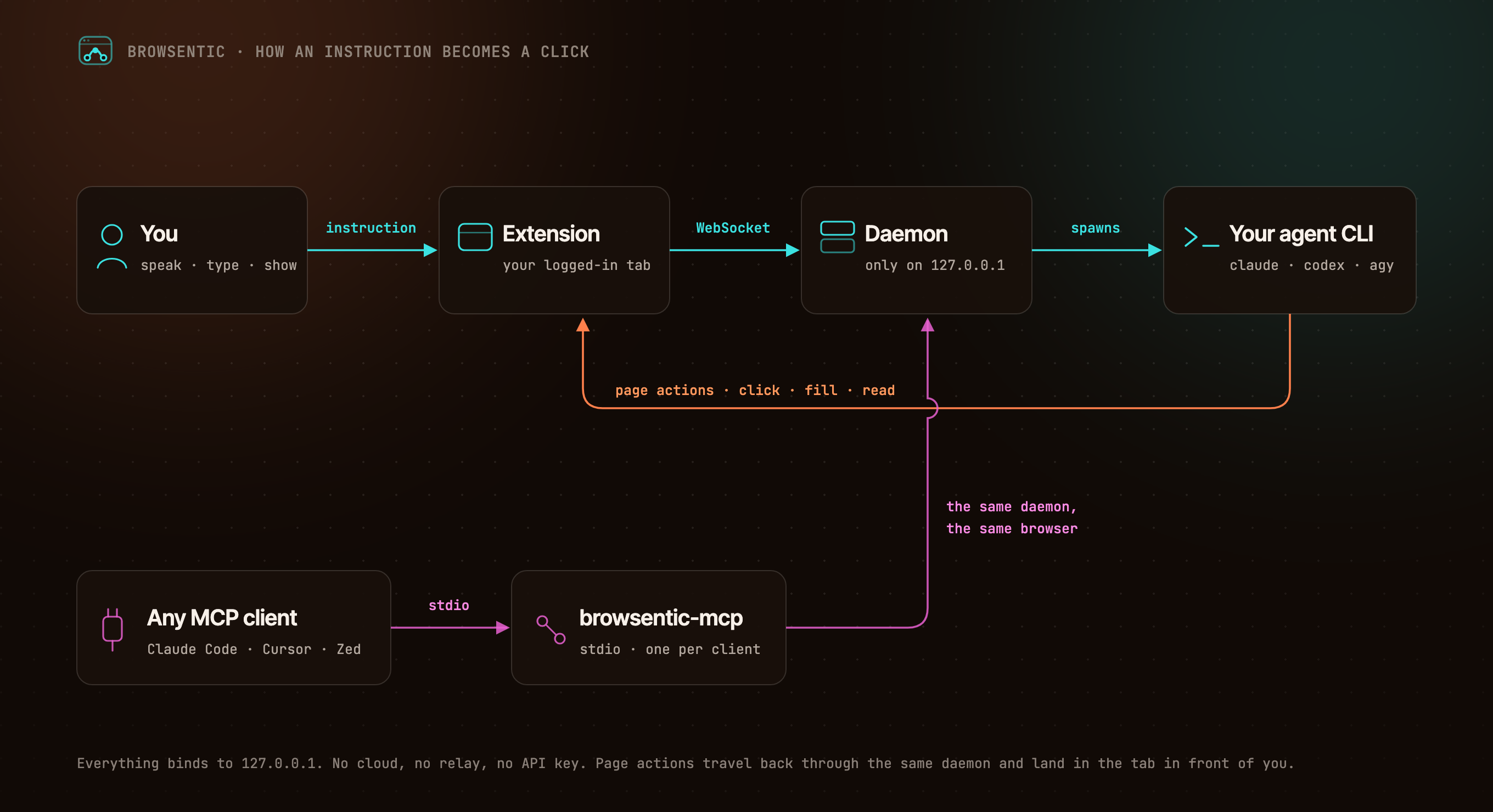
You ──speak or type──> Extension ──local WebSocket──> Daemon ──spawns──> your agent CLI
                            ▲                              (claude │ codex │ agy │ vibe │ grok)
                            └──────────────── page actions ─────────────────────┘

Any MCP client ──stdio──> browsentic mcp ──> the same daemon ──> the same browser
The extension dials out to the daemon, because a Manifest V3 service worker cannot listen for connections. One daemon owns the browser link, so several MCP clients can share one browser. Everything binds to 127.0.0.1.
Resources
- 📚 Documentation
- 🚀 Install and Pair
- ✨ Features
- 🧰 All 52 Page Tools
- 🔌 Optional: Drive It From Claude Code, Cursor or Zed Over MCP
- 🛡️ Approvals and Guardrails
- 🏗️ Architecture
- 🩺 Troubleshooting
Privacy and Security
Nothing connects until you pair, both ends prove themselves, consequential actions ask first, and credentials on a page are sealed before the agent sees them. The full model is in SECURITY.md, and what it does not cover is in Limits.
Contributing
Bugs and ideas are welcome — start at CONTRIBUTING.md.
License
Browsentic is MIT licensed.
- Source Available: Always visible source code
- Local First: No cloud component, no telemetry, no account
- Extensible: Add your own page capabilities, skills and agent runners
What does Browsentic mean?
Short answer: "Browse" + "agentic".
Long answer: Most browser automation asks you to hand the work to a different browser — a headless one, in a container, logged in to nothing. Browsentic is the other way round: the agentic part happens in the browser you are already looking at, with the sessions you are already signed in to. The name is the thesis — browsing, made agentic, where you already browse.
Related MCP servers

Anneal
Zero-friction personal operating system: habits, tasks, and FSRS-5 study retention via remote MCP.

io.github.imviky-ctrl/tickerr
Live status, API pricing and rate limits for ChatGPT, Claude, Gemini, Cursor and 42+ AI tools.

Validate and parse German e-invoices (XRechnung, ZUGFeRD, Factur-X) offline. No API key.
View repository →
io.github.inSideos-designs/cowork-qa
Goal-driven Playwright browser sessions for LLMs, with full action traces and aria-snapshots.

Check an agent's INAM reputation before trusting it, and sign a receipt when work is done.

iNavi Maps Docs
iNavi Maps docs for AI (South Korea): API specs, Web JS SDK reference, HTML map templates