BoardGameGeek MCP Server MCP Server
io.github.kkjdaniel/bgg-mcp
Access BoardGameGeek data, prices, and recommendations through AI assistants via MCP.
What is the BoardGameGeek MCP Server MCP server?
The BoardGameGeek MCP Server provides access to BoardGameGeek API data, enabling AI assistants to search games, retrieve collection information, check prices, find trading opportunities, and get game recommendations. It integrates with BoardGamePrices.co.uk for real-time pricing and Recommend.Games for algorithmic similarity recommendations.
BGG MCP lets you query BoardGameGeek's comprehensive board game database directly from Claude or Cursor. Search for games, explore user collections, check current prices across retailers, find trading partners, get personalized recommendations, and even search forum discussions for rules clarifications. Useful for board game enthusiasts, collectors, and anyone needing structured access to BGG data.
How to install BoardGameGeek MCP Server
Copy-paste configuration for popular MCP clients.
BGG_API_KEYAPI key for BoardGameGeek authentication (recommended). Obtain from https://boardgamegeek.com/applications
BGG_COOKIECookie string for BGG authentication (alternative to API key). Format: 'bggusername=user; bggpassword=pass; SessionID=xyz'
BGG_USERNAMEYour BoardGameGeek username for references such as ME or MY in prompts
Tools & capabilities
Tools this server exposes to the agent.
bgg-search— Search for board games with type filtering (base games, expansions, or all)bgg-details— Get detailed information about a specific board gamebgg-collection— Query and filter a user's game collection with extensive filtering optionsbgg-hot— Get the current BGG hotness listbgg-user— Get user profile informationbgg-price— Get current prices from multiple retailers using BGG IDsbgg-trade-finder— Find trading opportunities between two BGG usersbgg-recommender— Get game recommendations based on similarity to a specific gamebgg-thread-details— Get the full content of a specific BGG forum thread including all postsbgg-rules— Answer rules questions by searching BGG forums for relevant discussions and clarifications (experimental)
Use cases
- Search for board games and filter by type (base game, expansion, etc.) to discover new titles
- Explore other users' game collections with advanced filtering by rating, player count, or play status
- Get real-time pricing from multiple retailers to find the best deals on board games
- Find trading opportunities by comparing what you own with what other BGG users want
- Receive personalized game recommendations based on games similar to ones you already own
BoardGameGeek MCP Server MCP server FAQ
It's an MCP server that connects AI assistants like Claude and Cursor to BoardGameGeek's API, allowing you to search games, access collections, check prices, find trades, and get recommendations without leaving your AI chat.
The server itself is free and open-source. However, you need a free BoardGameGeek API key (obtained from boardgamegeek.com/applications) to authenticate with the BGG API.
Add the Docker configuration to your settings.json (Cursor) or claude_desktop_config.json (Claude Desktop), specifying the Docker image kdaniel/bgg-mcp:1.6.1 and your BGG_API_KEY environment variable. Alternatively, build from source using Go and point to the binary.
You need either a BGG API key (recommended) or cookie-based authentication. Set the BGG_API_KEY or BGG_COOKIE environment variable in your MCP configuration. Optionally set BGG_USERNAME to enable 'my collection' and 'my profile' queries.
Yes, the experimental bgg-rules tool searches BGG forums for rules clarifications and discussions. Include 'use bgg-rules' in your question to trigger it.
Yes, the bgg-price tool retrieves real-time prices from multiple retailers via BoardGamePrices.co.uk, allowing you to compare costs and find the best deals.
README (reference)
Source of truth, from the repository.
BGG MCP provides access to the BoardGameGeek API through the Model Context Protocol, enabling retrieval and filtering of board game data, user collections, and profiles. The server is implemented in Go, using the GoGeek library, which helps ensure robust API interactions.
Price data is provided by BoardGamePrices.co.uk, offering real-time pricing from multiple retailers.
Game recommendations are powered by Recommend.Games, which provides algorithmic similarity recommendations based on BoardGameGeek data.
<a href="https://boardgamegeek.com/"> <img src="images/powered-bgg.webp" width="160" alt="Powered by BGG"> </a>Demo
<div align="center">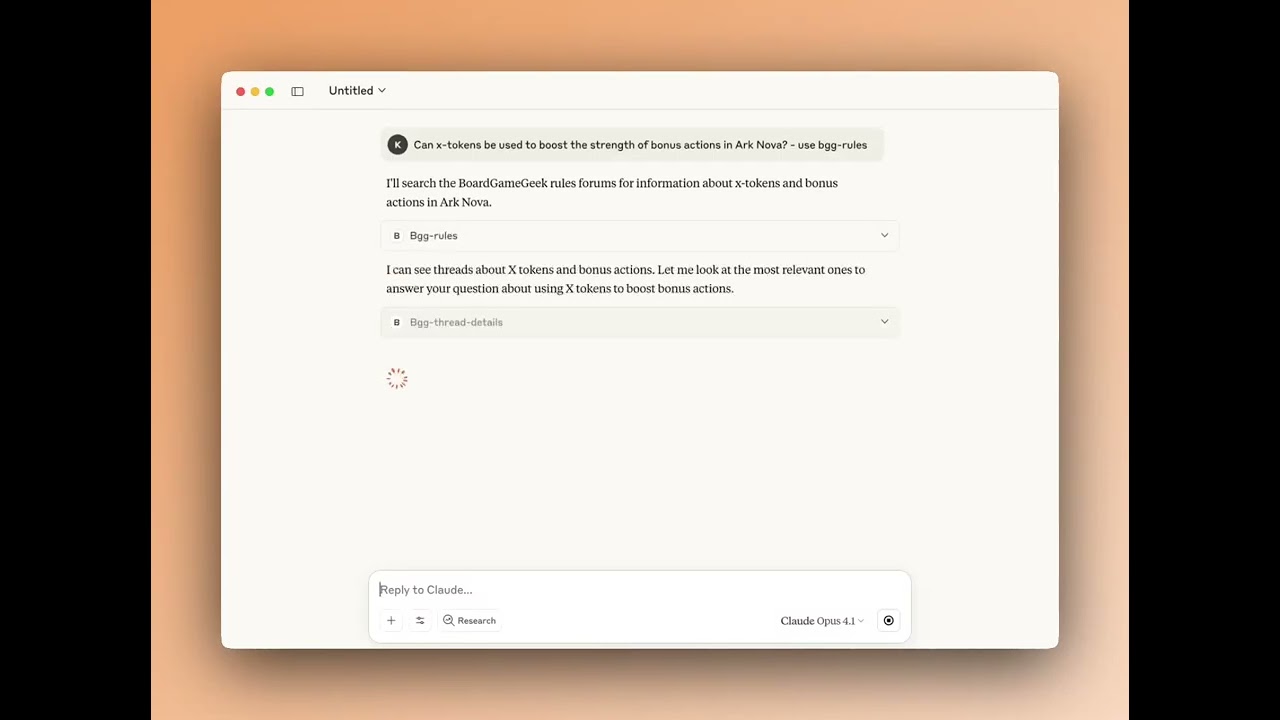
▶️ Watch the Rules Tool Demo Video
</div>Tools
Core Tools
| Tool | Description |
|---|---|
bgg-search | Search for board games with type filtering (base games, expansions, or all) |
bgg-details | Get detailed information about a specific board game |
bgg-collection | Query and filter a user's game collection with extensive filtering options |
bgg-hot | Get the current BGG hotness list |
bgg-user | Get user profile information |
bgg-price | Get current prices from multiple retailers using BGG IDs |
bgg-trade-finder | Find trading opportunities between two BGG users |
bgg-recommender | Get game recommendations based on similarity to a specific game |
bgg-thread-details | Get the full content of a specific BGG forum thread including all posts |
🧪 Experimental Tools
| Tool | Description |
|---|---|
bgg-rules | Answer rules questions by searching BGG forums for relevant discussions and clarifications |
Resources
BGG MCP exposes resources that AI assistants can access directly for contextual information:
| Resource | URI | Description |
|---|---|---|
BGG Hotness | bgg://hotness | Current BGG hotness list, always available |
My BGG Collection | bgg://my-collection | Your personal BGG collection (requires BGG_USERNAME to be set) |
Prompts
BGG MCP includes pre-configured prompts for common workflows:
| Prompt | Description |
|---|---|
Trade Sales Post | Generate a formatted sales post for your BGG 'for trade' collection with discounted market prices |
Game Recommendations | Get personalized game recommendations based on your BGG collection and preferences |
Example Prompts
Here are some example prompts you can use to interact with the BGG MCP tools:
🔍 Search
"Search for Wingspan on BGG"
"How many expansions does Grand Austria Hotel have?"
"Search for Wingspan expansions only"
📊 Game Details
"Get details for Azul"
"Show me information about game ID 224517"
"What's the BGG rating for Gloomhaven?"
📚 Collection
"Show me ZeeGarcia's game collection"
"Show games rated 9+ in kkjdaniel's collection"
"List unplayed games in rahdo's collection"
"Find games for 6 players in kkjdaniel's collection"
"Show me all the games rated 3 and below in my collection"
"What games in my collection does rahdo want?"
"What games does kkjdaniel have that I want?"
🔥 Hotness
"Show me the current BGG hotness list"
"What's trending on BGG?"
👤 User Profile
"Show me details about BGG user rahdo"
"When did user ZeeGarcia join BGG?"
"How many buddies do I have on bgg?"
💰 Prices
"Get the best price for Wingspan in GBP"
"Show me the best UK price for Ark Nova"
"Compare prices for: Wingspan & Ark Nova"
🎯 Recommendations
"Recommend games similar to Wingspan"
"What games are like Azul but with at least 1000 ratings?"
"Find 5 games similar to Troyes"
📖 Rules (Experimental)
"[Your rules question about any board game] - use bgg-rules"
"How does [game mechanic] work in [game name]? use bgg-rules"
"Can I [specific action] in [game name]? use bgg-rules"
"What happens when [situation] in [game name]? use bgg-rules"
Note: Include "use bgg-rules" in your question to ensure the AI searches BGG forums for answers.
Installation
Authentication Required: Most BGG MCP tools require authentication to access BoardGameGeek's API. See the Configuration section below for setup instructions.
A) Docker (Recommended)
BGG MCP is published to Docker Hub and listed on the MCP Registry. Add the following to your claude_desktop_config.json (Claude Desktop) or settings.json (VS Code / Cursor):
"bgg": {
    "command": "docker",
    "args": ["run", "-i", "--rm",
        "-e", "BGG_API_KEY",
        "-e", "BGG_USERNAME",
        "kdaniel/bgg-mcp"
    ],
    "env": {
        "BGG_API_KEY": "your_api_key_here",
        "BGG_USERNAME": "your_bgg_username"
    }
}
See Configuration below for details on obtaining a BGG API key and setting up your username.
For more details on connecting MCP servers to your client, see the official MCP guide.
B) Manual Setup
1. Install Go
You will need to have Go installed on your system to build binary. This can be easily downloaded and setup here, or you can use the package manager that you prefer such as Brew.
2. Build
The project includes a Makefile to simplify building and managing the binary.
# Build the application (output goes to build/bgg-mcp)
make build

# Clean build artifacts
make clean

# Both clean and build
make all
Or you can simply build it directly with Go...
go build -o build/bgg-mcp
3. Add MCP Config
In the settings.json (VS Code / Cursor) or claude_desktop_config.json add the following to your list of servers, pointing it to the binary you created earlier, once you load up your AI tool you should see the tools provided by the server connected:
"bgg": {
    "command": "path/to/build/bgg-mcp",
    "args": ["-mode", "stdio"]
}
More details for configuring Claude can be found here.
Configuration
Authentication
BGG MCP uses the GoGeek v3 library, which requires authentication for access to BoardGameGeek's API.
You can configure authentication using either BGG_API_KEY (recommended) or BGG_COOKIE:
Authentication Setup
Option 1: API Key (Recommended)
Get an API key from BoardGameGeek's API application form and add it to your configuration:
"bgg": {
    "env": {
        "BGG_API_KEY": "your_api_key_here"
    }
}
Option 2: Cookie Authentication
Alternatively, you can use cookie-based authentication:
"bgg": {
    "env": {
        "BGG_COOKIE": "bggusername=user; bggpassword=pass; SessionID=xyz"
    }
}
Note: If both are provided, BGG_API_KEY will be used by default.
Username Configuration
You can optionally set the BGG_USERNAME environment variable to enable "me" and "my" references in queries without needing to explicitly state your username:
"bgg": {
    "env": {
        "BGG_USERNAME": "your_bgg_username",
        "BGG_API_KEY": "your_api_key_here"
    }
}
This enables:
- Collection queries: "Show my collection" instead of specifying your username
- User queries: "Show my BGG profile"
- AI assistance: The AI can automatically use your username for comparisons and analysis
Note: When you use self-references (me, my, I) without setting BGG_USERNAME, you'll get a clear error message.
Related MCP servers

Submit and track stock/crypto direction predictions on LDBD's public leaderboard (ldbd.app).

AI-native local business data. Find businesses, browse menus, check ratings, and place orders.
View repository →
SSH, SFTP, PTY shells, host-to-host copies and remote screenshots for AI agents. One Rust binary.
Go code coverage analysis tool with MCP server for AI-powered coverage workflows

Scout
Browser automation MCP server with 84 tools. Pure CDP, DOM diffing, vision hybrid.

GitWarren
Local code review for git repos on your machine, with AI agent integration via MCP.