io.github.mkXultra/ai-cli-mcp MCP Server
io.github.mkXultra/ai-cli-mcp
Run Claude, Codex, Gemini, Grok, OpenCode, and Pi CLIs in background jobs through MCP.
What is the io.github.mkXultra/ai-cli-mcp MCP server?
The AI CLI MCP Server is an MCP (Model Context Protocol) server that allows running multiple AI CLI tools (Claude, Codex, Gemini, Grok, OpenCode, and Pi) in background processes with automatic permission handling. It enables LLMs to invoke powerful AI agents asynchronously, supporting parallel task execution, context caching via session IDs, and model selection across multiple AI providers.
This server bridges MCP clients (like Claude and Cursor) with local AI CLI tools, enabling background execution of complex coding tasks across multiple AI models. Instead of waiting for one agent to complete, you can launch parallel tasks using different models and providers, then collect results later. It's useful for large-scale refactoring, multi-model code review, and cost-optimized workflows that reuse context across runs.
How to install io.github.mkXultra/ai-cli-mcp
Copy-paste configuration for popular MCP clients.
Tools & capabilities
Tools this server exposes to the agent.
run— Launch an AI CLI tool (Claude, Codex, Gemini, Grok, OpenCode, or Pi) in a background process with specified model, prompt, working directory, and optional session ID for context reuse.wait— Wait for one or more background processes to complete and retrieve their final results, with optional timeout and verbose output.peek— Read incremental output from a running background process, including assistant text and optional tool execution events.result— Retrieve the final result of a completed background process, including response text, model used, token usage, and session ID.ps— List all currently running background processes with their PIDs and status.kill— Terminate a running background process by PID.cleanup— Remove completed or stale background process records.doctor— Check binary availability and path resolution for installed AI CLI tools (Claude, Codex, Gemini, Grok, OpenCode, Pi).models— List available models for each installed AI CLI backend, including dynamically discovered models and reasoning effort options.
Use cases
- Launch multiple AI agents in parallel to refactor different parts of a codebase simultaneously, then collect results together.
- Reuse expensive context (large codebases) across multiple tasks using session IDs to reduce API costs.
- Run complex multi-step coding operations that Cursor struggles with by delegating to more capable models like Claude Opus or Codex.
- Select the best or most cost-effective model for each task (Claude for reasoning, Codex for coding, Gemini for speed) without being locked into one provider.
- Automate unattended background AI runs with automatic tool approval and permission handling.
io.github.mkXultra/ai-cli-mcp MCP server FAQ
It's an MCP server that lets you run Claude, Codex, Gemini, Grok, OpenCode, and Pi CLI tools in background processes. You can launch multiple AI agents in parallel, reuse context via session IDs, and pick the best model for each task.
The server itself is free and open-source (npm package ai-cli-mcp). You need local installations of the AI CLI tools you want to use, and those tools may require paid API keys or subscriptions (e.g., Claude, Codex, Gemini).
Add it to your MCP configuration using npx: {"ai-cli-mcp": {"command": "npx", "args": ["-y", "ai-cli-mcp@latest"]}}. Or use `claude mcp add ai-cli` with the same config. You can also install globally with `npm install -g ai-cli-mcp`.
Each AI CLI tool must be installed and authenticated locally first. For Claude, run `claude --dangerously-skip-permissions` once to accept terms. For Codex, run `codex login`. For Gemini, run `agy` to sign in. For Grok, Pi, and OpenCode, follow their respective authentication steps.
Yes. Use the `run` tool to launch background jobs, then use `wait` to collect results later. You can also reuse context across runs with session IDs to save costs.
Claude (sonnet, opus, haiku, etc.), Codex (gpt-5.4, gpt-6-sol, gpt-6.1-sol, etc.), Gemini (gemini-3.8-flash, gemini-3.1-pro, etc.), Grok (grok, grok-4.6, grok-4.5), OpenCode (opencode, oc-<provider/model>), and Pi (pi, pi-<provider/model>).
README (reference)
Source of truth, from the repository.
AI CLI MCP Server


📦 Package Migration Notice: This package was formerly
@mkxultra/claude-code-mcpand has been renamed toai-cli-mcpto reflect its expanded support for multiple AI CLI tools.
An MCP (Model Context Protocol) server that allows running AI CLI tools (Claude, Codex, Gemini, OpenCode, Grok, and Pi) in background processes with automatic permission handling.
Did you notice that Cursor sometimes struggles with complex, multi-step edits or operations? This server, with its powerful unified run tool, enables multiple AI agents to handle your coding tasks more effectively.
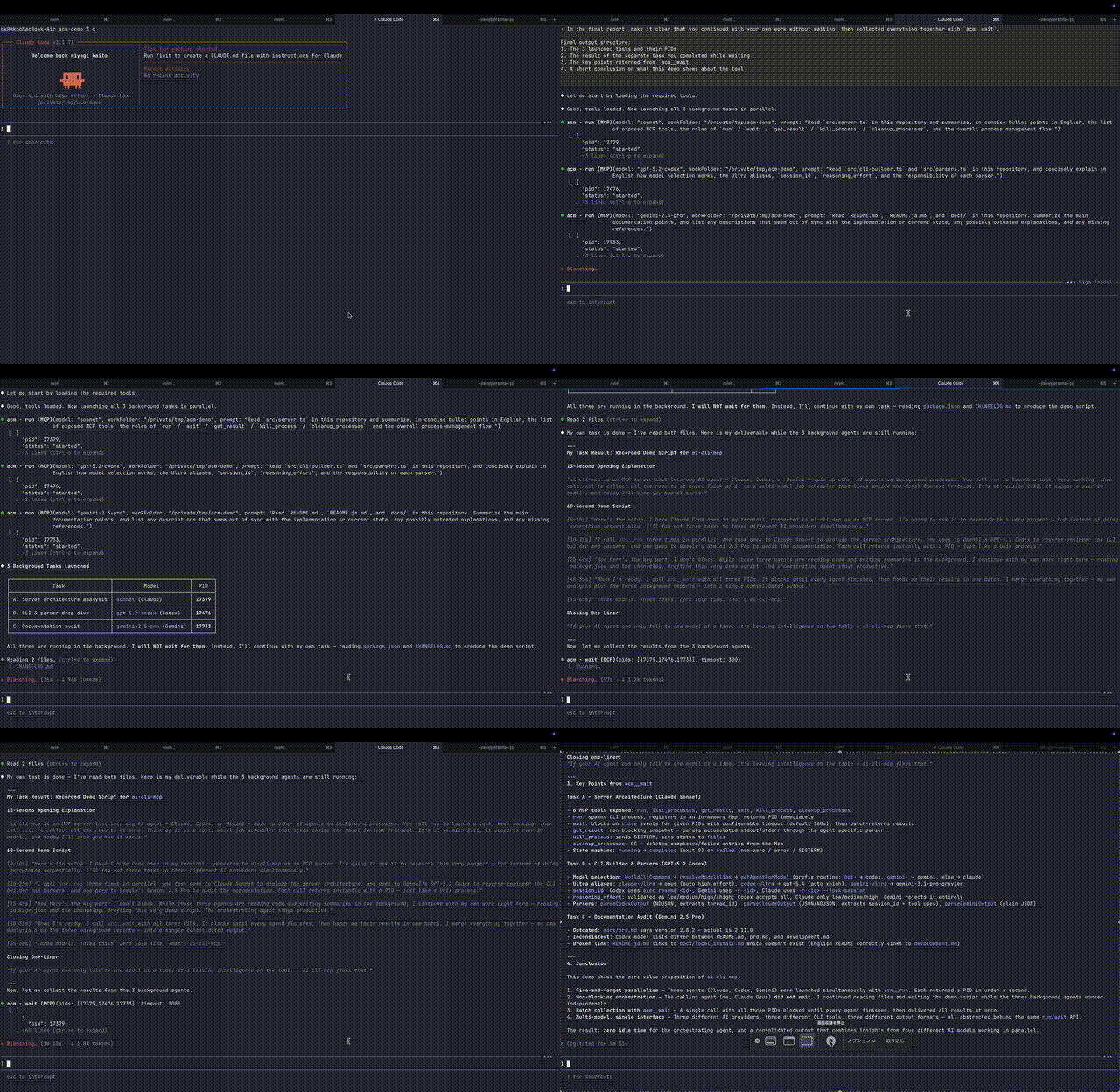
Demo
Overview
This MCP server provides tools that can be used by LLMs to interact with AI CLI tools. When integrated with MCP clients, it allows LLMs to:
- Run Claude CLI with all permissions bypassed (using
--dangerously-skip-permissions) - Execute Codex CLI with approvals and sandbox bypassed (using
--dangerously-bypass-approvals-and-sandbox) - Execute Gemini models through Antigravity CLI (
agy --print,stream-json, and--dangerously-skip-permissions) - Execute Grok Build CLI headlessly with
streaming-messages-json, automatic tool approval, and automatic updates disabled - Execute OpenCode in non-interactive JSON mode (using
opencode run --format json --dir <workFolder> <prompt>) - Execute Pi in non-interactive JSON mode with tool approval enabled for unattended runs
- Support multiple AI models: Claude (sonnet, sonnet[1m], opus, opusplan, fable, haiku), Codex (gpt-6-astra, gpt-6.1-sol, gpt-6-sol, gpt-6-luna, gpt-5.4, gpt-5.6-sol, gpt-5.6-terra, gpt-5.6-luna, gpt-5.5, gpt-5.4-mini, gpt-5.3-codex, gpt-5.3-codex-spark, gpt-5.2), Gemini (gemini-3.8-flash-high/medium/low, gemini-3.7-flash-high/medium/low, gemini-3.6-flash-high/medium/low, gemini-3.1-pro-high/low), Grok (
grok,grok-4.6,grok-4.5), OpenCode (opencodeplusoc-<provider/model>), and Pi (pipluspi-<provider/model>) - Manage background processes with PID tracking
- Parse and return structured outputs from both tools
Usage Example (Advanced Parallel Processing)
You can instruct your main agent to run multiple tasks in parallel like this:
Launch agents for the following 3 tasks using acm mcp run:
- Refactor
src/backendcode usingsonnet- Create unit tests for
src/frontendusinggpt-5.3-codex- Update docs in
docs/usinggemini-3.1-pro-highWhile they run, please update the TODO list. Once done, use the
waittool to wait for all completions and report the results together.
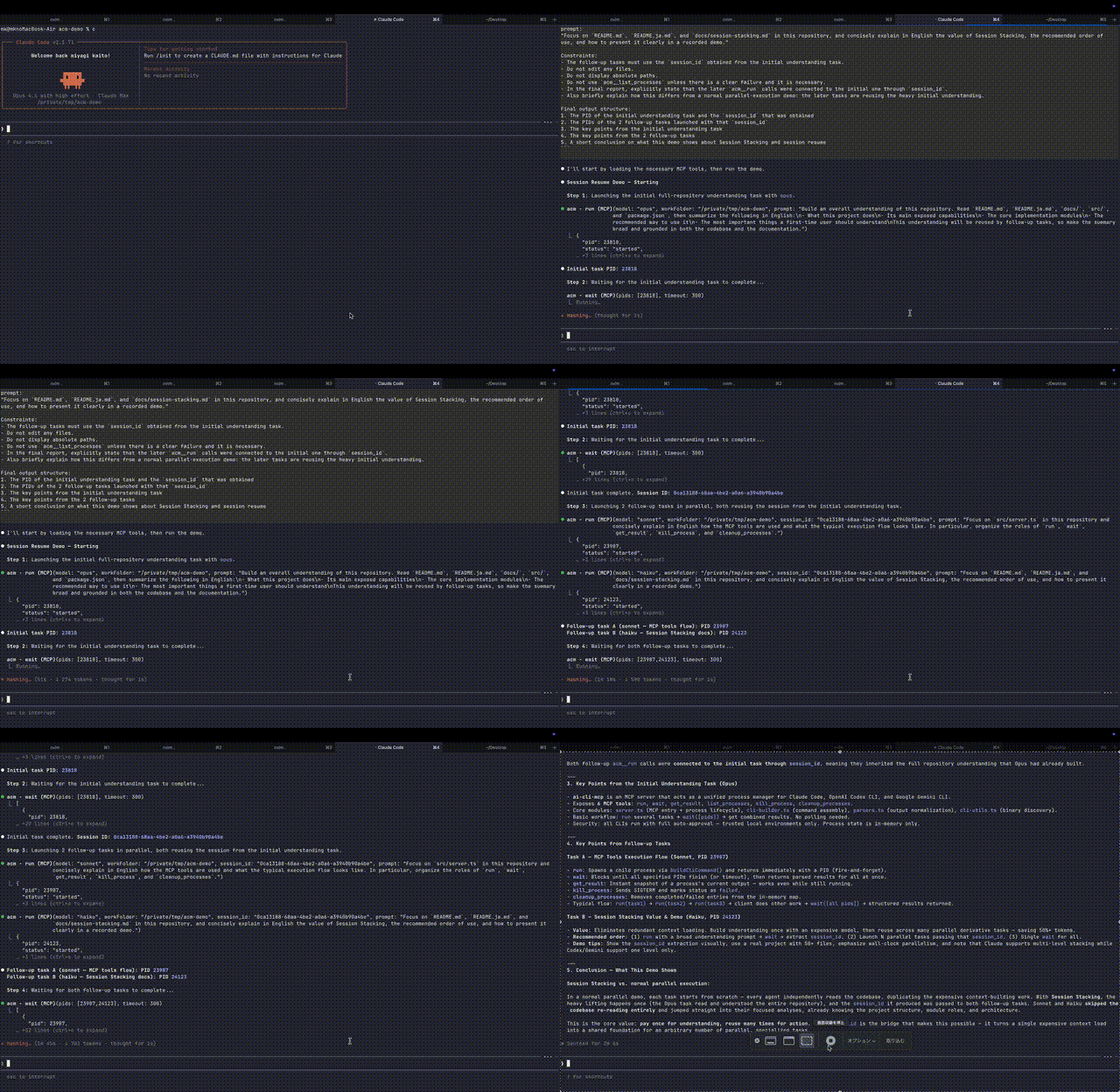
Usage Example (Context Caching & Sharing)
You can reuse heavy context (like large codebases) using session IDs to save costs while running multiple tasks.
- First, use
acm mcp runwithopusto read all files insrc/and understand the project structure.- Use the
waittool to wait for completion and retrieve thesession_idfrom the result.- Using that
session_id, run the following two tasks in parallel withacm mcp run:
- Create refactoring proposals for
src/utilsusingsonnet- Add architecture documentation to
README.mdusinggpt-5.3-codex- Finally,
waitagain to combine both results.
Benefits
- True Async Multitasking: Agent execution happens in the background, returning control immediately. The calling AI can proceed with the next task or invoke another agent without waiting for completion.
- CLI in CLI (Agent in Agent): Directly invoke powerful CLI tools like Claude Code or Codex from any MCP-supported IDE or CLI. This enables broader, more complex system operations and automation beyond host environment limitations.
- Freedom from Model/Provider Constraints: Freely select and combine the "strongest" or "most cost-effective" models from Claude, Codex (GPT), Gemini, OpenCode, Grok, and Pi without being tied to a specific ecosystem.
Prerequisites
The only prerequisite is that the AI CLI tools you want to use are locally installed and correctly configured.
- Claude Code:
claude doctorpasses, and execution with--dangerously-skip-permissionsis approved (you must run it manually once to login and accept terms). - Codex CLI (Optional): Installed and initial setup (login etc.) completed.
- Antigravity CLI (Optional, for Gemini models): Install
agyand sign in once; tested with 1.2.5. See the migration instructions below. - Grok Build CLI (Optional): Install and authenticate Grok locally (tested with 1.0.13 and OAuth). Discovery checks
~/.grok/bin/grok, thenPATH;GROK_CLI_NAMEoverrides either with a command name or absolute path. - OpenCode (Optional): Installed and configured. This integration uses
opencode run --format json, and explicit provider/model selection follows theoc-<provider/model>wrapper syntax exposed byai-cli models. - Pi (Optional): Install and authenticate Pi locally (tested with 0.86.1). Run
pi --list-modelsto see the provider/model pairs available to your account.PI_CLI_NAMEoverrides the binary name or path.
Installation & Usage
Antigravity CLI for Gemini models
The Gemini backend uses Google's Antigravity CLI (agy, tested with 1.2.5). On macOS/Linux:
curl -fsSL https://antigravity.google/cli/install.sh | bash
~/.local/bin/agy  # Sign in once interactively
agy models
ai-cli run --cwd /path/to/project --model gemini-ultra --prompt "Review this project"
On Windows, follow the official PowerShell instructions. Discovery checks ~/.local/bin/agy on macOS/Linux or %LOCALAPPDATA%/agy/bin/agy.exe on Windows, then PATH. Set ANTIGRAVITY_CLI_NAME to override this path.
The backend key remains gemini in doctor, models, and process results. The built-in gemini-ultra selects gemini-3.8-flash-high. Update custom aliases targeting old Gemini CLI names with ai-cli alias add; agy models lists the names available to your account. A supplied reasoning_effort must match the model suffix (for example, gemini-3.8-flash-medium with medium). Other Antigravity model families are not routed through this backend.
peek reads incremental assistant text and optional tool start/completion events. get_result/ai-cli result return the final response and expose Antigravity's conversation_id as session_id; pass it to the next run to resume with --conversation. Old Gemini CLI output parsing and session resumption are not supported.
This integration sets Antigravity's run limit to two hours (2h) by default. Set ANTIGRAVITY_PRINT_TIMEOUT=1h (or another positive duration) in the environment of ai-cli or the MCP server to override it. Antigravity's 0 means an immediate timeout. ACM wait(timeout: 0) only removes the waiting deadline and does not change this separate run limit.
There are now two primary ways to use this package:
ai-cli-mcp: MCP server entrypointai-cli: human-facing CLI for background AI runs
MCP usage with npx
The recommended way to use the MCP server is via npx.
Using npx in your MCP configuration:
    "ai-cli-mcp": {
      "command": "npx",
      "args": [
        "-y",
        "ai-cli-mcp@latest"
      ]
    },
Using Claude CLI mcp add command:
claude mcp add ai-cli '{"name":"ai-cli","command":"npx","args":["-y","ai-cli-mcp@latest"]}'
Human CLI usage with global install
If you want to use the production CLI directly from your shell, install the package globally:
npm install -g ai-cli-mcp
This exposes both commands:
ai-cliai-cli-mcp
Examples:
ai-cli doctor
ai-cli models
ai-cli run --cwd "$PWD" --model sonnet --prompt "summarize this repository"
ai-cli run --cwd "$PWD" --model opencode --prompt "summarize this repository with OpenCode defaults"
ai-cli run --cwd "$PWD" --model oc-openai/gpt-5.4 --session-id ses_123 --prompt "continue this session with an explicit OpenCode model"
ai-cli run --cwd "$PWD" --model pi-openai-codex/gpt-6-astra --reasoning-effort high --prompt "review this repository with Pi"
ai-cli ps
ai-cli result 12345
ai-cli result 12345 --verbose
ai-cli peek 12345 --time 10
ai-cli wait 12345 --timeout 300
ai-cli wait 12345 --timeout 0
ai-cli wait 12345 --verbose
ai-cli kill 12345
ai-cli cleanup
ai-cli-mcp
Human CLI usage with npx
Because the published package name is still ai-cli-mcp, the shortest npx form for the CLI is:
npx -y --package ai-cli-mcp@latest ai-cli run --cwd "$PWD" --model sonnet --prompt "hello"
npx -y --package ai-cli-mcp@latest ai-cli run --cwd "$PWD" --model oc-openai/gpt-5.4 --prompt "hello from OpenCode"
Important First-Time Setup
Forge CLI support has been removed. models and doctor no longer include Forge, and model: "forge" is rejected. In your user configuration, remove aliases targeting forge or change their targets to supported models. FORGE_CLI_NAME is no longer used.
For Claude CLI:
Before the MCP server can use Claude, you must first run the Claude CLI manually once with the --dangerously-skip-permissions flag, login and accept the terms.
npm install -g @anthropic-ai/claude-code
claude --dangerously-skip-permissions
Follow the prompts to accept. Once this is done, the MCP server will be able to use the flag non-interactively.
For Codex CLI:
For Codex, ensure you're logged in and have accepted any necessary terms:
codex login
For Antigravity CLI (Gemini):
Start Antigravity once interactively to sign in:
agy
macOS might ask for folder permissions the first time any of these tools run. If the first run fails, subsequent runs should work.
CLI Commands
ai-cli currently supports:
runpsresultpeekwaitkillcleanupdoctormodelsalias list/alias add/alias rmmcp
Example flow:
ai-cli doctor
ai-cli models
ai-cli run --cwd "$PWD" --model gpt-5.4 --prompt "use the default Codex model"
ai-cli run --cwd "$PWD" --model codex-ultra --prompt "fix failing tests"
ai-cli run --cwd "$PWD" --model opencode --session-id ses_existing --prompt "continue this OpenCode session"
ai-cli run --cwd "$PWD" --model oc-openai/gpt-5.4 --prompt "run with an explicit OpenCode backend model"
ai-cli run --cwd "$PWD" --model pi --prompt "run with Pi's configured default model"
ai-cli run --cwd "$PWD" --model pi-openai-codex/gpt-6-astra --reasoning-effort xhigh --prompt "run Pi with an explicit model"
ai-cli ps
ai-cli peek 12345 --time 10
ai-cli peek 12345 12346 --time 10
ai-cli wait 12345
ai-cli wait 12345 --verbose
ai-cli result 12345
ai-cli result 12345 --verbose
ai-cli cleanup
run accepts --cwd as the primary working-directory flag and also accepts the older aliases --workFolder / --work-folder for compatibility.
OpenCode model selection accepts either:
opencodefor the CLI's configured default modeloc-<provider/model>for an explicit OpenCode provider/model, for exampleoc-openai/gpt-5.4
ai-cli models runs opencode models and returns opencode plus discovered names such as oc-openai/gpt-6-astra in the opencode array. Each name can be passed directly to run. Discovery status and errors are available in dynamicModelBackends.opencode.discovery.
Codex model selection uses gpt-5.4 as the default advertised model. Select gpt-6.1-sol for the latest Sol model, gpt-6-sol for the previous Sol model, or gpt-6-luna for Luna. All three accept low, medium, high, xhigh, and max reasoning; both Sol models also accept ultra through Codex CLI. Omitting effort uses the CLI default. For example: ai-cli run --cwd "$PWD" --model gpt-6.1-sol --reasoning-effort ultra --prompt "Review this project".
doctor checks only binary availability and path resolution. Its JSON output includes a checks block that marks login state and terms acceptance as unchecked.
Pi CLI
Install Pi and sign in once before starting ai-cli or the MCP server. This integration was verified with Pi 0.86.1.
npm install -g --ignore-scripts @earendil-works/pi-coding-agent
pi                    # use /login if authentication is not configured
pi --list-models
Use pi to let Pi select its configured default model. Use pi-<provider/model> for an explicit model, for example pi-openai-codex/gpt-6-astra. ai-cli models runs pi --list-models and includes these names after pi in its pi array. dynamicModelBackends.pi.discovery reports discovery status; reasoningEfforts.pi lists off, minimal, low, medium, high, xhigh, and max. Omitting reasoning_effort leaves the choice to Pi.
ai-cli run --cwd "$PWD" --model pi --prompt "Explain this project"
ai-cli run --cwd "$PWD" --model pi-openai-codex/gpt-6-astra --reasoning-effort xhigh --prompt "Review this change"
ai-cli alias add pi-coding pi-openai-codex/gpt-5.6-terra --effort high
ai-cli run --cwd "$PWD" --model pi-coding --session-id <session_id> --prompt "Continue"
Runs use pi --mode json --approve, optional --model, --thinking, and --session, followed by -p -- <prompt>. The --approve flag lets Pi load project resources and execute its configured tools without an interactive confirmation. The existing workFolder and process isolation rules still apply.
peek accumulates Pi text_delta events and optionally reports normalized tool_execution_start / tool_execution_end events. Thinking deltas, tool updates, and raw tool output are excluded. get_result and wait return the final text, provider, model, usage, stop reason, and Pi session ID. Passing that ID to the next run resumes the same session with --session. Verbose results include detailed tool history; compact results omit it. Failed runs preserve diagnostic stderr, and cancellation uses the same process-tree termination used for Grok and Antigravity.
Grok Build CLI
See the Grok headless guide for authentication and CLI setup.
With no user alias named grok, both MCP and ai-cli route grok and native grok-* names to Grok. grok omits --model, using the Grok CLI configuration; explicit names select that model. models includes grok: ["grok", "grok-4.6", "grok-4.5"] and reasoningEfforts.grok with the accepted levels. Other native names are forwarded, with common low/medium/high effort validation; model availability is determined by Grok.
ai-cli run --cwd "$PWD" --model grok --prompt "Explain this project"
ai-cli run --cwd "$PWD" --model grok-4.6 --reasoning-effort xhigh --prompt "Review this change"
ai-cli alias add grok-coding grok-4.6 --effort high
ai-cli run --cwd "$PWD" --model grok-coding --session-id <session_id> --prompt "Continue"
A preexisting user alias named grok keeps precedence, including aliases that target OpenCode. It remains visible in models and alias list and does not affect unrelated runs or MCP tool discovery. Explicit grok-4.6 / grok-4.5 always select the native backend. To use the CLI-configured provider default, rename that alias or explicitly remove it with ai-cli alias rm grok; upgrades never edit your configuration.
The same alias and model, reasoning_effort, and session_id fields work in MCP run. Aliases use the existing user configuration. With no effort supplied, Grok decides the effort. The provider key grok accepts low/medium/high; select grok-4.6 explicitly for xhigh. grok-4.5 accepts low/medium/high. Neither accepts max or ultra.
Commands use grok --single=<prompt> --cwd <workFolder> --output-format streaming-messages-json --always-approve --no-auto-update, plus optional model, effort, and --resume=<session_id>. Attached values preserve leading hyphens and newlines. At the ai-cli surface use --prompt="--text" / --session-id="--id" for values starting with --, or use a prompt file. This follows the existing unattended tool approval policy. Authenticate with Grok before use; doctor.grok checks binary discovery only. The Grok 1.0.13 models command can show an unauthenticated banner even when OAuth headless execution works, so that banner is not used as an authentication test.
peek observes whole assistant messages during the call, plus optional normalized tool start/completion events. Thinking, token deltas, and raw tool output are excluded. get_result and wait return the final answer and session ID, or available assistant text while running. When present, Grok model/usage/cost metadata and terminal is_error, subtype, errors, and stop_reason are retained. Failures also preserve diagnostic stderr, including after a partial answer. Verbose results include detailed tools. kill/kill_process terminate the tracked process and its tool descendants; POSIX cancellation uses ps and signals, and Windows uses taskkill /t /f. If ps is unavailable, it still signals the tracked PID and its owned group, verifies exit and escalates to SIGKILL if needed; the kill response and failure stderr warn that descendants in other groups may survive. The MCP host stops tracked work on SIGINT/SIGTERM/SIGHUP and stdin/transport closure. Group signals target only groups created for tracked work, never the MCP host group.
During MCP cancellation, the Grok root may report failed/143 while its tool descendants are still stopping. Overlapping kill_process calls and host shutdown await the same tree termination; cleanup_processes retains the entry until that operation settles. If the first signal fails before any signal is delivered, the error is returned and later natural completion keeps its actual status and exit code.
User Model Aliases
Save a model and its default reasoning effort under a name you can use across projects. CLI and MCP share the same user configuration.
Manage and use aliases from the CLI
The built-in aliases sol and luna select gpt-6.1-sol and gpt-6-luna. They do not set a reasoning effort: omit --reasoning-effort to use the Codex CLI default, or specify it for a run. For example, ai-cli run --cwd "$PWD" --model sol --prompt "Review this project". User aliases with the same names override these defaults; removing the user override with ai-cli alias rm sol restores the built-in target.
ai-cli alias add codex-coding gpt-5.6-terra --effort xhigh
ai-cli alias add claude-review opus --effort max
ai-cli alias list
ai-cli run --cwd "$PWD" --model codex-coding --prompt "fix failing tests"
Here, codex-coding runs gpt-5.6-terra with xhigh reasoning. Override the effort for a single run with --reasoning-effort low.
alias list prints JSON with configPath and an aliases array containing the effective built-in and user aliases. Each entry has name, resolvesTo, agent, and optional defaultReasoningEffort, matching the aliases in ai-cli models. Listing does not create or modify the config file. Use ai-cli models to include the supported model catalog as well.
alias add <name> <model> [--effort <level>] creates the config file and its parent directories if needed, including an explicitly selected AI_CLI_CONFIG_PATH. Reusing a name replaces its definition; omitting --effort clears any previous alias effort. --reasoning-effort and --reasoning_effort are also accepted. Invalid definitions leave the file unchanged.
# Update the default effort
ai-cli alias add codex-coding gpt-5.6-terra --effort high
# Clear the alias effort and use the target CLI's default
ai-cli alias add codex-coding gpt-5.6-terra
# Remove the user alias
ai-cli alias rm codex-coding
alias rm <name> removes only a user definition. Removing an override such as codex-ultra restores the built-in default. Removing an unknown name or a built-in alias without a user override returns an error. Successful commands print JSON with the config path and the change made. Use ai-cli alias --help for usage.
# Override a built-in alias
ai-cli alias add codex-ultra gpt-5.6-terra --effort xhigh
# Restore its built-in gpt-6-astra / ultra definition
ai-cli alias rm codex-ultra
Use aliases through MCP
After registering codex-coding as above, pass its name to the MCP run tool:
{
  "workFolder": "/absolute/path/to/project",
  "model": "codex-coding",
  "prompt": "fix failing tests"
}
Add "reasoning_effort": "low" to override the effort for that request. ai-cli models and the MCP models tool expose the effective aliases as aliases entries with name, resolvesTo, agent, and optional defaultReasoningEffort fields.
Config is read for each run, models, and MCP tool-list request. Changes apply to subsequent requests without restarting the MCP server, provided CLI and MCP use the same config path.
Configuration file and rules
The commands above edit ~/.config/ai-cli/config.json. You can also edit it directly; for example, this file defines both aliases from the first example:
{
  "model_aliases": {
    "codex-coding": {
      "model": "gpt-5.6-terra",
      "reasoning_effort": "xhigh"
    },
    "claude-review": {
      "model": "opus",
      "reasoning_effort": "max"
    }
  }
}
modelis required;reasoning_effortis optional. The backend is selected from the target model, regardless of the alias name.- Effort precedence is: explicit run argument → alias default → target CLI default. Effort must be supported by the target model; Antigravity effort must match the model suffix; OpenCode aliases must omit it.
- User entries can override built-in aliases such as
codex-ultra. Each entry replaces the entire definition; omittingreasoning_effortuses the target CLI's default rather than inheriting the built-in effort. - Targets must be native model names such as
gpt-5.6-terra,opus, oroc-openai/gpt-5.4; alias chaining is not supported. Alias names are case-sensitive, start with an ASCII letter, and contain only ASCII letters, digits,_, or-. Listed native model names,codex, and theoc-prefix are reserved, except that a user alias namedgrokretains precedence for compatibility. - Missing default config files preserve built-in behavior. Malformed files and invalid model/effort combinations produce errors with the config path. A missing explicitly configured file also produces an error, except that
alias addcan create it.
An absolute XDG_CONFIG_HOME changes the default location to $XDG_CONFIG_HOME/ai-cli/config.json. AI_CLI_CONFIG_PATH overrides that location entirely; relative paths are resolved from the CLI/MCP process's working directory. For an MCP-specific path, set AI_CLI_CONFIG_PATH in the server's env settings. There is no project-level config lookup. The file uses JSON without comments and currently supports only model_aliases.
CLI State Storage
Background CLI runs are stored under:
~/.local/state/ai-cli/cwds/<normalized-cwd>/<pid>/
Each PID directory contains:
meta.jsonstdout.logstderr.logexit-status.jsonfor detached runs
Use ai-cli cleanup to remove completed and failed runs. Running processes are preserved.
Exit Status Tracking
Detached ai-cli runs persist natural exit status for all supported backends through exit-status.json. Non-zero exits are surfaced as failed with the recorded exitCode; zero exits are surfaced as completed with exitCode: 0. ai-cli kill records SIGTERM termination as a failed exit, and a tracked process that disappears without exit metadata is treated as failed rather than assumed successful.
Connecting to Your MCP Client
After setting up the server, add the configuration to your MCP client's settings file (e.g., mcp.json for Cursor, mcp_config.json for Windsurf).
If the file doesn't exist, create it and add the ai-cli-mcp configuration.
Tools Provided
This server exposes the following tools:
run
Executes a prompt using Claude CLI, Codex CLI, Antigravity CLI (Gemini), OpenCode, Grok, or Pi. The appropriate CLI is automatically selected based on the model name.
Arguments:
prompt(string, optional): The prompt to send to the AI agent. Eitherpromptorprompt_fileis required.prompt_file(string, optional): Path to a file containing the prompt. Eitherpromptorprompt_fileis required. Can be absolute path or relative toworkFolder.workFolder(string, required): The working directory for the CLI execution. Must be an absolute path. Models:- Ultra Aliases (built-in defaults; user config can override):
claude-ultra(opus, defaults to max effort and does not select Fable),codex-ultra(gpt-6-astra, defaults to ultra reasoning),gemini-ultra - Claude:
sonnet,sonnet[1m],opus,opusplan,fable,haikufableexplicitly selects Claude Code's latest Fable model. Fable may require separately billed usage credits and is not selected by the built-inclaude-ultradefault.
- Codex:
gpt-6-astra,gpt-6.1-sol,gpt-6-sol,gpt-6-luna,gpt-5.4,gpt-5.6-sol,gpt-5.6-terra,gpt-5.6-luna,gpt-5.5,gpt-5.4-mini,gpt-5.3-codex,gpt-5.3-codex-spark,gpt-5.2 - Gemini:
gemini-3.8-flash-high,gemini-3.8-flash-medium,gemini-3.8-flash-low, Gemini 3.7/3.6 Flash variants,gemini-3.1-pro-high,gemini-3.1-pro-low - Grok:
grokfor its configured default,grok-4.6,grok-4.5, and other nativegrok-*names - OpenCode:
opencodefor the configured default backend model, plus explicit wrappers likeoc-openai/gpt-5.4 - Pi:
pifor its configured default model, plus explicit wrappers likepi-openai-codex/gpt-6-astra reasoning_effort(string, optional): Reasoning control for Claude, Codex, Grok, and Pi. Pi mapsoff|minimal|low|medium|high|xhigh|maxto--thinking. Grok uses--reasoning-effort:grok-4.6supports low/medium/high/xhigh;grok-4.5, thegrokconfigured default, and other native Grok names accept low/medium/high. Omit effort to use the CLI default; max/ultra are rejected for Grok. Claude uses--effort(allowed: "low", "medium", "high", "xhigh", "max"). Codex usesmodel_reasoning_effort(base levels: "low", "medium", "high", "xhigh"; GPT-6.1 Sol, GPT-6 Astra/Sol, and GPT-5.6 Sol/Terra also support "max" and "ultra", while GPT-6 Luna and GPT-5.6 Luna support "max"). Antigravity accepts--effort low|medium|high, which must match the model name suffix when present. OpenCode does not supportreasoning_effort.session_id(string, optional): Optional session ID to resume a previous session. Supported for Claude, Codex, Gemini, OpenCode, Grok, and Pi. Grok resumes via--resume; OpenCode and Pi resume in place via--sessionand may also be combined with explicit model selection.
wait
Waits for multiple AI agent processes to complete and returns their combined results. Blocks until all specified PIDs finish or a timeout occurs.
Set timeout to 0 to wait until all specified processes finish without an ai-cli deadline. For example, call MCP wait with { "pids": [12345], "timeout": 0 }, or use ai-cli wait 12345 --timeout 0. MCP client or transport timeouts still apply independently. A finite wait timeout returns an error and leaves the processes running.
By default, each returned result item uses the compact shape shared with get_result(verbose: false): operational fields such as pid, agent, status, exitCode, model, parsed output such as agentOutput, and top-level session_id when available. Set verbose: true to include full metadata like startTime, workFolder, prompt, and detailed parsed output such as agentOutput.tools.
Arguments:
pids(array of numbers, required): List of process IDs to wait for (returned by theruntool).timeout(number, optional): Non-negative maximum wait time in seconds. Defaults to 180 (3 minutes);0disables the wait timeout.verbose(boolean, optional): Iftrue, each result item uses the full result shape. Defaults tofalse.
peek
Starts a one-shot short observation window for running child agents and returns structured events observed during that specific call. By default this includes only natural-language message events; pass include_tool_calls or --include-tool-calls to also include normalized tool-call events. It is not a history API, not gapless streaming, and not shell stdout/stderr tailing. Separate peek calls may miss events emitted between calls; --follow is intentionally not part of v1.
CLI v1:
ai-cli peek 123 --time 10
ai-cli peek 123 456 --time 10
ai-cli peek 123 --time 10 --include-tool-calls
Arguments:
pids(array of numbers, required): 1..32 process IDs returned byrun. Duplicate PIDs are deduplicated server-side, preserving first occurrence order. Unknown or unmanaged PIDs are returned per process asnot_found, not as a whole-call failure.peek_time_sec(number, optional): Positive integer observation length in seconds. Defaults to 10 and is capped at 60.0, negative values, and fractional values are invalid.include_tool_calls(boolean, optional): Whentrue, each processeventsarray includes normalizedtool_callevents in addition to message events. Defaults tofalse.
Observation and filtering:
peek_started_atandevents[].tsare ai-cli-mcp server-side UTC RFC3339 timestamps.peek_started_atis when the observation window starts after validation and listener registration;events[].tsis when ai-cli-mcp observed and accepted the event.- The window ends when
peek_time_secelapses or all target processes reach a terminal state, whichever comes first. - Events emitted before the window starts are not returned. Concurrent
peekcalls for the same PID are allowed; each has an independent window and may return overlapping events. - Message events are recognized from Codex
agent_messagetext, Claude and Grok whole assistant text content, OpenCodetype: "text"events wherepart.typeis"text", Antigravitystep_updateevents, and Pitext_deltaevents. - When tool calls are included,
tool_callevents are normalized for Codex command/MCP calls, Claude/Grok tool use/results, Antigravity tool steps, OpenCode tool use, and Pi tool execution start/end events. Tool summaries are bounded one-line strings derived from tool names and input metadata only. Raw tool and command output is excluded. - Unknown event shapes are denied by default. Managed agents without supported extraction return their real process status with
events: [],truncated: false, anderror: null. - Each PID keeps the first 50 events observed in the window. If later events are dropped,
truncatedistrue. statusis one ofrunning,completed,failed, ornot_found, and reflects state when the observation window closes.agentisclaude,codex,gemini,opencode,grok,pi, a future tracked string value, ornullwhen the process is not found or the agent cannot be determined.
Example response:
{
  "peek_started_at": "2026-04-11T12:34:56.789Z",
  "observed_duration_sec": 10.01,
  "processes": [
    {
      "pid": 123,
      "agent": "codex",
      "status": "running",
      "events": [
        { "kind": "message", "ts": "2026-04-11T12:34:59.120Z", "text": "I'm checking the implementation." },
        { "kind": "tool_call", "ts": "2026-04-11T12:35:00.000Z", "phase": "started", "id": "item_0", "tool": "command_execution", "summary": "/bin/sh -c 'echo hi'" }
      ],
      "truncated": false,
      "error": null
    },
    {
      "pid": 999,
      "agent": null,
      "status": "not_found",
      "events": [],
      "truncated": false,
      "error": "process not found"
    }
  ]
}
list_processes
Lists all running and completed AI agent processes with their status, PID, and basic info.
doctor
Checks supported AI CLI binary availability and path resolution from MCP clients. Like ai-cli doctor, it returns a checks block and does not verify login state or terms acceptance.
models
Lists supported model names and aliases, including models discovered by running pi --list-models and opencode models. This returns the same structured payload as ai-cli models. The pi and opencode arrays retain their default keys and append names ready for run.
The two discovery commands run concurrently with a 5-second timeout and a 1 MiB output limit per CLI. PI_CLI_NAME and OPENCODE_CLI_NAME overrides apply. Discovery uses the calling process's working directory and CLI configuration; listed models are not a guarantee of authentication or model access.
Each dynamicModelBackends.<backend>.discovery contains status (success or error), checkedAt, cached, and an error on failure. A missing CLI, timeout, or parsing error leaves that backend's default key and all other model lists and aliases available. An empty successful list has status: "success" and no additional names.
The MCP server caches discovery results, including failures, for 60 seconds and shares concurrent lookups. Each standalone ai-cli models invocation fetches fresh results. Changes to executable selection, working directory, or environment bypass the cache; changes to CLI config files appear after cache expiry. User aliases are read on every request. Listing MCP tools and starting runs do not trigger discovery.
The aliases array includes built-in defaults merged with user model aliases. Each entry contains name, resolvesTo, agent, and optional defaultReasoningEffort.
get_result
Gets the current output and status of an AI agent process by PID.
By default, this returns the compact result shape: operational fields such as pid, agent, status, exitCode, model, parsed output such as agentOutput, and top-level session_id when available. It omits metadata fields like startTime, workFolder, and prompt. Set verbose: true to return the full result shape including those metadata fields and detailed parsed output such as agentOutput.tools. If parsed output is unavailable or incomplete, the raw stdout/stderr fallback is preserved.
Arguments:
pid(number, required): The process ID returned by theruntool.verbose(boolean, optional): Iftrue, returns the full result shape. Defaults tofalse.
kill_process
Terminates a running AI agent process by PID.
Arguments:
pid(number, required): The process ID to terminate.
Troubleshooting
- "Command not found" (claude-code-mcp): If installed globally, ensure the npm global bin directory is in your system's PATH. If using
npx, ensurenpxitself is working. - "Command not found" (
ai-cli): If installed globally, ensure your npm global bin directory is inPATH. If usingnpx, usenpx -y --package ai-cli-mcp@latest ai-cli .... - "Command not found" (claude or ~/.claude/local/claude): Ensure the Claude CLI is installed correctly. Run
claude/doctoror check its documentation. - Permissions Issues: Make sure you've run the "Important First-Time Setup" step.
- JSON Errors from Server: If
MCP_CLAUDE_DEBUGistrue, error messages or logs might interfere with MCP's JSON parsing. Set tofalsefor normal operation. - ESM/Import Errors: Ensure you are using Node.js v20 or later.
Contributing
For development setup, testing, and contribution guidelines, see the Development Guide.
Testing
# Deterministic unit, parser, contract, and mocked e2e tests
npm test

# Published npm package contents smoke test
npm run test:package

# Deterministic PR/release gate used by GitHub Actions.
# This does not enable real external CLI runs by itself.
npm run test:release

# Release-time live E2E against real installed AI CLIs
ACM_LIVE_E2E=1 ACM_LIVE_E2E_AGENTS=claude,codex npm run test:live

# Release-time live E2E for both ai-cli and MCP server surfaces
ACM_LIVE_E2E=1 ACM_LIVE_E2E_SURFACE=all ACM_LIVE_E2E_AGENTS=claude,codex npm run test:live
Live E2E is opt-in because it depends on installed and authenticated external CLIs, network access, provider availability, and cost budget. ACM_LIVE_E2E_SURFACE defaults to cli; use mcp or all to include the MCP server surface.
Advanced Configuration (Optional)
Normally not required, but useful for customizing CLI paths or debugging.
CLAUDE_CLI_NAME: Override the Claude CLI binary name or provide an absolute path (default:claude)CODEX_CLI_NAME: Override the Codex CLI binary name or provide an absolute path (default:codex)ANTIGRAVITY_CLI_NAME: Override the Antigravity binary name or absolute path (default:agy). The deprecatedGEMINI_CLI_NAMEis a lower-priority override and must also point to an Antigravity binary.ANTIGRAVITY_PRINT_TIMEOUT: Override Antigravity’s run limit with a positive duration such as1h(integration default:2h;0is not unlimited).GROK_CLI_NAME: Override the Grok CLI binary name or absolute path (default discovery:~/.grok/bin/grok, thengrokon PATH)OPENCODE_CLI_NAME: Override the OpenCode CLI binary name or provide an absolute path (default:opencode)PI_CLI_NAME: Override the Pi CLI binary name or provide an absolute path (default:pi)MCP_CLAUDE_DEBUG: Enable debug logging (set totruefor verbose output)
CLI Name Specification:
- Command name only:
CLAUDE_CLI_NAME=claude-custom - Absolute path:
CLAUDE_CLI_NAME=/path/to/custom/claudeRelative paths are not supported.
Example with custom CLI binaries:
    "ai-cli-mcp": {
      "command": "npx",
      "args": [
        "-y",
        "ai-cli-mcp@latest"
      ],
      "env": {
        "CLAUDE_CLI_NAME": "claude-custom",
        "CODEX_CLI_NAME": "codex-custom",
        "OPENCODE_CLI_NAME": "opencode-custom",
        "PI_CLI_NAME": "pi-custom"
      }
    },
License
MIT
Related MCP servers

Reddit Ads MCP
MCP server for the Reddit Ads API. List accounts, campaigns, ads, and pull reports.

CompShop
Search 350+ compensation surveys by industry, region, or job title. Independent directory.

Search Japanese subsidies and public company data using J-Grants, gBizINFO, and EDINET.
View repository →AI agents propose database changes as reviewable requests — no direct write access.

Multi-account Gmail on a Cloudflare Worker you deploy yourself: read, send, reply, labels, threads

Give your AI a real terminal with persistent sessions, interactive REPLs, SSH, and TUI app support.