MarkView MCP Server
io.github.paulhkang94/markview
Native macOS markdown preview with MCP server for Claude Code—live rendering in a real Swift/SwiftUI window.
What is the MarkView MCP server?
MarkView is a native macOS markdown preview application with an MCP server for Claude Code integration. It renders markdown in a live-reloading native window while Claude writes, supporting GitHub Flavored Markdown, Mermaid diagrams, syntax highlighting, and a split-pane editor. The MCP server exposes two tools: `preview_markdown` to render markdown content and `open_file` to open existing markdown files.
MarkView gives Claude Code a native macOS markdown preview window. Instead of rendering in a browser or Electron, it uses Swift/SwiftUI for a lightweight, responsive experience. You can preview markdown Claude generates in real time, or open existing `.md` files directly. Features include live editing, Mermaid diagram support, syntax highlighting, linting, and export to HTML/PDF.
How to install MarkView
Copy-paste configuration for popular MCP clients.
Tools & capabilities
Tools this server exposes to the agent.
preview_markdown— Render markdown content in a live-reloading MarkView windowopen_file— Open an existing .md file in MarkView
Use cases
- Preview markdown documents Claude generates in real time while coding
- Open and edit markdown files with live rendering and syntax highlighting
- Render Mermaid diagrams and complex markdown tables in a native macOS window
- Export markdown to HTML or PDF directly from the preview
- Use markdown linting to catch formatting issues automatically
MarkView MCP server FAQ
MarkView is a native macOS markdown preview app with MCP server integration for Claude Code. It renders markdown in a real Swift/SwiftUI window with live editing, Mermaid diagrams, syntax highlighting, and linting—no Electron.
Yes, MarkView is open-source under the MIT license. The app and MCP server are both free to use.
Run `claude mcp add --transport stdio --scope user markview -- npx mcp-server-markview` to wire it into every Claude Code session. For Claude Desktop, add the config to `~/Library/Application Support/Claude/claude_desktop_config.json`.
GitHub Flavored Markdown (tables, strikethrough, task lists, footnotes), Mermaid diagrams, syntax highlighting for 18 languages, local image rendering, and markdown linting with 9 built-in rules.
No authentication required. Install via Homebrew (`brew install --cask paulhkang94/markview/markview`) or npm (`npx mcp-server-markview`), then add to Claude Code or Claude Desktop config.
Yes. Use the CLI (`mdpreview file.md`), right-click Open With in Finder, or open files programmatically with `open -a MarkView file.md`. The MCP server is optional for Claude integration.
README (reference)
Source of truth, from the repository.
MarkView

&color=green)

Native macOS markdown preview with MCP server for Claude Code. Claude writes markdown — MarkView renders it live, in a real native window, while you work.
Versions: The macOS app (
appbadge) and the npm MCP wrapper (npmbadge) are versioned independently. App releases happen when the Swift binary changes; npm patches happen for MCP server improvements. Both badges always show the latest of each.
| Preview only | Editor + Preview |
|---|---|
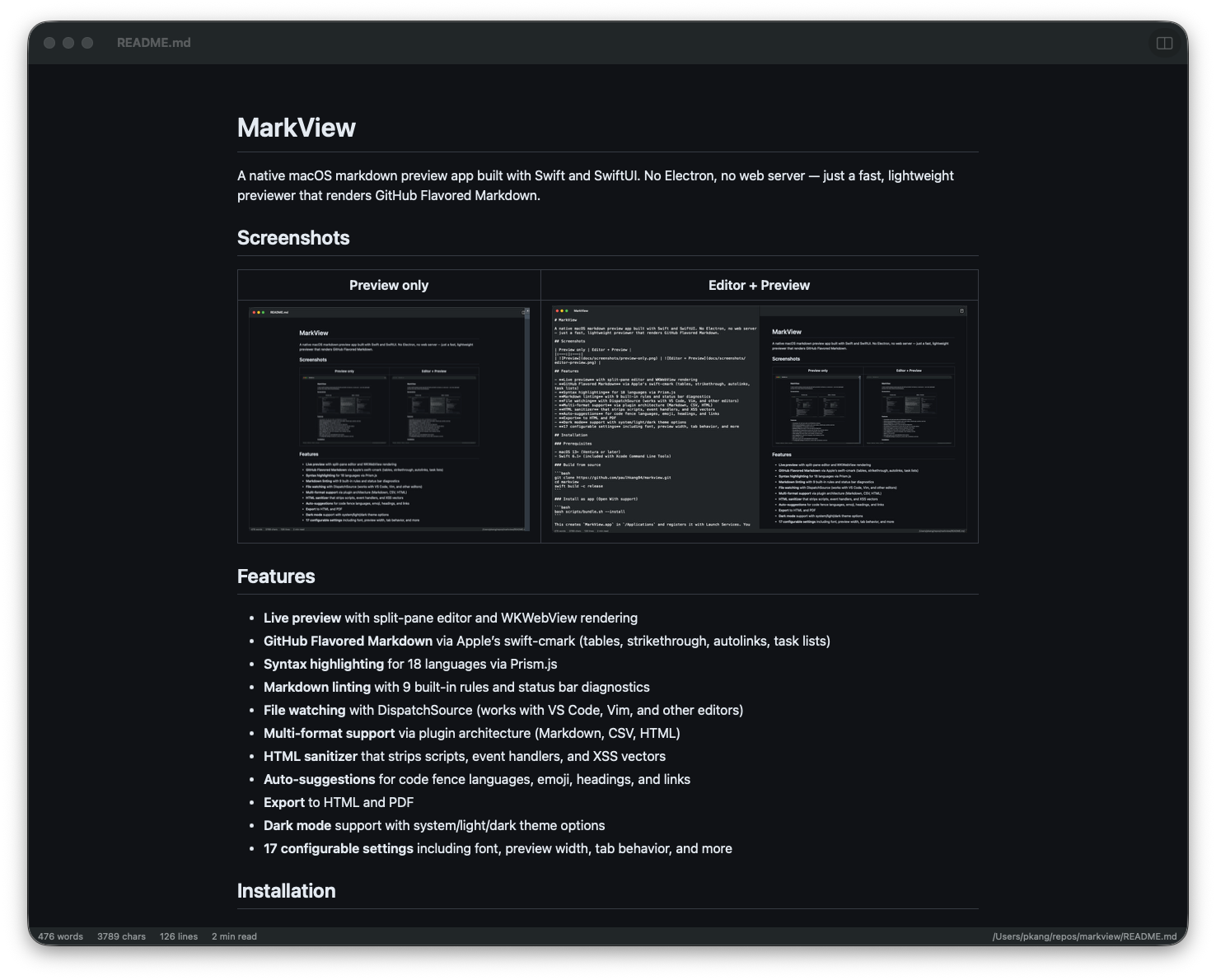 | 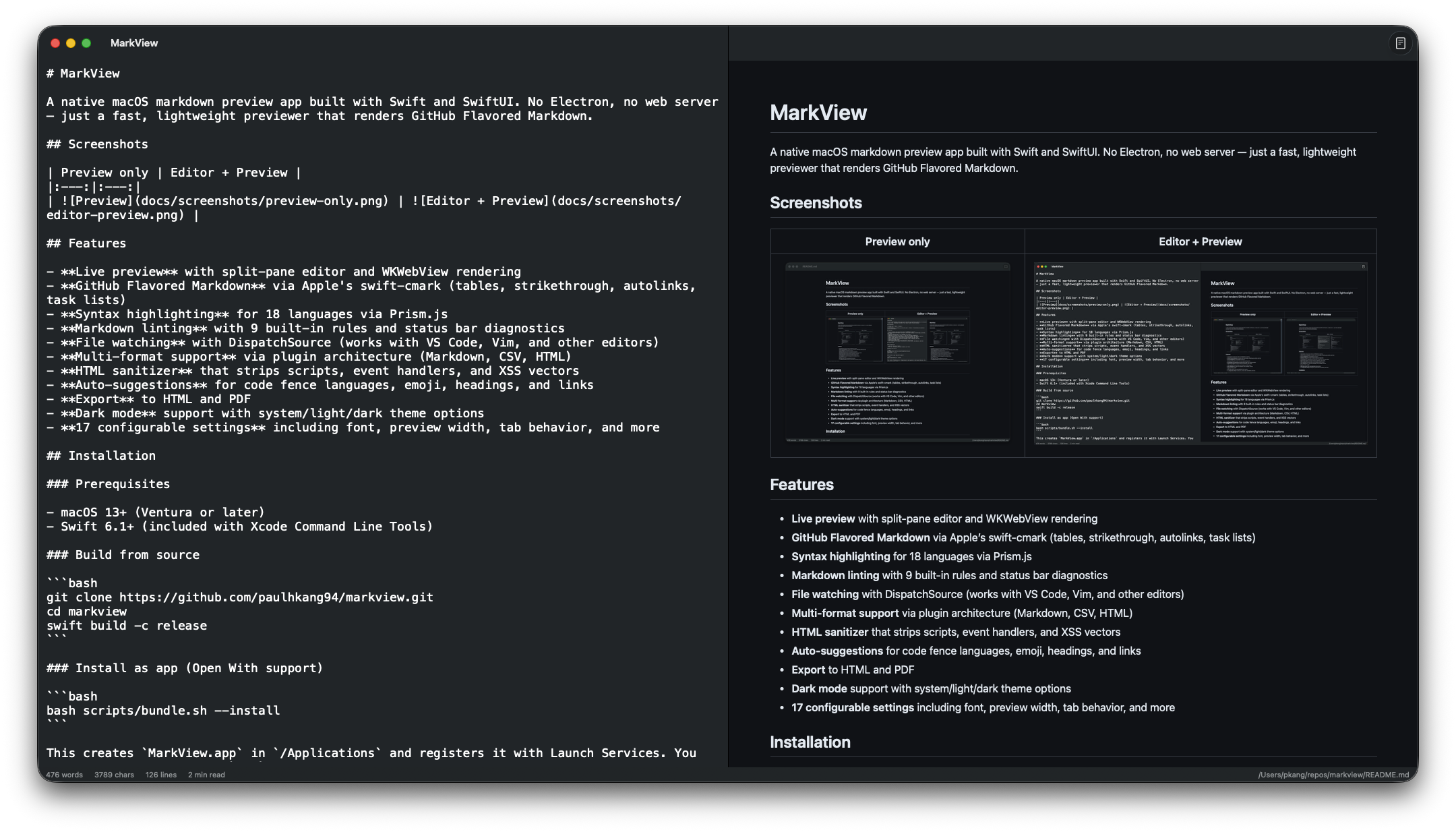 |
Quick Start — Claude Code
One command to wire MarkView into every Claude Code session:
claude mcp add --transport stdio --scope user markview -- npx mcp-server-markview
That's it. Claude can now call preview_markdown to render any markdown string in a native macOS window, or open_file to open any .md file directly.
| Tool | What it does |
|---|---|
preview_markdown | Render markdown content in a live-reloading MarkView window |
open_file | Open an existing .md file in MarkView |
Claude Desktop Setup
Add to ~/Library/Application Support/Claude/claude_desktop_config.json:
{
  "mcpServers": {
    "markview": {
      "command": "npx",
      "args": ["mcp-server-markview"]
    }
  }
}
Note: MCP servers belong in
~/.claude.json(Claude Code) orclaude_desktop_config.json(Claude Desktop), not~/.claude/settings.json.
Installation
Homebrew (recommended)
# Full .app with Quick Look extension — Apple notarized, Gatekeeper approved
brew install --cask paulhkang94/markview/markview

# CLI only (builds from source)
brew tap paulhkang94/markview
brew install markview
Build from source
Prerequisites: macOS 14+, Swift 6.0+ (Xcode Command Line Tools)
git clone https://github.com/paulhkang94/markview.git
cd markview
swift build -c release
Install as app (Open With support)
bash scripts/bundle.sh --install
Creates MarkView.app in /Applications and registers it with Launch Services for right-click > Open With in Finder. Refuses (unless you pass --force) if a Dock tile is pinned to a build/ or repo-root MarkView.app path, since both are ephemeral dev output.
Install CLI
bash scripts/install-cli.sh
Creates mdpreview and md symlinks in ~/.local/bin/.
Usage
CLI
mdpreview README.md       # Open a file
mdpreview                 # Open empty editor
Finder
Right-click any .md, .markdown, .mdown, .mkd file > Open With > MarkView
Programmatic
open -a MarkView README.md
Features
- GitHub Flavored Markdown via swift-cmark (tables, strikethrough, autolinks, task lists, footnotes)
- Mermaid diagrams — flowcharts, sequence, Gantt, ER, and pie charts
- Syntax highlighting via Prism.js (18 languages)
- Quick Look integration — spacebar-preview
.mdfiles in Finder without opening the app - Markdown linting with 9 built-in rules and status bar diagnostics
- Live split-pane editor with WKWebView rendering and bidirectional scroll sync
- File watching with DispatchSource — works with VS Code, Vim, and other editors
- Local image rendering — inlines relative paths like
correctly - Export to HTML and PDF
- HTML sanitizer — strips scripts, event handlers, and XSS vectors
- Drag and drop — drop any
.mdfile onto the window to open - Find & Replace — Cmd+F / Cmd+Option+F
- Format on save — auto-applies lint fixes
- Auto-save, word count, line numbers, scroll position preservation
- Dark mode — system/light/dark theme options, 18 configurable settings
Architecture
Sources/MarkViewCore/           # Library (no UI, fully testable)
  MarkdownRenderer.swift        # cmark-gfm C API wrapper
  FileWatcher.swift             # DispatchSource file monitoring
  MarkdownLinter.swift          # 9-rule pure Swift linting engine
  HTMLSanitizer.swift           # XSS prevention
  LanguagePlugin.swift          # Plugin protocol + registry
  Plugins/                      # CSV, HTML, Markdown plugins

Sources/MarkView/               # SwiftUI app (macOS 14+)
  ContentView.swift             # Split-pane editor + preview
  WebPreviewView.swift          # WKWebView with Prism.js
  ExportManager.swift           # HTML/PDF export

Sources/MarkViewMCPServer/      # MCP server for AI tool integration
  main.swift                    # stdio JSON-RPC (preview_markdown, open_file)

Tests/TestRunner/               # 403 standalone tests (no XCTest)
Tests/VisualTester/             # 5 visual regression tests + WCAG contrast
Tests/FuzzTester/               # 10K random input crash testing
Tests/DiffTester/               # Differential testing vs cmark-gfm CLI
See docs/ARCHITECTURE.md for full details.
Testing
swift run MarkViewTestRunner    # 403 tests
python3 scripts/verify.py       # Full verification (build + tests, writes stamp)
python3 scripts/verify.py --extended  # + fuzz + differential
bash scripts/test-mcp.sh        # MCP protocol tests
Development
swift build
swift run MarkView
swift run MarkView /path/to/file.md
Support
- GitHub Sponsors
- Star this repo to help others find it
License
MIT — see LICENSE.
Related MCP servers

BAILII UK Case Law
Search UK case law on BAILII — court judgments with section extraction. Runs locally.
Pine Script v6 Documentation
Pine Script v6 documentation lookup and function validation for AI code generation
UK Property Data
UK property data in one package: Land Registry comps, EPC, Rightmove, yields, stamp duty, and Companies House.
UK Due Diligence
UK due diligence — Companies House, Charity Commission, Land Registry, Gazette, HMRC VAT
UK Legal Research
Access UK case law, legislation, Hansard, bills, votes, and HMRC guidance for AI-assisted legal research.
