DocPull MCP Server
io.github.raintree-technology/docpull
Sync public web sources into cited context packs for AI agents and RAG pipelines.
What is the DocPull MCP server?
DocPull is an evidence-acquisition engine that turns changing public web sources into cited, reproducible context for AI agents and retrieval pipelines. It stores declared sources, detects source drift through hashing and diffs, and exports context in formats suitable for agent clients, vector databases, and data workflows. No account or paid API is required—direct fetching, extraction, indexing, and validation run locally.
DocPull helps AI applications track which sources they used, whether those sources changed, and how to rebuild the same context later. It supports websites, OpenAPI documents, feeds, repositories, packages, standards, and local files. Use it when you need reproducible, cited context with full provenance and the ability to detect when sources drift over time.
How to install DocPull
Copy-paste configuration for popular MCP clients.
Tools & capabilities
Tools this server exposes to the agent.
docpull init— Initialize a new DocPull projectdocpull add— Declare a public web source to syncdocpull sync— Fetch and acquire content from declared sourcesdocpull diff— Detect changes in source content with hash-based comparisondocpull export— Export context packs for agent clients, vector import, or data workflowsdocpull pack prepare— Prepare context packs at specified quality levelsdocpull pack validate— Validate context packs against quality standardsdocpull ci— Check freshness, citation coverage, pack quality, and configured gatesMCP server— Expose DocPull tools to local agent clients via Model Context Protocol
Use cases
- Sync API documentation and detect when it changes to keep AI agents current
- Build reproducible context packs for RAG systems with full source citations and provenance
- Validate that AI-generated answers are grounded in specific, versioned source material
- Monitor product pages, policies, and standards for drift and maintain audit trails
- Export context for use in Cursor, Claude, and other MCP-compatible agent clients
DocPull MCP server FAQ
DocPull is a tool that fetches public web sources (docs, APIs, websites, feeds, repositories) and turns them into cited, reproducible context packs for AI agents. It tracks source versions, detects changes, and exports context in formats suitable for RAG, agent clients, and data workflows.
Yes. DocPull is an open-source MIT-licensed project. The default path (direct fetching, extraction, indexing, validation, and export) runs entirely locally with no account or paid API required.
Install via pip: `pip install docpull[mcp]`, then register with Claude: `claude mcp add --transport stdio docpull -- docpull mcp`. Cursor can register the same local MCP server to access DocPull tools.
No authentication is required for public sources. Authenticated sources can reference credentials via environment variables, but DocPull does not persist credential values in project artifacts.
Static and server-rendered websites, OpenAPI documents, feeds, papers, public GitHub repositories, npm and PyPI packages, standards, datasets, transcripts, Wikimedia pages, product and policy pages, and local PDF or office files.
JavaScript rendering is optional and explicit—you must choose to enable it. The default path uses direct fetching. Complex interactive workflows, CAPTCHAs, and stealth scraping are not supported.
README (reference)
Source of truth, from the repository.
DocPull
<!-- project-record: docpull -->Active open-source project · MIT License
DocPull turns changing public web sources into cited, reproducible context for AI agents and retrieval pipelines. Use it when your application needs to know which sources it used, whether they changed, and how to rebuild the same context later.



Install and sync your first source
pip install docpull
docpull init stripe-docs
docpull add https://docs.stripe.com
docpull sync
docpull diff
docpull export context-pack --target cursor
The project stores declared sources in docpull.yaml and resolved inputs in
.docpull/context.lock.json. Later syncs produce a hash-based diff while preserving
source URLs, content hashes, run IDs, citations, and export metadata.
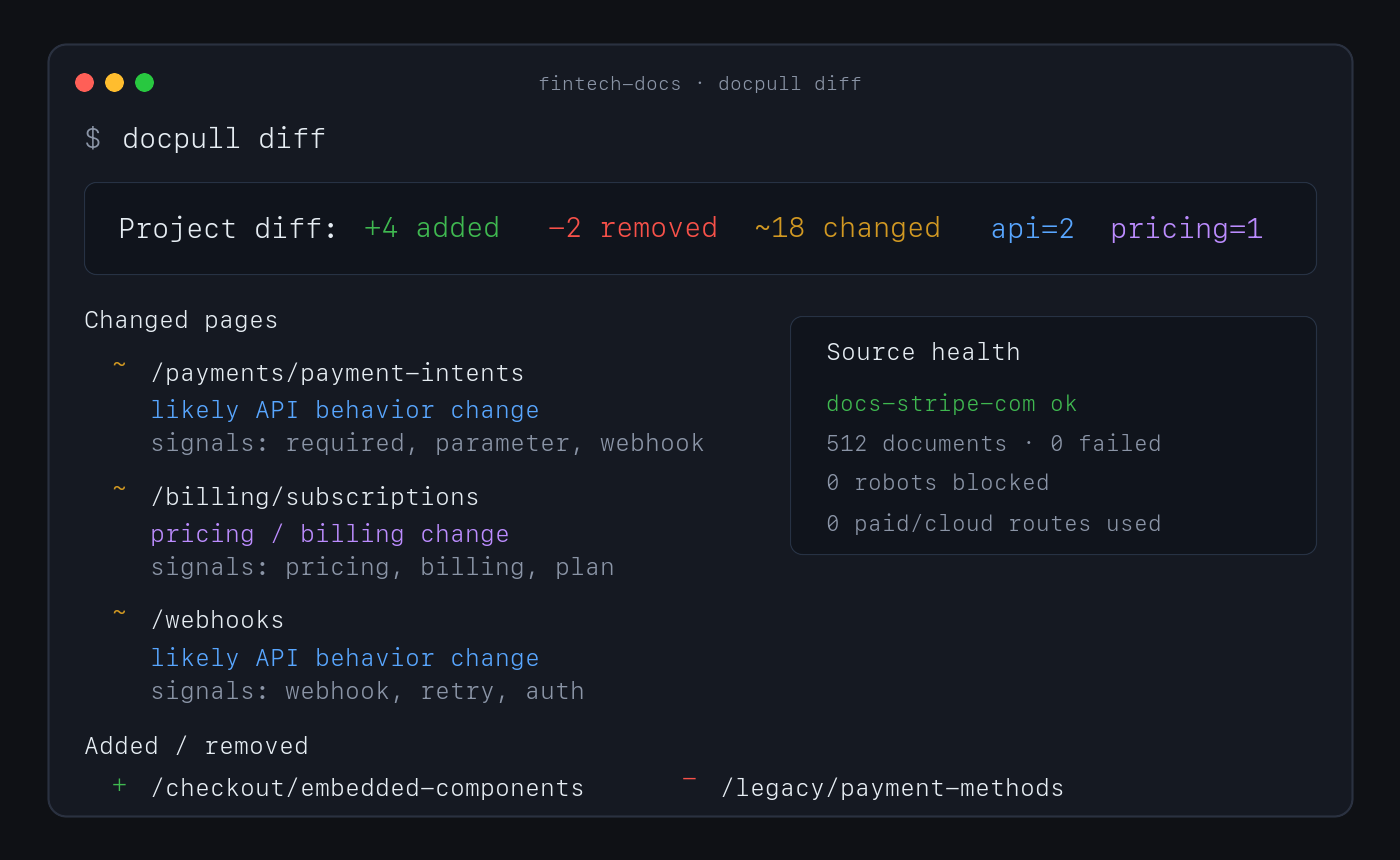
No account or paid API is required for this path. Direct fetching, discovery, extraction, indexing, pack analysis, and diffs run locally.
Why use DocPull
- Reproduce agent context. Stable IDs, hashes, manifests, and lockfiles show which source versions produced an answer or artifact.
- Detect source drift. Sync and diff documentation, product pages, policies, feeds, repositories, packages, standards, and local documents.
- Keep evidence inspectable. Markdown, NDJSON, SQLite, citations, and provenance sidecars remain readable without a hosted service.
- Choose the downstream surface. Export context for agent clients, vector import, data workflows, or a versioned context-pack release.
- Keep expensive routes explicit. Browser and cloud rendering require an explicit choice and can be blocked with a zero-dollar budget.
How it works
declared sources → local acquisition → versioned evidence → diff and validation → export
DocPull's v3 pack contract separates raw extraction, agent-ready context, and eval-grade evidence. Validate the level a downstream system requires:
docpull pack prepare packs/docs --eval-grade
docpull pack validate packs/docs --level eval
docpull ci --prepare
docpull ci checks freshness, citation coverage, pack quality, rights metadata, and
other configured gates. It writes context-ci.report.json and CONTEXT_CI.md, then
exits non-zero when a hard gate fails.
Supported surfaces
| Surface | Use it for | Start here |
|---|---|---|
| CLI | Fetch, sync, diff, validate, and export | docs/cli-recipes.md |
| Python SDK | Embed acquisition in Python applications | docs/surface-contract.md |
| MCP server | Give local agent clients source tools | MCP server |
| TypeScript SDK | Read local packs and invoke the CLI from Node or Bun | sdk/js/README.md |
| Agent plugin | Install the supported MCP workflow in an agent client | plugin/README.md |
Common source shapes include static and server-rendered websites, OpenAPI documents, feeds, papers, public GitHub repositories, npm and PyPI packages, standards, datasets, transcripts, Wikimedia pages, product and policy pages, and local PDF or office files. See context-pack workflows for the complete surface.
MCP server
pip install 'docpull[mcp]'
docpull mcp
Claude Code can register the same local server:
claude mcp add --transport stdio docpull -- docpull mcp
The Python stdio server is the supported release path. The TypeScript code formerly
documented under mcp/ is an internal semantic-search lab,
not part of the package contract.
Limits and security boundary
DocPull is an evidence-acquisition engine, not a hosted competitive-intelligence product. It owns fetching, explicit rendering adapters, versioning, citations, hashing, validation, replay, and export. Downstream products own scheduling, human review, approved claims, legal conclusions, accounts, and notifications.
The default path does not handle complex interactive browser workflows, CAPTCHAs, stealth scraping, or private dashboards. JavaScript rendering is explicit. Authenticated sources require environment-variable references; DocPull does not persist credential values in project artifacts.
Security defaults include HTTPS-only fetching, robots.txt compliance, SSRF and DNS rebinding protections, redirect guards, XXE protection, and path-traversal checks. Read the web-source boundary, security posture, and evidence-engine decision before extending acquisition behavior.
Documentation and evidence
- CLI recipes — Common commands and advanced workflows.
- Context dependencies — Project and lockfile model.
- Context Pack Contract v3 — Artifact levels and compatibility.
- Public contracts — Schemas and versioning rules.
- Alternatives — Browser automation and hosted extraction tradeoffs.
- Evaluation lab — Reproducible methods, results, and claim boundaries.
- Changelog — Release history.
Raintree open-source system
DocPull owns evidence acquisition and reproducible agent context. It can be used independently; the sibling projects do not imply a required integration or shared release cycle.
| Project | Responsibility |
|---|---|
| Raintree Standards | Defines governed requirements and evidence. |
| Trellis | Enforces shared JavaScript and TypeScript code policy. |
| HIG Doctor | Audits interface source and provides HIG guidance. |
| PolicyStrata | Tests cross-layer policy behavior. |
See the Raintree open-source portfolio for current lifecycle and distribution links.
Project policies
Contributing · Code of Conduct · Security · Metrics and evidence limits · Source repository · MIT License
Related MCP servers

HIG Doctor
Apple Human Interface Guidelines search, lookup, and compliance audits for AI coding agents.

Menor Preço Hoje - MPH
Preços e ofertas locais em Lages via MCP para consumidores e agentes de IA.

MCP server for Django project introspection, enabling AI assistants to understand and interact with Django codebases.

Cross-LLM persistent memory: store context once, recall it from any AI model.
View repository →
YouTube intelligence layer for AI agents. 41 tools, 10 modules, zero config.
View repository →
Visa requirements, documents, and FAQs for Indian passport holders. 35 countries.
View repository →