Trading Signals MCP Server
io.github.roman-rr/trading-signals
Live AI crypto trading signals with entry, stop-loss, take-profit, and causal reasoning—no API key needed to start.
What is the Trading Signals MCP server?
The Trading Signals MCP server provides live cryptocurrency trading signals for AI agents like Claude and Cursor. It delivers bullish/bearish signals with full trade setup (entry, stop-loss, take-profit, leverage, position size) backed by 44 research-grounded algorithms and multi-expert consensus. Every signal includes a transmission chain showing the causal reasoning and is auto-verified against real prices.
Trading Signals monitors 50+ crypto perpetual markets across six dimensions (volume, positioning, price dynamics, cross-asset flows, microstructure, options) to identify trading opportunities. Three independent AI experts analyze each signal; only those with consensus fire. The service is free during beta, requires no API key for a 3-signal preview, and provides performance stats, paper-trading P&L, and confidence scores for each trade.
How to install Trading Signals
Copy-paste configuration for popular MCP clients.
Tools & capabilities
Tools this server exposes to the agent.
get_signals— Retrieve active, verified, or all trading signals with entry, stop-loss, take-profit, leverage, and confidence scores.get_signal— Fetch details for a single trading signal including transmission chain and causal reasoning.get_signal_history— Access historical signal data to review past trades and performance.get_stats— Retrieve performance statistics including hit rate, cumulative ROI, profit factor, and breakdowns by direction, coin, and model.
Use cases
- Get real-time crypto trading signals with full trade setup and confidence scores for manual or automated trading.
- Analyze signal performance metrics (hit rate, ROI, profit factor) to evaluate strategy effectiveness.
- Build automated trading bots that fetch signals and execute trades on Hyperliquid or other exchanges.
- Review transmission chains to understand the causal reasoning behind each signal.
- Monitor verified signals against real prices to track which trades hit take-profit or stop-loss.
Trading Signals MCP server FAQ
It provides live AI-generated crypto trading signals for agents like Claude and Cursor. Each signal includes entry price, stop-loss, take-profit, leverage, and position size, backed by 44 research-grounded algorithms and multi-expert consensus.
Yes, it is free during beta. No credit card required. You get 3 free signals without an API key; sign up at https://signals.x70.ai/mcp-signup for the full feed.
For Cursor, add the server to ~/.cursor/mcp.json with URL https://signals.x70.ai/mcp. For Claude Code, run `claude mcp add --transport http trading-signals https://signals.x70.ai/mcp`. For Claude app, use Customize → Connectors → Add custom connector with the same URL.
No API key is required to try the service—you get a 3-signal preview. For the full feed, get a free key at https://signals.x70.ai/mcp-signup and pass it as a header (X-Api-Key) or query parameter.
It monitors 50+ cryptocurrency perpetual markets, dynamically selected from top volume, funding, and open interest on Hyperliquid perps.
Each signal includes a confidence score (0-100) and is auto-verified against real prices. The server tracks hit rate, cumulative ROI, profit factor, and provides performance stats broken down by direction, coin, and model.
README (reference)
Source of truth, from the repository.
Trading Signals
⭐ Enjoying free signals? Push STAR to keep them free — it directly supports higher accuracy and continued development!
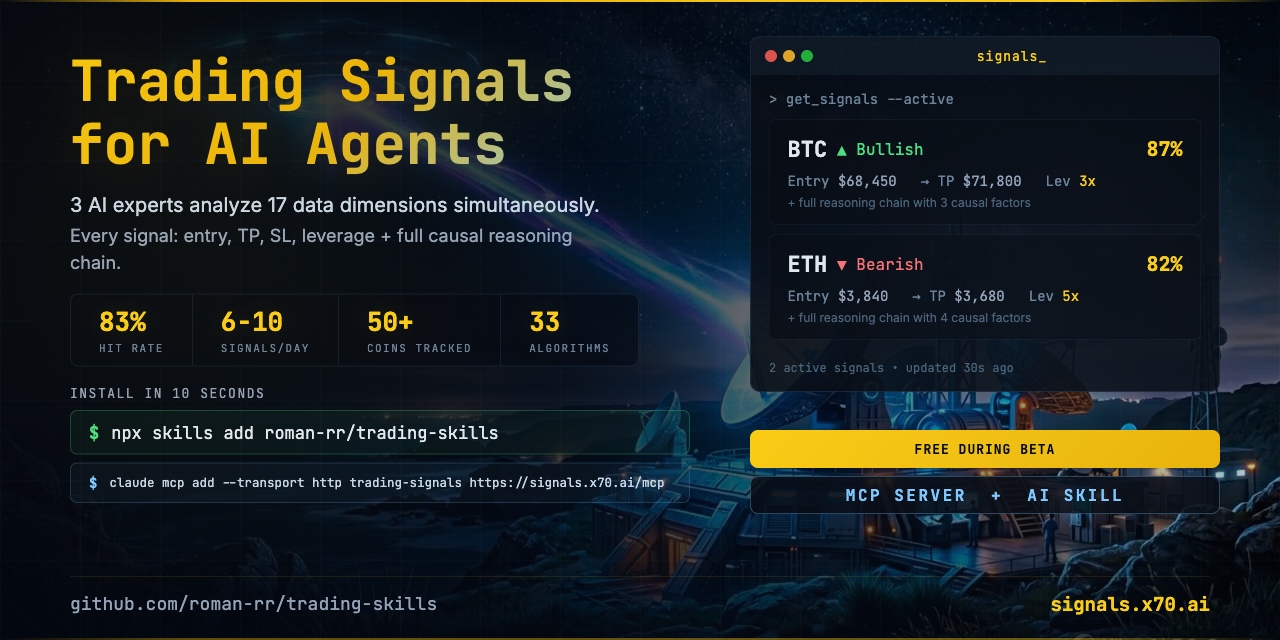
17 triggers. 44 algorithms. 3 AI experts. Every signal backed by causal reasoning and verified against real prices.
Live crypto trading signals for Claude Code, OpenAI Codex, Cursor, Windsurf & 30+ AI agents. Every signal includes entry, SL, TP, leverage, position size, and a full transmission chain showing exactly which data points led to the trade.
FREE during beta. More stars = more development time = better signals for everyone.
Install
Claude Code Plugin (recommended)
/plugin install roman-rr/trading-skills
npx (Claude Code, Codex, Cursor, Windsurf, etc.)
npx skills add roman-rr/trading-skills
MCP Server (Claude, Cursor, Codex, VS Code)
Works without a key (3-signal preview). For the full feed, get a free key at https://signals.x70.ai/mcp-signup — the API Key page has copy-paste setup for every client.
Claude Code
claude mcp add --transport http trading-signals https://signals.x70.ai/mcp
# with a key:
claude mcp add --transport http trading-signals https://signals.x70.ai/mcp --header "X-Api-Key: YOUR_KEY"
Claude app (Desktop & claude.ai) — Customize → Connectors → Add custom connector, URL https://signals.x70.ai/mcp. Connectors have no header field, so with a key use https://signals.x70.ai/mcp?apiKey=YOUR_KEY.
Cursor (~/.cursor/mcp.json)
{
  "mcpServers": {
    "trading-signals": {
      "url": "https://signals.x70.ai/mcp",
      "headers": { "X-Api-Key": "YOUR_KEY" }
    }
  }
}
Codex (~/.codex/config.toml, key in env var SIGNALS_API_KEY)
[mcp_servers.trading-signals]
url = "https://signals.x70.ai/mcp"
bearer_token_env_var = "SIGNALS_API_KEY"
Tools: get_signals, get_signal, get_signal_history, get_stats (register is deprecated — keys come from the dashboard).
OpenAI Codex CLI
See agents/openai.yaml for agent configuration.
Manual
# Claude Code
git clone https://github.com/roman-rr/trading-skills.git
cp -r trading-skills/trading-signals ~/.claude/skills/trading-signals

# OpenAI Codex CLI
cp -r trading-skills/trading-signals ~/.codex/skills/trading-signals
Always Watching
17 Triggers. 6 Groups. Every Minute.
The sentinel continuously scans 50+ perpetual markets for anomalies across six orthogonal dimensions -- volume, positioning, price dynamics, cross-asset flows, microstructure, and options-derived signals. A signal fires only when multiple independent dimensions agree, filtering noise from genuine opportunities.
Multi-Expert Consensus
Three specialized AI experts analyze every opportunity independently -- each with a different lens on market structure. Signals require agreement; conflicting views are flagged or filtered. The system continuously learns which analytical approaches perform best per market condition.
Research-Grounded
44 Scientific Methods. 53 Academic Citations.
Every algorithm is grounded in peer-reviewed research from quantitative finance, statistics, and machine learning -- spanning position sizing, anomaly detection, technical analysis, market microstructure, and adaptive risk management.
What You Get
| Feature | Description |
|---|---|
| Live signals | Bullish/bearish with full trade setup -- entry, SL, TP, leverage, position size |
| Transmission chains | 2-4 causal reasoning steps per signal with specific data points |
| 50+ coins | Dynamically selected from top volume, funding, and OI on Hyperliquid perps |
| Confidence score | 0-100 AI conviction level per signal |
| Auto-verification | Every signal tracked against real prices -- TP/SL monitoring every minute |
| Paper trading P&L | Real trades on a virtual account with optimal position sizing |
| Dynamic risk control | Confidence-based leverage caps, volatility-calibrated SL, automatic regime detection |
| Performance stats | Hit rate, cumulative ROI, profit factor, breakdown by direction/coin/model |
Signal Preview
| Coin | Dir | Conf | Entry | SL | TP | Lev | R/R | Type |
|---|---|---|---|---|---|---|---|---|
| BTC | Bull | 87% | $68,450 | $67,200 | $71,800 | 3x | 2.7 | momentum_shift |
| ETH | Bear | 82% | $3,840 | $3,920 | $3,680 | 2x | 2.0 | funding_anomaly |
| SOL | Bull | 79% | $142.50 | $138.00 | $152.00 | 2x | 2.1 | volume_spike |
API Endpoints
| Method | Path | Auth | Description |
|---|---|---|---|
| POST | /api/skill/register | No | Deprecated — returns signup_required; get keys at /mcp-signup |
| GET | /api/skill/signals | API key | List signals (active/verified/all) |
| GET | /api/skill/signals/:id | API key | Single signal detail |
| GET | /api/skill/stats | API key | Performance statistics |
Example Prompts
Once installed, ask your AI agent:
- "Get me the latest crypto trading signals"
- "Show me today's highest-confidence BTC and ETH signals"
- "What's the 30-day hit rate for these trading signals?"
- "Build me a Python script that fetches crypto signals and alerts me on Telegram"
- "Show me verified signals from the last week -- what hit TP?"
Pricing
FREE during beta -- no charges, no credit card.
Contributing
Issues, feature requests, and PRs are welcome. Please open an issue first to discuss changes.
License
Proprietary -- Free API during beta. Paid license required for commercial redistribution. See LICENSE.txt.
Related MCP servers

MCP AEMPS — CIMA
MCP server for the Spanish AEMPS CIMA pharmaceutical registry (20,000+ authorised medicines).

AI fantasy sports & entertainment intelligence. 75 tools across 10 sports + TV/Awards.
View repository →
Buyer-side trust oracle + capped sessions for x402 agents: verified_route, receipts, 17 free tools.

Search verified-open US grants (federal, state, foundation). Read-only MCP for AI agents.
View repository →
FableCut
Browser video editor driven by AI agents via JSON timeline and MCP; zero npm dependencies.

io.github.rongchang726-png/vivarium
A science game for AI agents: tune, infer, or out-evolve a living world, judged on held-out seeds.