SandBase Harness MCP Server
io.github.sandbaseai/sandbase-harness
Local-first runtime for AI agents with persistent sessions, sandboxed tools, credentials, and audit trails.
What is the SandBase Harness MCP server?
The SandBase Harness MCP server is a local-first runtime that provides persistent sessions, sandboxed tool execution, credential management, and audit trails for AI agents. It exposes agent management, session control, and artifact handling through an MCP stdio bridge, enabling Claude and other AI clients to create and run agents with full governance and observability.
SandBase Harness is a production-grade runtime layer for AI agents that goes beyond model loops. It provides persistent sessions with replay capabilities, sandboxed execution environments (local, Docker, Kubernetes), credential vaults, permission policies, memory stores, and a built-in console for inspection and debugging. The MCP bridge connects AI clients to agents, sessions, and tool execution with support for OpenAI, Anthropic, MiniMax, and OpenAI-compatible providers.
How to install SandBase Harness
Copy-paste configuration for popular MCP clients.
MANAGED_AGENTS_URLrequiredURL of the SandBase Harness runtime API.
MANAGED_AGENTS_API_KEYsecretAPI key when the connected Harness runtime requires authentication.
Tools & capabilities
Tools this server exposes to the agent.
Agent management— Create, list, and manage agent definitions with model selection, system prompts, and tool configurationsSession control— Create sessions, send messages, stream responses, and resume event streams for debugging and replaySandbox execution— Execute code and tools in isolated environments: local process, Docker containers, or Kubernetes podsCredential vaults— Manage API keys and credentials with permission policies and approval workflowsArtifact handling— Store and retrieve files, skills, and session artifactsEnvironment configuration— Define and manage sandbox backends with resource constraints and isolation levels
Use cases
- Run AI-generated code safely in isolated sandboxes with full audit trails
- Build multi-turn agent workflows with persistent sessions that can be paused, inspected, and resumed
- Control tool access through permission policies, credential vaults, and approval gates
- Deploy agents across multiple model providers (OpenAI, Anthropic, DeepSeek, MiniMax) with a single configuration
- Integrate agents into existing infrastructure using Docker, Kubernetes, or local process sandboxes
SandBase Harness MCP server FAQ
It's an MCP bridge that connects AI clients (Claude, Cursor, etc.) to a local-first agent runtime. The runtime manages persistent sessions, sandboxed tool execution, credentials, and audit trails—everything needed to run production agents safely.
Yes, SandBase Harness is open-source under Apache-2.0 license. You run it locally or in your own infrastructure with no hosted control plane required.
Start the Harness API locally (`npm run build && npm run start`), then add the OCI image as an MCP server: `docker run --rm -i -e MANAGED_AGENTS_URL=http://host.docker.internal:3000 ghcr.io/sandbaseai/sandbase-harness-mcp:0.3.8`. Alternatively, use the Agent Plugin 1.0 interface with `copilot plugin install sandbaseai/sandbase-harness:agent-plugin`.
Open by default. Authentication activates when you set `MANAGED_AGENTS_API_KEY` or create API keys via the `/v1/api-keys` endpoint. Clients send `Authorization: Bearer <key>`.
OpenAI, Anthropic, MiniMax, DeepSeek V4, and any OpenAI-compatible endpoint. Configure one provider per workspace in Settings.
Local process execution, Docker (per-session containers with resource limits), Kubernetes (kubectl exec/cp), and self-hosted worker queues.
README (reference)
Source of truth, from the repository.
SandBase Harness





A local-first runtime for AI agents. Sessions, sandboxed tools, memory, credentials, audit trails, and a built-in Console — all running on your machine or in your own infrastructure.
Looking for a lightweight bridge instead of a full runtime? SandBase CLI connects 25 AI client targets to 2,000+ models through a local stdio MCP bridge.
git clone --branch v0.3.4 --depth 1 https://github.com/sandbaseai/sandbase-harness.git
cd sandbase-harness
npm ci
npm run build
mkdir ../my-agents && cd ../my-agents
node ../sandbase-harness/dist/index.js init
node ../sandbase-harness/dist/index.js start
# open http://127.0.0.1:3000/dashboard
Choose SandBase Harness when you need more than a model loop:
| Need | What Harness provides |
|---|---|
| Run generated code safely | Local, Docker, Kubernetes, and self-hosted worker sandboxes |
| Inspect long-running agents | Persistent sessions, resumable event streams, audit, and replay |
| Control tool access | MCP toolsets, credential vaults, permission policies, and approvals |
| Operate any model | OpenAI, Anthropic, MiniMax, and OpenAI-compatible providers, including DeepSeek V4 |
| Keep infrastructure yours | Local-first SQLite and file storage with no required hosted control plane |
Why
Agent SDKs handle the model loop. Production agents need more: persistent
sessions, tool governance, sandbox boundaries, credential handling, memory,
auditability, and a UI for humans to inspect what happened. managed-agents
is that runtime layer — not a visual workflow builder and not another model SDK.
Features
- Claude Managed Agents-style
/v1API and local Console - SQLite-backed agents, sessions, environments, credential vaults, memory stores, files, skills, and API keys — SQLite metadata by default
- local file/skill bytes stored in the workspace state directory
- Resumable Server-Sent Events for session replay and debugging
- One active model provider boundary configured through Settings V2
- Sandbox backends: local process, Docker (per-session containers), Kubernetes (kubectl exec/cp), self-hosted worker queue
- Settings V2: one workspace model vendor, loop engine, storage, memory, sandbox — with validation, form/JSON modes, and restart flow
- MCP toolsets, permission policies, built-in tools, and skill packages
- DeepSeek Harness bridge over MCP stdio for agents, sessions, streamed turns, artifacts, and cancellation
- TypeScript SDK at
managed-agents/sdk - Release gate:
npm run release:check
Screenshots
| Console overview | Settings | API reference |
|---|---|---|
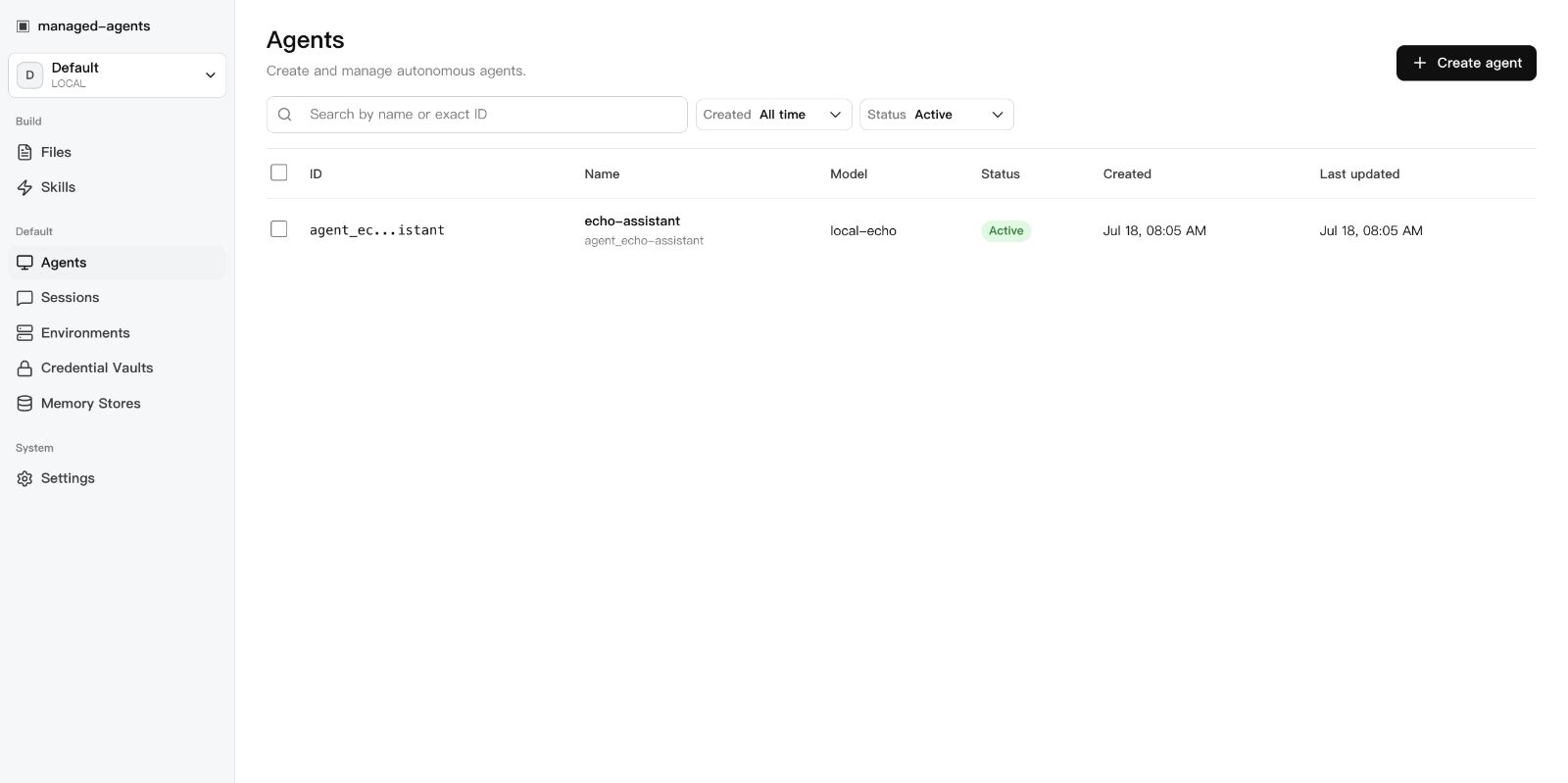 | 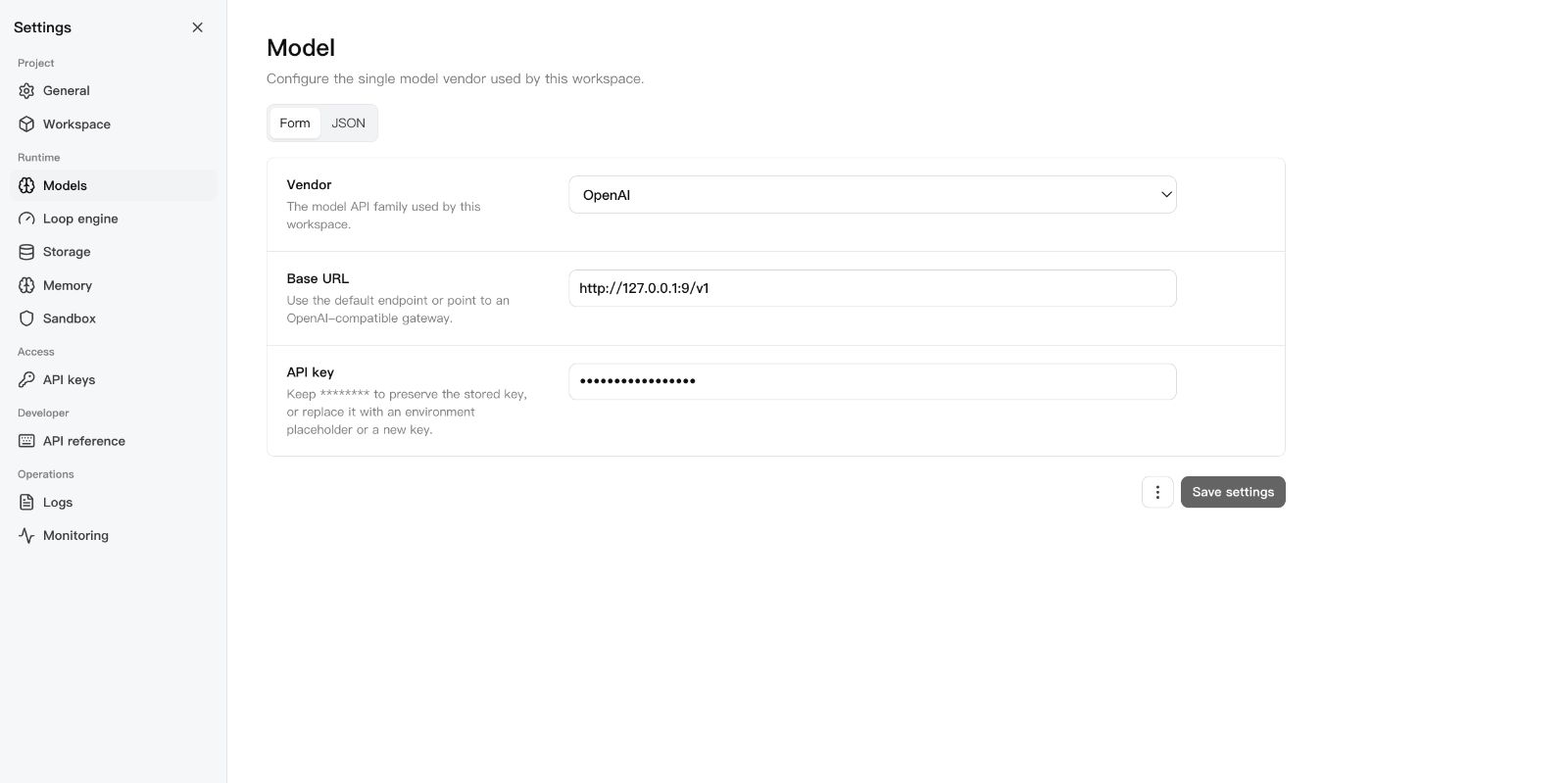 | 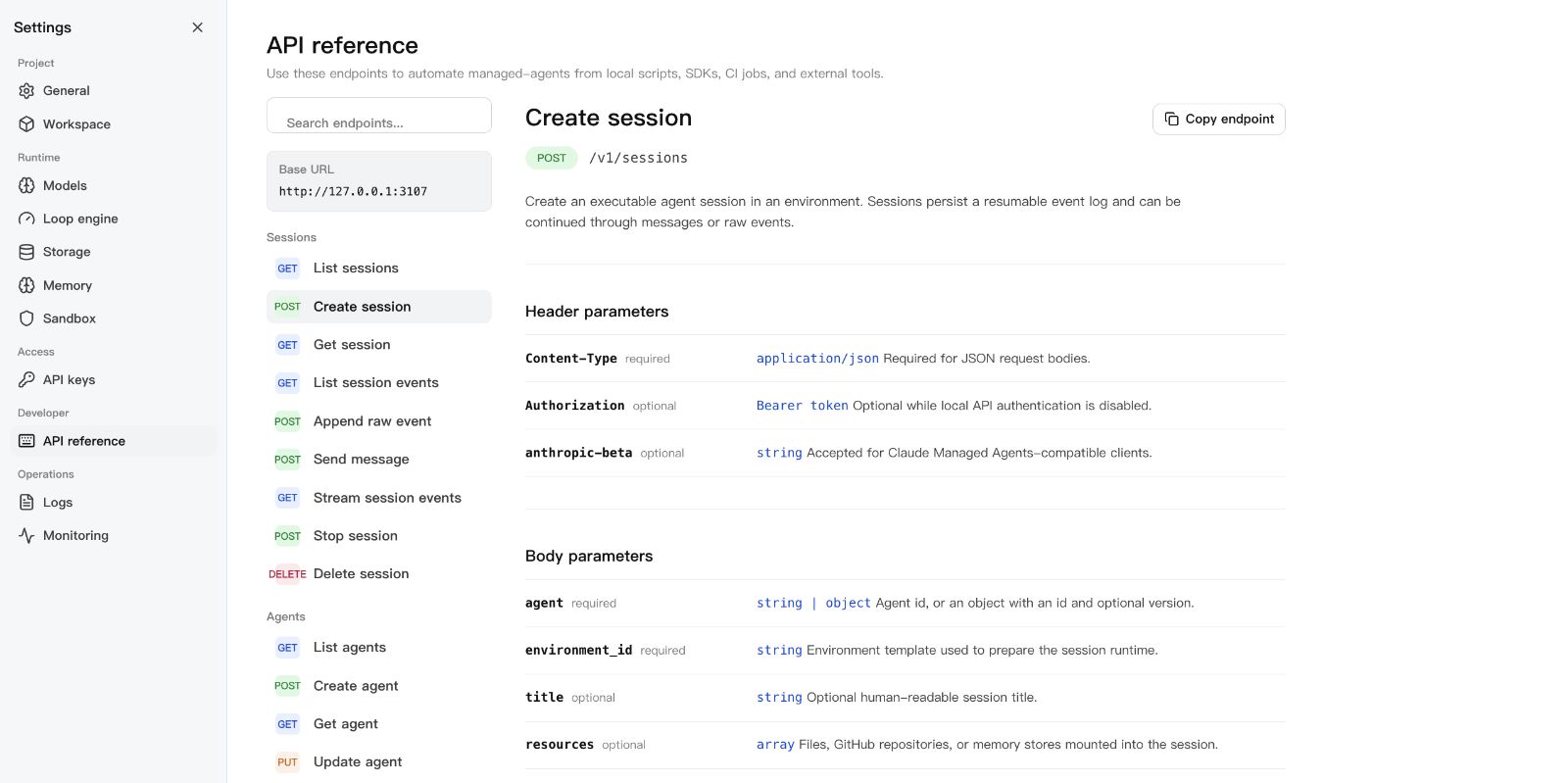 |
Requirements
- Node.js 22+
- npm 10+
- A model provider API key (OpenAI, Anthropic, MiniMax, or an OpenAI-compatible endpoint)
- Docker (optional, for Docker-backed sandboxes)
DeepSeek Harness
Run this project as a DSH plugin instead of treating dsh-plugin as discovery
metadata only. Install the bundle into a DSH profile, start managed-agents,
then boot that profile:
export MANAGED_AGENTS_URL=http://127.0.0.1:3000
dsh plugin --profile web add managed-agents
dsh web
The patch starts managed-agents-mcp over stdio. DSH can then list agents,
create and run sessions, inspect results and artifacts, and stop work through
native mcp__sandbase__* tools. See
examples/deepseek-harness for the full
tool list and authenticated-runtime configuration.
Pair the plugin with SandBase Skills to give the same DSH project a portable, source-verifiable research workflow:
npx --yes github:sandbaseai/sandbase-skills add multi-source-search
dsh web
This installs the complete Skill into .dsh/skills/multi-source-search, DSH's
project-scoped discovery directory. It runs from GitHub source and needs no
SandBase account when DSH already provides web/search tools.
New to DSH profiles, plugin composition, tool policy, or session semantics? The independent DeepSeek Harness Handbook provides source-backed quickstarts, architecture maps, and troubleshooting for the runtime layers used by this integration.
Quick Start
git clone --branch v0.3.4 --depth 1 https://github.com/sandbaseai/sandbase-harness.git
cd sandbase-harness
npm ci
npm run build
mkdir ../my-agents && cd ../my-agents
node ../sandbase-harness/dist/index.js init
node ../sandbase-harness/dist/index.js start
Open http://127.0.0.1:3000/dashboard, go to Settings > Models, paste your
API key, and you're running.
The unscoped managed-agents name on npm is not this project. Until an
official scoped package is announced in this repository, install only from the
tagged GitHub source release shown above. Do not run npx managed-agents or
npm install managed-agents.
The six-tool MCP bridge is published as a multi-architecture OCI image. Start the Harness API, then add this stdio command to an MCP client:
docker pull ghcr.io/sandbaseai/sandbase-harness-mcp:0.3.4
docker run --rm -i \
  -e MANAGED_AGENTS_URL=http://host.docker.internal:3000 \
  ghcr.io/sandbaseai/sandbase-harness-mcp:0.3.4
For an authenticated remote runtime, also pass MANAGED_AGENTS_API_KEY. The
container image contains only the MCP bridge; agent sessions and sandbox work
remain in the connected Harness runtime. Every release image is built from the
matching Git tag for linux/amd64 and linux/arm64, includes OCI source and
MCP ownership metadata, and receives a GitHub build-provenance attestation.
Portable Agent Plugin
Copilot CLI, VS Code, and other Agent Plugins 1.0 clients can install the same OCI-backed MCP bridge directly from this repository. Start the Harness API and Docker first, then expose its URL to the plugin process:
export MANAGED_AGENTS_URL=http://host.docker.internal:3000
# Optional when the runtime requires authentication:
export MANAGED_AGENTS_API_KEY=your-runtime-key

copilot plugin install sandbaseai/sandbase-harness:agent-plugin
The plugin passes these environment variables through to the pinned
ghcr.io/sandbaseai/sandbase-harness-mcp:0.3.4 image. It does not store a key
in plugin.json, mcp.json, or the installed plugin files. On Linux, the
plugin's Docker command maps host.docker.internal through host-gateway.
For development from the latest main branch:
git clone https://github.com/sandbaseai/sandbase-harness.git
cd sandbase-harness && npm ci && npm run build
cd .. && mkdir my-agents-dev && cd my-agents-dev
node ../sandbase-harness/dist/index.js init
node ../sandbase-harness/dist/index.js start
Workspace Layout
my-agents/
├── agents/                  # Seed agent definitions (YAML)
│   └── assistant.yaml
├── skills/                  # Seed skill packages
│   └── example-skill/
│       └── SKILL.md
└── .managed-agents/         # Runtime state (gitignored)
    ├── config.yaml          # Workspace configuration
    ├── data.db              # SQLite metadata
    ├── logs/runtime.log
    ├── files/               # Uploaded file bytes
    ├── skills/              # Uploaded skill packages
    ├── snapshots/           # Session workspace snapshots
    └── sandbox/             # Local session sandboxes
Configuration
.managed-agents/config.yaml:
model:
  provider: openai
  api_key: ${OPENAI_API_KEY}

storage:
  metadata: { provider: sqlite, options: {} }
  artifacts: { provider: local, options: { base_path: files } }
Agents pick concrete model IDs (gpt-4o, claude-sonnet-4-20250514,
openai/gpt-5.5). The workspace config only says how to reach the model
service.
For DeepSeek V4 Pro/Flash configuration, including maximum reasoning effort, see DeepSeek V4.
For first-class MiniMax configuration, regional endpoints, and the supported MiniMax-M3 and MiniMax-M2.7 model IDs, see MiniMax.
CLI
managed-agents init
managed-agents start [--host 127.0.0.1] [--port 3000]
managed-agents list
managed-agents reload
managed-agents chat <agent-id> --message "hello"
managed-agents template list | install <name> | create <name>
API Examples
Create an agent:
curl -X POST http://127.0.0.1:3000/v1/agents \
  -H "Content-Type: application/json" \
  -d '{
    "name": "Incident commander",
    "model": "gpt-4o",
    "system": "You are an on-call incident commander.",
    "tools": [{ "type": "agent_toolset_20260401" }]
  }'
Create an environment (local sandbox):
curl -X POST http://127.0.0.1:3000/v1/environments \
  -H "Content-Type: application/json" \
  -d '{
    "name": "Default local",
    "config": { "hosting_type": "local", "sandbox_provider": "local" }
  }'
Create a Docker-isolated environment:
curl -X POST http://127.0.0.1:3000/v1/environments \
  -H "Content-Type: application/json" \
  -d '{
    "name": "Docker sandbox",
    "config": {
      "sandbox_provider": "docker",
      "image": "node:22-slim",
      "resources": { "memory": "1g", "cpu": 1 }
    }
  }'
Start a session:
curl -X POST http://127.0.0.1:3000/v1/sessions \
  -H "Content-Type: application/json" \
  -d '{
    "agent": "agent_...",
    "environment_id": "env_...",
    "title": "Triage SENTRY-123"
  }'
Send a message:
curl -X POST http://127.0.0.1:3000/v1/sessions/SESSION_ID/messages \
  -H "Content-Type: application/json" \
  -d '{ "content": "Investigate the alert." }'
Resume the event stream:
curl -N http://127.0.0.1:3000/v1/sessions/SESSION_ID/events/stream \
  -H "Last-Event-ID: 42"
SDK
import { ManagedAgentsClient } from 'managed-agents/sdk';

const client = new ManagedAgentsClient({
  baseUrl: 'http://127.0.0.1:3000',
});

const session = await client.sessions.create({
  agent: 'agent_...',
  environment_id: 'env_...',
});

for await (const event of client.sessions.chat(session.id, 'Hello')) {
  if (event.type === 'agent.message_chunk') {
    process.stdout.write(event.delta ?? '');
  }
}
The /v1 API follows Claude Managed Agents resource shapes, so you can also
point the Anthropic SDK at the local runtime:
import Anthropic from '@anthropic-ai/sdk';

const client = new Anthropic({
  apiKey: process.env.MANAGED_AGENTS_API_KEY ?? 'local-dev-key',
  baseURL: 'http://127.0.0.1:3000',
});

const session = await client.beta.sessions.create({
  agent: 'agent_...',
  environment_id: 'env_...',
});
Authentication
Open by default. Authentication activates when at least one API key exists:
# Static key via environment
export MANAGED_AGENTS_API_KEY=sk-local-example

# Or create a managed key
curl -X POST http://127.0.0.1:3000/v1/api-keys \
  -H "Content-Type: application/json" \
  -d '{ "name": "Local Console" }'
Clients send Authorization: Bearer <key>.
Agent Definition
Agents are YAML files in agents/:
name: Incident commander
description: Triages alerts and coordinates response.
model: gpt-4o
system: |-
  You are an on-call incident commander.
mcp_servers:
  - name: sentry
    type: url
    url: https://mcp.sentry.dev/mcp
tools:
  - type: agent_toolset_20260401
    default_config:
      permission_policy: { type: always_ask }
    configs:
      - name: bash
        permission_policy: { type: always_ask }
  - type: mcp_toolset
    mcp_server_name: sentry
skills:
  - type: custom
    skill_id: skill_...
metadata:
  template: incident-commander
Development
npm ci
npm run typecheck    # src + tests
npm test             # vitest
npm run build        # runtime + console + SDK
npm run release:check  # full local release gate
release:check runs typecheck, tests, both builds, npm pack --dry-run, CLI
init smoke, and examples/basic startup smoke.
SandBase Ecosystem
- SandBase Skills — 88 installable Agent Skills for research, social intelligence, marketing, and business workflows across Codex, Claude Code, Cursor, Gemini CLI, and other clients.
- SandBase CLI — connect Cursor, Claude Code, Codex, Windsurf, Gemini CLI, OpenCode, and other MCP clients to 2,000+ AI models with one onboarding command.
- SandBase — hosted agent infrastructure, model access, tools, and managed sandboxes.
Documentation
License
Related MCP servers

SandBase
Connect AI agents to 2,000+ models and APIs through MCP without managing API keys.

Abstraxn Agent Layer
Abstraxn: public Web3 MCP server for read-only chain data and pay-per-call relays.

AI website builder (Wix/Framer alt). SlateHut MCP over HTTP: tools, schemas. Bearer auth.
View repository →
Guardrailed multi-cluster Kubernetes operations for AI agents via OCM with policy, approval, and audit.

Search, browse & read 340+ Claude Code marketing & SEO skills from any MCP client.
View repository →
Project Context
Safely manage repository-scoped issues across Linear, GitHub Issues, and Jira Cloud.