io.github.scrapeless-ai/scrapeless-mcp-server MCP Server
io.github.scrapeless-ai/scrapeless-mcp-server
Web search, browser automation, scraping, crawling and CAPTCHA solving for AI agents.
What is the io.github.scrapeless-ai/scrapeless-mcp-server MCP server?
The Scrapeless MCP Server is a Model Context Protocol integration that enables LLMs and AI agents like Claude and Cursor to interact with the web in real time. It provides Google search and trends integration, browser automation, dynamic web scraping, website crawling, and CAPTCHA solving capabilities without getting blocked.
Scrapeless MCP Server connects AI models to real-world web data through a suite of tools for searching, browsing, scraping, and crawling. Use it to build AI research assistants, coding copilots, and autonomous agents that need live web context—handling JavaScript-heavy sites, bypassing Cloudflare, and extracting content in multiple formats (HTML, Markdown, screenshots).
How to install io.github.scrapeless-ai/scrapeless-mcp-server
Copy-paste configuration for popular MCP clients.
SCRAPELESS_API_KEYrequiredsecretYour Scrapeless API key. Get one from https://app.scrapeless.com
x-api-tokenrequiredsecretYour Scrapeless API key. Get one from https://app.scrapeless.com
Tools & capabilities
Tools this server exposes to the agent.
google_search— Universal information search engine.google_trends— Get trending search data from Google Trends.browser_create— Create or reuse a cloud browser session using Scrapeless.browser_close— Closes the current session by disconnecting the cloud browser.browser_goto— Navigate browser to a specified URL.browser_go_back— Go back one step in browser history.browser_go_forward— Go forward one step in browser history.browser_click— Click a specific element on the page.browser_type— Type text into a specified input field.browser_press_key— Simulate a key press.browser_wait_for— Wait for a specific page element to appear.browser_wait— Pause execution for a fixed duration.browser_screenshot— Capture a screenshot of the current page.browser_get_html— Get the full HTML of the current page.browser_get_text— Get all visible text from the current page.browser_scroll— Scroll to the bottom of the page.browser_scroll_to— Scroll a specific element into view.scrape_html— Scrape a URL and return its full HTML content.scrape_markdown— Scrape a URL and return its content as Markdown.scrape_screenshot— Capture a high-quality screenshot of any webpage.
Use cases
- Search the web and retrieve Google search results programmatically for research or data gathering
- Automate browser interactions like navigation, clicking, typing, and form submission for complex workflows
- Extract content from JavaScript-heavy or Cloudflare-protected websites in HTML, Markdown, or screenshot formats
- Crawl entire websites by following links and capture each page in multiple formats
- Build autonomous AI agents that need real-time web context and live data for decision-making
io.github.scrapeless-ai/scrapeless-mcp-server MCP server FAQ
It's a Model Context Protocol server that gives AI agents and LLMs like Claude and Cursor the ability to search the web, automate browsers, scrape dynamic sites, crawl websites, and solve CAPTCHAs—all without getting blocked.
Scrapeless offers a free trial. You need to sign up at app.scrapeless.com, create an API key, and use it to authenticate the MCP server.
Open Claude Desktop, go to Settings → Tools → MCP Servers, click Add MCP Server, and paste the Stdio or Streamable HTTP config with your Scrapeless API key. Save and enable it.
Press Cmd+Shift+P in Cursor, search for 'Configure MCP Servers', add the Scrapeless MCP config with your API key, save, and restart Cursor if needed.
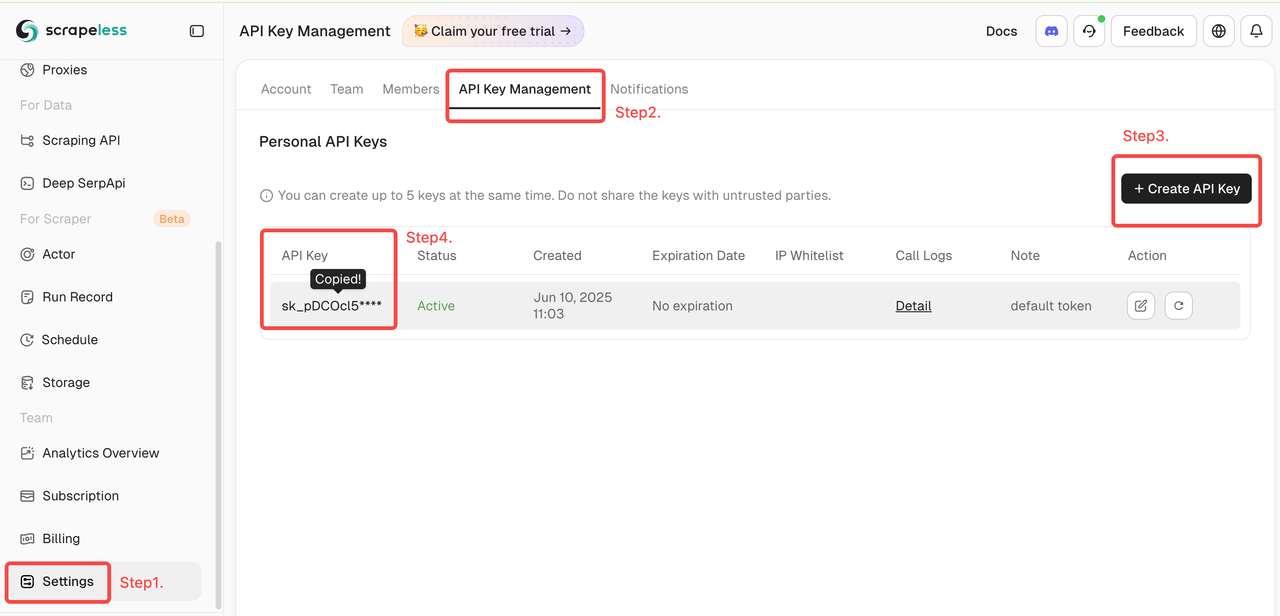
You need a Scrapeless API key, obtained by logging into the Scrapeless Dashboard, navigating to Settings → API Key Management, and creating a new key.
Yes, the server automatically handles Cloudflare pages and other anti-bot protections, extracting content without getting blocked.
README (reference)
Source of truth, from the repository.
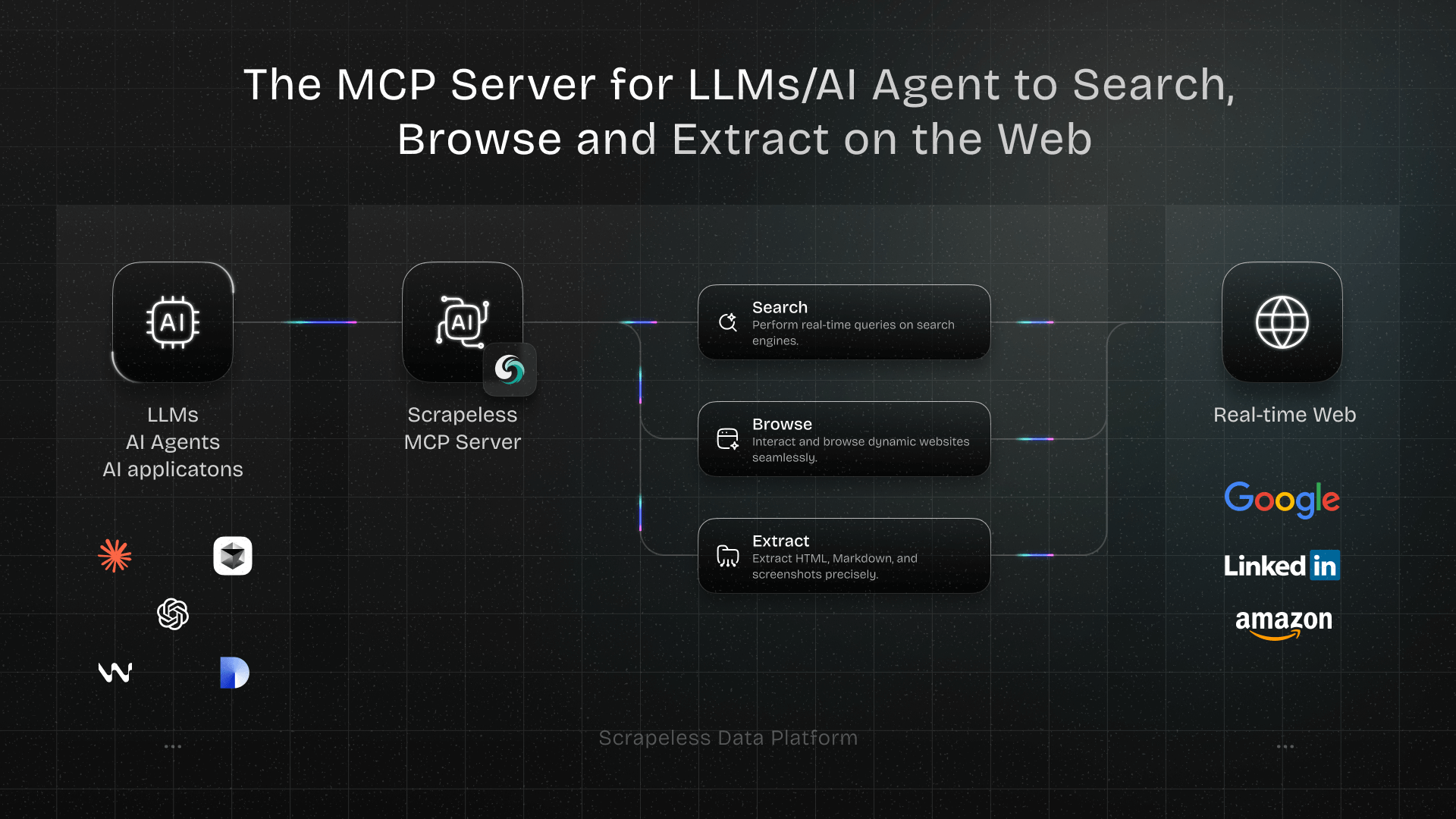
Scrapeless MCP Server
Welcome to the official Scrapeless Model Context Protocol (MCP) Server — a powerful integration layer that empowers LLMs, AI Agents, and AI applications to interact with the web in real time.
Built on the open MCP standard, Scrapeless MCP Server seamlessly connects models like ChatGPT, Claude, and tools like Cursor and Windsurf to a wide range of external capabilities, including:
- Google services integration (Search, Trends)
- Browser automation for page-level navigation and interaction
- Scrape dynamic, JS-heavy sites—export as HTML, Markdown, or screenshots
- Crawl entire websites by following links and capture each page in multiple formats
- AI Scraper Create an AI Scraper task for ChatGPT, Gemini, Perplexity, Copilot, Google AI Mode, Google AI Overview, Grok, or Alexa
Whether you're building an AI research assistant, a coding copilot, or autonomous web agents, this server provides the dynamic context and real-world data your workflows need—without getting blocked.
Usage Examples
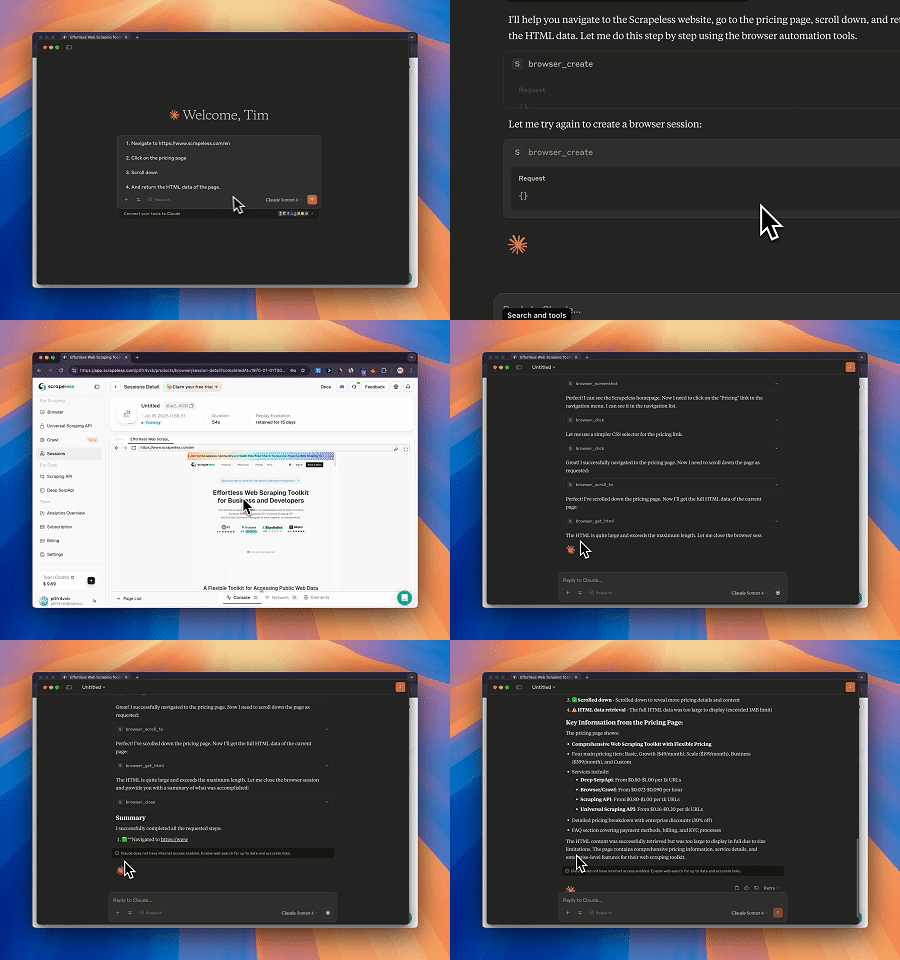
- Automated Web Interaction and Data Extraction with Claude
Using Scrapeless MCP Browser, Claude can perform complex tasks such as web navigation, clicking, scrolling, and scraping through conversational commands, with real-time preview of web interaction results via live sessions.
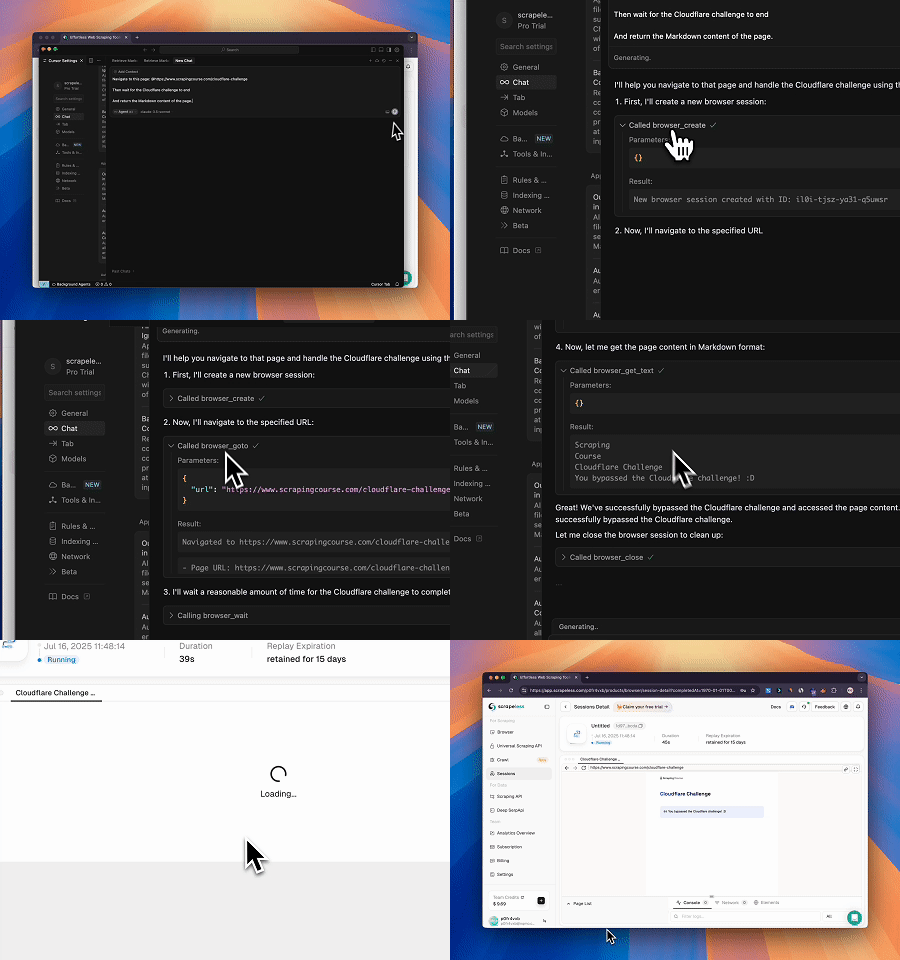
- Bypassing Cloudflare to Retrieve Target Page Content
Using the Scrapeless MCP Browser service, the Cloudflare page is automatically accessed, and after the process is completed, the page content is extracted and returned in Markdown format.
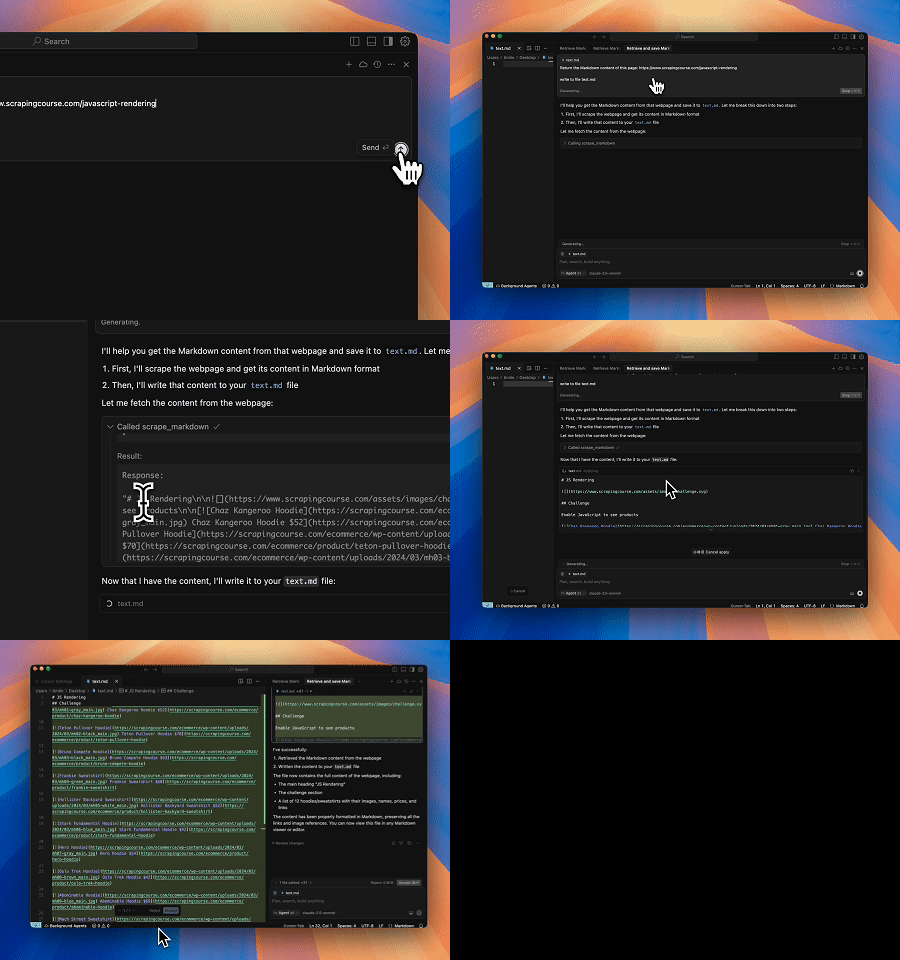
- Extracting Dynamically Rendered Page Content and Writing to File
Using the Scrapeless MCP Universal API, the JavaScript-rendered content of the target page above is scraped, exported in Markdown format, and finally written to a local file named text.md.
- Automated SERP Scraping
Using the Scrapeless MCP Server, query the keyword “web scraping” on Google Search, retrieve the first 10 search results (including title, link, and summary), and write the content to the file named serp.text.
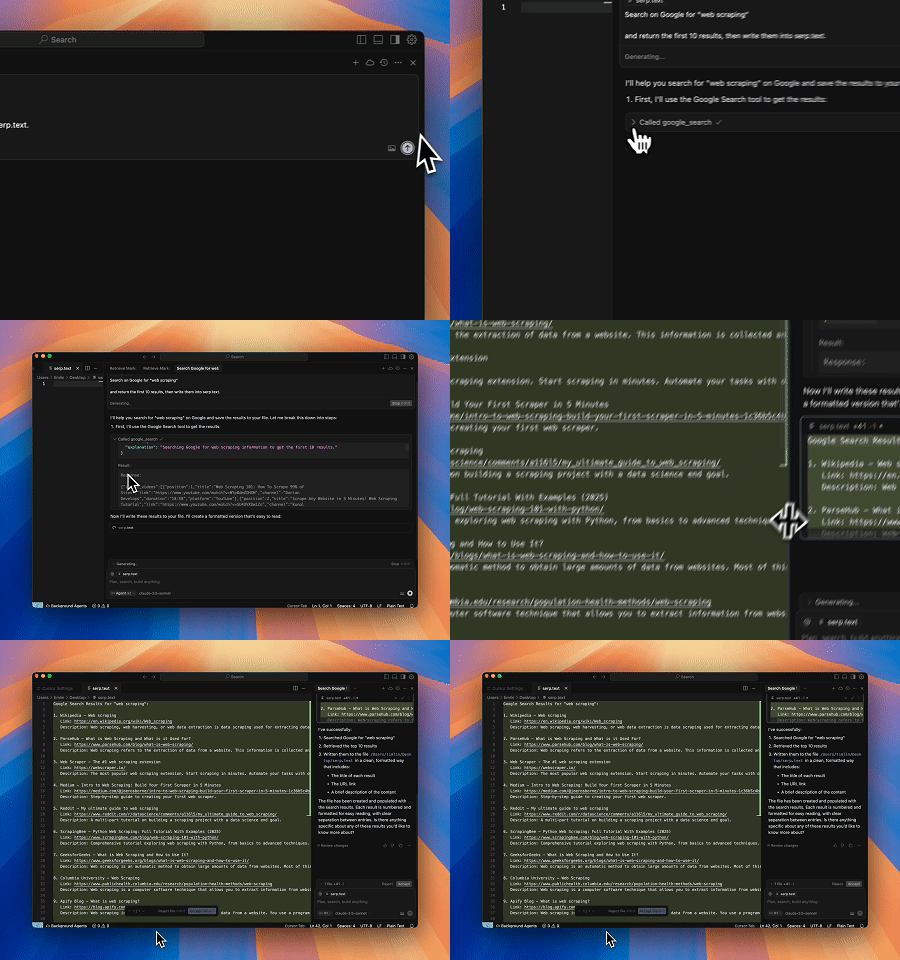
Here are some additional examples of how to use these servers:
| Example |
|---|
| Search scrapeless by Google search. |
| Find the search interest for "AI" over the last year. |
| Use a browser to visit chatgpt.com, search for "What's the weather like today?", and summarize the results. |
| Scrape the HTML content of scrapeless.com page. |
| Scrape the Markdown content of scrapeless.com page. |
| Get screenshots of scrapeless.com. |
Setup Guide
- Get Scrapeless Key
- Log in to the Scrapeless Dashboard(Free trial available)
- Then click "Setting" on the left -> select "API Key Management" -> click "Create API Key". Finally, click the API Key you created to copy it.
- Configure Your MCP Client
Scrapeless MCP Server supports both Stdio and Streamable HTTP transport modes.
🖥️ Stdio (Local Execution)
{
  "mcpServers": {
    "Scrapeless MCP Server": {
      "command": "npx",
      "args": ["-y", "scrapeless-mcp-server"],
      "env": {
        "SCRAPELESS_API_KEY": "YOUR_SCRAPELESS_KEY"
      }
    }
  }
}
🌐 Streamable HTTP (Hosted API Mode)
{
  "mcpServers": {
    "Scrapeless MCP Server": {
      "type": "streamable-http",
      "url": "https://api.scrapeless.com/mcp",
      "headers": {
        "x-api-token": "YOUR_SCRAPELESS_KEY"
      },
      "disabled": false,
      "alwaysAllow": []
    }
  }
}
Advanced Options
Customize browser session behavior with optional parameters. These can be set via environment variables (for Stdio) or HTTP headers (for Streamable HTTP):
| Stdio (Env Var) | Streamable HTTP (HTTP Header) | Description |
|---|---|---|
| BROWSER_PROFILE_ID | x-browser-profile-id | Specifies a reusable browser profile ID for session continuity. |
| BROWSER_PROFILE_PERSIST | x-browser-profile-persist | Enables persistent storage for cookies, local storage, etc. |
| BROWSER_SESSION_TTL | x-browser-session-ttl | Defines the maximum session timeout in seconds. The session will automatically expire after this duration of inactivity. |
Integration with Claude Desktop
- Open Claude Desktop
- Navigate to:
Settings→Tools→MCP Servers - Click "Add MCP Server"
- Paste either the
StdioorStreamable HTTPconfig above - Save and enable the server
- Claude will now be able to issue web queries, extract content, and interact with pages using Scrapeless
Integration with Cursor IDE
- Open Cursor
- Press
Cmd + Shift + Pand search for:Configure MCP Servers - Add the Scrapeless MCP config using the format above
- Save the file and restart Cursor (if needed)
- Now you can ask Cursor things like:
"Search StackOverflow for a solution to this error""Scrape the HTML from this page"
- And it will use Scrapeless in the background.
Supported MCP Tools
| Name | Description |
|---|---|
| google_search | Universal information search engine. |
| google_trends | Get trending search data from Google Trends. |
| browser_create | Create or reuse a cloud browser session using Scrapeless. |
| browser_close | Closes the current session by disconnecting the cloud browser. |
| browser_goto | Navigate browser to a specified URL. |
| browser_go_back | Go back one step in browser history. |
| browser_go_forward | Go forward one step in browser history. |
| browser_click | Click a specific element on the page. |
| browser_type | Type text into a specified input field. |
| browser_press_key | Simulate a key press. |
| browser_wait_for | Wait for a specific page element to appear. |
| browser_wait | Pause execution for a fixed duration. |
| browser_screenshot | Capture a screenshot of the current page. |
| browser_get_html | Get the full HTML of the current page. |
| browser_get_text | Get all visible text from the current page. |
| browser_scroll | Scroll to the bottom of the page. |
| browser_scroll_to | Scroll a specific element into view. |
| scrape_html | Scrape a URL and return its full HTML content. |
| scrape_markdown | Scrape a URL and return its content as Markdown. |
| scrape_screenshot | Capture a high-quality screenshot of any webpage. |
| crawl_start | Start an asynchronous crawl job from a base URL and return its job id. |
| crawl_cancel | Cancel an in-progress crawl job by its id. |
| crawl_result | Poll a crawl job by its id until it completes and return the crawled data. |
| ai_scraper | Create an AI Scraper task for ChatGPT, Gemini, Perplexity, Copilot, Google AI Mode, Google AI Overview, Grok, or Alexa. |
Security Best Practices
When using Scrapeless MCP Server with LLMs (like ChatGPT, Claude, or Cursor), it's critical to handle all scraped or extracted web content with care. Web data is untrusted by default, and improper handling may expose your application to prompt injection or other security vulnerabilities.
✅ Recommended Practices
- Never pass raw scraped content directly into LLM prompts. Raw HTML, JavaScript, or user-generated text may contain hidden injection payloads.
- Sanitize and validate all extracted content. Strip or escape potentially harmful tags and scripts before using content in downstream logic or AI models.
- Prefer structured extraction to free-form text. Use tools like
scrape_html,scrape_markdown, or targetedbrowser_get_textwith known-safe selectors to extract only the content you trust. - Apply domain or selector whitelisting when scraping dynamically generated pages, to restrict data flow to known and trusted sources.
- Log and monitor all outbound requests made via browser or scraping tools, especially if you're handling sensitive data, tokens, or internal network access.
🚫 Avoid
- Injecting scraped HTML directly into prompts
- Letting users specify arbitrary URLs or CSS selectors without validation
- Storing unfiltered scraped content for future prompt usage
Community
Contact Us
For questions, suggestions, or collaboration inquiries, feel free to contact us via:
- Email: market@scrapeless.com
- Official Website: https://www.scrapeless.com
- Community Forum: https://discord.gg/Np4CAHxB9a
Related MCP servers

io.github.scrapercity/scrapercity-cli
B2B lead generation MCP server - 20+ scrapers, email finder, skip trace, and more.

screenpipe
Search your local screen recordings, audio transcripts, and computer activity with AI—100% private, all local.

BrowserMesh
Isolated multi-session Chromium runtime for external MCP clients over stdio.

SocialGPT
Social media analytics, video analysis, and competitor intelligence integrated into Claude, ChatGPT, Cursor, and any MCP-compatible AI agent.

Fudge
Build websites that look designed, not generated. Fudge gives AI real websites to study.

Memento
Persistent local-first knowledge graph for AI tools — remember decisions and context across sessions without cloud or API keys.