io.github.spranab/brainstorm-mcp MCP Server
io.github.spranab/brainstorm-mcp
Multi-model AI debates with code review—get disagreement as signal, not one confident answer.
What is the io.github.spranab/brainstorm-mcp MCP server?
The brainstorm-mcp server runs multi-round debates between AI models (GPT, Gemini, DeepSeek, Claude, Ollama) to surface disagreement and uncertainty. Models see and critique each other's answers across rounds, producing a 3-bullet synthesis with recommendation, key tradeoffs, and strongest disagreement. It also offers instant quick perspectives, multi-model code review with verdicts, and red-team/Socratic debate styles—all from inside your editor with zero API keys in hosted mode.
brainstorm-mcp lets you ask multiple AI models the same question and watch them debate. Instead of trusting one confident answer, you get signal from where models disagree. It works in three modes: hosted (no API keys, uses Claude variants), API (direct calls to OpenAI, Gemini, DeepSeek, Groq, Ollama), and CLI (uses your existing agent subscriptions). Use it for design decisions, code review, architecture debates, or any question where multiple perspectives reduce risk.
How to install io.github.spranab/brainstorm-mcp
Copy-paste configuration for popular MCP clients.
OPENAI_API_KEYsecretOpenAI API key for GPT models (optional — not needed in hosted mode)
GEMINI_API_KEYsecretGoogle Gemini API key (optional)
DEEPSEEK_API_KEYsecretDeepSeek API key (optional)
Tools & capabilities
Tools this server exposes to the agent.
brainstorm— Multi-round debate between AI models with cross-examination and synthesis verdictbrainstorm_quick— Instant parallel multi-model perspectives in under 10 seconds, no debate roundsbrainstorm_review— Multi-model code review with structured findings, severity ratings, and verdictsbrainstorm_respond— Submit Claude's response in an interactive debate sessionbrainstorm_collect— Submit model responses in a hosted debate sessionlist_providers— Show configured providers, API key status, and detected CLI agentsadd_provider— Register a new API or CLI provider at runtime
Use cases
- Compare architectural approaches (REST vs GraphQL, Redis vs PostgreSQL) by having models debate tradeoffs
- Review code diffs for security and correctness issues with multi-model consensus on severity
- Make design decisions by surfacing where models disagree—the disagreement is the signal
- Run debates using your existing Claude/Codex subscriptions instead of buying API credits
- Conduct adversarial red-team reviews where models actively challenge each other's reasoning
io.github.spranab/brainstorm-mcp MCP server FAQ
It's an MCP server that runs debates between multiple AI models. Instead of asking one model a question, you ask three or more, they see each other's answers, critique them across rounds, and you get a synthesis showing recommendation, key tradeoffs, and strongest disagreement.
Hosted mode is free—it uses Claude variants already available in your environment. API mode costs depend on which model providers you enable (OpenAI, Gemini, DeepSeek, etc.). CLI mode uses your existing subscriptions (Claude Code, Codex, etc.) with no additional cost.
Run `claude mcp add brainstorm -- npx -y brainstorm-mcp` for Claude Code, or add the server to your `.mcp.json` or `claude_desktop_config.json` with the npx command. Hosted mode works immediately with no API keys.
None for hosted mode. For API mode, add keys for the providers you want (OPENAI_API_KEY, GEMINI_API_KEY, DEEPSEEK_API_KEY, etc.). For CLI mode, no keys—it shells out to agent CLIs on your PATH.
Yes. The CLI mode auto-detects agent CLIs on your PATH (claude, codex, gemini, cursor-agent, etc.) and uses them in debates. Debates run on your subscription instead of API credits.
The debate continues with remaining models. The tool reports which models failed (rate limit, timeout) and includes results from those that succeeded.
README (reference)
Source of truth, from the repository.
brainstorm-mcp



Ask one model a design question and you get one confident answer, with no signal about which parts it is unsure of. Ask three and the disagreement is the signal.
brainstorm-mcp runs multi-round debates between GPT, Gemini, DeepSeek, Claude and local Ollama models from inside your editor: they see and critique each other's answers across rounds, then you get a 3-bullet synthesis — recommendation, key tradeoffs, strongest disagreement. Also does instant quick mode, multi-model code review with verdicts, and red-team/Socratic styles. Hosted mode needs zero API keys.
Don't trust one AI. Make them argue.
<p align="center"> <img src="docs/hero.png" alt="brainstorm-mcp — Claude Opus vs GPT-5.4 vs DeepSeek debating" width="800"/> </p>Demo
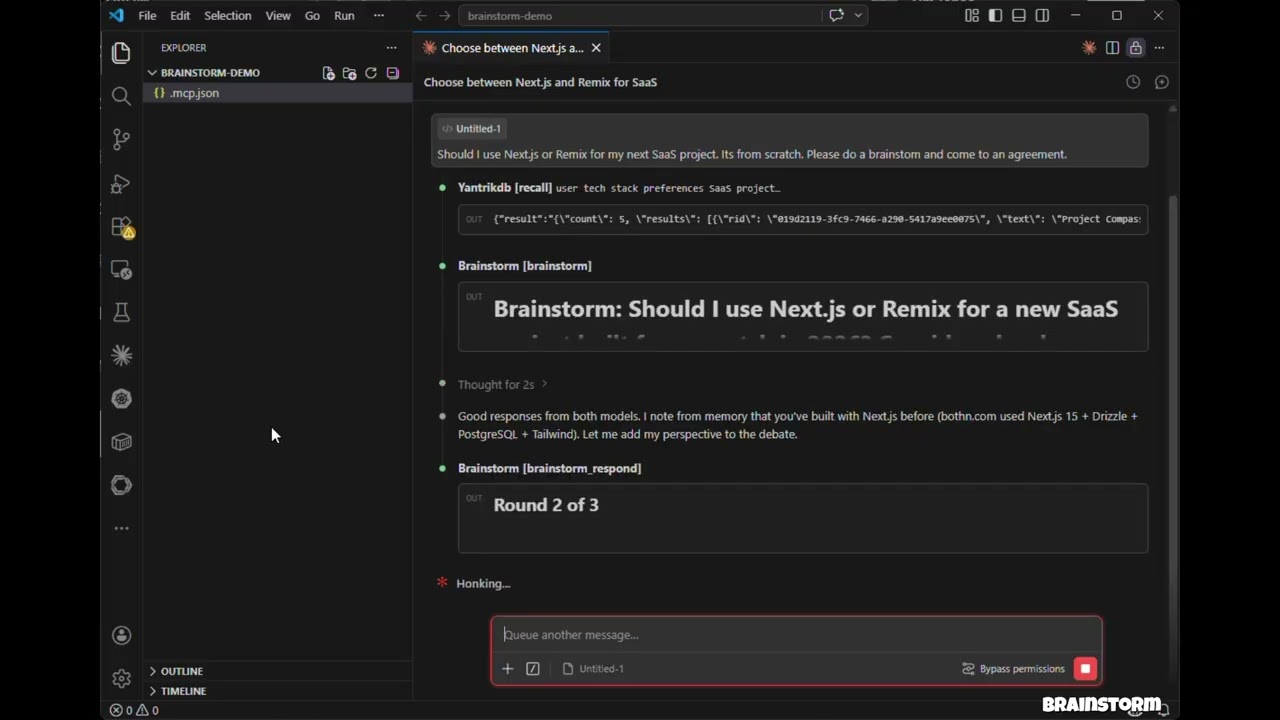
Click to watch: 3 models debate, cross-examine, and produce a structured verdict — all inside Claude Code.
Features
- Hosted mode — No API keys needed. Uses models in your environment (Claude Opus/Sonnet/Haiku) via sub-agents
- API mode — Direct model API calls with parallel execution across OpenAI, Gemini, DeepSeek, Groq, Ollama
- CLI mode — Debate through agent CLIs you already have (
claude,codex, and more) so debates run on your subscription instead of API credits - brainstorm_quick — Instant multi-model perspectives in under 10 seconds
- brainstorm_review — Multi-model code review with structured findings, severity ratings, and verdicts
- Debate styles — Freeform, red-team (adversarial), and Socratic (probing questions)
- Context injection — Ground debates in actual code, diffs, or architecture docs
- 3-bullet synthesis verdicts — Recommendation, Key Tradeoffs, Strongest Disagreement
- Claude as participant — Claude debates alongside external models with full conversation context
- Multi-round debates — Models see and critique each other's responses across rounds
- Parallel execution — All models respond concurrently within each round
- Resilient — One model failing doesn't abort the debate
- Cross-platform — Works on macOS, Windows, and Linux
Install (60 seconds)
claude mcp add brainstorm -- npx -y brainstorm-mcp
That is enough for hosted mode (no API keys — it debates using the models already available in your environment). Add provider keys to bring GPT, Gemini, DeepSeek, Groq or Ollama into the debate.
Claude Code
Add to your project's .mcp.json:
{
  "mcpServers": {
    "brainstorm": {
      "command": "npx",
      "args": ["-y", "brainstorm-mcp"],
      "env": {
        "OPENAI_API_KEY": "sk-...",
        "GEMINI_API_KEY": "AIza...",
        "DEEPSEEK_API_KEY": "sk-..."
      }
    }
  }
}
Claude Desktop
Add to claude_desktop_config.json:
{
  "mcpServers": {
    "brainstorm": {
      "command": "npx",
      "args": ["-y", "brainstorm-mcp"],
      "env": {
        "OPENAI_API_KEY": "sk-...",
        "DEEPSEEK_API_KEY": "sk-..."
      }
    }
  }
}
Manual Install
npm install -g brainstorm-mcp
brainstorm-mcp
Hosted mode requires no API keys — just install and go. The host (Claude Code) executes prompts using its own model access.
Configuration
Option 1: Environment Variables (simplest)
OPENAI_API_KEY=sk-...
GEMINI_API_KEY=AIza...
DEEPSEEK_API_KEY=sk-...
Option 2: Config File (full control)
Set BRAINSTORM_CONFIG to point to a JSON config:
{
  "providers": {
    "openai": { "model": "gpt-5.4", "apiKeyEnv": "OPENAI_API_KEY" },
    "gemini": { "model": "gemini-2.5-flash", "apiKeyEnv": "GEMINI_API_KEY" },
    "deepseek": { "model": "deepseek-chat", "apiKeyEnv": "DEEPSEEK_API_KEY" },
    "ollama": { "model": "llama3.1", "baseURL": "http://localhost:11434/v1" }
  }
}
Known providers (openai, gemini, deepseek, groq, mistral, together, moonshot,
minimax, glm, qwen) don't need a baseURL.
Option 3: CLI Providers (use a subscription, not API credits)
If you already pay for Claude Code, Codex, Gemini CLI, and friends, brainstorm can shell out to
those CLIs instead of buying API credits. Any agent CLI found on your PATH is registered
automatically at startup — no configuration needed:
[brainstorm] Detected CLI provider(s) on PATH: claude, codex (subscription-based, no API cost)
Use them like any other provider:
{ "topic": "GraphQL vs REST", "models": ["claude:sonnet", "codex:default", "openai:gpt-5.4"] }
Built-in adapters:
| Provider | Command | Default model | Status |
|---|---|---|---|
claude | claude -p | sonnet | verified |
codex | codex exec | default | verified |
gemini | gemini -p | gemini-2.5-pro | best-effort, verify locally |
cursor-agent | cursor-agent -p | default | best-effort |
opencode | opencode run | default | best-effort |
qwen | qwen -p | qwen3-coder-plus | best-effort |
kimi | kimi --print | default | best-effort |
droid | droid exec | default | best-effort |
<provider>:default means "let the CLI use whatever model it's configured with". CLI calls run
with tools disabled and a read-only sandbox where the CLI supports it — they generate text, they
don't touch your repo. Provider-specific API key env vars (ANTHROPIC_API_KEY, OPENAI_API_KEY)
are stripped from the child process so the CLI falls back to your subscription login.
Env knobs:
| Variable | Effect |
|---|---|
BRAINSTORM_CLI_PROVIDERS | auto (default), off, or a comma-separated list of adapters to detect |
BRAINSTORM_PREFER_CLI | 1 — debates with no explicit models use only CLI providers, skipping metered APIs |
BRAINSTORM_CLI_TIMEOUT_MS | Per-call timeout for CLI providers (default 300000) |
To pin a model or add a CLI that isn't built in, use the config file:
{
  "providers": {
    "claude": { "type": "cli", "model": "opus" },
    "my-cli": {
      "type": "cli",
      "adapter": "custom",
      "command": "some-agent-cli",
      "args": ["run", "--model", "{{model}}", "--quiet", "{{prompt}}"],
      "promptVia": "arg",
      "model": "some-model"
    }
  }
}
Template placeholders: {{model}}, {{system}}, {{prompt}}, {{outfile}}. A lone placeholder
that resolves to nothing drops out of the command line along with the flag introducing it, so
["--model", "{{model}}"] works even for provider:default. Set "promptVia": "stdin" to pipe
the prompt instead of passing it as an argument.
Coding-plan backends through the Claude CLI
Moonshot (Kimi), MiniMax, and Z.ai (GLM) sell coding-plan subscriptions that speak the Anthropic
API. Point the claude binary at one of them and that vendor joins the debate on the plan you
already pay for:
{
  "providers": {
    "moonshot": { "type": "cli", "backend": "moonshot", "model": "kimi-k2-thinking" },
    "minimax":  { "type": "cli", "backend": "minimax",  "model": "MiniMax-M2" },
    "glm":      { "type": "cli", "backend": "glm",      "model": "glm-4.6" }
  }
}
| Backend | Endpoint | Token env var |
|---|---|---|
moonshot | https://api.moonshot.ai/anthropic | MOONSHOT_API_KEY |
minimax | https://api.minimax.io/anthropic | MINIMAX_API_KEY |
glm | https://api.z.ai/api/anthropic | ZAI_API_KEY |
The token is read from your environment at call time — the config file holds the variable name,
never the secret. ANTHROPIC_API_KEY is stripped from the child so your Anthropic account is
never billed for these. Any CLI provider also accepts an "env" block to override the backend
manually; a value of "$NAME" indirects through the server's environment.
These vendors are reachable as plain metered APIs too — moonshot, minimax, glm and qwen
have known base URLs, so MOONSHOT_API_KEY alone is enough to register moonshot as an API
provider.
Tools
| Tool | Description | Annotation |
|---|---|---|
brainstorm | Multi-round debate between AI models (API or hosted mode) | readOnly |
brainstorm_quick | Instant multi-model perspectives — parallel, no rounds | readOnly |
brainstorm_review | Multi-model code review with findings, severity, verdict | readOnly |
brainstorm_respond | Submit Claude's response in an interactive session | readOnly |
brainstorm_collect | Submit model responses in a hosted session | readOnly |
list_providers | Show configured providers, API key status, and detected CLIs | readOnly |
add_provider | Add a new API or CLI provider at runtime | non-destructive |
Usage Examples
Example 1: Quick Multi-Model Perspectives
Prompt: "Use brainstorm_quick to compare Redis vs PostgreSQL for session storage"
Tool called: brainstorm_quick
{ "topic": "Redis vs PostgreSQL for session storage in a Node.js app" }
Output: Each configured model responds independently in parallel. You get a side-by-side comparison in under 10 seconds with model names, responses, timing, and cost.
Error handling: If a model fails (rate limit, timeout), the tool continues with remaining models and shows which ones failed.
Example 2: Multi-Model Code Review
Prompt: "Review this diff for security issues" (with a git diff pasted)
Tool called: brainstorm_review
{
  "diff": "diff --git a/src/auth.ts ...",
  "title": "Add JWT authentication middleware",
  "focus": ["security", "correctness"]
}
Output: A structured verdict (approve / approve with warnings / needs changes) with a findings table showing severity, category, file, line numbers, and suggestions. Includes model agreement analysis — issues flagged by multiple models have higher confidence.
Error handling: If synthesis fails, raw model reviews are still returned.
Example 3: Hosted Mode Brainstorm (No API Keys)
Prompt: "Brainstorm using opus, sonnet, and haiku about whether we should use GraphQL or REST"
Tool called: brainstorm
{
  "topic": "GraphQL vs REST for our public API",
  "models": ["opus", "sonnet", "haiku"],
  "mode": "hosted",
  "rounds": 2,
  "style": "redteam"
}
Output: The tool returns prompts for each model. The host (Claude Code) spawns sub-agents with different models, collects responses, and feeds them back via brainstorm_collect. After all rounds, a synthesis model produces a 3-bullet verdict: Recommendation, Key Tradeoffs, Strongest Disagreement.
Error handling: Sessions expire after 10 minutes. If a session is not found, a clear error message is returned with instructions to start a new one.
How It Works
API / CLI Mode
- You ask Claude to brainstorm a topic
- The tool sends the topic to all configured providers in parallel — HTTP for API providers, a spawned subprocess for CLI providers
- Claude reads their responses and contributes its own perspective
- Models see each other's responses and refine across rounds
- A synthesizer produces the final verdict
Hosted Mode
- You ask Claude to brainstorm with specific models (e.g., opus, sonnet, haiku)
- The tool returns prompts — no API calls are made
- Claude spawns sub-agents with different models to execute prompts
- Responses are collected and fed back for the next round
- Repeat until synthesis
Privacy Policy
brainstorm-mcp runs entirely on your machine and does not collect, store, or transmit any personal data, telemetry, or analytics.
In API mode, prompts are sent directly from your machine to the model providers you configure (OpenAI, Gemini, DeepSeek, etc.) using your own API keys. In CLI mode, prompts are passed to agent CLIs installed on your machine, which talk to their own vendors under your existing subscription. In hosted mode, no external API calls are made.
Debate sessions are stored in-memory only with a 10-minute TTL. No data is written to disk unless you explicitly save results.
Full privacy policy: PRIVACY.md
Support
- Issues: https://github.com/spranab/brainstorm-mcp/issues
- Email: developer@pranab.co.in
- Repository: https://github.com/spranab/brainstorm-mcp
Development
git clone https://github.com/spranab/brainstorm-mcp.git
cd brainstorm-mcp
npm install
npm run build
npm start
Related projects
Other agent infrastructure by the same author, built to be used together:
- saga-mcp — SQLite-backed project tracker: once the debate settles, the decision goes somewhere durable.
- yantrikdb-mcp — persistent cognitive memory so the agent remembers what you decided and why.
- swarmcode — real-time channel between Claude Code instances on different machines.
- truenas-mcp — 278 TrueNAS SCALE actions behind one hierarchical tool.
- mcpier — self-hosted MCP control plane that keeps API keys off your clients.
License
MIT
Related MCP servers
Browse verified products and open asks, post asks, and submit reviews on icantmarket.

SQLite-backed project tracker for AI agents with task hierarchy, dependencies, and persistent state across sessions

AgentBadge
AgentBadge MCP — agent-readiness scan, passport, discovery, marketplace and circle-payments tools

GTM tools for agents: social listening, traffic and SEO research, lead and creator discovery
Register, deploy, review, and govern internal applications built with coding agents.

io.github.spronta/mcp
Upload, transform, and deliver images on a global CDN via AI agents.