io.github.tunglt1810/figma-mcp-go MCP Server
io.github.tunglt1810/figma-mcp-go
Local Figma plugin integration with 60 tools for live read/write access—no API token or rate limits.
What is the io.github.tunglt1810/figma-mcp-go MCP server?
The figma-mcp-go MCP server provides full read and write access to Figma files through a local plugin bridge, eliminating the need for REST API tokens and rate limits. It exposes 60 tools covering styles, variables, components, prototypes, and content manipulation, plus built-in prompts for design strategy and code generation.
This server connects Claude, Cursor, and other MCP clients directly to your open Figma file via a plugin running on your machine. Instead of making slow cloud API calls, it reads and edits designs live with no token overhead. You can turn text into designs, designs into code, and automate multi-step design workflows with undo support.
How to install io.github.tunglt1810/figma-mcp-go
Copy-paste configuration for popular MCP clients.
Tools & capabilities
Tools this server exposes to the agent.
get_document— Node tree of the selection, page, or whole file with configurable depth and detailget_nodes_info— Full details of nodes by ID with optional child limitingget_selection— Selected nodes or pinned nodesget_metadata— File name, current page, and all pagessearch_nodes— Find nodes by name and/or typeget_viewport— View center, zoom, and visible areaget_styles— Paint, text, effect, and grid stylesget_variable_defs— Variable collections, modes, and valuesget_local_components— All components and component setsget_instance_overrides— An instance's component properties and valuesget_annotations— Dev Mode annotationsget_fonts— Fonts on the current pageget_reactions— A node's prototype reactionsexport_screenshots— Export nodes as PNG, JPG, or SVG imagesexport_frames_to_pdf— Save frames as multi-page PDFget_image_bytes— Original image files from image fills as base64export_tokens— Variables and paint styles as JSON or CSSset_export_settings— Set a node's export presetscreate_node— Create FRAME, RECTANGLE, ELLIPSE, STAR, POLYGON, LINE, or SECTIONcreate_text— Text node with font loading
Use cases
- Generate design mockups from text descriptions and iterate with AI feedback
- Export designs as code (HTML, CSS, React) for development handoff
- Automate bulk design changes like renaming, restyling, or reorganizing components across files
- Create and manage design systems with variables, styles, and component properties
- Build design-to-code workflows with Dev Mode annotations and code generation
io.github.tunglt1810/figma-mcp-go MCP server FAQ
It's an MCP server that connects AI tools to your open Figma file via a local plugin, providing 60 tools for reading and editing designs without API tokens or rate limits.
Yes, figma-mcp-go is open-source (MIT license) and free to use. You only need a Figma account and the ability to install plugins.
Install via npm with `npx @tunglt1810/figma-mcp-go`, add it to your `.vscode/mcp.json` (Cursor) or `.mcp.json` (Claude), then install the plugin from the manifest.json in the releases.
No. The server uses a local plugin bridge instead of the REST API, so no token is required.
Yes. The first server takes port 1994; others forward calls to it. For different files, assign each tool its own port in the config.
Update the plugin whenever you update the server. An old plugin will reject new commands with 'Unknown request type'.
README (reference)
Source of truth, from the repository.
figma-mcp-go
Figma MCP — Local Plugin Integration 
Open-source Figma MCP server with full read and write access through a Figma plugin. Turn text into designs and designs into code. Works with Claude, Cursor, GitHub Copilot, and any MCP client.
Highlights
- Runs locally through the Figma Plugin API. No REST API token needed.
- Reads and edits the open Figma file live — 60 tools.
- Covers styles, variables, components, prototypes, text, and multi-step batches with undo.
- Built-in prompts such as
read_design_strategyanddesign_strategy. - Lean on tokens: short tool descriptions, capped node trees, and images returned as images.
Styles, Variables, Components, Prototypes, and Content
https://github.com/user-attachments/assets/eae41471-fc72-4574-8261-4f42c38b8c99
Text to Design, Design to Code
https://github.com/user-attachments/assets/17bda971-0e83-4f18-8758-8ac2b8dcba62
Why this exists
Most Figma MCP servers use the cloud Figma REST API. AI tools make hundreds of quick calls per session, and every cloud round trip adds delay.
This server talks to a Figma plugin on your own machine instead. You get fast, live read and write access to the open file, with no API token.
Setup
Install with npx or bunx. No build step. Watch the setup video or follow the steps below.
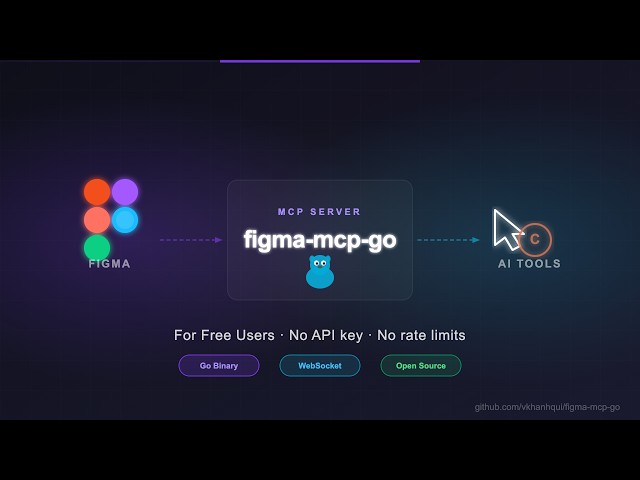
1. Add the server to your AI tool
Claude Code CLI
# via npx
claude mcp add -s project figma-mcp-go -- npx -y @tunglt1810/figma-mcp-go@latest

# or via bunx
claude mcp add -s project figma-mcp-go -- bunx @tunglt1810/figma-mcp-go@latest
Codex CLI
# via npx
codex mcp add figma-mcp-go -- npx -y @tunglt1810/figma-mcp-go@latest

# or via bunx
codex mcp add figma-mcp-go -- bunx @tunglt1810/figma-mcp-go@latest
.mcp.json (Claude and other MCP-compatible tools)
{
  "mcpServers": {
    "figma-mcp-go": {
      "command": "npx",
      "args": ["-y", "@tunglt1810/figma-mcp-go"]
    }
  }
}
.vscode/mcp.json (Cursor / VS Code / GitHub Copilot)
{
  "servers": {
    "figma-mcp-go": {
      "type": "stdio",
      "command": "npx",
      "args": [
        "-y",
        "@tunglt1810/figma-mcp-go"
      ]
    }
  }
}
2. Install the Figma plugin
- In Figma Desktop: Plugins → Development → Import plugin from manifest
- Pick
manifest.jsonfrom plugin.zip - Run the plugin in any Figma file
3. Use more than one AI tool (optional)
Each AI tool starts its own server, but only one can hold the plugin connection on a port.
Same file: change nothing. The first server takes port 1994; the others forward their calls to it. If it stops, another takes over in a few seconds.
Different files: give each tool its own port, and set the same port in that file's plugin (settings gear):
{
  "mcpServers": {
    "figma-mcp-go": {
      "command": "npx",
      "args": ["-y", "@tunglt1810/figma-mcp-go", "--port", "1995"]
    }
  }
}
The plugin remembers the last port for all files, so check it when you open the plugin elsewhere.
--ip 0.0.0.0 accepts connections from other machines.
Security: the plugin connection has no login. On the default
127.0.0.1only your machine can reach it. On any other address, anyone who can reach the port can read and edit your open file. The server warns you and the plugin turns onconfirmmode. Prefer an SSH tunnel.
Plugin panel
The panel shows the connected file, the selection, and what the AI is doing.
| Control | What it does |
|---|---|
| Guard | off (default) runs everything. confirm asks before deletes and bulk changes. read-only blocks all changes. |
| Undo | Undoes the last change. A whole batch_execute_pipeline run is one undo step. |
| Log | Shows every request with tool, time, and error. Copy exports it for bug reports. |
| Pin | Saves the current selection. get_selection(source: "pinned") returns it even after the user clicks elsewhere. |
Settings and panel size are saved per machine. The panel follows Figma's light and dark theme.
Dev Mode
set_codegen_result saves code on a node. It shows in Dev Mode's Code panel for everyone on the file. Code on a component shows for all its instances. The Language menu filters blocks; if a language has no block, all blocks show.
How it works
The first server to start becomes the leader and holds the only WebSocket to the plugin. Other servers are followers and forward their calls to the leader.
flowchart LR
    client([MCP client]) -- stdio --> tools
    client2([2nd MCP client]) -- stdio --> follower[Follower]

    subgraph leaderProc [Leader process]
        tools[tools<br/>60 tools, Check] -- Send --> leader[cluster.Leader<br/>:1994 /rpc /ws /ping]
        leader --> bridge[bridge<br/>request/response match]
    end

    follower -. POST /rpc .-> leader

    subgraph plugin [Figma plugin]
        ui[Plugin UI<br/>Svelte iframe] -- postMessage --> main[Plugin main<br/>dispatch handlers]
    end

    bridge == WebSocket ==> ui
    main -- read / write --> figma[(Figma document)]
One tool call, end to end:
sequenceDiagram
    participant C as MCP client
    participant T as tools
    participant L as cluster
    participant B as bridge
    participant U as Plugin UI
    participant M as Plugin main
    participant F as Figma

    C->>T: tools/call (stdio)
    T->>L: Send after Check
    Note over L: A follower first sends POST /rpc to the leader
    L->>B: forward
    B->>U: WebSocket request
    U->>M: postMessage
    M->>F: read / write nodes
    F-->>M: nodes
    M-->>U: response
    U-->>B: WebSocket reply
    B-->>L: matched by id
    L-->>T: (any, error)
    T-->>C: tool result
Tools
Read
| Tool | What it does |
|---|---|
get_document | Node tree of the selection, page, or whole file. Stops at 500 nodes by default; depth, maxNodes, detail, dedupe_components control size |
get_nodes_info | Full details of nodes by ID. Unknown IDs go in missing; depth and maxNodes limit children |
get_selection | Selected nodes, or pinned ones with source: "pinned" |
get_metadata | File name, current page, and all pages |
search_nodes | Find nodes by name and/or type on a page, in a node, or in the whole file |
get_viewport | View center, zoom, and visible area |
get_styles | Paint, text, effect, and grid styles |
get_variable_defs | Variable collections, modes, and values |
get_local_components | All components and component sets |
get_instance_overrides | An instance's component properties and values |
get_annotations | Dev Mode annotations |
get_fonts | Fonts on the current page, most used first |
get_reactions | A node's prototype reactions |
Export
| Tool | What it does |
|---|---|
export_screenshots | Export nodes as images: saved to a file with outputPath, or returned (PNG/JPG as image, SVG as text). No items = the selection |
export_frames_to_pdf | Save frames as one multi-page PDF |
get_image_bytes | Original image files from image fills, as base64 |
export_tokens | Variables and paint styles as JSON or CSS |
set_export_settings | Set a node's Export presets |
Create
| Tool | What it does |
|---|---|
create_node | FRAME, RECTANGLE, ELLIPSE, STAR, POLYGON, LINE, or SECTION |
create_text | Text node (loads the font) |
create_vector | Vector from SVG, e.g. an icon |
import_image | Image from a URL or base64, as a new rectangle or into a node |
create_component | Turn a frame into a component |
create_component_instance | Instance of a local or library component |
combine_as_variants | Combine components into a variant set |
manage_component_properties | Add, edit, delete, or bind component properties |
create_connector | Connector line (FigJam only) |
boolean_operation | UNION, SUBTRACT, INTERSECT, or EXCLUDE shapes |
flatten_nodes | Merge nodes into one vector |
outline_stroke | Turn a stroke into a filled shape |
Edit
| Tool | What it does |
|---|---|
set_node_properties | Position, size, radius, visibility, lock, opacity, rotation, blend, constraints, layer order, mask, stroke |
set_paint | Solid or gradient fill, or solid stroke |
set_auto_layout | Auto layout: direction, padding, gap, align, HUG/FILL sizing, min/max |
set_layout_grids | Column, row, or square grids |
set_effects | Shadows, blurs, noise, texture, glass |
set_text | Text content and whole-node text settings |
set_text_ranges | Style part of a text: bold, color, link, list |
find_replace_text | Find and replace text, regex allowed |
set_instance_overrides | Set an instance's component properties |
swap_component | Swap an instance to another component |
detach_instance | Turn instances into plain frames |
clone_node | Copy a node |
reparent_nodes | Move nodes into another parent |
group_nodes / ungroup_nodes | Group or ungroup |
batch_rename_nodes | Rename by name, find/replace, regex, prefix, or suffix |
set_annotations | Dev Mode annotations (paid seat) |
set_reactions | Prototype reactions: set, append, or remove |
delete_nodes | Delete nodes |
Styles, variables, pages
| Tool | What it does |
|---|---|
create_style | PAINT, TEXT, EFFECT, or GRID style |
update_paint_style | Rename or recolor a paint style |
apply_style_to_node | Apply a style to a node |
delete_style | Delete a style |
manage_variable | Create collections, modes, and variables; set values; delete; bind to nodes |
manage_page | Add, delete, rename, or go to a page |
Workflow
| Tool | What it does |
|---|---|
batch_execute_pipeline | Run many write steps in one call, pass results between steps, undo on error |
set_selection | Select and zoom to nodes to show the user |
save_version_checkpoint | Save a named version before big changes |
set_codegen_result | Save code for Dev Mode's Code panel |
manage_plugin_data | Store key/value notes on a node in the file |
Prompts
| Prompt | What it does |
|---|---|
read_design_strategy | How to read designs well |
design_strategy | How to create and edit designs |
text_replacement_strategy | Replace text across a design in chunks |
annotation_conversion_strategy | Turn manual notes into Figma annotations |
swap_overrides_instances | Copy overrides between instances |
reaction_to_connector_strategy | Turn prototype links into flow diagrams |
Upgrading
Update the plugin when you update the server. npx updates the server, but the plugin is installed by hand. An old plugin rejects new commands with Unknown request type.
See CHANGELOG.md for what changed in each release, including removed tools and what to use instead.
Development
- Server: Go 1.27+ (
make test-go,make build-go) - Plugin: Bun 1.4+ (
cd plugin && bun install && bun run build) - All tests:
make test - Logs: stderr.
FIGMA_MCP_LOG=debugshows tool parameters and traffic. - Package rules:
make deps-checkfails on wrong-way imports.internal/hasbridge(plugin WebSocket),cluster(leader election),figma(rules), andtools(tool table). Allowed:tools → figma,cluster → bridge.
macOS binaries need macOS 13 or later (Go 1.27).
Contributing
Issues and PRs are welcome.
Star History
<a href="https://www.star-history.com/?repos=tunglt1810%2Ffigma-mcp-go&type=date&legend=top-left"> <picture> <source media="(prefers-color-scheme: dark)" srcset="https://api.star-history.com/chart?repos=tunglt1810/figma-mcp-go&type=date&theme=dark&legend=top-left" /> <source media="(prefers-color-scheme: light)" srcset="https://api.star-history.com/chart?repos=tunglt1810/figma-mcp-go&type=date&legend=top-left" /> <img alt="Star History Chart" src="https://api.star-history.com/chart?repos=tunglt1810/figma-mcp-go&type=date&legend=top-left" /> </picture> </a>Related MCP servers

tunnels.io
Read a tunnels.io account and put local ports online. Lists only the tools the token was granted.

Iconoteka
Search and retrieve 1,300 open-source icons in 7 weights and 2 styles as paste-ready SVG.

Website performance monitoring: scans, Core Web Vitals, RUM data and alerts.

Build-aware code intelligence for embedded C/C++ firmware — libclang, FTS5, call graphs, 33 tools
Temporal memory MCP server with LanceDB vector search, weight-decay scoring, and LLM consolidation
View repository →
io.github.tushariitr-19/patents-mcp
Patent search and prior art discovery via Google Patents on BigQuery