Apple Books MCP Server
io.github.vgnshiyer/apple-books-mcp
Access your Apple Books library, annotations, and highlights through Claude for reading insights and reflection.
What is the Apple Books MCP server?
The Apple Books MCP server connects Claude to your Apple Books library on macOS, exposing your books, annotations, highlights, reading progress, and chapter content. It lets you query your reading history, search notes, and attach your current read to conversations for context-aware discussion.
This server bridges Apple Books and Claude, giving you AI-powered tools to explore your reading life. Search highlights by color or date, get context around any annotation, cluster themes across books, and generate weekly reading digests. It supports non-DRM EPUBs with full chapter content access, and includes optional write capabilities to manage collections directly from Claude.
How to install Apple Books
Copy-paste configuration for popular MCP clients.
Tools & capabilities
Tools this server exposes to the agent.
list_all_collections— List all collections in your Apple Books libraryget_collection_books— Get all books in a specific collectiondescribe_collection— Get details of a collectionsearch_collections_by_title— Search for collections by titlecreate_collection— Create a new collection (requires --enable-writes)rename_collection— Rename a user-created collection (requires --enable-writes)delete_collection— Delete a user-created collection without deleting books (requires --enable-writes)add_book_to_collection— Add a book to a collection (requires --enable-writes)remove_book_from_collection— Remove a book from a collection (requires --enable-writes)list_all_books— List all books in your librarydescribe_book— Get metadata, progress, annotation count, and description for a booklist_annotations— Get all annotations for a book, ordered by chaptersearch_books_by_title— Search for books by titleget_books_by_genre— Get books by genre substring matchget_books_in_progress— Get books currently being readget_finished_books— Get books that have been finishedget_unstarted_books— Get books not yet startedget_recently_read_books— Get most recently opened bookslist_all_annotations— Browse every annotation grouped by book, newest firstrecent_annotations— Get most recent annotations with date and book information
Use cases
- Generate a weekly digest summarizing what you've read and highlighted in the past week
- Search all your highlights by color or date range to find patterns and recurring themes across books
- Get surrounding context for any highlight to understand its meaning within the full paragraph
- Attach your currently reading book to a conversation so Claude can discuss it with chapter-level awareness
- Organize and manage your book collections directly from Claude without opening Apple Books
Apple Books MCP server FAQ
It's an MCP server that connects Claude to your Apple Books library on macOS, giving Claude access to your books, annotations, highlights, reading progress, and chapter content for non-DRM EPUBs.
Yes, the Apple Books MCP server is open-source and free to use. It's licensed under Apache 2.0.
Add the server to your Claude Desktop config at ~/.config/Claude/claude_desktop_config.json using either uvx (recommended), pip, or Docker. See the README for exact configuration examples.
It works with all books for metadata and annotations. Chapter content access is limited to non-DRM EPUBs (imported books, Project Gutenberg, Standard Ebooks). Apple Books Store purchases are FairPlay-protected and cannot be accessed.
No authentication required. The server reads your local Apple Books library at ~/Library/Containers/com.apple.iBooksX/. macOS will ask for permission to access another app's data on first run—click Allow.
Yes, but it's opt-in. Add --enable-writes to the server args to enable creating, renaming, and deleting collections, plus adding/removing books. Writes are guarded: they refuse while Books is open, back up automatically, and validate the database schema.
README (reference)
Source of truth, from the repository.
Apple Books MCP
<!-- mcp-name: io.github.vgnshiyer/apple-books-mcp -->Model Context Protocol (MCP) server for Apple Books.





At a glance
- Pick up where you left off — Claude sees the chapter you're on and its text, plus recent highlights in the book.
- Expand on any highlight — get the surrounding paragraph explained in context, with the exact anchor you marked shown in
«...». - Revisit a book — pull your highlights, cluster them by theme, and quote you back to yourself.
- Reflect on your reading — patterns across books, recurring ideas in your highlights, what you're actually drawn to.
https://github.com/user-attachments/assets/77a5a29b-bfd7-4275-a4af-8d6c51a4527e
And much more!
Available Tools
Collections
| Tool | Description | Parameters |
|---|---|---|
| list_all_collections | List all collections | limit?: int |
| get_collection_books | Get all books in a collection | collection_id: str |
| describe_collection | Get details of a collection | collection_id: str |
| search_collections_by_title | Search for collections by title | title: str |
Editing collections (opt-in)
Off by default. Enable by adding --enable-writes to the server args:
"args": ["apple-books-mcp@latest", "--enable-writes"]
Apple provides no automation API for collections, so these write directly to the library database — behind guard rails: every write refuses while Books is open, takes an automatic WAL-safe backup first (~/.py_apple_books/backups/), validates the schema and aborts on drift, and only touches user-created collections (plus "Want to Read" membership). Deleting a collection never deletes the books in it.
⚠️ If iCloud sync for collections is enabled, direct edits may not propagate to other devices and can be reverted by a cloud re-sync.
| Tool | Description | Parameters |
|---|---|---|
| create_collection | Create a new collection | title: str, details?: str |
| rename_collection | Rename a user-created collection | collection_id: int, new_title: str |
| delete_collection | Delete a user-created collection (books untouched) | collection_id: int |
| add_book_to_collection | Add a book to a collection (idempotent) | collection_id: int, book_id: int |
| remove_book_from_collection | Remove a book from a collection (idempotent) | collection_id: int, book_id: int |
Books
| Tool | Description | Parameters |
|---|---|---|
| list_all_books | List all books | limit?: int |
| describe_book | Get details of a particular book (metadata, progress, annotation count, description) | book_id: str |
| list_annotations | Get all annotations for a book (id + text + chapter per row, chapter-ordered) | book_id: int, limit?: int |
| search_books_by_title | Search for books by title | title: str |
| get_books_by_genre | Get books by genre (substring match) | genre: str, limit?: int |
Reading Status
| Tool | Description | Parameters |
|---|---|---|
| get_books_in_progress | Get books currently being read | limit?: int |
| get_finished_books | Get books that have been finished | limit?: int |
| get_unstarted_books | Get books not yet started | limit?: int |
| get_recently_read_books | Get most recently opened books | limit?: int (default: 10) |
Annotations
| Tool | Description | Parameters |
|---|---|---|
| list_all_annotations | Browse every annotation grouped by book, newest first | limit?: int |
| recent_annotations | Get most recent annotations (flat, with date + book per row) | limit?: int (default: 10) |
| describe_annotation | Get full details of a single annotation | annotation_id: str |
| get_annotation_context | Text window around a highlight (the paragraph it's in), with the highlight marked «...» | annotation_id: int, chars_before?: int (default: 500), chars_after?: int (default: 500) |
| get_highlights_by_color | Highlights of a particular color, grouped by book | color: str, limit?: int |
| search_notes | Search user notes (shows highlight + note inline) | note: str, limit?: int |
| search_annotations | Search across highlights + notes + surrounding text | text: str, limit?: int |
| get_annotations_by_date_range | Annotations within a date range (flat, with date + book per row) | after?: YYYY-MM-DD, before?: YYYY-MM-DD, limit?: int |
Library Stats
| Tool | Description | Parameters |
|---|---|---|
| get_library_stats | Get library summary with reading stats | None |
Book Content
Only works for non-DRM EPUBs (imported books, Project Gutenberg, Standard Ebooks, etc.). Apple Books Store purchases are FairPlay-protected and return a clear error. iCloud-only books return a "not downloaded" hint.
| Tool | Description | Parameters |
|---|---|---|
| list_book_chapters | Table of contents for a book (chapter titles, order, nesting) | book_id: int |
| get_chapter_content | Plain-text content of a chapter, with optional offset + max_chars slicing | book_id: int, chapter_id: str, offset?: int, max_chars?: int |
| get_current_reading_position | The chapter the user last left off reading (via Apple Books' auto-bookmark CFI) | book_id: int |
Available Resources
Attachable data objects accessible from Claude Desktop's resource picker.
| Resource | URI | Description |
|---|---|---|
| Currently Reading | apple-books://currently-reading | The book you're reading right now — most recently opened in-progress book, with metadata, the chapter you left off on plus a preview of its text (for non-DRM EPUBs), and recent annotations. Attach to any conversation to focus Claude on your current read. |
Available Prompts
One-click workflows, accessible from Claude Desktop's prompt picker.
| Prompt | Description | Arguments |
|---|---|---|
| weekly_digest | Summarize what I've read and highlighted in the past week | days?: int (default: 7) |
| library_snapshot | A reflection on my whole reading life | None |
| revisit_book | Revisit your notes and highlights from a specific book | book_title: str |
Installation
Using uv (recommended)
uvx can be used to directly run apple-books-mcp (without installing it).
brew install uv  # for macos
uvx apple-books-mcp
Using pip
pip install apple-books-mcp
After installing, you can run the server using:
python -m apple_books_mcp
Using Docker
docker run -v ~/Library/Containers/com.apple.iBooksX/Data/Documents:/root/Library/Containers/com.apple.iBooksX/Data/Documents:ro ghcr.io/vgnshiyer/apple-books-mcp:latest
First-run permission prompt (macOS)
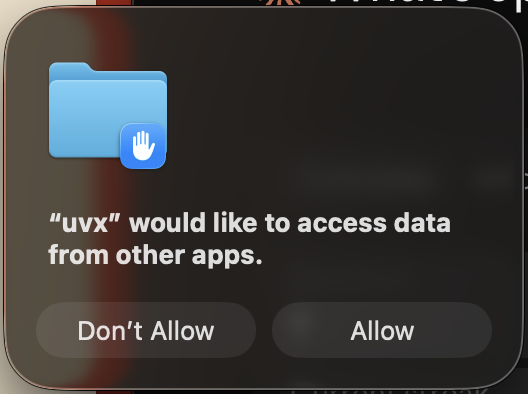
On first use, macOS will ask whether uvx (or python / docker, depending on how you launched) may "access data from other apps." Click Allow — the MCP reads Apple Books' private container at ~/Library/Containers/com.apple.iBooksX/, which macOS treats as another app's sandboxed data. Access is read-only and scoped to that container; the server starts successfully either way, but without permission every tool comes back empty.
Configuration
Claude Desktop Setup
Using uvx (recommended)
{
    "mcpServers": {
        "apple-books-mcp": {
            "command": "uvx",
            "args": [ "apple-books-mcp@latest" ]
        }
    }
}
Using python
{
    "mcpServers": {
        "apple-books-mcp": {
            "command": "python",
            "args": ["-m", "apple_books_mcp"]
        }
    }
}
Using Docker
{
    "mcpServers": {
        "apple-books-mcp": {
            "command": "docker",
            "args": [
                "run", "-i", "--rm",
                "-v", "~/Library/Containers/com.apple.iBooksX/Data/Documents:/root/Library/Containers/com.apple.iBooksX/Data/Documents:ro",
                "ghcr.io/vgnshiyer/apple-books-mcp:latest"
            ]
        }
    }
}
Upcoming Features
- PDF content access (currently EPUB-only)
- fuller annotation context via CFI → paragraph resolution
Contribution
Thank you for considering contributing to this project!
Development
If you cloned this repository, you can test it using Claude Desktop with below configuration:
Use uv venv to create a virtual environment and install the dependencies.
uv venv
uv sync
Debugging
With Claude Desktop
{
    "mcpServers": {
        "apple-books-mcp": {
            "command": "uv",
            "args": [
                "--directory",
                "/path/to/apple-books-mcp/",
                "run",
                "apple_books_mcp",
                "-v"
            ]
        }
    }
}
With inspector
npx @modelcontextprotocol/inspector uvx apple-books-mcp
Opening Issues
If you encounter a bug, have a feature request, or want to discuss something related to the project, please open an issue on the GitHub repository. When opening an issue, please provide:
Bug Reports: Describe the issue in detail. Include steps to reproduce the bug if possible, along with any error messages or screenshots.
Feature Requests: Clearly explain the new feature you'd like to see added to the project. Provide context on why this feature would be beneficial.
General Discussions: Feel free to start discussions on broader topics related to the project.
Contributing
1️⃣ Fork the GitHub repository https://github.com/vgnshiyer/apple-books-mcp
2️⃣ Create a new branch for your changes (git checkout -b feature/my-new-feature).
3️⃣ Make your changes and test them thoroughly.
4️⃣ Push your changes and open a Pull Request to main.
Please provide a clear title and description of your changes.
License
Apple Books MCP is licensed under the Apache 2.0 license. See the LICENSE file for details.
Related MCP servers

AgentBase
Shared knowledge base for AI agents. Semantic search across agents, no setup required — just a URL.

Onboard
Your AI copilot for customer onboarding — projects, KPIs, tasks, and safe writes.

VibeHacker
Product Hunt for AI tools. Search, submit, upvote from Claude Code or Cursor.

io.github.vibeads/mcp
Manage Google Ads from Claude: read metrics, draft campaigns, publish with human approval.

Bug bounty platform for vibe coders. Post bugs, find fixes, run diagnostics.
View repository →AI seller verification and policy risk analysis for any online store.