XMemo MCP Server
io.github.yonro/xmemo
Persistent, governed long-term memory for AI agents across tools and sessions via MCP and REST.
What is the XMemo MCP server?
XMemo is a Memory OS for AI agents that provides persistent memory, project context, and session continuity with agent identity and governed access. It exposes memory capabilities through MCP, a CLI, and a public REST API, enabling agents to store, search, and recall durable facts and operational knowledge across sessions and tools.
XMemo gives AI agents user-owned, persistent memory that survives across sessions and tools. You can store facts, preferences, project context, and decisions; retrieve focused context on demand; resume agent state after restarts; and track authorship and access through governed scopes. It's designed for multi-agent workflows where continuity and memory governance matter.
How to install XMemo
Copy-paste configuration for popular MCP clients.
XMEMO_KEYsecretBearer token issued by XMemo for the stdio proxy. Optional for discovery; required for tool execution.
XMEMO_URLOptional XMemo service base URL. Defaults to https://xmemo.dev.
AuthorizationrequiredsecretBearer token issued by XMemo; send as an Authorization Bearer value.
X-Memory-OS-Agent-IDOptional stable agent family id for attribution, for example 'claude-code' or 'copilot-cli'.
X-Memory-OS-Agent-Instance-IDOptional stable local installation id for attribution; XMemo hashes it server-side.
X-Memory-OS-Device-IDOptional stable local device id for attribution; use a non-secret machine or installation identifier.
X-Memory-OS-Device-LabelOptional human-readable local device label for attribution, for example 'MacBook Pro' or 'PC A'.
Tools & capabilities
Tools this server exposes to the agent.
Persistent Memory— Store, search, list, and soft-delete durable facts, preferences, and operational knowledge across sessions.Context Recall— Retrieve focused, relevant context on demand with token-budget controls and document expansions.Session Continuity & Working State— Restart snapshots and state save/restore so agents resume context across process restarts.Project Context & Decisions— Track project-scoped facts, TODOs, and durable decisions across agent workflows.Agent Identity & Provenance— Track authorship and origin per memory record via agent instance attribution without conflating credentials.Governed Access— Scoped tokens, OAuth where supported, soft/hard deletion and sensitive-memory handling with governance and retention controls.TODOs— Manage task lists within project context.
Use cases
- Store and retrieve agent preferences and operational knowledge across multiple AI tool sessions
- Resume agent workflows after process restarts with saved state and context snapshots
- Track project-scoped decisions and facts with full provenance and authorship attribution
- Manage multi-agent collaboration with governed memory access and soft/hard deletion policies
- Implement session continuity for long-running agent tasks that span multiple interactions
XMemo MCP server FAQ
XMemo is a Memory OS that provides persistent, governed memory for AI agents. It stores facts, preferences, project context, and decisions that survive across sessions and tools, accessible via MCP, CLI, and REST API.
The README does not specify pricing. Visit https://xmemo.dev for current pricing and plan details.
Run `npm install -g @xmemo/client` then `xmemo init` for guided setup, or use `xmemo setup cursor` or `xmemo setup claude-code` for specific clients. Alternatively, configure the hosted MCP endpoint `https://xmemo.dev/mcp` with your authentication token.
Yes. You must authenticate via `xmemo account login` or provide an `XMEMO_KEY` token. OAuth is supported for compatible clients like Gemini CLI and Antigravity.
XMemo supports Codex, Cursor, Copilot CLI, Gemini CLI, Antigravity, OpenClaw, Hermes, Kiro, Grok, Claude Desktop, Claude Code, Cline, Continue, Zed, JetBrains, and other MCP-compatible hosts. Run `xmemo mcp list` for the full catalog.
Yes. You can run commands via `npx @xmemo/client <command>` or configure the hosted MCP endpoint `https://xmemo.dev/mcp` directly in your client's MCP settings.
README (reference)
Source of truth, from the repository.
XMemo: Memory OS for AI Agents








XMemo is a user-owned Memory OS for AI agents: persistent memory, project context and session continuity with agent identity, provenance and governed access, shared across AI clients through MCP, the CLI and a public REST API surface.
English · 简体中文 | Documentation · Hosted MCP
Quick start · What this repo contains · Beyond MCP · Integrations · Connection modes · Plugins · Commands · Versioning · Security
What this repository contains
@xmemo/client: the officialxmemoCLI for setup, diagnostics, behavior profiles, and memory commands.- MCP distribution: hosted Streamable HTTP configuration (
https://xmemo.dev/mcp) and the localxmemo-mcpstdio server. - XMemo Skill & native integrations:
skills/xmemofor agent platforms and the native plugin index (src/plugins/index.json). - Marketplace and registry metadata: canonical descriptors for MCP Registry (
server.json), LobeHub (lhm.plugin.json), and AI agents (context7.json).
The hosted service implementation is private.
Beyond MCP
MCP is one access surface of XMemo, not the product boundary. XMemo provides a persistent, governed memory operating layer across AI tools and agents:
- Persistent Memory: store, search, list, and soft-delete durable facts, preferences, and operational knowledge across sessions.
- Context Recall: retrieve focused, relevant context on demand with token-budget controls and document expansions.
- Session Continuity & Working State: restart snapshots and state save/restore so agents resume context across process restarts.
- Project Context & Decisions: track project-scoped facts, TODOs, and durable decisions across agent workflows.
- Agent Identity & Provenance: track authorship and origin per memory record via agent instance attribution without conflating credentials.
- Governed Access: scoped tokens, OAuth where the client supports it, soft/hard deletion and sensitive-memory handling (governance details).
- Native Integrations & Skill: dedicated integration for OpenClaw, Hermes, XMemo Skill (ClawHub), and DeepSeek DSH (available, released and pilot-tested; integration maturity Preview).
- Access Surfaces: unified via Model Context Protocol, the local CLI (
xmemo), and the public REST API.
Preview: Cloud Skills; Dream (off by default); Teams (Business plan not yet available). Knowledge Bases are available where enabled for the account.
XMemo CLI
@xmemo/client is the official control plane for connecting AI tools to XMemo. It makes setup repeatable, keeps credentials out of project files, and gives every supported client a consistent path to durable, user-owned memory.
The package is deliberately small: the CLI runtime, safe client configuration, behavior profiles, XMemo skills, and marketplace metadata. Server code, databases, deployment files, logs, and internal operations remain outside the npm distribution.
Architecture
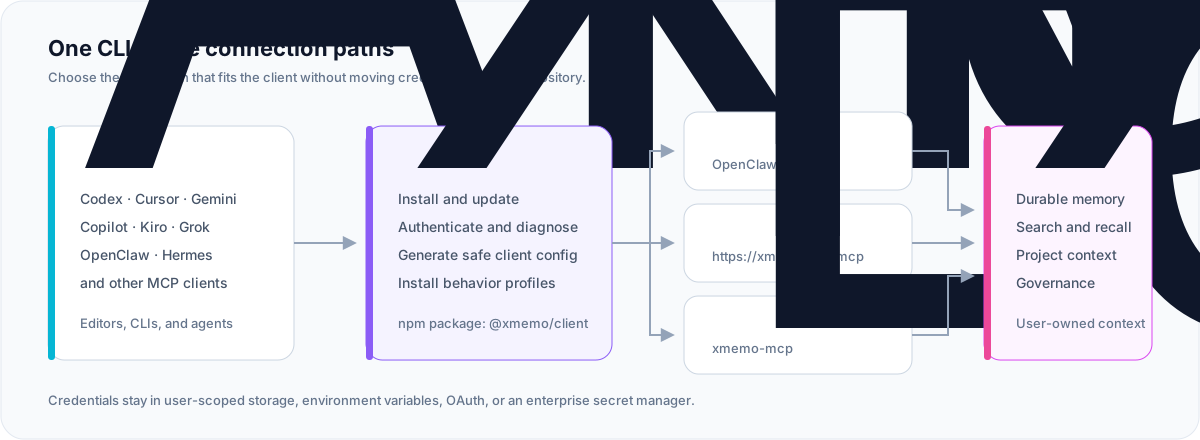
| Package | @xmemo/client |
| Primary command | xmemo (alias: client) |
| Local MCP command | xmemo-mcp |
| Hosted MCP | https://xmemo.dev/mcp |
| Runtime | Node.js 20 or later |
| License | MIT |
Why XMemo CLI
- One control plane — login, diagnostics, configuration, profiles, updates, and smoke checks share one predictable interface.
- Private by design — generated project configuration references a credential; it never embeds the credential value.
- Native where it matters — OpenClaw and Hermes use dedicated memory integrations instead of duplicating the same capability through MCP.
- Portable everywhere else — hosted Streamable HTTP MCP and local stdio cover modern editors, terminals, and agent runtimes.
- Safe automation — supported setup and removal paths offer preview, dry-run, or explicit confirmation before making changes.
- Small supply-chain surface — the npm package is governed by an explicit file allowlist and release provenance.
Quick start
Guided onboarding (xmemo init)
For an interactive first-run experience across account authentication, detected clients, agent behavior instructions, MCP server setup, skills, and plugins, run:
npm install -g @xmemo/client
xmemo init
Flags and options:
xmemo init --dry-run: View the full onboarding plan without performing network calls or disk writes.xmemo init --yes: Automatically accept and apply all onboarding steps without interactive prompts.xmemo init --json: Emit structured JSON for the plan or result envelope.xmemo init --client <id>...: Restrict onboarding to specific clients (e.g.,cursor,codex,claude-code).xmemo start: Alias forxmemo initwith quick-start walkthrough steps.
Global installation exposes xmemo as the primary command, and also provides client and memory-os as aliases.
Manual step-by-step setup
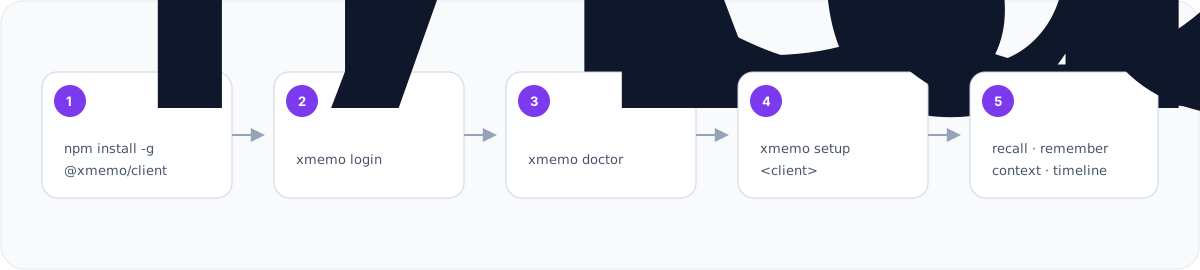
xmemo account login
xmemo doctor
xmemo setup codex
xmemo status
Replace codex with your client. Preview a configuration before writing it:
xmemo setup cursor --dry-run
Running with npx
You can also run any CLI command directly without a global install via npx @xmemo/client <command>:
# Check version or health
npx @xmemo/client --version
npx @xmemo/client doctor

# Guided onboarding without global install
npx @xmemo/client init

# Install skill or run MCP stdio server
npx @xmemo/client skill install
npx @xmemo/client mcp serve
[!TIP] Start with
xmemo init(orxmemo account login,xmemo doctor, andxmemo setup <client>). Hand-edit MCP configuration only when a client has no verified setup path.
How the commands fit together
The XMemo CLI architecture is built on four core design principles:
1. Unified Resource Grammar (xmemo <resource> <action>)
Every integration component is a first-class resource with predictable lifecycle actions:
| Resource | Scope | Actions | Examples |
|---|---|---|---|
mcp | MCP server connection configuration | install, remove, status | xmemo mcp install codex, xmemo mcp status |
plugin | Host-native extension packages | install, remove, status, list, info | xmemo plugin install gemini-cli, xmemo plugin list |
skill | Agent skill scripts & documentation | install, remove, status, update | xmemo skill install --client openclaw |
profile | Markdown behavior steering instructions | install, remove, status, show | xmemo profile install cursor |
- Composite commands:
xmemo setup [<client>...],xmemo uninstall [<client>...], andxmemo status [<client>]orchestrate these resources in a single step according to the client's declarative profile. - Backward-compatible aliases: Familiar commands such as
xmemo mcp add(alias formcp install),xmemo profile uninstall(alias forprofile remove), andxmemo skill uninstall(alias forskill remove) remain fully functional and print a helpful one-line hint in interactive terminals.
2. Unified Target Resolver
When no client is explicitly passed, the CLI uses a deterministic three-tier precedence resolution model:
- Explicit flag or argument:
--client <id>, positional client argument, or--all. - Calling agent environment: Automatically identifies the calling agent runtime when running inside an agent session (e.g.,
CLAUDECODE/CLAUDE_CODE_ENTRYPOINTmaps toclaude-code, andCODEX_THREAD_ID/CODEX_SESSION_IDmaps tocodex). - Detected installed clients: Inspects local configuration paths and markers. If exactly one matching client is found, it is automatically selected; if multiple clients are found in interactive mode, an interactive picker is presented. The CLI never silently writes configuration to arbitrary unverified paths.
3. Plan, Confirm Once, Apply (PlanRunner)
Mutating commands follow a strict, atomic execution pattern:
- Build Plan: Assemble an ordered sequence of actions across resources (e.g. plugin install followed by skill configuration).
- Preview: Print the entire plan (including modified paths, commands, and unified diffs) to the terminal.
- Confirm Once: Prompt
[y/N]exactly once for the entire sequence. Re-running with--yesor-ybypasses the prompt;--dry-rundisplays the preview without mutation. - Apply Sequentially: Steps run in dependency order, stopping immediately upon first failure. Re-running an already configured client detects that all components are up to date and reports
Nothing to do.
4. Declarative Client Registry
All client configurations, recipes, and capabilities are declared centrally in src/clients/registry.js. Command implementations are purely generic orchestrators with zero hardcoded client ID strings. Platforms can also be added dynamically at runtime via registerClient().
Supported integrations
| Client | Recommended command | Connection |
|---|---|---|
| Codex | xmemo setup codex | Hosted MCP + behavior profile |
| Cursor | xmemo setup cursor | Hosted MCP + Bearer Token + behavior profile |
| Copilot CLI | xmemo setup copilot | Local authenticated proxy |
| Gemini CLI | xmemo setup gemini | Hosted MCP + OAuth |
| Antigravity | xmemo setup antigravity | Hosted MCP + OAuth |
| OpenClaw | xmemo setup openclaw | Native memory plugin + Skill |
| Hermes | xmemo setup hermes | Native memory provider |
| Kiro | xmemo setup kiro | Native HTTP OAuth; --auth key for API Key |
| Grok | xmemo setup grok | Hosted MCP |
| Other MCP clients | xmemo mcp config --client generic | Generated template |
The client registry also covers Devin Desktop (formerly Windsurf), Cline, Continue, Claude Desktop,
Claude Code, Kimi Code, Zed, JetBrains, OpenCode, Qwen, Trae, and compatible
MCP hosts. Run xmemo mcp list for the current machine-readable catalog.
For VS Code users looking for the dedicated editor extension, see the yonro/xmemo-vscode repository. For Cursor users looking for the dedicated plugin, see the yonro/xmemo-cursor-plugin repository. For Claude users looking for the dedicated plugin, see the yonro/xmemo-claude-plugin repository.
Connection modes
Hosted MCP
The recommended universal path is the XMemo Streamable HTTP endpoint:
https://xmemo.dev/mcp
OAuth-capable clients complete authentication in the browser. Other clients
reference XMEMO_KEY without copying its value into repository files.
Generic configuration shape:
{
  "mcpServers": {
    "XMemo": {
      "type": "streamable-http",
      "url": "https://xmemo.dev/mcp",
      "headers": {
        "Authorization": "Bearer ${XMEMO_KEY}"
      }
    }
  }
}
Client configuration keys differ; prefer xmemo setup <client> over copying
this generic example directly.
Local stdio MCP
xmemo-mcp is the dedicated stdio entry point for marketplaces and clients
that launch a local process. Safe discovery exposes 20 tools, three prompts,
and two documentation resources without a token. Tool execution still requires
authentication.
After a global installation:
xmemo-mcp
Install-free MCP configuration:
{
  "mcpServers": {
    "XMemo": {
      "command": "npx",
      "args": [
        "-y",
        "--package",
        "@xmemo/client@latest",
        "xmemo-mcp"
      ]
    }
  }
}
xmemo mcp serve is equivalent when the CLI is already installed.
Native integrations
OpenClaw and Hermes have dedicated memory providers. Their default setup avoids installing a second, duplicate XMemo tool surface:
- OpenClaw: installs the pinned plugin
clawhub:@xmemo/openclaw-memory@1.0.18without--forceby default. Re-running setup gracefully detects existing installations; use--forceto reinstall or overwrite. - Hermes: installs the pinned provider package
hermes-xmemo==1.1.3viapip installwithout-U. - Every install command prints the exact command before executing. Use
--dry-runto preview actions without installing.
# Native OpenClaw plugin (clawhub:@xmemo/openclaw-memory@1.0.18) + XMemo Skill
xmemo setup openclaw

# Native Hermes memory provider (hermes-xmemo==1.1.3)
xmemo setup hermes
Add hosted MCP only when an explicit fallback is desired:
xmemo setup openclaw --with-mcp
xmemo setup hermes --with-mcp
Use --mcp-only to skip the native integration and install only the hosted MCP
fallback.
XMemo Skill install
The CLI installs the verified XMemo Skill locally into agent skill folders or a target directory:
- Installs into client skill directories:
- Claude Code:
~/.claude/skills/xmemo-memory(global) or.claude/skills/xmemo-memory(project with--project) - Codex:
~/.codex/skills/xmemo-memory - OpenClaw:
~/.openclaw/skills/xmemo-memory - All other 21 clients remain
nulluntil officially documented.
- Claude Code:
- Defaults to the pinned
@xmemo/skill@1.1.35release from npm and verifies tarball integrity (sha512 SRI) before extraction. - Override version with
--version <semver>or explicitly opt into the latest release via--version latest. - For air-gapped or offline installations, install from a local directory or packed tarball with
--from <dir|tgz>(optional--integrity <sha512>). - Manage client skills with
skill status,skill update, andskill remove. - Preview actions without writing files using
--dry-run. - Safety & Consent:
- Interactive install prompts
[y/N]before writing (Enter, EOF, or empty input cancels) unless--yesis specified. - Existing installs refuse overwrite without
--force; when--forceis used, a backup is created in~/.xmemo/backups/skills/<client>/(outside the agent skills directory). skill removeonly removes verified XMemo skill directories, refusing foreign folders, and reports the preserved backup location.
- Interactive install prompts
# Install to agent skill folder (Claude Code global, Codex, or OpenClaw)
xmemo skill install --client claude-code
xmemo skill install --client codex
xmemo skill install --client openclaw

# Install OpenClaw skill globally (shared ~/.openclaw/skills)
xmemo skill install --client openclaw --global

# Install to project-level skill folder (Claude Code project: .claude/skills/xmemo-memory)
xmemo skill install --client claude-code --project

# Install for all detected supported clients
xmemo skill install --all

# Automatically resolve detected client(s) (or specify --client <id>)
xmemo skill install

# Install into a custom directory path
xmemo skill install --dir ./custom-skill-dir

# Non-interactive install (skips [y/N] prompt)
xmemo skill install --client codex --yes

# Replace existing installation (creates backup in ~/.xmemo/backups/skills/<client>/)
xmemo skill install --client codex --force --yes

# Update alias (equivalent to skill install --force)
xmemo skill update --client codex --yes

# Inspect installation status across clients
xmemo skill status
xmemo skill status --client codex
xmemo skill status --all --json

# Remove installed skill from an agent folder (refuses non-XMemo folders)
xmemo skill remove --client codex --yes
xmemo skill remove --client claude-code --project --yes

# Dry run preview
xmemo skill install --client codex --dry-run
Standalone curl & PowerShell installers
For environments without Node.js or @xmemo/client, XMemo provides standalone HTTPS installers at https://xmemo.dev/skill/install (POSIX sh) and https://xmemo.dev/skill/install.ps1 (PowerShell).
The installer is agent-aware and automatically resolves the correct target directory for your active agent:
# Claude Code: installs to ~/.claude/skills/xmemo-memory
curl -fsSL https://xmemo.dev/skill/install | XMEMO_SKILL_AGENT=claude-code sh

# Codex: installs to ${CODEX_HOME:-$HOME/.codex}/skills/xmemo-memory
curl -fsSL https://xmemo.dev/skill/install | XMEMO_SKILL_AGENT=codex sh

# OpenClaw: install via OpenClaw CLI
openclaw skills install @xmemo/xmemo --version 1.1.35

# Windows (PowerShell):
# $env:XMEMO_SKILL_AGENT="claude-code"; irm https://xmemo.dev/skill/install.ps1 | iex
# $env:XMEMO_SKILL_AGENT="codex"; irm https://xmemo.dev/skill/install.ps1 | iex
[!TIP] Prompt for your AI Agent (copy and paste directly into Claude Code, Codex, or another agent):
Install the standalone XMemo Skill into your skills directory: run the installer from https://xmemo.dev/skill/install (on Windows, https://xmemo.dev/skill/install.ps1) with XMEMO_SKILL_DIR set to your skills directory plus /xmemo-memory. Run the doctor command it prints to verify the installation, then reload your skills and follow the Skill's first-run steps. Follow your normal safety checks and do not use elevated privileges.
Target resolution precedence (first match wins):
XMEMO_SKILL_DIR: Installs to the specified directory.XMEMO_SKILL_AGENT=claude-code|codex: Installs to the explicit agent's skills directory (openclawredirects toopenclaw skills install xmemo).- Auto-detection: Automatically detects Claude Code (
CLAUDECODE=1) or Codex (CODEX_THREAD_ID,CODEX_SESSION_ID, orCODEX_HOME). - Home directory discovery: If only
~/.claudeor only~/.codexexists in HOME, selects that agent. - Fallback: Installs to
./xmemo-skillwith a warning on stderr explaining that AI agents will not automatically load the skill from this directory.
Safety & Replacement:
- Refuses to overwrite existing installations unless
XMEMO_SKILL_FORCE=1is provided. - When replacing, moves the previous installation to
~/.xmemo/backups/skills/<agent>/<name>-<timestamp>(safely outside agent skill search paths). - After installation, prints the absolute install path, the verification doctor command (
node <path>/scripts/xmemo-skill.mjs doctor --anonymous), and a prompt to reload your agent.
Agent plugins
The CLI provides a curated, static index of verified agent plugins shipped directly in @xmemo/client. Each entry contains a pinned version, release tag, and exact Git commit SHA resolved at release time.
ℹ️ Strict Separation Rule:
xmemo plugininstalls agent plugins only (e.g.@xmemo/openclaw-memory). Skills are installed exclusively viaxmemo skill install(e.g.@xmemo/xmemo).
| Plugin ID | Platform / Agent | Kind | Status | Integration |
|---|---|---|---|---|
openclaw | OpenClaw | native-cli | Stable | openclaw plugins install clawhub:@xmemo/openclaw-memory@1.0.18 (auto-prompts update if already installed) |
hermes | Hermes Agent | native-cli | Stable | hermes plugins install xmemo (fallback: python -m pip install hermes-xmemo==1.1.3) |
claude-code | Claude Code | git-dir | Preview | Pinned Git clone verified against commit 5d0d280 (defaults to ~/.xmemo/plugins/claude-code) |
cursor | Cursor | marketplace | Preview | Cursor Marketplace plugin |
gemini-cli | Gemini CLI | native-cli | Preview | gemini extensions install https://github.com/yonro/xmemo-gemini-cli --ref 39e25b185b5157490d1683e4ca8c5c5fb1312a88 |
kiro | Kiro | manual | Preview | Steering rules & Power integration |
vscode | VS Code | manual | Preview | VS Code extension manual steps (pending marketplace publication) |
deepseek-dsh | DeepSeek DSH | native-cli | Preview | dsh plugin --profile <name> add dsh-xmemo (requires --profile) |
chatgpt-codex | ChatGPT / Codex | marketplace | Preview | ChatGPT & Codex extension |
cindy | Cindy | manual | Preview | Native agent memory integration |
codex | Codex | mcp | Preview | Dedicated MCP configuration (xmemo setup codex) |
Commands:
# List available plugins (excluding legacy entries)
xmemo plugin list

# Include legacy plugins
xmemo plugin list --all

# View plugin details and verification metadata
xmemo plugin info <id>

# Preview install plan without executing
xmemo plugin install <id> --dry-run

# Install with explicit confirmation (prompts [y/N] by default)
xmemo plugin install <id>

# Non-interactive install
xmemo plugin install <id> --yes

# Specify profile for deepseek-dsh
xmemo plugin install deepseek-dsh --profile default --yes

# Specify custom target directory for git-dir plugins
xmemo plugin install claude-code --yes --dir ~/.custom-plugins/claude-code

# Open plugin documentation or marketplace in browser
xmemo plugin install <id> --open

# Check installation status
xmemo plugin status [<id>]
Security & Consent:
- Only verified plugin IDs from the static index are accepted; arbitrary URLs and unknown IDs are rejected with exit code 2.
- Interactive install always displays the execution plan and requires explicit consent (
[y/N], defaulting to Cancel on empty input or EOF). --dry-runguarantees zero disk writes and zero spawned processes.- Marketplace and manual plugins display exact step-by-step instructions from the plugin repository during
plugin install <id>(pass--opento open docs in browser). - Git directory plugins (
claude-code) clone into a stable per-user location (~/.xmemo/plugins/<id>), support--dir <path>override, verify the checked-outHEADcommit byte-for-byte, and output the exact load command (claude --plugin-dir <dir>). On commit mismatch, the directory is immediately removed. - Plugin child processes run in an isolated environment with authentication tokens (
XMEMO_KEY,MEMORY_OS_MCP_TOKEN,XMEMO_TOKEN) scrubbed from argv and env.
Account and authentication
Account commands
Manage local authentication, stored credentials, and tokens through the account command family:
# Browser device login
xmemo account login

# Check active authentication state
xmemo account status

# Optional remote verification
xmemo account status --verify

# Check or store token credentials
xmemo account token status
printf '%s\n' 'your-token' | xmemo account token add --from-stdin --allow-plaintext

# Logout: remove locally stored XMemo credentials owned by the CLI
xmemo account logout

# Non-interactive logout
xmemo account logout --yes
Safe account logout (xmemo account logout)
- Target removal: Removes only the user-scoped credential file owned by the CLI (
~/.config/xmemo/credentials.jsonor OS config root). - Explicit confirmation: Displays the target credential path and prompts
Proceed with logout? [y/N](defaulting to No) unless--yesis specified. - Client & Agent Isolation: Preserves all client MCP configuration files (Cursor, Claude, VS Code, etc.) and agent-managed OAuth sessions.
- Privacy: Never displays or leaks token values in stdout, stderr, or JSON envelopes.
- Scripting: Requires
--yeswhen--jsonis specified to prevent accidental headless logout.
Legacy authentication aliases
The legacy commands remain fully supported as backward-compatible aliases:
xmemo login(alias forxmemo account login)xmemo auth status(alias forxmemo account status)xmemo auth-status(alias forxmemo account status)xmemo token <status|add|set>(alias forxmemo account token <status|add|set>)
In interactive human mode, legacy aliases emit a one-line deprecation hint to stderr. When run with --json or --help, the deprecation hint is suppressed.
Existing token import
Pipe an existing token through stdin so it does not appear in command history:
printf '%s\n' 'your-token' | xmemo account token add --from-stdin --allow-plaintext
xmemo account token status --verify
PowerShell:
$xmemoToken = Read-Host "XMemo token"
$xmemoToken | xmemo account token add --from-stdin --allow-plaintext
Remove-Variable xmemoToken
For CI and managed workstations, expose XMEMO_KEY through the platform's
secret manager. Do not commit it to .env, MCP configuration, logs, issue
reports, or chat transcripts.
Universal --json output
Every command and subcommand supports --json for predictable scripting:
- On success: Outputs valid JSON on
stdoutwith exit code0. - On error: Outputs a structured JSON error envelope
{ schemaVersion, ok: false, command, data: null, error: { code, message, ... } }onstdoutwith a non-zero exit code (e.g. exit code2for usage/input errors,1for internal/network errors).
Command reference
<details> <summary><strong>1. Get started</strong></summary>xmemo init [--client <id>...] [--yes] [--dry-run] [--json]
# Backward-compatible alias
xmemo start [--json]
# High-level client configuration
xmemo setup <client> [--url <url>] [--no-profile] [--json] [--force]
xmemo setup <client> --dry-run
xmemo setup --all [--write] [--profile] [--force]

# Direct MCP server configuration
xmemo mcp serve
xmemo mcp list
xmemo mcp config --client <client-id> [--base-url <url>] [--json]
xmemo mcp add <client-id> [--write] [--config <path>]
xmemo mcp proxy [--port 8765] [--base-url <url>]

# Workspace behavior profiles
xmemo profile install <client-id> [--target <path>] [--dry-run]
xmemo profile show <client-id> [--target <path>] [--json]
xmemo profile status <client-id> [--target <path>] [--json]
xmemo profile uninstall <client-id> [--target <path>] [--yes]
# Install verified pinned skill into agent skill folders
xmemo skill install [--client <id>|--all] [--project] [--dir <path>] [--dry-run] [--yes] [--force] [--json]

# Inspect installation status across clients
xmemo skill status [--client <id>|--all] [--json]

# Remove installed skill from an agent folder (refuses non-XMemo folders)
xmemo skill remove --client <id> [--project] [--yes] [--json]

# Update skill installation (creates backup in ~/.xmemo/backups/skills/<client>/)
xmemo skill update [--client <id>|--all] [--yes] [--json]
xmemo plugin list [--all] [--json]
xmemo plugin info <id> [--json]
xmemo plugin install <id> [--dry-run] [--yes] [--open] [--dir <path>] [--json]
xmemo plugin status [<id>] [--all] [--json]
xmemo memory add --content "Remember this" --path notes/example --json
xmemo memory search "example" --json
xmemo memory read <id> --json
xmemo memory list [--path-prefix <prefix>] [--project <name>] [--query <text>] [--type <type>] [--all] [--limit <n>] [--offset <n>] --json
xmemo memory delete <id> [--reason <text>] [--yes] --json
xmemo memory restore <id> [--yes] --json
xmemo memory import --file memories.jsonl [--dry-run] [--idempotency-key <key>] [--yes] --json
xmemo memory ledger-delete --id <transaction-uuid> --yes --json
xmemo context recall "resume this task" --include-knowledge --json
xmemo state save --current-task "ship the client" --next-action "run tests" --json
xmemo state restore --json
xmemo restart snapshot --json
xmemo restart restore --snapshot-id <snapshot-id> --json

xmemo knowledge add --base <base-id> --file ./guide.pdf --title "Guide" --json
xmemo knowledge search "setup" --base <base-id> --json
xmemo knowledge read <item-id> --json > knowledge-view.json
xmemo knowledge update <item-id> --text "Updated" --from knowledge-view.json --publish --yes --json

xmemo dream preview --wait --json
xmemo dream show <run-id> --json > dream-view.json
xmemo dream apply <run-id> --item <candidate-id> --from dream-view.json --yes --json

xmemo cloud-skill list --json
xmemo cloud-skill add --file ./SKILL.md --json
xmemo cloud-skill show <skill-id> --json > skill-view.json
xmemo cloud-skill update <skill-id> --from skill-view.json --file ./SKILL.md --json
xmemo cloud-skill run <skill-id> --input ./args.json --from skill-view.json --yes --json
All direct service commands support a single machine-readable JSON envelope.
Knowledge update, Dream apply, and Cloud Skill run use the readReceipt from a
saved read/show result so the CLI never silently substitutes a newer revision.
Set XMEMO_KNOWLEDGE_BASE_ID for a non-interactive default knowledge base.
For a long knowledge item, continue the same fixed revision with
xmemo knowledge read <item-id> --from knowledge-view.json --offset <n>.
Run xmemo doctor --services --json for read-only Knowledge, Dream, and Cloud
Skill diagnostics; it deliberately does not claim write or production readiness.
Cloud Skill add/update already target the safe create-only and content-CAS
contracts. They fail with SERVER_CONTRACT_REQUIRED on older services and do
not fall back to legacy upsert routes. Binary Knowledge item updates similarly
require a new version of the same server Document; use --document and
--document-version after that version has been uploaded.
The normal login scopes remain unchanged. Request additional service scopes explicitly when needed, for example:
xmemo login --scopes memory:read,memory:write,memory:restore,knowledge:read,knowledge:write
xmemo account login [--base-url <url>] [--allow-plaintext] [--json]
xmemo account logout [--yes] [--json]
xmemo account status [--verify] [--base-url <url>] [--json]
xmemo account token status [--verify] [--json]
xmemo account token add --from-stdin --allow-plaintext [--json]
xmemo account token set --from-stdin [--allow-plaintext] [--json]

# Backward-compatible aliases (emit one-line deprecation note on stderr in human mode)
xmemo login
xmemo auth status
xmemo auth-status
xmemo token status
xmemo token add --from-stdin --allow-plaintext
# Diagnostics and environment validation
xmemo doctor [--services [memory,dream,knowledge,cloud-skill]] [--base-url <url>] [--json]
xmemo doctor --discovery [--base-url <url>] [--json]
xmemo doctor --client <client-id> [--config <path>] [--smoke] [--auth oauth|key] [--fix] [--json]

# Probes, updates, and environment
xmemo status [--url <url>] [--json]
xmemo update [--dry-run] [--json]
xmemo env [--example] [--shell bash|powershell|cmd] [--json]
xmemo privacy [--json]
xmemo --version [--json]

# Safe removal (only XMemo-owned entries and profiles are removed)
xmemo uninstall <client> --dry-run
xmemo uninstall <client> --yes
xmemo uninstall --all --dry-run
xmemo uninstall --all --yes --profiles

# Backward-compatible aliases (emit one-line deprecation note on stderr in human mode)
xmemo smoke --client codex
xmemo discovery show
Run xmemo help or xmemo <command> --help for complete, version-matched
options.
Client notes
<details> <summary><strong>Codex and Cursor</strong></summary>xmemo setup codex
xmemo doctor --client codex --smoke
xmemo setup cursor
Both setup paths write a user-scoped MCP entry and can install a marker-scoped
memory behavior profile. Use --no-profile to configure MCP only. Cursor's
public marketplace plugin remains OAuth-first and contains no bearer-token
configuration.
xmemo setup gemini
xmemo setup antigravity
These clients use hosted MCP OAuth. Their generated configuration carries no token value; restart the client and complete the browser login on first use.
</details> <details> <summary><strong>OpenClaw</strong></summary>xmemo login
xmemo setup openclaw
openclaw xmemo status
The setup command installs or updates @xmemo/openclaw-memory, installs the
XMemo Skill, reuses the shared XMemo credential, and checks plugin status.
xmemo login
xmemo setup hermes
The setup command installs or updates hermes-xmemo, configures the native
provider, and synchronizes the user-scoped XMemo credential with Hermes.
xmemo login
xmemo setup copilot
xmemo mcp proxy
Copilot CLI receives a local proxy entry. The proxy reads the credential from user-scoped storage, adds identity metadata, and forwards requests to hosted MCP without writing secrets into Copilot configuration.
</details>Security by default
| Control | Default behavior |
|---|---|
| Telemetry | No CLI analytics or usage telemetry |
| Credential output | Token values are never printed |
| Project files | Generated configuration references secrets; it does not embed them |
| Discovery | doctor, discovery show, and public capability discovery send no token |
| Identity | One stable, non-secret agent-instance ID is stored outside git |
| Writes | Setup supports preview/dry-run; broad removal requires confirmation |
| Local credential storage | Interactive login asks first; non-interactive writes require --allow-plaintext; stored tokens are unencrypted |
| Package contents | An npm files allowlist excludes tests, operations, logs, and server code |
Credential precedence and compatibility aliases are documented by:
xmemo env example --shell bash
xmemo privacy
For private or self-hosted deployments, set XMEMO_URL or pass
--url <service-url>. MEMORY_OS_URL remains a compatibility alias.
Package boundary
Published to npm:
bin/
docs/assets/
src/
README.md
LICENSE
Not published:
.github/
docs/analysis/
docs/architecture/
docs/design/
test/
coverage/
server code
database migrations
deployment files
logs and local state
Development
npm install
npm run release:check
npm run lint
npm test
npm run pack:dry-run
Before proposing a release, run the complete package gate:
npm run prepublishOnly
The local stdio server can be inspected directly:
node bin/mcp-stdio.js
Versioning
This repository distributes two independent products with decoupled version tracks:
- CLI (
@xmemo/client): Published to npm.- Version source:
package.json. - Tag convention:
cli-v*(legacy tags through version 0.4.181 usedv0.4.xxx). - View versions on npm (@xmemo/client).
- Version source:
- Skill (
xmemo): Published to ClawHub and distributed via xmemo.dev.- Version source:
skills/xmemo/scripts/xmemo-skill.mjs(SKILL_VERSION). - Tag convention:
skill-v*. - View versions on ClawHub (xmemo). GitHub Releases for skill releases explicitly carry the
Latestrelease badge to support automated installer and server fallback downloads.
- Version source:
Release model
Normal releases are produced by GitHub Actions from the exact tagged commit, not from a mutable branch checkout or a developer workstation:
develop → CLI version sync → test → cli-v tag → GitHub Actions → npm publish --provenance
The CLI package and hosted MCP service intentionally have separate version streams:
- CLI/npm version:
package.json,package-lock.json, and the npm package entry inserver.json. - Hosted MCP/Registry version: the top-level
server.json.versionandlhm.plugin.json. This version follows the deployed XMemo service.
node scripts/check-release-version.mjs verifies both contracts. A
cli-vX.Y.Z tag must equal the CLI/npm version and publishes only npm. The
MCP Registry is published separately with the Publish MCP Registry metadata
workflow using mcp-vX.Y.Z, which must equal the hosted MCP/Registry version.
The separate npm publish workflow is manual recovery only, so creating a
GitHub Release cannot publish twice. CLI npm publishing uses OIDC trusted
publishing (environment: npm, id-token: write); static NPM_TOKEN is no
longer used. Manual recovery via .github/workflows/publish.yml requires its
own trusted publisher entry on npmjs.com.
Documentation and support
Canonical service documentation lives at docs.xmemo.dev. This repository documents the client; the pages below document the hosted service it connects to.
| Quickstart | docs.xmemo.dev/docs/quickstart |
| MCP overview and per-client setup | docs.xmemo.dev/docs/mcp/overview |
Tool reference (remember, recall, search, …) | docs.xmemo.dev/docs/tools/remember |
| REST API | docs.xmemo.dev/docs/api/authentication |
| Troubleshooting | docs.xmemo.dev/docs/troubleshooting |
| Machine-readable index | xmemo.dev/llms.txt |
License
MIT © 2025–2026 Yonro
Related MCP servers

Generate professional PDFs (invoices, contracts, reports) from AI tools via rendoc templates.
MCP server providing personalized greetings with AI-powered tools using Spring Boot and Spring AI

MarkdownPointer
Markdown viewer for AI-assisted document review. Click any element to copy file path + line number.

Generate and edit images with GPT Image 2.5 for $0.029 — free key, 50 credits, no card.

You.com Web Access & AI
Web search, content extraction, and AI discovery via You.com APIs—free tier available, no signup required.

Read-only Kubernetes MCP server: inspect resources, logs, events, and metrics. Secrets are masked.