io.github.yuvalsuede/claudia MCP Server
io.github.yuvalsuede/claudia
Task management system for AI agents with hierarchical tasks, dependencies, sprints, and multi-agent coordination.
What is the io.github.yuvalsuede/claudia MCP server?
Claudia is a task management system built for AI agents that provides structured task tracking through a Model Context Protocol (MCP) server. It enables AI assistants like Claude to manage complex work via hierarchical tasks, dependencies, sprints, acceptance criteria verification, and multi-agent coordination with atomic claiming and optimistic locking.
Claudia helps AI agents organize and track work across complex, multi-step projects. It offers hierarchical task structures, dependency management, sprint planning, and 64KB JSON context storage per task for agent memory. The system includes both a CLI and MCP server interface, plus a web dashboard with kanban board and sprint views, making it ideal for coordinating multiple agents on the same project.
How to install io.github.yuvalsuede/claudia
Copy-paste configuration for popular MCP clients.
Tools & capabilities
Tools this server exposes to the agent.
task_start— Create and start a task in one operation with auto-claiming for the current agenttask_finish— Complete a task with optional summarytask_workspace— Get current agent's workspace context including claimed taskstask_handoff— Transfer task to another agenttask_abandon— Release task back to pending with reasontask_create— Create a new task with title, description, priority, parent, sprint, tags, assignee, and acceptance criteriatask_read— Get task details by IDtask_update— Update task fields with version checkingtask_delete— Delete a tasktask_list— Query tasks with filters for status, priority, parent, sprint, assigneetask_transition— Change task status through the state machinetask_tree— Get hierarchical task view with optional depth limittask_create_many— Bulk create multiple taskstask_update_many— Bulk update multiple taskstask_transition_many— Bulk transition multiple taskstask_dependency_add— Add a dependency between taskstask_dependency_remove— Remove a dependency between taskstask_dependencies— Get all dependencies for a tasktask_blocked— List all tasks with unsatisfied dependenciestask_ready— List all tasks ready to work on with satisfied dependencies
Use cases
- Manage complex multi-step projects with hierarchical task breakdown and dependency tracking
- Coordinate work between multiple AI agents with atomic task claiming and conflict detection
- Track task progress with state transitions (pending → in_progress → verification → completed) and acceptance criteria verification
- Store and retrieve agent memory (up to 64KB JSON) per task across sessions
- Organize work into time-boxed sprints with visual kanban board and progress tracking
io.github.yuvalsuede/claudia MCP server FAQ
Claudia is a task management system designed specifically for AI agents. It provides hierarchical tasks, dependencies, sprints, acceptance criteria verification, and multi-agent coordination through both a CLI and MCP server interface.
Yes, Claudia is open-source and licensed under GPLv3. You can clone it from GitHub and build it yourself.
Add Claudia to your `.mcp.json` configuration file with the command path to the claudia binary and args `["mcp"]`, then restart Claude Code or Cursor to connect.
Claudia requires Bun runtime (v1.0+). You can install Bun from https://bun.sh, then clone the Claudia repository and run `bun install` and `bun run build`.
No, Claudia stores data locally in a JSON database file (default: ~/.claudia/tasks.db) and does not require external authentication.
Yes, Claudia supports multi-agent coordination with atomic task claiming, optimistic locking for version conflicts, and task handoff between agents.
README (reference)
Source of truth, from the repository.
Claudia



A task management system built for AI agents.
Official website: https://claudiacli.com/
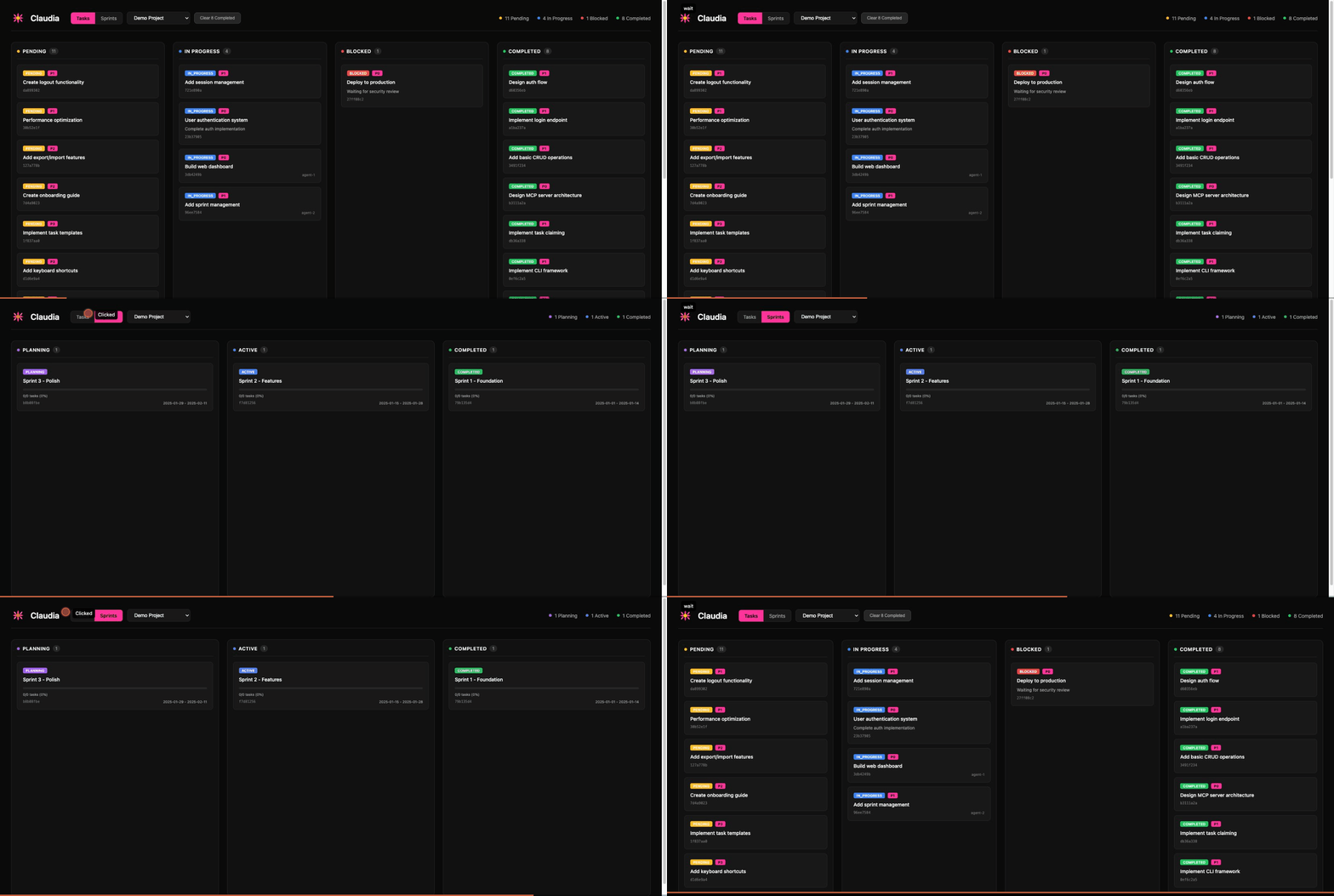
Claudia provides structured task tracking with a Model Context Protocol (MCP) server, enabling AI assistants like Claude to manage their own work through hierarchical tasks, dependencies, sprints, and acceptance criteria verification.
Why Claudia?
AI agents need a way to:
- Track progress across complex, multi-step tasks
- Coordinate when multiple agents work on the same project
- Remember context between sessions (64KB JSON storage per task)
- Verify work against acceptance criteria before completion
- Organize work into sprints and project hierarchies
Claudia provides all of this through both a CLI and MCP server interface.
Quick Start
# Install Bun if you haven't already
curl -fsSL https://bun.sh/install | bash

# Clone and build
git clone https://github.com/yuvalsuede/claudia.git
cd claudia
bun install
bun run build

# Initialize and start using
./claudia db init
./claudia task create --title "My first task"
./claudia task list
Try the Demo
See Claudia in action with sample data:
# Seed demo project with sample tasks and sprints
bun run seed:demo

# Open the web dashboard
./claudia @@ --port 3333
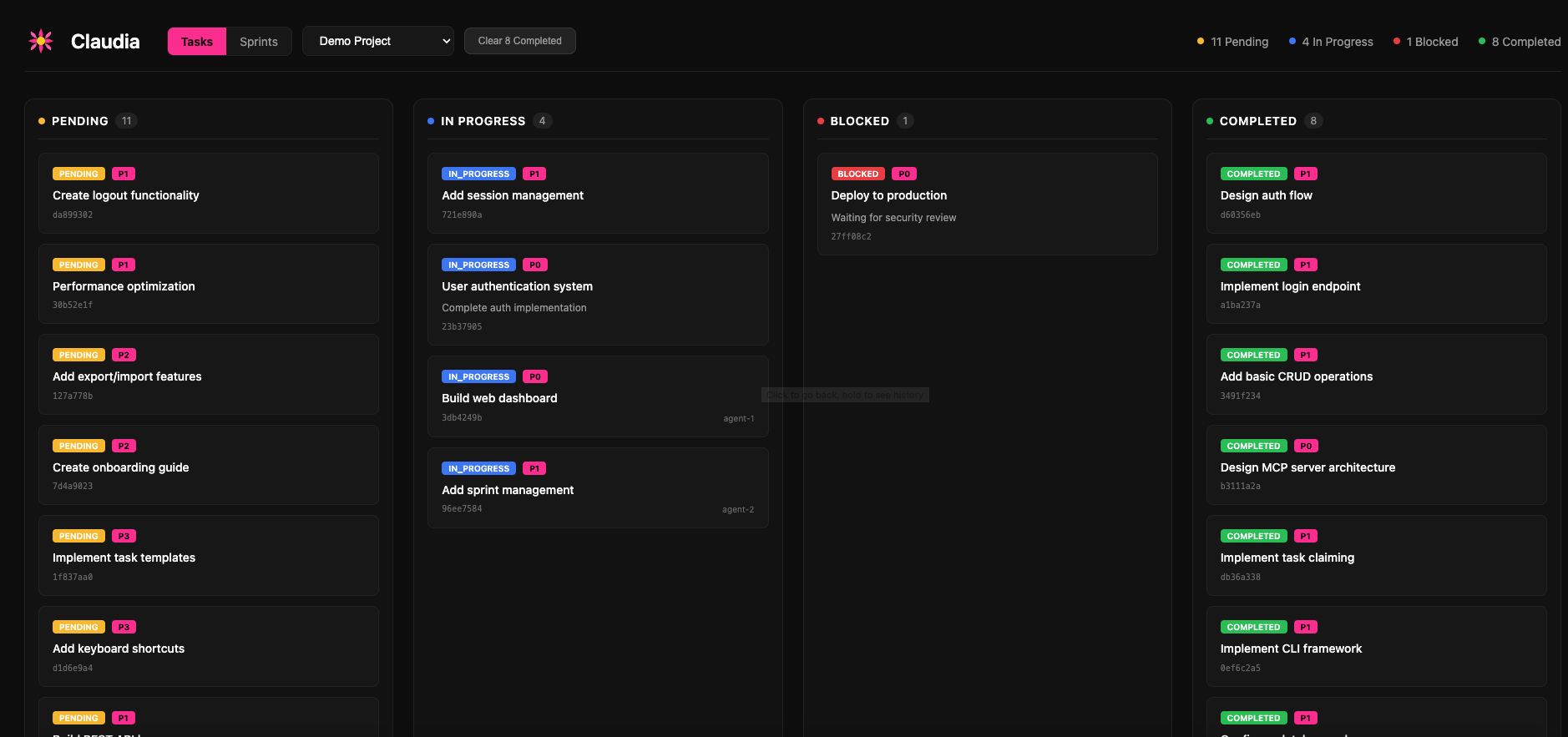
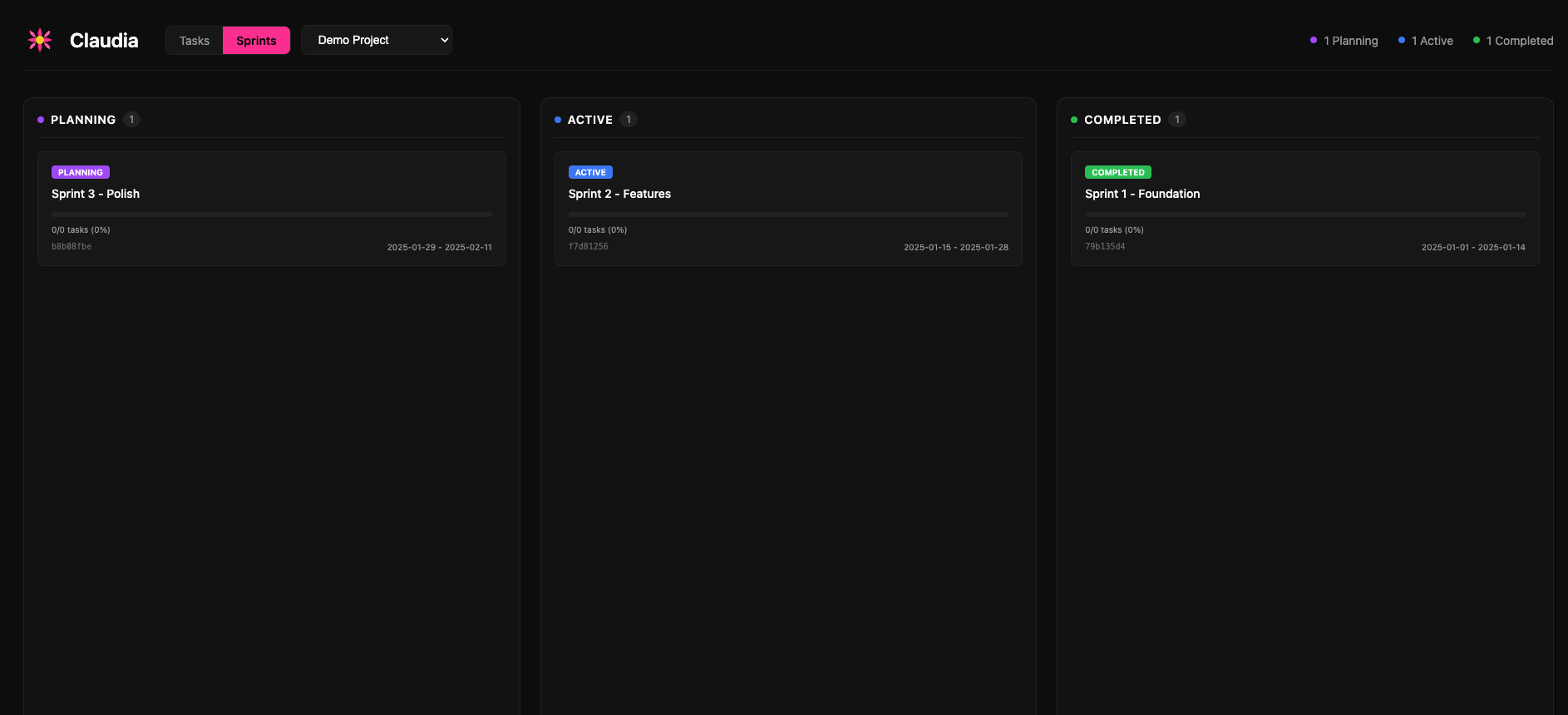
Then open http://localhost:3333 in your browser to explore the kanban board and sprint views.
Screenshots
Task Board
Sprint Management
Features
| Feature | Description |
|---|---|
| Hierarchical Tasks | Parent-child relationships with tree visualization |
| State Machine | Validated transitions: pending → in_progress → verification → completed |
| Dependencies | Block tasks until prerequisites complete, with cycle detection |
| Sprints | Group tasks into time-boxed work periods |
| Multi-Project | Isolated task namespaces with auto-detection from working directory |
| Agent Memory | 64KB JSON context storage per task |
| Acceptance Criteria | Define and verify requirements before task completion |
| Multi-Agent Coordination | Atomic task claiming, optimistic locking, conflict detection |
| Web Dashboard | Visual kanban board with project/sprint filtering |
| MCP Server | Drop-in integration with Claude Code and other MCP clients |
Installation
Prerequisites
- Bun runtime (v1.0+)
From Source
git clone https://github.com/yuvalsuede/claudia.git
cd claudia
bun install
Build Standalone Binary
bun run build
# Creates ./claudia binary

# Optional: install globally
cp claudia ~/.bun/bin/
Usage
CLI Commands
Task Management
# Create a task
claudia task create --title "Implement feature X" --priority p1

# Create with acceptance criteria
claudia task create --title "Add login" --acceptance-criteria "Has email field" --acceptance-criteria "Has password field"

# List tasks
claudia task list
claudia task list --status in_progress --priority p0,p1

# Show task details
claudia task show <task-id>

# Update a task
claudia task update <task-id> --title "New title" --priority p0

# Transition status
claudia task transition <task-id> --to in_progress

# Delete a task
claudia task delete <task-id> --force
Task Hierarchy
# Create a subtask
claudia task create --title "Subtask" --parent <parent-id>

# View task tree
claudia task tree              # Full tree
claudia task tree <task-id>    # Subtree from task
Task Context (Agent Memory)
# Set context (overwrites)
claudia task context-set <task-id> '{"key": "value"}'

# Merge context (deep merge)
claudia task context-merge <task-id> '{"additional": "data"}'

# Get context
claudia task context-get <task-id>
Dependencies
# Add dependency (task depends on blocker)
claudia task depends <task-id> --on <blocker-id>

# Remove dependency
claudia task undepends <task-id> --on <blocker-id>

# Show dependencies
claudia task deps <task-id>

# List blocked tasks
claudia task blocked

# List ready tasks (all deps satisfied)
claudia task ready
Sprints
# Create a sprint
claudia sprint create --name "Sprint 1" --start 2024-01-15 --end 2024-01-29

# List sprints
claudia sprint list

# Show sprint with tasks
claudia sprint show <sprint-id>

# Activate a sprint
claudia sprint activate <sprint-id>
Projects
# Create a project
claudia project create --name "My Project" --path /path/to/project

# List projects
claudia project list

# Select active project
claudia project select <project-id>

# Show current project
claudia project current
Web Dashboard
# Open dashboard in browser
claudia @@

# Custom port
claudia @@ --port 8080
The dashboard provides:
- Tasks View: Kanban board with drag-and-drop columns
- Sprints View: Sprint cards with progress indicators
- Project Filter: Scope views to specific projects
- Clear Completed: Archive finished tasks
MCP Server Integration
Start the MCP server for use with Claude Code:
claudia mcp
Claude Code Configuration
Add to .mcp.json in your project root:
{
  "mcpServers": {
    "claudia": {
      "command": "/path/to/claudia",
      "args": ["mcp"]
    }
  }
}
Or for development (without building):
{
  "mcpServers": {
    "claudia": {
      "command": "bun",
      "args": ["run", "/path/to/claudia/src/mcp/server.ts"],
      "cwd": "/path/to/claudia"
    }
  }
}
After adding the config, restart Claude Code to connect.
Available MCP Tools
Compound Operations (Recommended for agents)
| Tool | Description |
|---|---|
task_start | Create and start a task in one operation |
task_finish | Complete a task with optional summary |
task_workspace | Get current agent's workspace context |
task_handoff | Transfer task to another agent |
task_abandon | Release task back to pending |
Task Management
| Tool | Description |
|---|---|
task_create | Create a new task |
task_read | Get task by ID |
task_update | Update task fields |
task_delete | Delete a task |
task_list | Query tasks with filters |
task_transition | Change task status |
task_tree | Get hierarchical task view |
Coordination
| Tool | Description |
|---|---|
task_claim | Atomically claim a task |
task_release | Release a claimed task |
task_blocked | List blocked tasks |
task_ready | List ready tasks |
task_dependency_add | Add task dependency |
Verification
| Tool | Description |
|---|---|
task_verify | Mark criterion as verified |
task_verification_status | Get verification progress |
See the full MCP tools reference below for complete documentation.
Task Workflow
┌─────────┐     ┌─────────────┐     ┌──────────────┐     ┌───────────┐
│ pending │────▶│ in_progress │────▶│ verification │────▶│ completed │
└─────────┘     └─────────────┘     └──────────────┘     └───────────┘
     │                │                    │                    │
     ▼                ▼                    ▼                    ▼
┌─────────┐                         ┌──────────┐
│ blocked │                         │ archived │ (terminal)
└─────────┘                         └──────────┘
Valid transitions:
pending→in_progress,blocked,archivedin_progress→pending,verification,completed,blocked,archivedverification→in_progress,completed,blocked,archivedblocked→pending,in_progress,archivedcompleted→in_progress,archivedarchived→ (terminal state)
Tasks can skip verification if no acceptance criteria are defined.
Multi-Agent Coordination
Claudia supports multiple AI agents working concurrently on the same project.
Task Claiming
// Claim before working
const result = await task_claim({ task_id: "uuid", agent_id: "agent-1" });
if (result.success) {
  // Task is yours - proceed
} else {
  // Already claimed by another agent
}

// Release when done or on failure
await task_release({ task_id: "uuid", agent_id: "agent-1" });
Optimistic Locking
// Read task first
const task = await task_read({ id: "uuid" });

// Update with version check
await task_update({
  id: task.id,
  title: "Updated",
  version: task.version  // Fails if modified by another agent
});
Recommended Pattern
task_ready- List tasks with satisfied dependenciestask_claim- Atomically reserve a tasktask_transition- Move toin_progresstask_context_merge- Save progresstask_transition- Move tocompleted- On failure:
task_release- Let another agent retry
Configuration
| Environment Variable | Description | Default |
|---|---|---|
CLAUDIA_DB | Database file path | ~/.claudia/tasks.db |
Development
# Development mode
bun run dev

# Run tests
bun test

# Type checking
bun run typecheck
Exit Codes
| Code | Meaning |
|---|---|
| 0 | Success |
| 1 | General error |
| 2 | Resource not found |
| 3 | Conflict (version mismatch) |
| 4 | Validation error |
| 5 | Storage error |
MCP Tools Reference
<details> <summary><strong>Compound Operations</strong></summary>task_start
Create and start a task in one operation. Auto-claims for the current agent.
{
  "title": "Task title",
  "description": "Optional description",
  "priority": "p0|p1|p2|p3",
  "parent_id": "optional-parent-uuid",
  "acceptance_criteria": ["criterion 1", "criterion 2"]
}
task_finish
Complete a task with optional summary.
{
  "id": "task-uuid",
  "summary": "Optional completion summary"
}
task_workspace
Get current agent's workspace context including claimed tasks.
{
  "include_completed": false
}
task_handoff
Transfer task to another agent.
{
  "task_id": "task-uuid",
  "to_agent_id": "target-agent",
  "notes": "Optional handoff notes"
}
task_abandon
Release task back to pending with reason.
{
  "task_id": "task-uuid",
  "reason": "Why abandoning"
}
task_create
{
  "title": "Required title",
  "description": "Optional",
  "status": "pending",
  "priority": "p0|p1|p2|p3",
  "parent_id": "uuid",
  "sprint_id": "uuid",
  "tags": ["tag1", "tag2"],
  "assignee": "name",
  "acceptance_criteria": ["criterion"]
}
task_read
{ "id": "task-uuid" }
task_update
{
  "id": "task-uuid",
  "title": "New title",
  "version": 1
}
task_delete
{ "id": "task-uuid" }
task_list
{
  "status": ["pending", "in_progress"],
  "priority": ["p0", "p1"],
  "parent_id": "uuid",
  "sprint_id": "uuid",
  "assignee": "name",
  "limit": 100,
  "offset": 0
}
task_transition
{
  "id": "task-uuid",
  "to": "in_progress"
}
task_tree
{
  "id": "optional-root-uuid",
  "depth": 5
}
task_create_many
{
  "tasks": [
    { "title": "Task 1" },
    { "title": "Task 2" }
  ],
  "parent_id": "optional-common-parent",
  "sprint_id": "optional-common-sprint"
}
task_update_many
{
  "ids": ["uuid1", "uuid2"],
  "updates": {
    "priority": "p1",
    "assignee": "agent-1"
  }
}
task_transition_many
{
  "ids": ["uuid1", "uuid2"],
  "to": "completed",
  "skip_invalid": true
}
task_dependency_add
{
  "task_id": "blocked-task",
  "depends_on_id": "blocking-task"
}
task_dependency_remove
{
  "task_id": "task-uuid",
  "depends_on_id": "dependency-uuid"
}
task_dependencies
{ "task_id": "task-uuid" }
task_blocked
List all tasks with unsatisfied dependencies.
task_ready
List all tasks ready to work on (dependencies satisfied).
task_claim
{
  "task_id": "task-uuid",
  "agent_id": "claiming-agent"
}
task_release
{
  "task_id": "task-uuid",
  "agent_id": "releasing-agent"
}
task_context_set
Overwrite task context (max 64KB).
{
  "id": "task-uuid",
  "context": { "any": "json data" }
}
task_context_merge
Deep merge into existing context.
{
  "id": "task-uuid",
  "context": { "additional": "data" }
}
task_context_get
{ "id": "task-uuid" }
task_verify
Mark an acceptance criterion as verified.
{
  "task_id": "task-uuid",
  "criterion_id": "criterion-uuid",
  "evidence": "Optional verification evidence"
}
task_verification_status
Get verification progress for a task.
{ "task_id": "task-uuid" }
sprint_create
{
  "name": "Sprint 1",
  "start_at": "2024-01-15",
  "end_at": "2024-01-29"
}
sprint_list
{ "include_archived": false }
sprint_show
{ "id": "sprint-uuid" }
sprint_update
{
  "id": "sprint-uuid",
  "name": "New name",
  "status": "active"
}
sprint_delete
{ "id": "sprint-uuid" }
sprint_activate
{ "id": "sprint-uuid" }
project_create
{
  "name": "Project name",
  "description": "Optional",
  "path": "/optional/directory/path"
}
project_list
List all projects.
project_read
{ "id": "project-uuid" }
project_update
{
  "id": "project-uuid",
  "name": "New name"
}
project_delete
{ "id": "project-uuid" }
project_select
{ "id": "project-uuid" }
project_current
{ "cwd": "/optional/path/for/autodetect" }
Contributing
We welcome contributions! Please see CONTRIBUTING.md for guidelines.
License
GPLv3 - see LICENSE for details.
Related MCP servers

Persistent memory + git snapshots for Claude Code. Never lose context or code.
Generate AI UGC videos with talking heads, B-roll, and subtitles.
View repository →
io.github.yvonne-chow/htmlpub-mcp
Publish AI-generated HTML to a live page on your own domain — from Claude, ChatGPT, or Cursor.

X/Twitter search, profiles, timelines, and Smart Money discovery via XFlux.

Multisim MCP
Generate Multisim circuits, run simulations, export data, and create experiment reports.

Finewisdom 社媒与电商数据接口
统一 Token 调用 89 个社媒与电商数据接口,覆盖抖音、小红书、微博、B站、视频号、TikTok 与淘宝、京东、1688 等 14 平台,注册赠 20 次。