walkerOS Source Browser MCP Server
io.walkeros/source-browser
Generate, parse, and validate walkerOS data-elb HTML tagging attributes for event collection
What is the walkerOS Source Browser MCP server?
The walkerOS Source Browser MCP server enables AI agents to generate, parse, and validate walkerOS data-elb HTML tagging attributes used in event collection. It provides programmatic access to walkerOS event schema and tagging definitions, allowing AI to suggest tracking implementations and generate integration code.
This MCP server exposes walkerOS event collection capabilities to AI agents, letting them read your event schema, validate HTML tagging attributes, and generate tracking code. It's part of walkerOS, a config-as-code event collection layer that routes data to GA4, BigQuery, ad platforms, and more—all from a single declarative source.
How to install walkerOS Source Browser
Copy-paste configuration for popular MCP clients.
Tools & capabilities
Tools this server exposes to the agent.
Generate data-elb attributes— Generate walkerOS data-elb HTML tagging attributes for event trackingParse data-elb attributes— Parse and interpret walkerOS data-elb HTML tagging attributesValidate data-elb attributes— Validate walkerOS data-elb HTML tagging attributes against schema
Use cases
- Generate HTML data-elb attributes for tracking specific user events in your application
- Validate that your HTML tagging follows walkerOS schema before deployment
- Parse existing data-elb attributes to understand current tracking setup
- Suggest tracking definitions based on your event schema and business requirements
- Generate integration code to connect walkerOS to GA4, BigQuery, or other destinations
walkerOS Source Browser MCP server FAQ
It provides AI agents with tools to generate, parse, and validate walkerOS data-elb HTML tagging attributes used for event collection. It exposes your event schema so AI can suggest tracking implementations and generate code.
Yes, walkerOS is MIT licensed and open-source. You can self-host it anywhere with no vendor lock-in.
In Claude Code, use `/plugin marketplace add elbwalker/walkerOS` then `/plugin install walkeros@elbwalker`. For other MCP clients, add the server to your configuration with `npx @walkeros/mcp-source-browser`.
No. Loading flows, validating them, and simulating events all run locally without requiring any account or authentication.
walkerOS is a config-as-code event collection layer that captures events from your browser or application and routes them to GA4, Google Ads, Meta CAPI, BigQuery, and other destinations from a single declarative definition.
Yes, walkerOS is designed as an alternative to GTM with better version control, schema validation, and consent handling. See the walkerOS documentation for a detailed comparison.
README (reference)
Source of truth, from the repository.
Event collection you own, version, and trust
<div align="left"> <a href="https://github.com/elbwalker/walkerOS/blob/main/LICENSE"> <img src="https://img.shields.io/github/license/elbwalker/walkerOS" alt="License" /> </a> <a href="https://www.walkeros.io/docs/"> <img src="https://img.shields.io/badge/docs-www.walkeros.io/docs-yellow" alt="walkerOS Documentation" /> </a> <a href="https://github.com/elbwalker/walkerOS/tree/main/apps/demos/react"> <img src="https://img.shields.io/badge/React_demo-blue" alt="React demo" /> </a> <a href="https://storybook.walkeros.io/"> <img src="https://img.shields.io/badge/Storybook_demo-pink" alt="Storybook demo" /> </a> <a href="https://www.npmjs.com/package/@walkeros/collector"> <img src="https://img.shields.io/npm/v/@walkeros/collector" alt="npm version" /> </a> </div>From browser to BigQuery and ad platforms - warehouse-native, and ready for AI agents via MCP.
The problem
GA4, custom tags, ad pixels - each one a separate setup, none of them agreeing on the same numbers. When something breaks, you can't see where.
walkerOS is one collection layer for all of them.
Why walkerOS?
- Config-as-code - version control your tracking, review it in PRs, deploy with confidence
- Declarative tagging - tag your UI in HTML, not scattered JavaScript
- Consent-native - events queue until consent is given, then flush correctly to every destination
- Schema validation - catch bad events at collection time, not weeks later in a dashboard
- One layer, many destinations - send to your warehouse and ad platforms from a single event definition
- Warehouse-native - events land clean and structured in your data warehouse, ready to query
- MIT licensed - self-host anywhere, no vendor lock-in
How it works
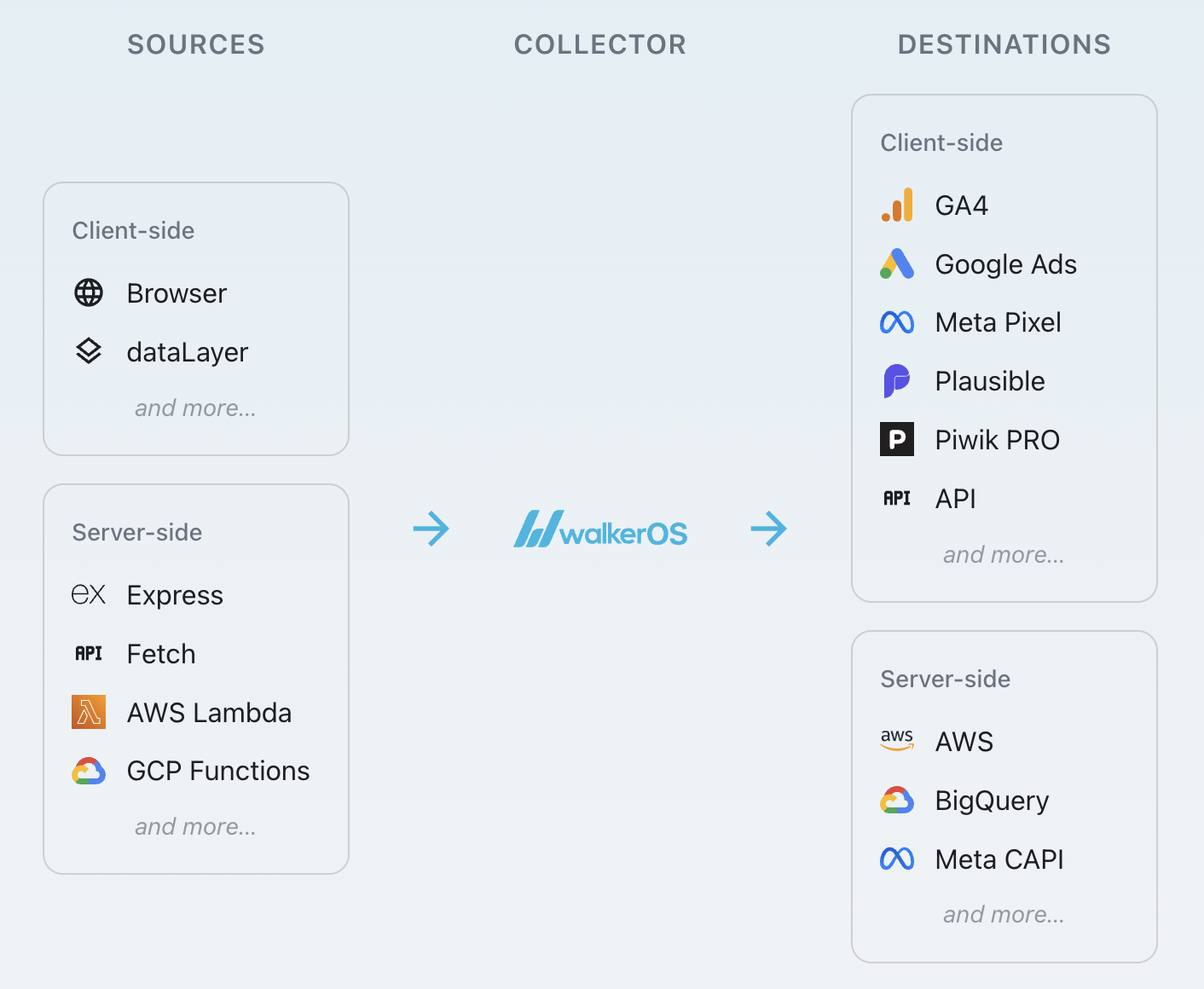
- Sources: Where events come from (browser, dataLayer, Express, AWS Lambda, GCP Functions, and more)
- Collector: The processing engine (consent, validation, mapping, routing, enrichment)
- Destinations: Where events go (GA4, Google Ads, Meta CAPI, BigQuery, and more)
Two ways to install walkerOS
Choose one based on your workflow and integration possibilities:
| Mode | Description | Best For |
|---|---|---|
| Integrated | Import directly into your TypeScript application | React/Next.js apps, TypeScript projects |
| Bundled | Build a standalone script from JSON config with npx walkeros | Static sites, Docker deployments, CI/CD |
Integrated (import into your app):
import { startFlow } from '@walkeros/collector';

const { elb } = await startFlow({
  destinations: {
    console: {
      code: {
        type: 'console',
        config: {},
        push: (event) => console.log('Event:', event.name),
      },
    },
  },
});

await elb('page view', { title: 'Home' });
// -> logs: Event: page view
Wire a real source and destination once you are ready:
import { startFlow } from '@walkeros/collector';
import { sourceBrowser } from '@walkeros/web-source-browser';
import { destinationGtag } from '@walkeros/web-destination-gtag';

await startFlow({
  sources: {
    browser: {
      code: sourceBrowser,
      config: { settings: { pageview: true } },
    },
  },
  destinations: {
    ga4: {
      code: destinationGtag,
      config: {
        settings: { ga4: { measurementId: 'G-XXX' } },
      },
    },
  },
});
Bundled (build from JSON config):
{
  "version": 4,
  "flows": {
    "default": {
      "config": {
        "platform": "web",
        "bundle": {
          "packages": {
            "@walkeros/collector": {},
            "@walkeros/web-source-browser": {},
            "@walkeros/web-destination-gtag": {}
          }
        }
      },
      "sources": {
        "browser": {
          "package": "@walkeros/web-source-browser",
          "config": { "settings": { "pageview": true } }
        }
      },
      "destinations": {
        "ga4": {
          "package": "@walkeros/web-destination-gtag",
          "config": {
            "settings": { "ga4": { "measurementId": "G-XXX" } }
          }
        }
      }
    }
  }
}
Then: npx walkeros bundle flow.json
- Operating Modes
- Quickstart guide for React
- Full Documentation - Complete guides and API reference
- Destinations - GA4, Meta, BigQuery, and more
- React Demo
- Storybook
AI-ready via MCP
walkerOS exposes a Model Context Protocol (MCP) interface. AI agents can read your event schema, suggest tracking definitions, and generate integration code - making your event layer programmable, not just configurable.
In Claude Code, one plugin installs both MCP servers and the walkerOS skills:
/plugin marketplace add elbwalker/walkerOS
/plugin install walkeros@elbwalker
For any other MCP client, add the servers to its configuration:
{
  "mcpServers": {
    "walkeros-flow": {
      "command": "npx",
      "args": ["@walkeros/mcp"]
    },
    "walkeros-source-browser": {
      "command": "npx",
      "args": ["@walkeros/mcp-source-browser"]
    }
  }
}
Loading a flow, validating it, and simulating an event all run locally, no account needed. See the MCP docs.
Coming from Google Tag Manager? See walkerOS vs. GTM.
Contributing
⭐️ Help us grow and star us. See our Contributing Guidelines to get involved.
Support
Need help? Start a discussion, or reach out via email.
For more insights, visit the talks repository.
License
Licensed under the MIT License.
Related MCP servers

walkerOS Flow
Build, validate, simulate, and deploy event pipelines with config-as-code tracking that you own and version.

wawesome
Deploy JavaScript Functions and static sites, read logs, and roll back on wawesome.

Wealthnow
Institutional financial data for agents: bond prints, CDS, private markets, options history, 13F.

Historical weather and climate: 100+ years of station data, normals, extremes, and trends.
Governed app access for AI agents: 1,000+ apps & 12,000+ tools via Code Mode MCP.
Manage your Webshare proxies, usage, plans and billing. Sign in with OAuth, no API key.