Audio File MCP App MCP Server
io.github.counterpoint-studio/audio-file-mcp-app
Play and inspect local audio files with waveform, spectrogram, loudness metrics, and interactive timeline.
What is the Audio File MCP App MCP server?
The Audio File MCP App is an MCP server for playing and inspecting local audio files in Claude Desktop, Cursor, and other MCP hosts. It renders an interactive UI with waveform visualization, spectrogram analysis, EBU R128 loudness metrics, playback controls, and optional annotation lanes, while exposing file metadata and playhead state back to the model.
This server lets you display and analyze local audio files with professional-grade audio inspection tools. You get real-time loudness metrics (LUFS, LRA, True Peak), a reassigned spectrogram with log-frequency bins, waveform coloring by spectral centroid, looping region selection, and optional annotation timelines. The model can see what you're hearing and looking at, enabling follow-up analysis and tasks grounded in actual audio content.
How to install Audio File MCP App
Copy-paste configuration for popular MCP clients.
Tools & capabilities
Tools this server exposes to the agent.
display_audio_file— Display a local audio file with waveform, spectrogram, loudness metrics, playback controls, and optional annotation lanes. Returns file metadata, loudness statistics, playhead position, selected regions, and active annotations.
Use cases
- Analyze loudness and dynamics of audio tracks using EBU R128 metrics
- Inspect frequency content and transients with a reassigned spectrogram
- Mark and loop specific regions of audio for detailed listening and analysis
- Annotate audio timelines with custom labels and envelopes for visualization
- Compare spectral characteristics across different sections of an audio file
Audio File MCP App MCP server FAQ
It displays local audio files with interactive playback, waveform visualization, spectrogram analysis, EBU R128 loudness metrics (LUFS, LRA, True Peak), and optional annotation lanes. You can select regions, loop playback, and the model receives metadata and playhead state for follow-up tasks.
Yes, the Audio File MCP App is open-source under the ISC license and free to use.
Download the latest `.mcpb` file from the Releases page and double-click it, or manually add it to `claude_desktop_config.json` with command `npx` and args `-y @counterpoint-studio/audio-file-mcp-app`.
In VS Code with Copilot Agent mode, add to `.vscode/mcp.json` with type `stdio`, command `npx`, and args `-y @counterpoint-studio/audio-file-mcp-app`. Cursor uses similar MCP configuration.
The README does not specify supported audio formats; check the repository or test with common formats like WAV, MP3, and FLAC.
No, the Audio File MCP App runs locally over stdio and requires no authentication or external API keys.
README (reference)
Source of truth, from the repository.
Audio File MCP App
An MCP App for playing and inspecting local audio files in an MCP host.
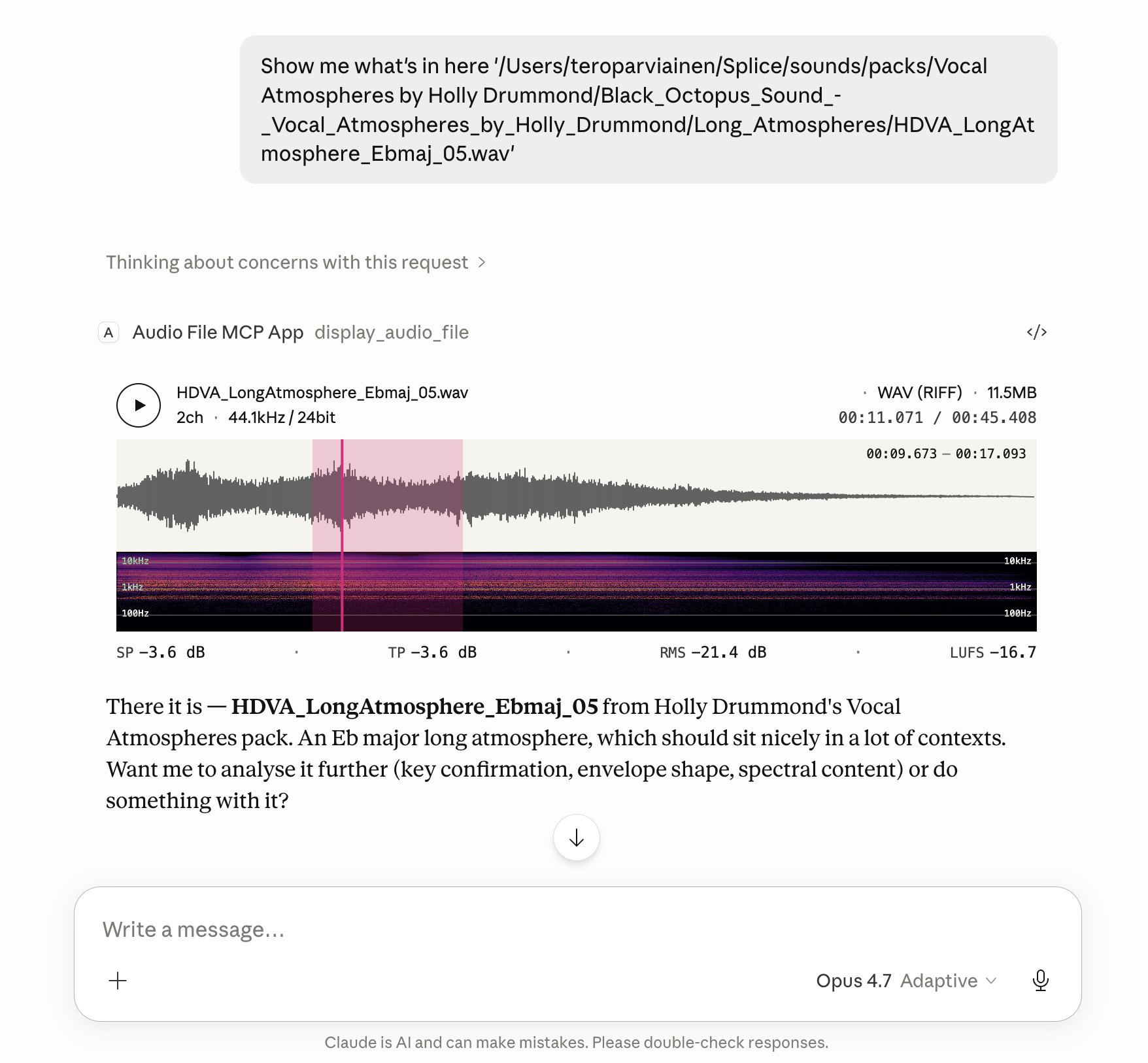
Renders an in-conversation UI with playback, metadata, loudness, a spectrogram, and an optional annotation-lane timeline.
File metadata, loudness statistics, the current playhead position, any selected region, and the annotation lanes active at the playhead are also exposed back to the model, so follow-up tasks can refer to what the user is actually hearing and looking at.
Features
- Global loudness metrics computed to EBU R128: Integrated Loudness (LUFS), Loudness Range (LRA), True Peak (dBTP), Sample Peak, and RMS.
- Instantaneous loudness metrics while playing or hovering: Momentary (400 ms) and Short-Term (3 s) LUFS, plus sample-peak and RMS at the cursor position.
- Waveform colouring by spectral centroid — each waveform slice is shaded along a tonal ramp using a low/mid/high band-energy ratio, so bright/dark regions read at a glance as bright/dark sound.
- Reassigned spectrogram with log-frequency bins (20 Hz floor) and an Inferno colour scale; time-frequency reassignment sharpens transients and tonal partials beyond what a plain STFT shows.
- Looping region selection. Drag on the timeline to mark a region; playback loops over it, and the region's start/end are passed back to the model alongside the file's loudness and playhead state.
- Annotation-lane timeline. Supply timeline annotations and the widget draws a stack of thin labelled lanes between the waveform and spectrogram, aligned to the audio's own timeline. Each lane carries time spans, an optional colour, and an optional envelope that fades span opacity along the lane. Hovering a span reveals its label, and the lanes active at the playhead — plus those starting, ending, or active within a selected region — are reported back to the model.
Install
The server runs locally over stdio. Every install path below configures the
same command: npx -y @counterpoint-studio/audio-file-mcp-app.
Claude Desktop
Easiest: grab the latest .mcpb from the
Releases page
and double-click it. Claude Desktop has Node bundled, so no extra runtime
is needed.
Or add the server by hand to claude_desktop_config.json:
{
  "mcpServers": {
    "audio-file": {
      "command": "npx",
      "args": ["-y", "@counterpoint-studio/audio-file-mcp-app"]
    }
  }
}
Codex Desktop
- Go to Settings -> MCP Servers
- Add Server
- Name:
audiofile-mcp-app - Command to launch:
npx - Arguments
-yand@counterpoint-studio/audio-file-mcp-app
VS Code (Copilot, Agent mode)

Or add to .vscode/mcp.json (workspace) or your user mcp.json:
{
  "servers": {
    "audio-file": {
      "type": "stdio",
      "command": "npx",
      "args": ["-y", "@counterpoint-studio/audio-file-mcp-app"]
    }
  }
}
Goose
Paste this deep link into your browser (Goose Desktop must be installed; the custom URI scheme can't be a real link in a GitHub README):
goose://extension?id=audio-file&name=Audio%20File%20MCP%20App&cmd=npx&arg=-y&arg=%40counterpoint-studio%2Faudio-file-mcp-app
Or run goose configure → Add Extension → Command-line Extension and
enter npx -y @counterpoint-studio/audio-file-mcp-app.
MCP Inspector
npx @modelcontextprotocol/inspector npx -y @counterpoint-studio/audio-file-mcp-app
Usage
Ask the host to show you a local audio file by its absolute path. For example:
"Show me
/Users/me/Music/track.wav"
The host calls the display_audio_file tool, which renders the in-app UI
with waveform, spectrogram, loudness metrics, and playback transport.
Annotation lanes
display_audio_file accepts an optional annotations object describing lanes
to draw on the timeline (or an annotationsPath pointing at a JSON file with
the same { "lanes": [...] } shape — handy for large payloads):
{
  "annotations": {
    "lanes": [
      {
        "label": "Delay tails",
        "color": "#e6007e",
        "spans": [{ "start": 8, "end": 24 }],
        "envelope": [
          { "time": 8, "value": 0 },
          { "time": 24, "value": 1 }
        ]
      }
    ]
  }
}
Times are in seconds on the audio's own timeline. label, color, and
envelope are optional; a lane with an envelope fades its span opacity along
the envelope curve, and uncoloured lanes use a light-accent fill. Overlapping
spans in a lane are truncated at the next span's start so rows never overlap.
The model can author annotations to point out sections, mark events, or
visualise an analysis it just ran.
Client compatibility
Tested and known to work in:
- Claude Desktop — Chat, Cowork, and Code
- Codex Desktop
- Visual Studio Code
- Goose
- MCP Inspector
Development
pnpm install
pnpm run build:dsp   # emsdk required; see WASM-BUILD.md
pnpm run serve       # runs the server with tsx, no compile step
pnpm test
pnpm run build:dist produces the publishable layout under dist/
(dist/mcp-app.html + dist/server/).
Releasing
pnpm version <bump>          # bumps every version string (package.json, server.json,
                             # mcpb/manifest.json, src/server/app.ts) + commits + tags
pnpm publish --access public # publishes to npm, then the MCP Registry (postpublish)
pnpm run build:mcpb          # produces dist/audio-file-mcp-app-<version>.mcpb
gh release create v<version> dist/*.mcpb # attaches the bundle to a GitHub release
The MCP Registry step runs mcp-publisher publish automatically after
pnpm publish. It needs a valid login — if it fails with an auth error, run
mcp-publisher login github and then mcp-publisher publish by hand.
mcp-publisher is a Go binary; install it via brew install mcp-publisher
or per the registry quickstart.
License
ISC © Counterpoint Studio OÜ
Related MCP servers

Countersign
Kill switch + spend guard for AI agents that spend money, across every wallet vendor at once.

Search and retrieve US federal court cases, dockets, claims, and documents via PACER

Find your perfect Cowboy e-bike with an interactive wizard and AI recommendations.
View repository →
YouTube Research MCP
Citation-ready YouTube transcript research with timestamps and links for AI agents—no API key required.

text2sql
Ask any SQL database in natural language. Agent explores schema, writes SQL, self-corrects.

io.github.cphoskins/cronometer
Access your Cronometer nutrition data—food logs, macros, fasting, and biometrics—directly from Claude and Cursor.