io.github.hhopke/intervals-icu-mcp MCP Server
io.github.hhopke/intervals-icu-mcp
Access your Intervals.icu training data, wellness metrics, and performance analysis through Claude and other LLMs.
What is the io.github.hhopke/intervals-icu-mcp MCP server?
The Intervals.icu MCP server is a Model Context Protocol integration that connects Claude, ChatGPT, and other LLMs to your Intervals.icu account. It exposes 68 tools spanning activities, wellness metrics, performance curves, workout library, gear management, and calendar events, plus 4 MCP Resources and 9 prompt templates for training analysis and planning.
This server lets you query and manage your training data, wellness metrics, and performance analysis through natural language. Ask Claude about your activities, recovery trends, CTL/ATL/TSB, power curves, and workouts—then create or update workouts, events, and gear directly from the LLM. It's designed for cyclists, runners, and endurance athletes who want AI-assisted training analysis and planning without leaving their chat interface.
How to install io.github.hhopke/intervals-icu-mcp
Copy-paste configuration for popular MCP clients.
INTERVALS_ICU_API_KEYrequiredsecretYour Intervals.icu API key (from Settings → Developer)
INTERVALS_ICU_ATHLETE_IDrequiredYour Intervals.icu athlete ID (e.g. i12345)
Tools & capabilities
Tools this server exposes to the agent.
Activities (12 tools)— Query, search, update, delete, and download activities from your training logActivity Analysis (8 tools)— Streams, intervals, best efforts, and histograms for detailed performance breakdownActivity Messages (2 tools)— Read and post notes, comments, and coach feedback on activitiesAthlete Profile (3 tools)— Profile data, CTL/ATL/TSB fitness analysis, and fitness chart time-seriesWellness (3 tools)— HRV, sleep, and recovery metrics trackingEvents / Calendar (12 tools)— Planned workouts, races, notes, and ATP periodization with bulk operationsPerformance / Curves (3 tools)— Power, heart rate, and pace curves with zone definitionsWorkout Library (7 tools)— Browse and create folders, training plans, and library workouts (bulk create/update/delete)Gear Management (6 tools)— Track equipment and maintenance remindersSport Settings (5 tools)— FTP, FTHR, pace thresholds, and custom zonesCustom Items (5 tools)— User customizations: custom charts, fields, zones, and dashboard panels
Use cases
- Analyze your training load and recovery: ask Claude to check your CTL, ATL, TSB, HRV, and sleep trends to assess overtraining risk
- Create and schedule workouts: generate sweet spot, threshold, or interval workouts and add them to your calendar for upcoming sessions
- Review activity performance: query your last 30 days of activities, examine best efforts, power curves, and interval data to identify trends
- Manage gear and maintenance: track equipment usage and get reminders for maintenance schedules across your bikes or running shoes
- Plan training blocks: use AI-assisted periodization to structure ATP events and training plans aligned with your goals
io.github.hhopke/intervals-icu-mcp MCP server FAQ
It's a Model Context Protocol server that connects Claude, ChatGPT, Cursor, and Claude Code to your Intervals.icu training account. It exposes 68 tools for reading and writing activities, wellness data, workouts, events, gear, and performance metrics.
Yes. The server is MIT-licensed and free to use. You only need a free or paid Intervals.icu account and an API key from their Developer settings.
Add the config snippet to your Claude Desktop config file (macOS: ~/Library/Application Support/Claude/claude_desktop_config.json; Windows: %APPDATA%\Claude\claude_desktop_config.json) with your Intervals.icu API key and athlete ID, then restart Claude.
Add the same config to ~/.cursor/mcp.json (or .cursor/mcp.json in your project), then restart Cursor and verify it in Settings → MCP.
You need an Intervals.icu API key and your athlete ID (format: i123456). Get the API key from https://intervals.icu/settings → Developer → Create API Key, and find your athlete ID in your profile URL.
Yes, but destructive tools are gated by the optional INTERVALS_ICU_DELETE_MODE environment variable (safe/full/none, default safe) to prevent accidental data loss.
README (reference)
Source of truth, from the repository.
Intervals.icu MCP Server
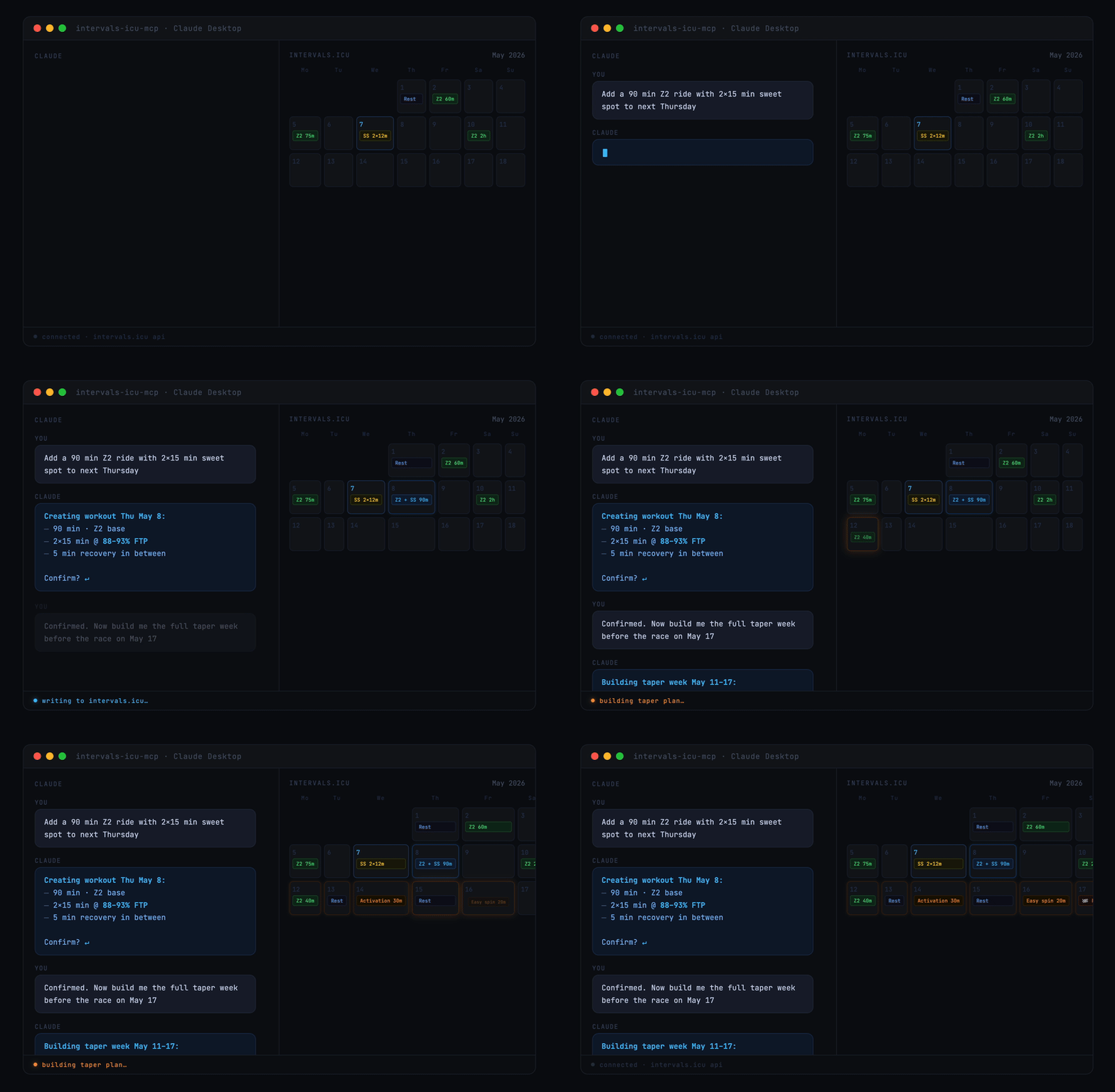
A Model Context Protocol (MCP) server for Intervals.icu integration. Access your training data, wellness metrics, and performance analysis through Claude, ChatGPT, and other LLMs.
Originally based on eddmann/intervals-icu-mcp (MIT licensed). This project is an independent continuation with significant bug fixes and new features — see CHANGELOG.md for details.




Overview
68 tools spanning activities, activity analysis, activity messages, athlete profile, wellness, events/calendar, performance curves, workout library, gear, sport settings, and custom items — plus 4 MCP Resources (athlete profile, workout syntax, event categories, custom item schemas) and 9 MCP Prompts (training analysis, recovery check, weekly planning, and more). See Available Tools for the per-category breakdown.
Quick Start
<a href="https://cursor.com/en/install-mcp?name=intervals-icu&config=eyJjb21tYW5kIjoidXZ4IiwiYXJncyI6WyJpbnRlcnZhbHMtaWN1LW1jcCJdLCJlbnYiOnsiSU5URVJWQUxTX0lDVV9BUElfS0VZIjoiIiwiSU5URVJWQUxTX0lDVV9BVEhMRVRFX0lEIjoiIn19"><picture><source media="(prefers-color-scheme: dark)" srcset="https://cursor.com/deeplink/mcp-install-dark.svg"><img alt="Install in Cursor" src="https://cursor.com/deeplink/mcp-install-light.svg"></picture></a>
Or for Claude Desktop, in 30 seconds:
- Get your API key and athlete ID
- Add this to your Claude Desktop config:
{
  "mcpServers": {
    "intervals-icu": {
      "command": "uvx",
      "args": ["intervals-icu-mcp"],
      "env": {
        "INTERVALS_ICU_API_KEY": "your-api-key-here",
        "INTERVALS_ICU_ATHLETE_ID": "i123456"
      }
    }
  }
}
- Restart Claude and ask "Show me my activities from the last 7 days."
Prefer Claude Code, Cursor, or ChatGPT? See Client Configuration. Want to run from source or with Docker? See Installation & Setup.
Prerequisites
Install uv — it handles Python, dependencies, and execution in one tool. brew install uv on macOS/Linux, or powershell -c "irm https://astral.sh/uv/install.ps1 | iex" on Windows. From there, uvx fetches Python and the package automatically. Docker is also supported as an alternative.
Intervals.icu API Key Setup
Before installation, obtain your Intervals.icu API key:
- Go to https://intervals.icu/settings → Developer → Create API Key.
- Copy the key, and note your Athlete ID from your profile URL (format:
i123456).
Installation & Setup
Nothing to install separately if you use the recommended setup. uvx (which ships with uv) automatically downloads and caches the intervals-icu-mcp package the first time your MCP client launches it — just paste the config snippet from Client Configuration into your client and you're done.
git clone https://github.com/hhopke/intervals-icu-mcp.git
cd intervals-icu-mcp
uv sync
uv run intervals-icu-mcp-auth  # interactive credential setup; or create .env manually:
#   INTERVALS_ICU_API_KEY=your_api_key_here
#   INTERVALS_ICU_ATHLETE_ID=i123456
Then point your MCP client at this checkout — see the From source snippet inside each client below.
</details> <details> <summary><b>Alternative: Docker</b></summary>docker build -t intervals-icu-mcp .
# Interactive credential setup (creates intervals-icu-mcp.env in the current directory):
touch intervals-icu-mcp.env # pre-create the file so Docker mounts it as a file, not a dir
docker run -it --rm \
-v "$(pwd)/intervals-icu-mcp.env:/app/.env" \
--entrypoint= intervals-icu-mcp:latest \
python -m intervals_icu_mcp.scripts.setup_auth
Or create intervals-icu-mcp.env manually (same format as the .env above).
Then point your MCP client at the Docker image — see the Docker snippet inside each client below.
</details>Client Configuration
The server speaks MCP over stdio and works with any compliant client. Click a client to expand. If you followed Quick Start (uvx), use the first config block; if you used the source or Docker alternative above, use the matching variant inside the same collapsible.
<details> <summary><b>Claude Desktop</b></summary>Add to your configuration file:
- macOS:
~/Library/Application Support/Claude/claude_desktop_config.json - Windows:
%APPDATA%\Claude\claude_desktop_config.json
{
  "mcpServers": {
    "intervals-icu": {
      "command": "uvx",
      "args": ["intervals-icu-mcp"],
      "env": {
        "INTERVALS_ICU_API_KEY": "your-api-key-here",
        "INTERVALS_ICU_ATHLETE_ID": "i123456"
      }
    }
  }
}
From source (requires git clone + uv sync + uv run intervals-icu-mcp-auth):
{
  "mcpServers": {
    "intervals-icu": {
      "command": "uv",
      "args": ["run", "--directory", "/ABSOLUTE/PATH/TO/intervals-icu-mcp", "intervals-icu-mcp"]
    }
  }
}
Docker:
{
  "mcpServers": {
    "intervals-icu": {
      "command": "docker",
      "args": ["run", "-i", "--rm", "-v", "/ABSOLUTE/PATH/TO/intervals-icu-mcp.env:/app/.env", "intervals-icu-mcp:latest"]
    }
  }
}
Register the server as a user-scoped MCP server:
claude mcp add intervals-icu --scope user \
  --env INTERVALS_ICU_API_KEY=your-key \
  --env INTERVALS_ICU_ATHLETE_ID=i123456 \
  -- uvx intervals-icu-mcp
Then in any Claude Code session, run /mcp to confirm intervals-icu is connected.
Add to ~/.cursor/mcp.json (or the project-local .cursor/mcp.json):
{
  "mcpServers": {
    "intervals-icu": {
      "command": "uvx",
      "args": ["intervals-icu-mcp"],
      "env": {
        "INTERVALS_ICU_API_KEY": "your-api-key-here",
        "INTERVALS_ICU_ATHLETE_ID": "i123456"
      }
    }
  }
}
Restart Cursor and open Settings → MCP to verify the server is listed.
</details> <details> <summary><b>ChatGPT</b> — requires a paid plan, Developer Mode, and a publicly reachable URL <em>(walkthrough not yet verified end-to-end)</em></summary>ChatGPT's custom MCP connector flow requires running the server over HTTP and exposing it via a tunnel, then registering the URL in ChatGPT's Developer Mode settings. See docs/chatgpt-connector.md for the full walkthrough, plan-tier requirements, and security notes.
</details>Usage
Ask Claude to interact with your Intervals.icu data in natural language. A few starter prompts:
"Show me my activities from the last 30 days"
"Am I overtraining? Check my CTL, ATL, and TSB"
"How's my recovery this week? Show HRV and sleep trends"
"Create a sweet spot cycling workout for tomorrow"
"What's my 20-minute power and FTP?"
For the full catalogue of example prompts by category, see docs/examples.md.
Available Tools
68 tools, 4 resources, and 9 prompt templates. One-line summary below — full reference in docs/tools.md.
| Category | Tools | Summary |
|---|---|---|
| Activities | 12 | Query, search, update, delete, download activities |
| Activity Analysis | 8 | Streams, intervals, best efforts, histograms |
| Activity Messages | 2 | Read and post notes/comments/coach feedback on activities |
| Athlete | 3 | Profile, CTL/ATL/TSB analysis, and fitness chart time-series |
| Wellness | 3 | HRV, sleep, recovery metrics |
| Events / Calendar | 12 | Planned workouts, races, notes, ATP periodization (bulk ops supported) |
| Performance / Curves | 3 | Power, HR, and pace curves with zones |
| Workout Library | 7 | Browse and create folders and training plans; create (incl. bulk), update, and delete library workouts |
| Gear Management | 6 | Track equipment and maintenance reminders |
| Sport Settings | 5 | FTP, FTHR, pace thresholds, and zones |
| Custom Items | 5 | User customizations: custom charts, fields, zones, dashboard panels |
Delete Safety Mode
Destructive tools are gated by the optional INTERVALS_ICU_DELETE_MODE env var (safe / full / none, default safe) — a server-side gate outside the model's reach, so unregistered tools can't be invoked. See docs/tools.md for the full mode table, response envelope, and TZ-buffer rationale.
Remote Deployment (HTTP / SSE)
The server runs over stdio by default — the right transport for local clients like Claude Desktop, Claude Code, and Cursor. HTTP and SSE transports are available for remote or hosted use.
⚠️ MCP has no built-in authentication — never expose an HTTP-mode server to an untrusted network without a tunnel (Tailscale, Cloudflare Tunnel) or an authenticating reverse proxy.
See docs/remote-deployment.md for transport flags and the full security model.
Documentation
- Example prompts — full catalogue of natural-language prompts by category
- Tool reference — complete tool, resource, and prompt inventory
- Architecture overview — how the server, middleware, client, and tools fit together
- Remote deployment (HTTP/SSE) — transports, flags, and the security model for hosted/remote setups
- Testing guide — conventions for pytest + respx, fixtures, and running the suite
- Changelog — release history
- Adding a new tool — step-by-step workflow for contributors
Feedback
How are you using this? Which tools you lean on, what your prompts look like, where it gets in your way — that shapes the roadmap more than my own guesses do.
Show and tell · Q&A · Ideas · General — or open an issue for a reproducible bug.
Contributing
Contributions are very welcome, and none is too small — a typo, a clearer parameter description, an extra test, a whole new tool. No Python or MCP expertise assumed. See CONTRIBUTING.md; in short, run make can-release before opening a PR. Good first issues are a gentle place to start.
Sponsor
Free under the MIT License, maintained in my spare time. If it's useful to you, GitHub Sponsors supports continued development — entirely optional, and feedback or a PR helps just as much.
License
MIT License - see the LICENSE file for details.
Disclaimer
This project is not affiliated with, endorsed by, or sponsored by Intervals.icu. All product names, logos, and brands are property of their respective owners.
Related MCP servers

Snapshot testing for AI agents—record behavior, catch regressions automatically.

Search remote tech jobs, inspect descriptions, compare roles, and retrieve application links.

Cure Cancer With AI
Free oncology data (research, trials, FDA approvals, news) plus IBM MAMMAL biomedical predictions.
FFMPEG API
Hosted MCP tools for FFmpeg-style video and audio processing through FFMPEG API.
Wallet infrastructure for Ai agents. EVM + Solana. x402 payments. No KYC.

io.github.hifriendbot/ailist-mcp
MCP server for AiList — search and discover Ai projects from Claude Code