Baron Munchausen MCP Server
io.github.shinegang/baron
Local grounded memory for coding agents: persistent facts with verdicts across sessions, zero dependencies.
What is the Baron Munchausen MCP server?
Baron Munchausen is a local memory server for coding agents that persists facts and decisions across chat sessions. It provides grounding verdicts (grounded/partial/ungrounded) on every answer, backed by a searchable graph of claims with sources, and runs entirely locally with no third-party runtime dependencies.
Baron Munchausen solves context loss by maintaining a persistent local graph of project facts, decisions, and loose ends. When an agent answers a question, it checks claims against the graph and returns a verdict showing which sentences are backed by memory. This cuts context tokens by 60–70% on real projects while keeping agents honest about what they actually know.
How to install Baron Munchausen
Copy-paste configuration for popular MCP clients.
No machine-readable install method is published for this server in the registry. Check the repository or website for setup instructions.
Tools & capabilities
Tools this server exposes to the agent.
memory_add— Write up to 50 facts per call, each with a claim and source, into the graph.memory_ground_prepare— Search the graph before answering; returns relevant nodes and a prompt excerpt, plus a flag if the answer is already in memory.memory_ground— Check an answer against the graph after generation; returns grounded/partial/ungrounded verdict with unsupported claims named.memory_checkpoint— One call combining search and the project thread; returns the head, last 3 sessions, open loose ends, and last 5 decisions.memory_retract— Mark a fact as no longer valid; reversible with undo=true, nothing deleted from disk.memory_ground_log— Append-only journal of every grounding pass for audit.
Use cases
- Recover project context after closing a tab or switching models without re-explaining decisions
- Get a grounding verdict on agent answers showing which claims are backed by memory and which are unsupported
- Reduce input tokens by 60–70% by injecting only relevant graph slices instead of full session transcripts
- Track decisions and loose ends across multiple sessions so nothing falls through the cracks
- Audit what an agent claimed versus what was actually in memory with the ground log
Baron Munchausen MCP server FAQ
A local memory server that stores project facts in a searchable graph and gives every agent answer a grounding verdict (grounded/partial/ungrounded) showing which claims are backed by memory.
Yes, Baron is open-source under Apache-2.0 with no paid tier. It runs entirely on your machine.
Clone the repo, start the server with `bin/baron --host 127.0.0.1 --port 8765 --store blank`, then use the integration scripts in `integrations/` (e.g., `bash integrations/baron_add.sh` for Claude Code, or copy `baron_cursor_mcp.json` to `~/.cursor/mcp.json` for Cursor).
No. Baron runs locally with no third-party runtime dependencies and nothing leaves your machine. It starts with an empty graph on a fresh install.
On a real 11,342-node graph, median slice-building time is 115 ms (p90 221 ms, max 394 ms), fast enough to stay in the loop during generation.
Any client that accepts the standard `mcpServers` JSON block: Claude Code, Cursor, Codex, llama.cpp, LangChain, Claude Desktop, and anything else via stdio or JSON-RPC on 127.0.0.1:8765.
README (reference)
Source of truth, from the repository.
Baron Munchausen — local memory that outlives the chat
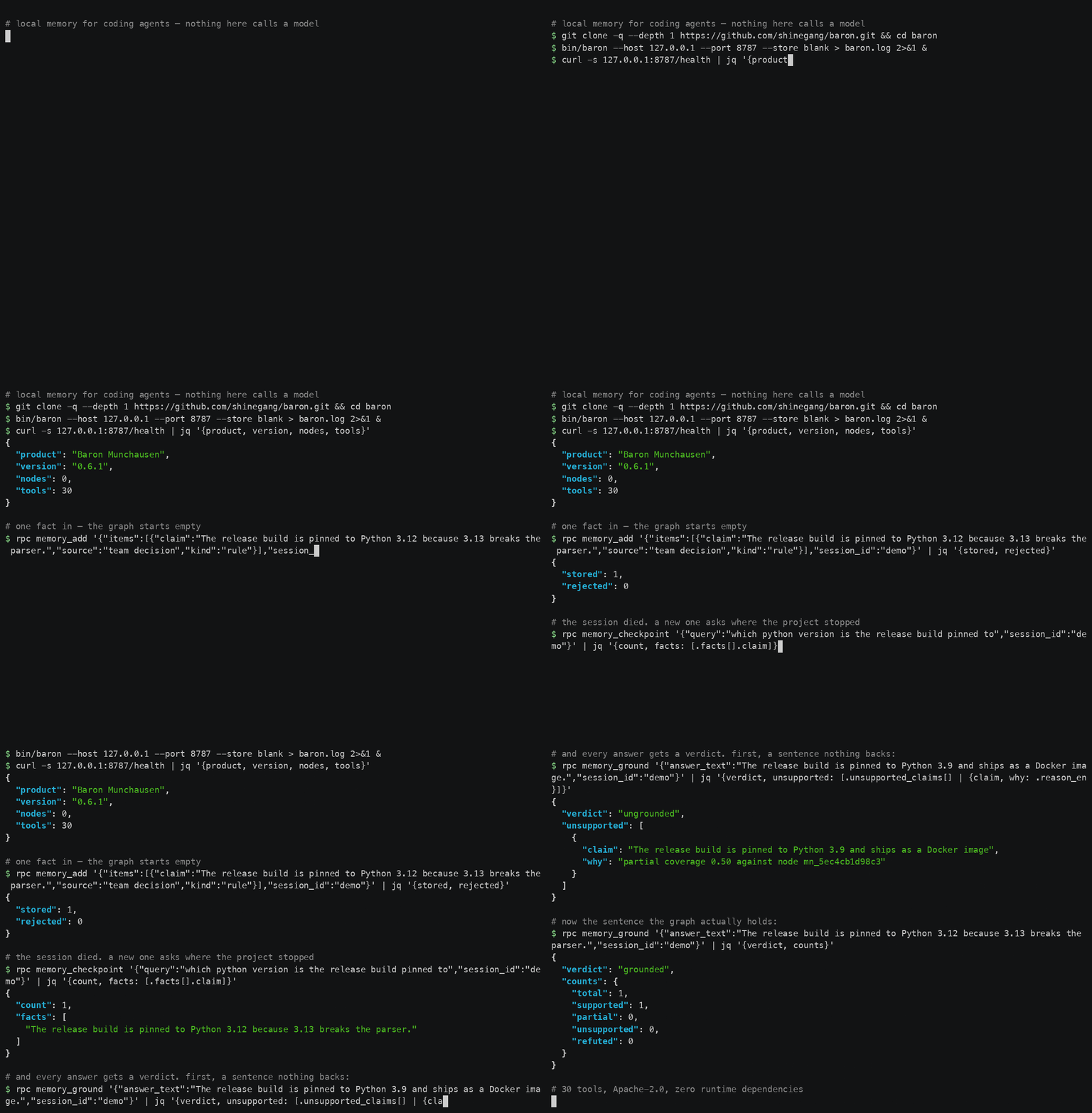
<sub>Everything above is a real run against a clean clone. rpc is the two-line
curl wrapper defined in docs/demo/baron-demo.sh;
re-record the whole thing with cd docs/demo && ./record.sh.</sub>
Public alpha (0.6.1). The engine has run daily in the authors' own work for months; this repository is one day old. The code is Apache-2.0 and complete — the packaging, the docs and the install path are what "alpha" refers to. Report anything that breaks.
Your session ends. Your project doesn't. One call brings back where the
project stopped, what was decided and what comes next — after a closed tab, a
spent limit or a change of model. And every answer built on that memory comes
back with a verdict: grounded, partial or ungrounded, with the sentences
nothing backs named one by one.




A memory server in Python 3.12 with no third-party runtime dependency. MCP over
stdio for your client, JSON-RPC on 127.0.0.1:8765 for everything else. Nothing
here calls a model and nothing leaves your machine. A fresh install starts with
an empty graph: we ship the tools, never the data.
Why
Three numbers, each one measured, each one with what it does not say written next to it.
1. One context return: 7 146 tokens → 2 388. The 7 146 is a real compaction
summary out of a session transcript; the 2 388 is the slice a live
memory_ground_prepare returned for the same moment of the same project. Both
counted with tiktoken/cl100k_base on 2026-09-10. What it does not say: it
is one pair of instances, not a distribution — a second summary from the same
corpus came to 5 913 tokens, which would make the same slice a 60 % cut instead
of a 67 % one.
2. Claude Opus 5: −69.6 % input tokens, measured. Not arithmetic on the
figures above — this is what the models' own usage reports came back with on
live runs of the same tasks, 2026-09-10. Sonnet 5 came to −61.7 %, Haiku 4.5 to
−66.3 % on the same runs. What it does not say: these are the authors' graph
and the authors' tasks. Your ratio depends on how much of your context is
recoverable from a graph at all, and nobody has run this on a public benchmark
yet.
3. Thirty tools, zero runtime dependencies. curl -s 127.0.0.1:8765/health reports "tools": 30 on a fresh clone — the same 30 over
MCP stdio and over JSON-RPC, with requirements.txt empty of third-party
runtime packages. What it does not say: nothing about quality. It is a count.
What those percentages are worth in money depends on your model and your volume: the savings calculator on shinegang.click does that arithmetic with current list prices, and shows which figures are measured and which are calculated.
Install in two minutes
git clone https://github.com/shinegang/baron.git && cd baron

# 1. start the memory server — standard library only, nothing to install
bin/baron --host 127.0.0.1 --port 8765 --store blank

# 2. in a second terminal: it is up, the graph is empty, 30 tools are loaded
curl -s http://127.0.0.1:8765/health | jq '{product, version, nodes, tools}'

# 3. check the stdio bridge against the live server
python3.12 bridge/mnemos_bridge.py --selftest

# 4. register it with your MCP client (Claude Code shown; the rest are below)
bash integrations/baron_add.sh
Step 2 prints {"product": "Baron Munchausen", "version": "0.6.1", "nodes": 0, "tools": 30}. Without jq, drop the pipe and read the raw JSON.
Write a fact and get a verdict without any client at all — this is the same JSON-RPC the demo above runs:
curl -sX POST 127.0.0.1:8765/rpc -H content-type:application/json -d '{
  "jsonrpc":"2.0","id":1,"method":"tools/call","params":{"name":"memory_add",
  "arguments":{"items":[{"claim":"The release build is pinned to Python 3.12.",
  "source":"team decision","kind":"rule"}],"session_id":"demo"}}}'
Installing the package (pip install .) puts the same server on PATH as
baron; python3.12 -m baron works from a checkout.
Clients
Any client that takes the standard mcpServers JSON block can use Baron. These
are the ones with a file in integrations/
already written:
| Client | How | File |
|---|---|---|
| Claude Code | bash integrations/baron_add.sh | baron_add.sh |
| Codex | bash integrations/codex/register.sh | codex/ |
| Cursor | copy into ~/.cursor/mcp.json | baron_cursor_mcp.json |
| llama.cpp | copy next to your server config | baron_llama_cpp_mcp_servers.json |
| LangChain | a working call against the HTTP endpoint | langchain_example.py |
| Claude Desktop | copy into claude_desktop_config.json | baron_claude_desktop.json |
| Anything else | python3.12 bridge/mnemos_bridge.py for stdio, http://127.0.0.1:8765 for JSON-RPC | — |
Claude Code can go further than registration: the PreCompact and
SessionStart hooks in tools/hooks/claude/ re-inject a
slice of the graph when the context window is compacted, so what the window
drops the graph still holds.
What it does, with the number and where it is checked
Every number below was measured on 2026-09-10 on the authors' own graph and their own machine, and every one of them can be re-measured from this repository. Where a number does not exist yet, this page says so.
| What it does | Measured | |
|---|---|---|
| 1. Sessions do not break | One memory_checkpoint returns the head of the thread, the last 3 sessions, every open loose end and the last 5 decisions. | docs/QUICKSTART.md |
| 2. A verdict on every answer | grounded / partial / ungrounded, each unsupported sentence named. Thresholds: 0.60 backed, 0.30 partial, 0.80 of sentences for grounded. | mnemos/grounding.py, tests/test_grounding.py |
| 3. The slice has a budget | 30 real queries against an 11 342-node graph: median prompt 1 070 tokens, max 1 166, ceiling 1 200, over budget 0 times; median 5 nodes in the slice. | mnemos/slice.py, mnemos/context_engine.py |
| 4. It is fast enough to be in the loop | Same 30 queries, local: median 115 ms to build the slice, p90 221 ms, max 394 ms. | mnemos/context_engine.py |
| 5. Any model, any client | 30 tools over MCP stdio and JSON-RPC on 127.0.0.1:8765. Claude Code, Codex, Cursor, llama.cpp, LangChain and a curl one-liner are equal clients. | integrations/ |
| 6. It checks itself, without a model | The pulse walks the whole graph continuously: 3 300 nodes in 571.7 s at 0.72 % of one core; on a 3 455-node graph its first circuit filed 52 incidents. | mnemos/pulse.py |
| 7. Memory can forget by rule | memory_retract closes a fact's validity window and drops it out of search, the slice and grounding; nothing is deleted from disk and undo=true restores it. | mnemos/store.py, tests/test_memory_retract.py |
| 8. It survives context compaction | Claude Code hooks re-inject a slice of the graph on PreCompact and SessionStart, so what the window drops the graph still holds. | tools/hooks/claude/ |
Numbers this project does not have. No LongMemEval or LoCoMo score: those harnesses have not been run here, and until they are, the honest word is "not measured". In fourteen days of live use the verdict distribution on the authors' own journal was 81 ungrounded, 41 partial, 20 grounded over 142 passes — that is a measurement of how often agents answered without consulting the graph first, not a quality score, and it is published because hiding it would be the kind of thing this tool exists to catch.
How grounding actually works
| Step | Tool | What it does |
|---|---|---|
| 1 — before the answer | memory_ground_prepare(query, session_id) | Searches the graph, builds a prompt from the nodes it found, registers the pre-pass. Returns graph_first: if the answer is already in memory, take it and skip the model. |
| 2 — the answer | (your model) | Generates from that excerpt — or does not generate at all. |
| 3 — after the answer | memory_ground(answer_text, session_id) | Splits the answer into claims, checks each against the graph, returns the verdict plus unsupported_claims. |
| one call | memory_checkpoint(query, session_id, agent) | Steps 1 and search together, with the project thread. |
| write | memory_add(items=[{claim, source}, …]) | Up to 50 facts per call, gated per item. |
| retract | memory_retract(node_id, reason) | The fact stopped being true. Reversible. |
| audit | memory_ground_log | Append-only journal of every pass. |
No pre-pass, no credit. Call memory_ground without a matching
memory_ground_prepare and the verdict is ungrounded (notes: no_pre_pass),
however many claims the text happens to support.
Full detail: docs/GROUNDING.md.
Your graph starts empty
baron --store blank                       # ./nodes.json, empty
baron --store blank:/var/lib/baron.json   # explicit path
blank never overwrites an existing file, and the graph you get really is
empty. When the two collide, the server refuses to start and tells you what to
do. Configuration: docs/CONFIGURATION.md.
Install from directories
Baron is published in the official MCP Registry as
io.github.shinegang/baron:
curl -s "https://registry.modelcontextprotocol.io/v0/servers?search=io.github.shinegang/baron"
Registries that mirror the official index (Glama, and clients that read it directly) pick the entry up from there. This repository carries the metadata those directories read:
| File | Directory | What it holds |
|---|---|---|
server.json | official MCP Registry | reverse-DNS name, version, repository, website |
smithery.yaml | Smithery | stdio start command for bridge/mnemos_bridge.py and its config schema |
glama.json | Glama | maintainer, for the ownership claim |
There is no package on PyPI or npm yet, so the registry entry points at the
source repository rather than at an installable artifact: install with the
git clone in Install in two minutes, or pip install . from the
checkout. When baron-munchausen lands on PyPI, a packages block goes into
server.json and the same directories will offer one-command installs.
Contributing
Issues and pull requests are welcome. Two house rules, and they are the rules the software enforces on itself:
- A claim comes with its source. A bug report with the command that reproduces it is worth ten without one.
- "I could not check" is a valid answer and a better one than a guess.
unknownis a status here, not a failure.
Run python3.12 -m pytest tests -q before opening a pull request.
License
Apache-2.0 — LICENSE.
Related MCP servers

Generate and edit images with AI-powered prompt optimization across Gemini, OpenAI, and BytePlus providers.
Local RAG server for searching private documents without sending them to APIs
Run task-specific AI sub-agents across Cursor, Claude, Codex, Gemini, and other tools via MCP.

Local-first codebase intelligence: cited answers, audits, reports. EN/FR.

Track any parcel by tracking number — real-time status, event history, and carrier detection.
View repository →
Shipmail MCP server for AI agent custom-domain email inboxes with REST API and webhooks.