Tidewave Rails MCP Server
io.github.tidewave-ai/tidewave-rails
Runtime-level MCP server for Rails development: execute code, read logs, query databases, and access documentation.
What is the Tidewave Rails MCP server?
Tidewave Rails is an MCP server that provides runtime-level tools for developing Ruby on Rails applications with coding agents. It enables agents to execute code in the context of a running Rails app, read live logs, query the development database, locate source code, and access documentation for exact gem versions. This bridges the gap between agent capabilities and live application state during development.
Tidewave Rails gives AI agents direct access to your running Rails application during development. Instead of making assumptions about behavior, agents can execute code in your app's context, query the database, inspect logs, and look up documentation for the exact gem versions you're using. This makes agent-assisted development faster and more reliable by grounding decisions in live application state.
How to install Tidewave Rails
Copy-paste configuration for popular MCP clients.
No machine-readable install method is published for this server in the registry. Check the repository or website for setup instructions.
Tools & capabilities
Tools this server exposes to the agent.
project_eval— Evaluates Ruby code in the context of your running application with access to its runtime, loaded dependencies, and in-memory data, returning the result and standard output. Works like a Rails console for agents.execute_sql_query— Runs SQL queries against your app's development database and returns the rows to the agent.get_docs— Looks up documentation for a class, method, or constant from the exact gem versions locked in your app's Gemfile.lock.get_logs— Returns output from your running server's log.get_source_location— Returns the file and line where a class, module, or method is defined, across both your app and its dependencies, handling metaprogramming correctly.
Use cases
- Execute Ruby code against your running Rails app to verify behavior or debug issues without starting new instances
- Insert test data or verify record creation by querying your development database directly
- Look up method signatures and documentation for the exact gem versions your app depends on
- Read request logs and backtraces to understand what happened after an action or error
- Locate source code for classes and methods across your app and dependencies, including metaprogrammed code
Tidewave Rails MCP server FAQ
Tidewave Rails is an MCP server that gives AI agents runtime-level access to your Rails application during development. Agents can execute code, query databases, read logs, and access documentation—all grounded in your live app state.
Yes, Tidewave Rails is open-source and available under the Apache License 2.0. You can use it as a standalone MCP server at no cost.
Add the `tidewave` gem to your Gemfile's development group with `bundle add tidewave --group development`, then configure your editor or MCP client to connect to `http://localhost:3000/tidewave/mcp` (or your app's port). Specific instructions are available for Cursor, VS Code, Claude Code, and other editors.
No, Tidewave Rails is designed only for development. It will raise an error if used in environments where code reloading is disabled, such as production.
Tidewave only allows requests from localhost by default for security. Remote access can be enabled via configuration if needed, but is not recommended without understanding the security implications.
No, Tidewave runs as middleware in your existing Rails development server. Just add the gem and configure your editor to connect to the `/tidewave/mcp` endpoint.
README (reference)
Source of truth, from the repository.
Tidewave Rails
Tidewave Rails is an MCP server that provides runtime-level tools for developing Ruby on Rails apps using coding agents.
Your agent will be able to use this MCP server to talk to your running Rails app in development to:
- execute code in the context of the running app (like a Rails console for agents)
- read the app's live logs
- query your development database
- get source locations of classes and methods
- read documentation pinned to the exact gem versions your app depends on
This MCP server is an open-source component of Tidewave, the agentic development environment for Rails and Phoenix.
You can use this project as a standalone MCP server or integrated with the Tidewave product by following the instructions below.
Installation
1. Add the Tidewave gem to your app
You can add Tidewave Rails to your app by running:
bundle add tidewave --group development
or by manually adding the tidewave gem to the development group in your Gemfile:
gem "tidewave", group: :development
2. Add the Tidewave MCP to your agent/editor
Add the Tidewave MCP server to your editor or MCP client configuration as the type "http" (streamable), pointing to the /tidewave/mcp path and port your web application is running at. For example, http://localhost:3000/tidewave/mcp.
We also have specific instructions for:
Usage
As with any other MCP server, your agent will call the tools exposed by the Tidewave MCP whenever it sees fit. But you can also prompt it to call them explicitly.
Available MCP tools
project_eval
Evaluates Ruby code in the context of your running application, with access to its runtime, loaded dependencies, and in-memory data, returning the result plus anything printed to standard output. It's like a Rails console for the agent.
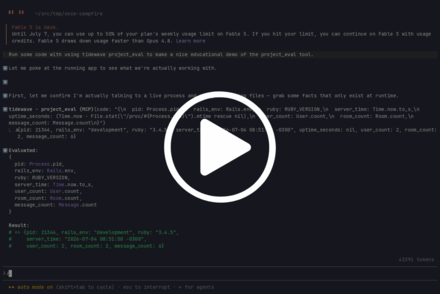
Your agent can use it when it would rather run code than assume behavior, grounding its next step in what the running app actually does. For example, calling a method to see what comes back or reproducing a failing code path against live app state to debug it.
execute_sql_query
Runs a SQL query against your app's development database and returns the rows to the agent.
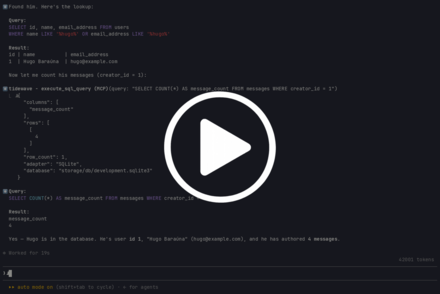
Your agent can use it to run any SQL against your development database. For example, ask it to insert some test records to see how a page looks with realistic data. Or, after a create action, the agent can verify whether the record was saved with the expected values.
get_docs
Looks up the documentation for a class, method, or constant, reading from the exact gem versions locked in your app's Gemfile.lock.
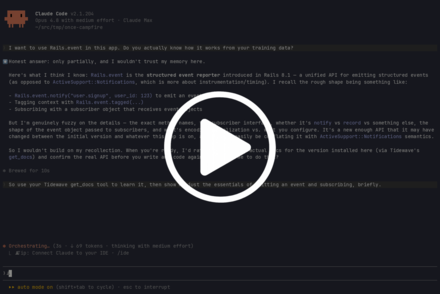
Your agent can use it when it's unsure how a class or method works, so the code it generates is grounded in the docs for the exact versions of the gems your app uses, rather than training data that may be stale or a generic docs lookup that can't guarantee it matches the version your app depends on.
get_logs
Returns output from your running server's log.
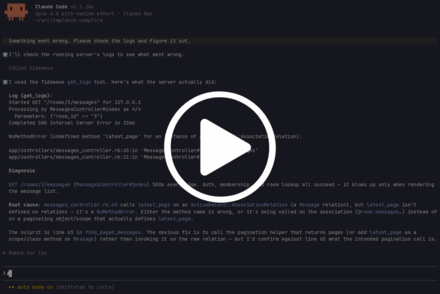
Your agent can use it to see what happened after a request. For example, reading the request log and backtrace when something misbehaves, or checking the log after an action to confirm the request came in with the expected params.
get_source_location
Returns the file and line where a class, module, or method is defined, across both your app and its dependencies.
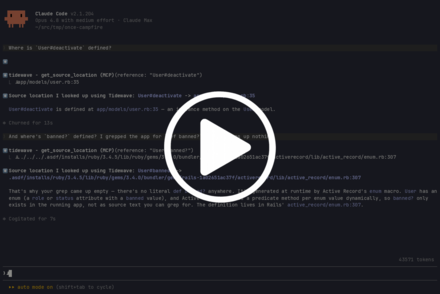
Your agent can use it to jump straight to where a class or method is defined, by file and line, instead of grepping for it, including when the definition lives in a gem dependency.
Also, because it resolves the location from your running app instead of parsing source text, it handles metaprogramming, where a method is generated at runtime and does not appear as a literal def for grep to find.
[!NOTE]
Why no tools for routes, associations, etc?
Tidewave does not include tools for listing your routes, associations, etc. because agents are better off reading their respective source files, which gives agents more context and enables them to perform any necessary edit without additional tool calls.
Instead, Tidewave aims to fill in missing gaps, such as evaluating code inside your Rails app (without starting new instances) and finding source location, which can be tricky, even with grepping, due to metaprogramming and the different places Bundler can install your dependencies.
Troubleshooting
The Tidewave toolbar is missing
This may happen if you are compressing your responses (gzip, brotli, etc) after the Tidewave middleware runs. Use bin/rails middleware and make sure Tidewave comes after Rack::Deflater or similar. Also look into your browser and terminal logs for any errors.
Using multiple hosts/subdomains
If you are using multiple hosts/subdomains during development, you must use *.localhost, as such domains are considered secure by browsers. Additionally, add the following to config/initializers/development.rb:
config.session_store :cookie_store,
  key: "__your_app_session",
  same_site: :none,
  secure: true,
  assume_ssl: true
And make sure you are using rack-session version 2.1.0 or later.
The above will allow your application to run embedded within Tidewave across multiple subdomains, as long as it is using a secure context (such as admin.localhost, www.foobar.localhost, etc).
Content security policy
If you have enabled Content-Security-Policy, Tidewave will automatically enable "unsafe-eval" under script-src in order for contextual browser testing to work correctly. It also disables the frame-ancestors directive. This is done only in the environments that Tidewave is loadead (development by default).
Production Environment
Tidewave is a powerful tool that can help you develop your web application faster and more efficiently. However, it is important to note that Tidewave is not meant to be used in a production environment.
Tidewave will raise an error if it is used in any environment where code reloading is disabled (which typically includes production).
Configuration
You may configure tidewave using the following syntax:
config.tidewave.team = { id: "my-company" }
The following config is available:
-
allow_remote_access- Tidewave only allows requests from localhost by default, even if your server listens on other interfaces, for security purposes. Read our security guidelines for more information and when to allow remote access (if you know what you are doing) -
logger_middleware- The logger middleware Tidewave should wrap to silence its own logs -
preferred_orm- which ORM to use, either:active_record(default) or:sequel -
team- set your Tidewave Team configuration, such asconfig.tidewave.team = { id: "my-company" } -
toolbar- controls whether the Tidewave toolbar is injected into HTML pages. Defaults totrue
Acknowledgements
A thank you to Yorick Jacquin for the initial version of this project.
Development
Run the Minitest suite with:
bundle exec ruby -Itest test/all_test.rb
License
Copyright (c) 2025 Dashbit
Licensed under the Apache License, Version 2.0 (the "License"); you may not use this file except in compliance with the License. You may obtain a copy of the License at http://www.apache.org/licenses/LICENSE-2.0
Unless required by applicable law or agreed to in writing, software distributed under the License is distributed on an "AS IS" BASIS, WITHOUT WARRANTIES OR CONDITIONS OF ANY KIND, either express or implied. See the License for the specific language governing permissions and limitations under the License.
Related MCP servers

Tidewave Phoenix
Runtime-level MCP server for Phoenix development: execute code, read logs, query the DB, and access docs.

AI-driven penetration testing - 22 security tools behind safety-hardened MCP endpoints

tierproxy
Multi-provider proxy infrastructure for AI/ML. Geo, sessions, cost-aware routing, usage tools.

GIMP 3 MCP
Let AI assistants paint, edit and export images in a running GIMP 3, with 80 tools.

Stealth Chromium engine that bypasses bot detection by spoofing fingerprints at the C++ level, not JavaScript.

TILL
Swiss accounting your agent can actually use: the TILL ledger over MCP.